Freedom251 › AI Readability Checkers

Readability Formulas
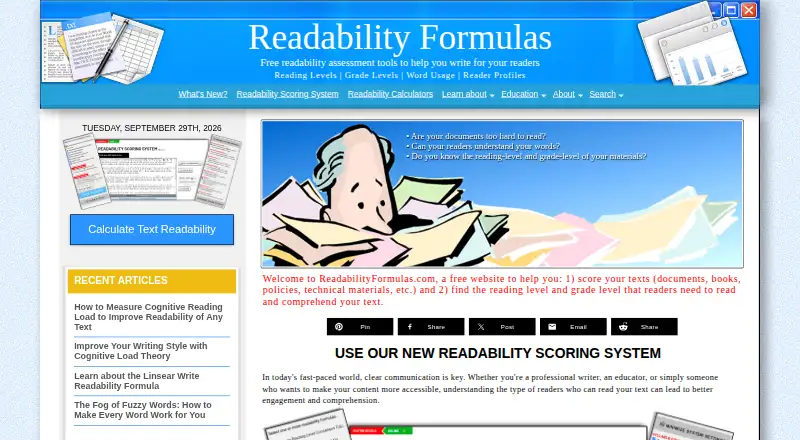
What Readability Formulas is
Readability Formulas provides free tools for scoring English-language text and estimating the grade level and age of readers likely to understand it. Its Readability Scoring System includes formulas such as Flesch Reading Ease, Flesch-Kincaid, Gunning Fog, SMOG, Dale-Chall, Spache, FORCAST, Fry, and Raygor. Text can be pasted or supplied as .txt, .docx, .rtf, .html, or .pdf files.
Text Statistics reports measures including syllable count, average sentence length, abbreviations, proper nouns, and passive voice. The beta Robert Gunning Editor helps locate difficult words and wordiness, with editing tools for phrases, nominalizations, fuzzy words, and weak verbs. Batch Processing, also marked beta, can score multiple texts with one or more formulas. A Google Chrome and Microsoft Edge extension can score highlighted website text, open the editor, and display word statistics. The privacy policy says text processing runs through scripts on the user’s device and submitted text is not stored on a server or accessible to the site. The Synonym Finder connects to Datamuse and may send one word at a time.
Who it suits
The tools may suit writers, editors, educators, marketing professionals, healthcare providers, and government agencies working with English text. The extension may also help people checking text while browsing.
What it does well
- Scores text with a broad set of readability formulas.
- Accepts pasted text and five file formats.
- Reports sentence, syllable, and other text statistics.
- Browser extension can score highlighted website text.
What to know first
- Readability scoring supports English-language text.
- Editor and batch processing are marked beta.
- Synonym Finder may transmit one word at a time to Datamuse.
Limits
The free plan lists free calculators and the Readability Scoring System. The Robert Gunning Editor and Batch Processing are marked beta.
Plans
| Plan | Billed and limits | Price |
|---|---|---|
| Free online readability tools | Free calculators and Readability Scoring System; current pricing page not found | Free |
As readabilityformulas.com lists them, read 2 Oct 2026. The maker's own page has the final word.
Getting started
- Open https://readabilityformulas.com/.
- Paste text or provide a .txt, .docx, .rtf, .html, or .pdf file for scoring.
- Choose a readability formula, such as Flesch Reading Ease or SMOG.
- Use Text Statistics or the beta Robert Gunning Editor to review the text.
- Install the browser extension for Google Chrome or Microsoft Edge to score highlighted website text.
Readability Formulas is an English-language toolkit for checking reading difficulty and refining text. It suits writers, editors, educators, and organizations that need to assess passages or batches; the breadth of scoring methods is its strongest case, while English-only support and beta tools narrow its fit.
Overview
The Readability Scoring System estimates the grade level and age readers may need to understand a text. Users can paste text or upload .txt, .docx, .rtf, .html, and .pdf files. Sentence analysis and clarity recommendations help put scores in context, but readability formulas are signals for revision rather than a complete measure of whether writing suits its audience.
Key features
Scoring and editing
Readability Formulas includes Flesch Reading Ease, Flesch-Kincaid, Gunning Fog, SMOG, Dale-Chall, Spache, FORCAST, Fry, and Raygor. Comparing several formulas can help editors and educators spot how different measures assess a passage, though interpreting the results still takes editorial judgment.
The beta Robert Gunning Editor flags hard words and wordiness, with tools for phrases, nominalizations, fuzzy words, weak verbs, and more. It offers a route from diagnosis to revision, but its beta status makes it less suitable as the foundation of a polished, dependable editing workflow.
Statistics, batches, and browser checks
Text Statistics reports syllable count, average sentence length, abbreviations, proper nouns, and passive voice. Batch Processing, also marked beta, can score multiple texts with one or more formulas, a useful fit for comparing a body of material rather than handling documents one at a time.
The Chrome and Microsoft Edge extension scores highlighted website text, opens the editor, and shows word statistics. This brings checks to browser-based reading and editing; the scoring system also accepts common document formats, so users need not rely on the extension for their own files.
The privacy policy says text processing runs through local scripts in the user's browser and submitted text is not stored on a server or accessible to the site. The Synonym Finder is a separate exception: it connects securely to Datamuse's API and may transmit one word at a time. That distinction matters for users handling sensitive copy.
Pricing
The Free online readability tools plan costs nothing and includes free calculators and the Readability Scoring System. It is the natural starting point for occasional checks and users who want the core scoring tools without a subscription. The free-plan description does not give usage caps, so the stated price alone does not establish how much text or how many runs it supports.
Readability Formulas uses a freemium model, but the free plan is the only plan described here. Its beta editor and batch processing add useful capabilities, though the plan description does not establish whether either has separate limits or paid options.
Platforms
The platform coverage includes web, macOS, Windows, and an extension. The Chrome and Microsoft Edge extension handles highlighted website text; the scoring tools accept pasted text and uploaded files. English is the supported language, so multilingual teams should choose a tool that explicitly covers their other languages.
Who it's for
Writers and editors can use the scores, statistics, and editor to identify passages to revisit. Educators can compare reading difficulty, while marketing professionals, healthcare providers, and government agencies may use the tools to assess text for intended readers. The free entry point makes it approachable for occasional use; teams with a formal batch workflow should weigh the beta status of Batch Processing.
Pros and cons
- Pros: A broad set of named formulas lets users compare reading-difficulty estimates instead of depending on one score.
- Pros: File uploads, browser checks, statistics, editing tools, and batch scoring cover several stages of text review.
- Pros: The policy says submitted text is processed locally and not stored on a server, with a clear caveat for one-word Synonym Finder requests.
- Cons: English-only support rules it out for teams that need readability scoring in other languages.
- Cons: The editor and batch processing are beta, making them less reassuring for workflows that depend on mature production tools.
- Cons: The free plan description gives no usage caps, so heavy users cannot judge its practical ceiling from the plan terms.
Alternatives
For a broader directory view, browse Readability Checkers or AI Readability Checkers.
Choose ProWritingAid if you want a writer-focused extension and can work within its free limits: 500 words per report run, two report runs per day, 10 Rephrases per day, and three Sparks per day. TextGears is a better fit for API or web access with unlimited checks, translations, and paraphrases of long texts on PRO at $2.48 a month, plus custom dictionary rules and an option not to store texts.
AnchorKite Readability Checker is a free web option that runs in-browser and works offline after loading, with no signup. Check Readability suits people who want a free extension or web tool with no account or usage fees and personal or commercial use. Delimiter Readability Checker is another free web choice, with no account requirement or paywall.
Text Inspector may suit users who need API access or a stated 250-word free allowance with automatic deletion after six hours. Slick Write offers a free web tool with a 200,000-character submission limit. Hemingway Editor is an alternative for users seeking a macOS, web, or Windows editor.
Verdict
Readability Formulas is a strong starting point for English-language writers, editors, educators, and organizations that want several scoring methods plus practical text statistics without paying for the core tools. Choose it for formula breadth and local text processing; look elsewhere if you need other languages or a mature, clearly bounded batch-editing workflow.
Verdict
Readability Formulas offers scoring, editing, statistics, and batch tools for English text, including a browser extension. Its privacy policy says submitted text is processed locally and not stored on a server.
Questions
Is Readability Formulas free?
Yes. The listed plan is Free and includes free calculators and the Readability Scoring System.
What platforms does it support?
The listed platforms are extension, macOS, web, and Windows. The browser extension is for Google Chrome and Microsoft Edge.
What file types can I score?
It accepts .txt, .docx, .rtf, .html, and .pdf files, as well as pasted text.
Which languages does it support?
The listed language support is English, and the Readability Scoring System scores English-language text.
Does it offer text editing tools?
Yes. The beta Robert Gunning Editor helps identify hard words and wordiness, with tools for phrases, nominalizations, fuzzy words, and weak verbs.
How does it handle submitted text?
The privacy policy says text processing runs through local scripts in the user's browser and submitted text is not stored on a server or accessible to the site. The Synonym Finder can send one word at a time to Datamuse's API.
Facts from Readability Formulas's own pages
- Batch processing
- Batch Processing is marked beta and can score multiple texts using one or more readability formulas. · readabilityformulas.com, 2 Oct 2026
- Browser extension
- The extension for Google Chrome and Microsoft Edge can score highlighted website text, open the editor, and show word statistics. · readabilityformulas.com, 2 Oct 2026
- Editor
- The beta Robert Gunning Editor helps identify hard words and wordiness, with tools for editing phrases, nominalizations, fuzzy words, weak verbs, and more. · readabilityformulas.com, 2 Oct 2026
- File inputs
- The system accepts .txt, .docx, .rtf, .html, and .pdf files, as well as pasted text. · readabilityformulas.com, 2 Oct 2026
- Formula selection
- The system includes formulas such as Flesch Reading Ease, Flesch-Kincaid, Gunning Fog, SMOG, Dale-Chall, Spache, FORCAST, Fry, and Raygor. · readabilityformulas.com, 2 Oct 2026
- Founded
- 1996 · readabilityformulas.com, 28 Sept 2026
- Intended users
- The site names writers and editors, educators, marketing professionals, healthcare providers, and government agencies as users who may benefit. · readabilityformulas.com, 2 Oct 2026
- Privacy
- The privacy policy says text processing runs through local scripts in the user's device browser and submitted text is not stored on a server or accessible to the site. · readabilityformulas.com, 2 Oct 2026
- Purpose
- The site offers free tools to score text and identify the reading and grade levels readers need to understand it. · readabilityformulas.com, 2 Oct 2026
- Readability scoring
- The Readability Scoring System scores English-language text using popular readability formulas and estimates reader grade level and age. · readabilityformulas.com, 2 Oct 2026
- Support
- The site asks users to contact it about difficulties, bugs, mistakes, or scoring discrepancies. · readabilityformulas.com, 2 Oct 2026
- Synonym Finder
- The privacy policy says the Synonym Finder connects securely to Datamuse's API and can transmit one word at a time. · readabilityformulas.com, 2 Oct 2026
- Text statistics
- Text Statistics reports measures including syllable count, average sentence length, abbreviations, proper nouns, and passive voice. · readabilityformulas.com, 2 Oct 2026
Where Readability Formulas stands on Freedom251
- AI Readability Checkers#8 of 26
- Readability Checkers#10 of 25