Freedom251 › Knowledge base software

Confluence
by Confluence
What Confluence is
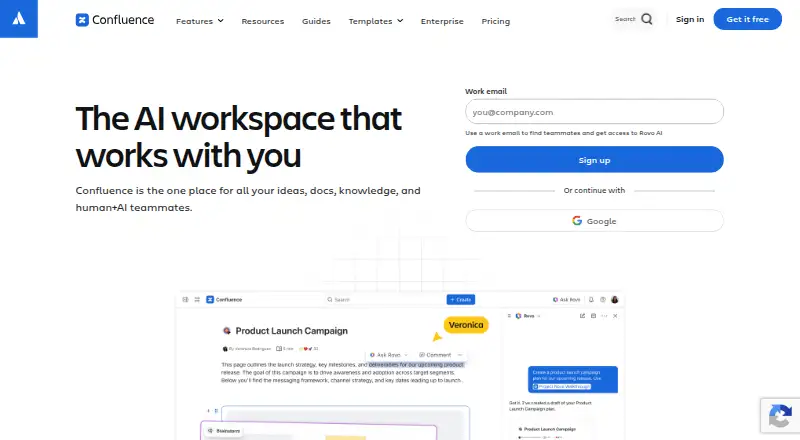
Confluence is Atlassian’s workspace for managing knowledge and collaborating on projects. Teams can create pages, whiteboards, databases, and Loom video messages, then edit together in real time, comment, and receive notifications when tagged or assigned tasks. Its connection to Jira links project tracking with documentation planning, and whiteboards can turn ideas into Jira work. Teams can share view-only pages through public links and use version history, content analytics, and app integrations. The Free plan supports up to 10 users, includes 2 GB of file storage, and allows three active whiteboards per user. Cloud products provide a hosted service, while Data Center products can run on infrastructure a team chooses. The mobile app syncs published work across smartphones, tablets, and desktop web. Rovo can turn content into timelines, charts, maps, slides, and prototypes. A 7-day trial is listed; paid plans start at $5.42 per user per month. Enterprise includes advanced encryption and identity controls.
Who it suits
Confluence suits teams that need a shared space for project documentation, knowledge, and collaborative content. Its free tier is sized for teams of up to 10 users, while Data Center offers deployment on chosen infrastructure.
What it does well
- Real-time editing with comments and task notifications
- Links Jira tracking with documentation planning
- Free plan includes 2 GB file storage
- Public links allow view-only page sharing
What to know first
- Free plan is limited to 10 users
- Free plan includes 2 GB of storage
- Enterprise plan price is not listed
Limits
The Free plan supports up to 10 users, includes 2 GB of file storage, and allows three active whiteboards per user. It also includes 50 automation steps per subscription per month.
Plans
| Plan | Billed and limits | Price |
|---|---|---|
| Free | free forever · 10 users · 2 GB file storage · 3 active whiteboards per user · 50 automation steps per subscription per month | Free |
| Standard | per user / month · Up to 250,000 users per site · 250 GB storage · 100 automation steps per user per month · 9/5 regional support | $5.42 a month |
| Premium | per user / month · Unlimited storage · Unlimited whiteboards · 250 automation steps per user per month · 24/7 critical-issue support · 99.9% uptime SLA | $10.44 a month |
| Enterprise | annually · Multiple sites up to 150 · 500 automation steps per user per month · 24/7 support · 99.95% uptime SLA | On request |
As atlassian.com lists them, read 28 Sept 2026. The maker's own page has the final word.
Getting started
- Open the Confluence website.
- Choose the Free plan or review the paid plans, which start at $5.42 per user per month.
- Use the listed 7-day trial if you want to try a paid plan.
- Access Confluence on the web or use its Android or iOS app; self-hosted options are also listed.
Overview
Confluence is Atlassian’s workspace for shared knowledge and project collaboration, best suited to teams that want documentation closely connected to Jira work. Its combination of pages, whiteboards, databases, and video messaging gives teams room to plan and record work together; the trade-off is a tightly capped free tier and a broadest set of controls reserved for higher plans.
Teams can edit together in real time, comment on pages or passages, and get notifications when tagged or assigned tasks. Jira connections make it possible to turn whiteboard ideas into tracked work, which gives Confluence a practical advantage for project-centered documentation over a wiki used in isolation.
Key features
- Pages, whiteboards, databases, and Loom video messaging: Multiple content formats let teams keep written knowledge and developing ideas in a shared workspace. Free users get up to three active whiteboards per user; Premium removes that cap.
- Real-time collaboration and history: Co-editing, comments, tags, task assignments, notifications, and version history support ongoing team work and preserve changes.
- Jira connection: Documentation planning sits alongside project tracking, and whiteboards can turn ideas into Jira work. This is most useful for teams already organizing delivery in Jira.
- Rovo and external connectors: Rovo can turn content into timelines, charts, maps, slides, and prototypes. Connectors bring material from Google Drive, Slack, Salesforce, GitHub, Microsoft Teams, and SharePoint into AI-powered search, chat, and workflows.
- Integrations and sharing: Atlassian says hundreds of Confluence apps cover theming, diagramming, and workflow management, with thousands of Marketplace apps overall. Paid plans allow up to five free guests per paid user; view-only pages can also be shared through public links.
- Security and service: Data is encrypted in transit with TLS 1.2 or later and at rest with AES-256 full-disk encryption. Atlassian’s compliance program includes SOC 2, SOC 3, PCI DSS, ISO/IEC 27001, ISO/IEC 27018, and GDPR. Premium Cloud includes a 99.9% uptime SLA; Enterprise adds advanced encryption and Shadow IT controls, among other organization-level controls.
Pricing
Confluence uses a freemium model with a seven-day trial. The paid prices below are per user per month; the Enterprise plan is billed annually with custom pricing.
| Plan | Price | What it includes | Best fit |
|---|---|---|---|
| Free | free, free forever | Up to 10 users, 2 GB file storage, three active whiteboards per user, and 50 automation steps per subscription per month; Atlassian Community support | Small teams trying shared documentation and collaboration without a subscription |
| Standard | $5.42 per user per month | Everything from Free, up to 250,000 users per site, 250 GB storage, 100 automation steps per user per month, and regional business-hours support | Growing teams that need more storage, automation, and business-hours support |
| Premium | $10.44 per user per month | Everything from Standard, unlimited storage and whiteboards, 250 automation steps per user per month, 24/7 critical-issue support, and a 99.9% uptime SLA | Teams whose storage, whiteboard use, uptime commitment, or critical support needs exceed Standard |
| Enterprise | Custom pricing; billed annually | Multiple sites up to 150, 500 automation steps per user per month, 24/7 support, and a 99.95% uptime SLA; supports multiple sites, centralized visibility and identity management with Guard Standard, advanced analytics, and compliance controls | Organizations needing centralized controls, several sites, or the highest stated uptime commitment |
The free plan’s 10-user and 2 GB limits make it a starting point rather than a roomy long-term home for a growing team. Standard lifts the site limit substantially and storage to 250 GB, but still caps storage and whiteboards; Premium removes those two limits and adds stronger support and an SLA. Enterprise is the step up for multi-site governance and a 99.95% SLA, but requires an annual commitment and custom pricing.
Monthly subscriptions qualify for a refund within the first paid month; annual subscriptions qualify within 30 days of payment. Standard provides regional business-hours support, while Premium and Enterprise provide round-the-clock support; Enterprise specifies a 30-minute critical-issue response time. Confluence supports SSO; Enterprise supports identity providers, SCIM, and enforced SSO.
Platforms
Confluence is available on the web, Android, iOS, and as self-hosted software. The Cloud option is a SaaS service, while Data Center can be deployed on infrastructure of the organization’s choice. The Cloud mobile app syncs published work across smartphones, tablets, and desktop web, giving teams a way to keep up with published material across devices.
Who it's for
Confluence suits organizations that want a shared knowledge workspace tied to project planning, especially teams already using Jira. It also fits teams that need varied formats, real-time collaboration, guest access, or connections to a broad set of workplace apps. Small groups can start free, but the storage, user, whiteboard, and automation caps make that tier a constrained choice as work expands. Teams that do not need Jira-connected collaboration or prefer a no-cost self-hosted wiki may find a simpler fit elsewhere.
Pros and cons
- Pro: Pages, whiteboards, databases, and Loom messaging bring several collaboration formats into one workspace.
- Pro: Jira integration connects planning and documentation with project tracking, including a route from whiteboard ideas to Jira work.
- Pro: Paid guest access, public view-only links, integrations, and external connectors help teams share and gather knowledge across tools.
- Pro: Cloud Premium and Enterprise provide stated uptime SLAs, while Enterprise adds centralized identity and compliance controls.
- Con: Free is limited to 10 users and 2 GB, with only three active whiteboards per user and 50 monthly automation steps per subscription.
- Con: Standard still limits storage to 250 GB and does not include unlimited whiteboards or Premium’s 24/7 critical-issue support and SLA.
- Con: The highest-scale controls and 99.95% uptime commitment require Enterprise’s annual, custom-priced plan.
Alternatives
For a broader comparison, see Wiki Software, Knowledge base software, Knowledge Management Software, Internal Knowledge Base Software, Document Collaboration Software, and Team Collaboration Software.
- MediaWiki is a free, self-hosted option under GNU GPL version 2 or later, suited to readers who want a wiki they can host without a subscription.
- TiddlyWiki is a free alternative available on web, desktop, and mobile platforms.
- Wiki.js offers a free-forever, AGPL-licensed self-hosted edition for readers seeking that deployment model.
- Slab has a free plan for up to 10 users with unlimited posts and topics, but attachments are limited to 10MB and version history to 90 days.
- BookStack is a no-cost, MIT-licensed self-hosted option for readers who want to install their own instance.
- Docmost offers an open-source Community edition with real-time collaboration, spaces, full-text search, page history and restore, and public sharing.
- MoinMoin is a free alternative licensed under the GNU GPL.
- PmWiki is a free alternative available on web, Windows, macOS, and Linux.
Verdict
Choose Confluence if your organization wants shared documentation and flexible collaboration formats connected to Jira, with room to scale into paid storage, support, and governance options. Its free tier is useful for a small group, but the caps are restrictive; teams that prioritize a no-cost self-hosted wiki over Jira-connected planning should look at the free alternatives instead.
Verdict
Confluence combines collaborative documents and project knowledge with Jira connections and multiple deployment options. The Free plan has clear user and storage limits; paid plans start at $5.42 per user per month.
Questions
Is Confluence free?
Yes. Its Free plan is free forever for up to 10 users.
How much do paid plans cost?
Standard starts at $5.42 per user per month, and Premium is $10.44 per user per month. Enterprise pricing is available through sales.
Which platforms does Confluence support?
Confluence lists web, Android, iOS, and self-hosted platforms.
Does Confluence have a free trial?
Yes. A 7-day trial is listed.
Can Confluence be self-hosted?
Data Center products can be deployed on infrastructure of your choice.
What integrations does it offer?
Confluence connects with Jira and other apps teams use. Rovo Connectors can bring knowledge from Google Drive, Slack, Salesforce, GitHub, Microsoft Teams, and SharePoint into AI-powered search, chat, and workflows.
Facts from Confluence's own pages
- Publishing audience
- both · atlassian.com, 20 Sept 2026
- Cloud option
- Cloud products provide a complete SaaS solution · atlassian.com, 27 Sept 2026
- Collaboration
- Teams can edit content in real time, comment inline or on pages, and receive notifications when teammates are tagged or assigned tasks. · atlassian.com, 28 Sept 2026
- Company name
- Atlassian · atlassian.com, 27 Sept 2026
- Compliance
- Atlassian lists SOC 2, SOC 3, PCI DSS, ISO/IEC 27001, ISO/IEC 27018, and GDPR in its compliance program. · atlassian.com, 28 Sept 2026
- Content analytics
- Premium Analytics provides deeper insights into team, site, space, and page use · atlassian.com, 27 Sept 2026
- Core content
- Confluence provides pages, whiteboards, databases, and Loom video messaging. · atlassian.com, 28 Sept 2026
- Custom domain
- Yes · atlassian.com, 20 Sept 2026
- Encryption
- Confluence encrypts data in transit with TLS 1.2 or later with perfect forward secrecy and uses AES-256 full-disk encryption at rest. · atlassian.com, 28 Sept 2026
- Enterprise controls
- Confluence Enterprise supports multiple sites, centralized visibility and identity management with Guard Standard, advanced analytics, and compliance controls. · atlassian.com, 28 Sept 2026
- External connectors
- Rovo Connectors can bring knowledge from Google Drive, Slack, Salesforce, GitHub, Microsoft Teams, and SharePoint into AI-powered search, chat, and workflows. · atlassian.com, 28 Sept 2026
- Founded
- 2002 · atlassian.com, 23 Sept 2026
- Free automation
- 50 automation steps per subscription per month · atlassian.com, 27 Sept 2026
- Free plan
- Yes · atlassian.com, 20 Sept 2026
- Free user limit
- The Free plan supports up to 10 users · atlassian.com, 27 Sept 2026
- Free storage
- 2 GB of file storage · atlassian.com, 27 Sept 2026
- Free trial
- A 7-day free trial is available for Standard or Premium · atlassian.com, 27 Sept 2026
- Free whiteboards
- Up to 3 active whiteboards per user · atlassian.com, 27 Sept 2026
- Guest access
- Paid plans allow up to 5 free guests per paid user · atlassian.com, 27 Sept 2026
- Headquarters
- Sydney, Australia · atlassian.com, 23 Sept 2026
- History
- Atlassian says Confluence 1.0 was born and released in 2002. · atlassian.com, 28 Sept 2026
- Identity access
- Enterprise supports IdPs, SCIM, and enforced SSO · atlassian.com, 27 Sept 2026
- App integrations
- Confluence integrates with other apps teams already use · atlassian.com, 27 Sept 2026
- Jira integration
- Confluence connects Jira project tracking with documentation planning, and its whiteboards can turn ideas into Jira work. · atlassian.com, 28 Sept 2026
Where Confluence stands on Freedom251
- Knowledge base software#5 of 138
- Internal Knowledge Base Software#1 of 25
- Knowledge Management Software#2 of 37
- Content Collaboration Software#3 of 28
- Browser Based#5 of 34
- Wiki Software#5 of 33
- Web App#5 of 32
- Cloud Content Collaboration Software#5 of 30
- Document Collaboration Software#6 of 32
- Team Collaboration Software#6 of 25