Freedom251 › AI Color Palette Generators

ColorUI Prompt Palette Studio
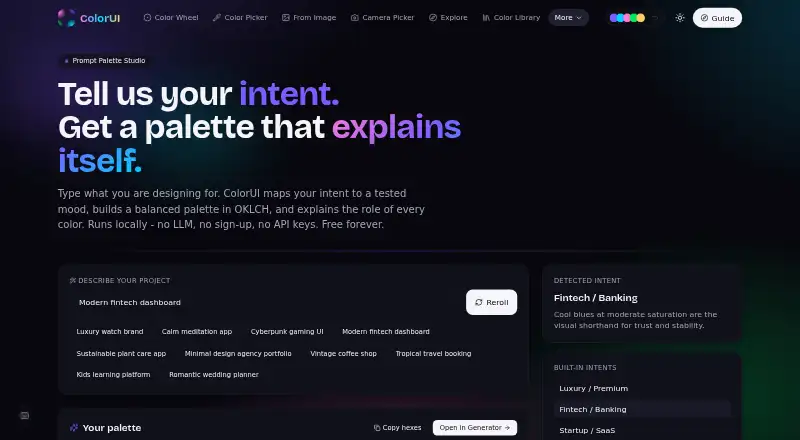
What ColorUI Prompt Palette Studio is
ColorUI Prompt Palette Studio turns written design requests into coordinated color palettes and explains the role of each color. It maps a prompt’s mood, temperature, and context to OKLCH properties, then builds palettes with primary brand tones, secondary accents, and neutral backgrounds. Users can supply color names or exact hex codes, lock chosen colors, and generate matching tones around them. Palette exports include CSS custom properties, W3C design tokens, and Tailwind themes, alongside formats such as SCSS, JSON, Style Dictionary, Swift UIColor, and Android XML. Its public API requires no signup or key, supports CORS, and allows 60 requests per minute. Prompts are processed statelessly and are not stored or tied to personal accounts. ColorUI lists integrations for Figma, VS Code, CLI, GitHub, Raycast, and MCP. The toolkit also includes image color extraction, an accessibility checker, and seven harmony modes. Its free plan allows personal and commercial use without attribution.
Who it suits
It suits designers and developers creating palettes from written prompts or specified colors. The export formats and integrations are relevant to people moving color tokens into design and development workflows.
What it does well
- Generates palettes from natural-language prompts.
- Users can lock chosen colors while generating matches.
- Exports include CSS properties, W3C tokens, and Tailwind themes.
- Free personal and commercial use without attribution.
What to know first
- Public API is limited to 60 requests per minute.
- Palette endpoint random mode supports counts from 2 to 8.
Limits
The public API allows 60 requests per minute. In random mode, the palette endpoint accepts counts from 2 to 8.
Plans
| Plan | Billed and limits | Price |
|---|---|---|
| Free | Free forever · no sign-up · no LLM · no API keys · commercial use without attribution | Free |
As colorui.io lists them, read 15 Oct 2026. The maker's own page has the final word.
Getting started
- Visit https://colorui.io/ai; the free plan requires no signup.
- Enter a natural-language design prompt, or specify color names or hex codes to anchor the palette.
- Lock any colors you want to keep while matching tones are generated.
- Export the palette in a supported format such as CSS custom properties, W3C design tokens, or a Tailwind theme.
- For API use, call the public API without an API key or signup; it allows 60 requests per minute.
Overview
ColorUI Prompt Palette Studio is a prompt-led palette generator for designers and developers who want to move from a written brief to usable color values without creating an account. Its strongest case is the combination of fixed-color controls and code-ready exports; its API’s 60-request-per-minute limit may matter for heavier automated use.
Describe a project’s mood and context in natural language, and the studio produces a coordinated set of brand tones, accents, and neutral backgrounds, with an explanation for each color. Its OKLCH-based approach makes the result more than a list of disconnected swatches. For a wider comparison, see our AI Color Palette Generators list.
Key features
You can specify a color by name or exact hex code and lock it while matching tones are generated. That is useful when a brand color is non-negotiable but the surrounding palette still needs exploration. Seven harmony modes add another route beyond free-form prompting, and the API also supports random generation with palettes of two to eight colors.
Exports span CSS variables, Tailwind, SCSS, JSON, W3C DTCG, Style Dictionary, Swift UIColor, and Android XML. This range makes the tool practical for both web styling and native-platform handoff, though it does not establish that every format is available through every integration. ColorUI also connects with Figma, VS Code, CLI, GitHub, Raycast, and MCP.
The public API needs no key or signup, supports CORS, and permits 60 requests per minute. That is a useful low-friction option for prototypes and modest integrations, not an unlimited generation service. ColorUI says prompts are processed statelessly and are not stored or associated with accounts. It also cites CSP, HSTS preload, COOP, frame-ancestors restrictions, SSRF guards, per-IP rate limits, and weekly CodeQL scans. These are concrete security measures, though they do not remove the need to assess a service against a particular organization’s requirements.
The CLI has no dependencies, runs wherever Node 18 or later runs, collects no telemetry, and supports self-hosting through COLORUI_API. That makes it a stronger fit for developer workflows than for teams seeking a managed palette library or account-based project organization. Generated palettes may be used commercially or personally without attribution.
Pricing
The Free plan costs nothing, forever. It requires no signup, LLM, or API key, and includes personal and commercial use without attribution. There is no paid tier described, so the product’s appeal is unusually straightforward: no subscription decision, but API users should still account for the 60-requests-per-minute cap.
ColorUI’s wider toolkit also includes image color extraction and an accessibility checker, alongside more than 40 free tools. These broaden its usefulness beyond prompt generation, although the palette studio remains the relevant choice when the goal is a prompt-built scheme with export options.
Platforms
ColorUI lists Android, iOS, web, API, extension, and self-hosted availability. Its named integrations and CLI help bridge design and development, while the Node 18+ requirement applies specifically to the CLI rather than the broader service.
Who it's for
This is a good fit for independent designers, developers, and small teams who need to turn a visual brief into a palette, preserve a known brand color, and export values into familiar code or token formats. Stateless prompts and no-account access suit people who prefer not to tie experimentation to a personal account. It is less compelling for users who need a high-volume API, shared project management, or a platform whose published offer centers on account-based color libraries.
Pros and cons
- Pros: Locking named or hex colors keeps an existing brand choice intact while related tones are generated.
- Pros: Broad exports, native color formats, and named integrations reduce friction between palette exploration and implementation.
- Pros: No signup or API key, stateless prompt handling, and commercial use without attribution keep access and reuse simple.
- Cons: The public API is capped at 60 requests per minute, which constrains sustained automated workloads.
- Cons: The CLI requires Node 18 or later, so it is not a drop-in option in every development environment.
Alternatives
Pantone Connect Palette Generator is the better pick for readers who want account-based access to a 15,000-plus-color library and tools to search, pick, measure, save, and share palettes. AIColors suits those who want unlimited palette generation on the web without an account, rather than ColorUI’s wider integration and export workflow.
Chromos is worth considering for a project-centered workflow: its free plan includes one project and five palettes, with color tools, explanations, advanced reasoning, and ADA optimization. Color Palette Generator AI may suit API users who prioritize unlimited generations and every export format without an account.
ColorBrew is another free web and browser-extension option. Colorfor.ai offers its tools, API, MCP server, widgets, and exports free under fair-use limits. ColorMagic is a free web and API alternative that says it offers unlimited palette generation and may show ads. DuckColor provides free online generation without login, with possible rate limits or daily quotas.
Verdict
Choose ColorUI Prompt Palette Studio if you want no-sign-up prompt-based palettes that can preserve a fixed brand color and flow into design or code through varied exports. Its privacy-conscious processing, commercial-use permission, and integration range make it a capable free starting point. Look elsewhere if your workflow depends on API traffic beyond 60 requests per minute or on managing palettes as account-based projects.
Verdict
ColorUI Prompt Palette Studio connects prompt-based palette creation with controls for chosen colors and several export formats. Its API has a stated request limit, while prompts are not stored or associated with accounts.
Questions
Is ColorUI Prompt Palette Studio free?
Yes. Its plan is listed as Free forever, with no signup, LLM, or API keys required.
Can generated palettes be used commercially?
Yes. Palettes may be used in personal and commercial projects without attribution.
What formats can I export?
Listed formats include CSS variables, Tailwind, SCSS, JSON, W3C DTCG, Style Dictionary, Swift UIColor, and Android XML.
Does the public API require an account or key?
No. The public API requires no API key or signup, supports CORS, and allows 60 requests per minute.
Which integrations are available?
ColorUI lists integrations for Figma, VS Code, CLI, GitHub, Raycast, and MCP.
Are prompts stored with personal accounts?
Prompts are evaluated statelessly through the backend API and are not stored or associated with personal accounts.
Facts from ColorUI Prompt Palette Studio's own pages
- Accessibility commitment
- The accessibility statement names WCAG 2.2 AA, EN 301 549, Section 508, and the European Accessibility Act as standards it follows. · colorui.io, 15 Oct 2026
- AI limitation
- The maker warns that prompt generation does not itself perform precise WCAG contrast verification or color-vision-deficiency simulation. · colorui.io, 15 Oct 2026
- API access
- The public API requires no API key or signup, supports CORS, and allows 60 requests per minute. · colorui.io, 30 Sept 2026
- API authentication
- Normal API use requires no account or API key. · colorui.io, 15 Oct 2026
- API limits
- The palette endpoint accepts prompt-based generation, harmony rules, or random mode, with random counts from 2 to 8. · colorui.io, 30 Sept 2026
- Audience
- ColorUI describes itself as a toolkit for designers and developers, with more than 40 free tools and no sign-ups. · colorui.io, 30 Sept 2026
- Browser extension
- The browser extension supports Chromium browsers including Chrome 116+, Edge, Brave, Arc, Opera, and Vivaldi. · colorui.io, 15 Oct 2026
- Browser extension status
- The maker says the Chrome Web Store submission is still under review and provides sideload instructions. · colorui.io, 15 Oct 2026
- Built-in intents
- Preset intents include luxury, fintech, startup, wellness, gaming, education, nature, travel, minimal, sports, vintage, and wedding themes. · colorui.io, 15 Oct 2026
- CLI
- The CLI provides palette generation, WCAG contrast checks, and color conversion through npx or global npm installation. · colorui.io, 15 Oct 2026
- CLI deployment
- The CLI has zero dependencies, runs wherever Node 18+ runs, has no telemetry, and supports self-hosted deployments through COLORUI_API. · colorui.io, 30 Sept 2026
- CLI requirements
- The CLI is a single approximately 9 KB JavaScript file with zero dependencies and requires Node 18 or newer. · colorui.io, 15 Oct 2026
- CLI self-hosting
- CLI users can set COLORUI_API to route requests to their own deployment. · colorui.io, 15 Oct 2026
- Color control
- Users can specify color names or exact hex codes and lock those colors while matching tones are generated. · colorui.io, 30 Sept 2026
- Color locking
- Users can specify color names or exact hex values and have the generator preserve them while matching other tones. · colorui.io, 15 Oct 2026
- Color model
- The generator maps mood, temperature, and context to OKLCH color properties. · colorui.io, 30 Sept 2026
- Commercial rights
- Generated color palettes may be used in personal and commercial projects without attribution. · colorui.io, 30 Sept 2026
- Commercial use
- The maker states generated palettes may be used commercially without attribution. · colorui.io, 15 Oct 2026
- Exports
- Palettes can be exported as CSS custom properties, W3C design tokens, or Tailwind themes. · colorui.io, 15 Oct 2026
- Figma integration
- The Figma plugin generates palettes, applies colors to selections, checks WCAG contrast, and converts color formats. · colorui.io, 15 Oct 2026
- Founder
- The About page identifies Harsh Mistry as ColorUI's founder. · colorui.io, 15 Oct 2026
- Independent criticism
- Gridinsoft flagged limited independent reputation data, low estimated traffic, and the site's recent registration as caution signals. · gridinsoft.com, 15 Oct 2026
- Independent domain age
- Gridinsoft reported the domain as approximately two months old at its May 26, 2026 check. · gridinsoft.com, 15 Oct 2026
- Independent hosting detail
- Gridinsoft identified Cloudflare as the hosting provider and recorded IP address 104.21.58.247. · gridinsoft.com, 15 Oct 2026
Where ColorUI Prompt Palette Studio stands on Freedom251
- AI Color Palette Generators#1 of 22