Freedom251 › AI Color Palette Generators

AI Brand Colors
What AI Brand Colors is
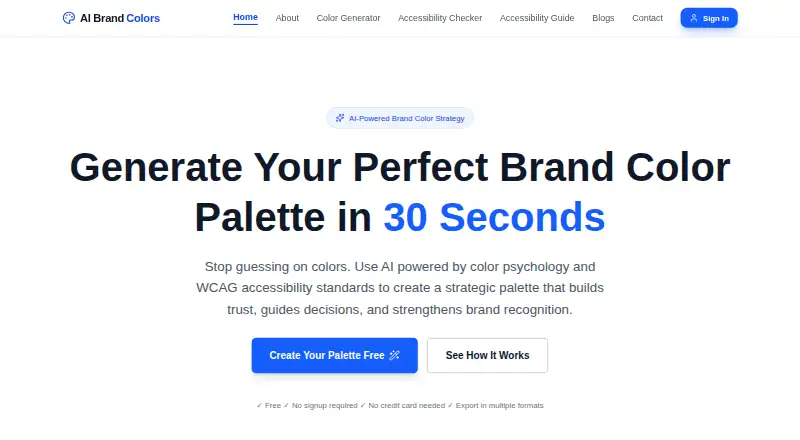
AI Brand Colors is a web tool for creating brand color palettes from brand inputs, with color psychology and accessibility standards informing the results. A generated palette includes primary, secondary, accent, neutral, tint, and shade colors, adding up to 50+ colors the site describes as production-ready. The site says palettes are checked against WCAG AA and AAA contrast standards and tested for color blindness; an accessibility checker is also available.
Users can change brand descriptors to regenerate a palette, then adjust the generated colors in their design tools. Export options include JSON, CSS variables, Tailwind config, HEX, RGB, HSL, and a PDF swatch guide. The site says palettes can be imported into Figma, Tailwind, a design system, or other tools. It identifies startups, design teams, product managers, e-commerce brands, enterprise rebrands, and marketing agencies as intended users.
The free plan allows unlimited palette generation and exports in multiple formats, with no signup or credit card required. AI Brand Colors is a passion project built and maintained by the UX Mate team. Its privacy policy says brand inputs are sent to Google Gemini for processing and are not stored by the service, while Google may process them under its own policy. The site also uses Google Analytics and Microsoft Clarity, including analytics cookies and session recordings or heatmaps.
Who it suits
AI Brand Colors suits startups, design teams, product managers, e-commerce brands, agencies, and teams working on enterprise rebrands. It is useful for people who want to generate palettes, check accessibility, and export colors into design tools or code formats.
What it does well
- Unlimited palette generation is included in the free plan.
- No signup or credit card is required.
- Palettes are checked against WCAG AA and AAA contrast standards.
- Exports include code formats, color values, and a PDF swatch guide.
- Palettes can be imported into Figma, Tailwind, and other tools.
What to know first
- The service is web-only.
- It does not extract colors from images.
- Brand inputs are sent to Google Gemini for processing.
Plans
| Plan | Billed and limits | Price |
|---|---|---|
| Free | No signup required · No credit card needed · Unlimited palette generation · Export in multiple formats | Free |
As aibrandcolors.com lists them, read 7 Oct 2026. The maker's own page has the final word.
Getting started
- Open the AI Brand Colors website.
- Enter brand inputs to generate a palette.
- Change brand descriptors and regenerate if you want another palette.
- Adjust generated colors in your design tools or import them into Figma, Tailwind, a design system, or another tool.
- Export the palette in a supported format.
AI Brand Colors is a web-based generator for turning brand descriptions into structured color systems. It suits founders, designers, and product teams that need a substantial starting palette without an account or subscription. Its strongest proposition is unlimited generation with accessibility-oriented checks and developer-friendly exports; it is less suitable when image sampling or offline software is essential.
Overview
The tool combines brand inputs with color psychology to produce palettes covering primary, secondary, accent, neutral, tint, and shade roles. The result is described as more than 50 production-ready colors, giving a team enough range for interface states, marketing materials, and a broader design system rather than only a few headline swatches.
Generation is iterative: change the brand descriptors and create another direction, then refine the chosen colors in Figma, a design system, or another design tool. That workflow makes AI Brand Colors useful at the concept and system-starting stage, but it remains a palette generator rather than a complete design workspace. It cannot extract colors from images.
Key features
Palettes are checked against WCAG AA and AAA contrast standards and tested for color blindness, and the product includes an accessibility checker. Those safeguards make it a sensible first stop for teams that must consider readable combinations and color-vision differences. They do not remove the need to assess colors in real components, states, and layouts.
Export options are unusually broad for a free web tool: JSON, CSS variables, Tailwind configuration, HEX, RGB, HSL, and a PDF swatch guide. The formats bridge design and engineering work, while stated import support for Figma, Tailwind, design systems, and other tools reduces manual transcription. Users can regenerate from revised descriptors, then make final adjustments where the palette will be used.
Privacy deserves attention before entering confidential positioning or unreleased brand strategy. Brand inputs are sent to Google Gemini for processing and are not stored by AI Brand Colors, although Google may handle them under its own policy. The site also uses Google Analytics and Microsoft Clarity, including analytics cookies, session recordings, and heatmaps. Traffic and Gemini communications use encrypted connections, and the service says it does not retain inputs or generated palettes on its servers.
Pricing
The Free plan costs nothing. There is no signup and no credit card requirement, no trial period, and no stated renewal charge. It provides unlimited palette generation and exports in multiple formats, so the principal limitation is not a generation quota but the web-only workflow and the absence of image color extraction.
This is a strong fit for independent designers, startups, agencies, and teams that want to explore many directions without procurement friction. Larger organizations should weigh the Gemini data-processing arrangement and analytics practices before using sensitive inputs; the service does not present a paid tier with different controls.
Platforms
AI Brand Colors runs on the web. That keeps access broad across operating systems, but it does not provide a native desktop or mobile application.
Who it's for
Startups can use it to establish a first visual language quickly, while design teams and product managers get role-based colors and implementation-ready exports. E-commerce brands and marketing agencies benefit from rapid variation across brand directions, and enterprise rebrand teams can use the broad palette as an initial system to review. Choose another category of tool if your process starts with photographs, screenshots, or local-only data.
Pros and cons
- Pros: Unlimited generation without signup or payment removes trial friction.
- Pros: More than 50 colors across primary, secondary, accent, neutral, tint, and shade roles support a fuller system.
- Pros: WCAG AA/AAA checks, color-blindness testing, and an accessibility checker address common palette risks early.
- Pros: JSON, CSS variables, Tailwind, color-space exports, and a PDF guide suit mixed design and development workflows.
- Cons: No image color extraction means it cannot start from an existing visual reference.
- Cons: Brand inputs are processed by Google Gemini, and analytics include recordings and heatmaps, which may rule it out for sensitive briefs.
- Cons: Web-only access and the need to finish detailed adjustments in other tools limit it as an all-in-one environment.
Alternatives
AI Color Palette Generators is the broader directory choice when you want to compare this category rather than select one generator immediately.
Choose ColorUI Prompt Palette Studio instead if you want Android, iOS, extension, API, or self-hosted access, plus no LLM or API keys and personal and commercial use without attribution. Pantone Connect Palette Generator is the better fit for Pantone’s 15,000-plus colors and Search, Pick, and Measure tools, with an account required on its free tier. Pick 10015.io AI Color Palette Generator for a simpler web tool focused on AI palettes and CSS-variable or hexadecimal text export.
AIColors suits readers who want completely free, unlimited web generation without an account. Chromos is preferable when project structure, explanations, advanced reasoning, and ADA optimization matter; its free tier allows one project and five palettes, with Pro at $20 a month. Choose Color Palette Generator AI for unlimited generations, every export format, shareable links, and an API. ColorBrew is an alternative when a browser extension is useful. Colorfor.ai fits users seeking tools, API, MCP server, widgets, and exports under fair-use limits.
Verdict
Choose AI Brand Colors if you need free, unlimited web-based palette generation with a broad role-based color set, accessibility checks, and exports that move cleanly into design and code. Look elsewhere if image-derived colors, native apps, or stricter control over third-party processing and analytics are central to your workflow.
Verdict
Choose AI Brand Colors if you want free, unlimited web-based palette generation with accessibility checks and multiple export formats. Look elsewhere if your workflow depends on extracting colors from images or using an app outside the web.
Questions
How much does AI Brand Colors cost?
The Free plan costs nothing. It includes unlimited palette generation and exports in multiple formats.
Do I need to sign up or provide a credit card?
No. The Free plan requires neither signup nor a credit card.
Which platforms does it support?
AI Brand Colors is a web product.
What export formats are available?
Exports include JSON, CSS variables, Tailwind config, HEX, RGB, HSL, and a PDF swatch guide.
Who maintains AI Brand Colors?
The UX Mate team says AI Brand Colors is its passion project and that the team builds and maintains it.
How are brand inputs handled?
The privacy policy says inputs are sent to Google Gemini for processing and are not stored by the service. Google may process them under its own policy.
Facts from AI Brand Colors's own pages
- Accessibility
- The site says palettes are checked against WCAG AA and AAA contrast standards and tested for color blindness. · aibrandcolors.com, 7 Oct 2026
- Analytics
- The privacy policy says the site uses Google Analytics and Microsoft Clarity, including analytics cookies and session recordings or heatmaps. · aibrandcolors.com, 7 Oct 2026
- Customization
- Users can regenerate palettes by changing brand descriptors and can adjust generated colors in their design tools. · aibrandcolors.com, 7 Oct 2026
- Export formats
- Exports include JSON, CSS variables, Tailwind config, HEX, RGB, HSL, and a PDF swatch guide. · aibrandcolors.com, 7 Oct 2026
- Integrations
- The site says palettes can be imported into Figma, Tailwind, a design system, or other tools. · aibrandcolors.com, 7 Oct 2026
- Maker
- The about page says AI Brand Colors is a passion project built and maintained by the UX Mate team. · aibrandcolors.com, 7 Oct 2026
- Palette contents
- Generated palettes include primary, secondary, accent, neutral, tint, and shade colors, described as 50+ production-ready colors. · aibrandcolors.com, 7 Oct 2026
- Privacy
- The privacy policy says brand inputs are sent to Google Gemini for processing and are not stored by the service, while Google may process them under its own policy. · aibrandcolors.com, 7 Oct 2026
- Purpose
- The product generates brand color palettes using brand inputs, color psychology, and accessibility standards. · aibrandcolors.com, 7 Oct 2026
- Security
- The privacy policy says site traffic and Gemini API communications use encrypted connections and that the service does not retain brand inputs or generated palettes on its servers. · aibrandcolors.com, 7 Oct 2026
- Support
- The privacy policy lists [email protected] for privacy questions and says it will respond within 30 days or as required by law. · aibrandcolors.com, 7 Oct 2026
- Use cases
- The site identifies startups, design teams, product managers, e-commerce brands, enterprise rebrands, and marketing agencies as intended users. · aibrandcolors.com, 7 Oct 2026
Where AI Brand Colors stands on Freedom251
- AI Color Palette Generators#3 of 22