Freedom251 › AI Color Palette Generators

AIColors
What AIColors is
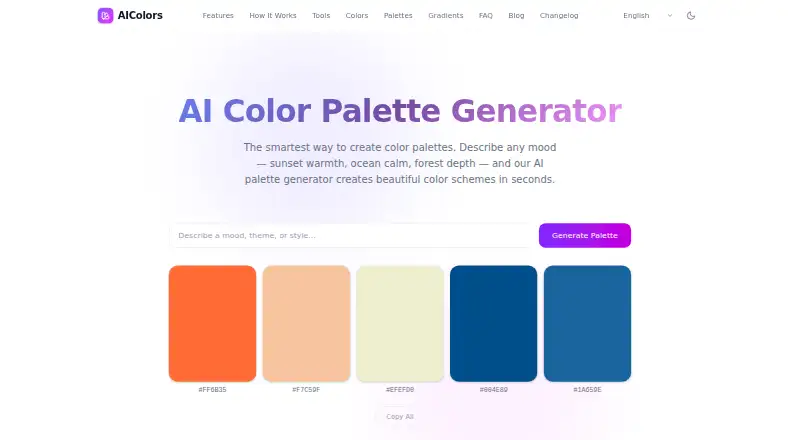
AIColors is a free web tool that generates color palettes from a described mood, theme, or style. Its homepage says each generated scheme contains five colors, which users can copy as individual hex codes or as a complete palette. The tools directory also lists contrast checking, color conversion, harmony and gradient generation, image color extraction, and palette visualization. The contrast checker compares color pairs against WCAG 2.2 and APCA, with live previews, OKLCH-based suggestions, and color blindness simulation. The converter supplies copy-ready snippets for CSS, Tailwind, Swift, Android, and Flutter. Image extraction uses k-means clustering in OKLab, and the site says images remain in the browser. Its privacy policy says prompts, uploaded images, color values, and generated palettes are not stored by an AIColors account system; most listed color work runs locally in the browser. The generator is available in nine languages, including English, Simplified Chinese, Japanese, Spanish, French, German, and Portuguese. The homepage generator has no public API, and users are responsible for reviewing outputs in their own product, legal, brand, and accessibility context.
Who it suits
AIColors suits people looking for palette ideas and browser-based color tools for contrast, conversion, gradients, or image extraction. Designers can use its copy-ready snippets for several design formats, but the homepage generator has no public API.
What it does well
- Free plan includes unlimited palette generation.
- No account is required.
- Contrast checker supports WCAG 2.2 and APCA.
- Image extraction keeps images in the browser.
- Converter offers snippets for CSS, Tailwind, Swift, Android, and Flutter.
What to know first
- Homepage generator has no public API.
- Users are responsible for reviewing outputs in context.
- Privacy-focused analytics may track page usage and navigation patterns.
Limits
The free plan allows unlimited palette generation. The homepage generator has no public API, and the listed feature set has no brand library.
Plans
| Plan | Billed and limits | Price |
|---|---|---|
| AIColors | Completely free · Unlimited palette generation · no account required | Free |
As aicolors.app lists them, read 30 Sept 2026. The maker's own page has the final word.
Getting started
- Visit the AIColors website.
- Describe a mood, theme, or style to generate a palette.
- Copy individual hex codes or the complete palette.
- Use the listed tools for contrast checking, conversion, gradients, image extraction, or visualization.
AIColors turns a described mood, theme, or style into a five-color palette. It is best for people who want palette exploration alongside practical color checks and code conversions in a browser. Its strongest case is the breadth of free tools; teams needing a brand library or a public API for the homepage generator should look elsewhere.
Overview
The service covers more than palette generation: its tools include contrast checking, color conversion, harmony and gradient generation, image extraction, and palette visualization. That makes it a useful choice for moving from a color idea toward implementation and review without changing tools. Palettes can be generated without an account, and the plan offers unlimited palette generation at no cost.
Most color generation, conversion, contrast checking, palette work, and image extraction runs locally in the browser. AIColors says it does not store color values, prompts, uploaded images, or generated palettes in an account system. Privacy-focused analytics may be used to understand page usage, performance, and navigation. The terms leave responsibility for reviewing outputs in their product, legal, brand, and accessibility context with users.
Key features
Palette creation and export
Describe a mood, theme, or style to generate a harmonious five-color scheme. You can copy individual hex codes or a complete palette, and export formats include HEX, CSS variables, Tailwind configuration, and design tokens. Seven harmony modes offer structured ways to explore related colors. This is well suited to early exploration and handoff, but the absence of a brand library makes it less appropriate for teams that need a managed, reusable palette system.
Contrast and accessibility checks
The contrast checker compares color pairs against WCAG 2.2 and APCA, with live previews, OKLCH-based fix suggestions, and color-blindness simulation. That combination can help designers identify issues and examine alternatives while working. It is a useful review aid, not a substitute for checking whether a final design meets the needs of its product and users.
Conversion and image extraction
The converter produces copy-ready snippets for CSS, Tailwind, Swift, Android, and Flutter, making it practical for developers working across those formats. Image extraction uses k-means clustering in OKLab; images stay in the browser. Together with harmony, gradient, and visualization tools, these features give AIColors a wider working range than a prompt-only generator.
Pricing
AIColors costs nothing, billed completely free. The plan includes unlimited palette generation and requires no account. There is no free trial because the service is free. For individuals and teams who need color exploration and the listed utilities without a paid plan, the price and lack of a generation quota are compelling. The trade-off is that there is no brand library, and the homepage generator has no public API.
Platforms
AIColors is a web service. The homepage generator supports English, Simplified Chinese, Traditional Chinese, Japanese, Korean, Spanish, French, German, and Portuguese. Its browser-based approach suits people who want to work in a web browser rather than choose among native apps.
Who it's for
AIColors is a strong fit for designers and developers who want to generate palettes, inspect contrast, extract colors from images, and prepare implementation-ready snippets in one free web service. It is less suitable for organizations that need a managed brand library or an API for the homepage generator. Anyone using its accessibility suggestions should still assess the result in the context of their product.
Pros and cons
- Pros: Unlimited palette generation is free and requires no account, lowering friction for quick exploration.
- Pros: Contrast checking, image extraction, conversion, and palette tools extend the service beyond prompt-based generation.
- Pros: Most color work runs locally in the browser, and AIColors says it does not store prompts, uploaded images, palettes, or color values in an account system.
- Cons: There is no brand library, so teams cannot use AIColors as a managed home for reusable brand palettes.
- Cons: The homepage generator has no public API, which limits its fit for developers seeking programmatic access to that generator.
Alternatives
ColorUI Prompt Palette Studio is worth considering if you want a free option spanning Android, iOS, web, extensions, API, and self-hosting, with no sign-up or LLM/API keys and permission for personal and commercial use without attribution.
Pantone Connect Palette Generator may suit people who want access to a catalog of more than 15,000 colors and search, pick, and measure tools; its free Basic plan requires an account and includes saving and sharing up to 10 palettes.
10015.io AI Color Palette Generator is a simpler web alternative for AI-generated palettes with CSS-variable or hexadecimal text export.
AI Brand Colors is another free web option for readers comparing palette generators.
Chromos may be a better match if you want a free plan with one project, five palettes, color tools, explanations, advanced reasoning, and ADA optimization; its Pro plan costs $20 a month.
Color Palette Generator AI is an alternative for people who value unlimited generations, every export format, shareable links, and API access on a free plan, across web and API.
ColorBrew is a free option available on the web and as an extension.
Colorfor.ai may appeal if you want its tools, API, MCP server, widgets, and exports on a free plan, subject to fair-use limits.
For more options, see AI Color Palette Generators.
Verdict
Choose AIColors if you want a free, no-account palette generator paired with contrast checks, image extraction, and code-ready color conversion. Its broad browser-based toolkit is the main reason to pick it; the lack of a brand library and a public API for the homepage generator are good reasons to choose another service when those capabilities matter.
Verdict
AIColors combines palette generation with contrast, conversion, and image-extraction tools in a free web service. Its broad toolset includes browser-local processing for most listed color work, but users must assess whether results fit their product and accessibility needs.
Questions
How much does AIColors cost?
AIColors has a free plan at no cost, billed completely free. It includes unlimited palette generation and does not require an account.
What platforms does AIColors support?
AIColors is a web tool.
What can the palette generator do?
It generates a harmonious five-color scheme from a described mood, theme, or style. Users can copy individual hex codes or an entire palette.
Does AIColors have an API?
The homepage says there is no public API for its generator.
What formats can the color converter provide?
It provides copy-ready code snippets for CSS, Tailwind, Swift, Android, and Flutter.
How does AIColors handle palette and image data?
Its privacy policy says color values, palette prompts, uploaded images, and generated palettes are not stored by an AIColors account system. It says most listed color work runs locally in the browser.
Facts from AIColors's own pages
- Accessibility
- The contrast checker compares color pairs against WCAG 2.2 and APCA and offers live previews, OKLCH-based fix suggestions, and color blindness simulation. · aicolors.app, 30 Sept 2026
- Analytics
- AIColors may use privacy-focused analytics to understand page usage, performance, and navigation patterns. · aicolors.app, 30 Sept 2026
- API
- The homepage says there is no public API for the homepage generator. · aicolors.app, 30 Sept 2026
- Design formats
- The color converter provides copy-ready code snippets for CSS, Tailwind, Swift, Android, and Flutter. · aicolors.app, 30 Sept 2026
- Image extraction
- The image color extractor uses k-means clustering in OKLab and says images stay in the browser. · aicolors.app, 30 Sept 2026
- Languages
- The homepage says the AI palette generator is available in English, Simplified Chinese, Traditional Chinese, Japanese, Korean, Spanish, French, German, and Portuguese. · aicolors.app, 30 Sept 2026
- Local processing
- The privacy policy says most color generation, conversion, contrast checking, palette work, and image color extraction runs locally in the browser. · aicolors.app, 30 Sept 2026
- Palette export
- Users can copy individual hex codes or an entire palette. · aicolors.app, 30 Sept 2026
- Palette size
- The homepage says the generator creates a harmonious 5-color scheme. · aicolors.app, 30 Sept 2026
- Privacy
- The privacy policy says color values, palette prompts, uploaded images, and generated palettes are not stored by an AIColors account system. · aicolors.app, 30 Sept 2026
- Support
- The privacy policy directs privacy questions and data concerns to an issue on the AIColors GitHub repository. · aicolors.app, 30 Sept 2026
- Tools
- The tools directory lists color contrast checking, color conversion, harmony and gradient generation, image color extraction, and palette visualization. · aicolors.app, 30 Sept 2026
- Use responsibility
- The terms say users are responsible for reviewing outputs in their product, legal, brand, and accessibility context. · aicolors.app, 30 Sept 2026
- What it does
- AIColors generates color palettes from a described mood, theme, or style. · aicolors.app, 30 Sept 2026
Where AIColors stands on Freedom251
- AI Color Palette Generators#4 of 22