Freedom251 › AI Color Palette Generators
DuckColor
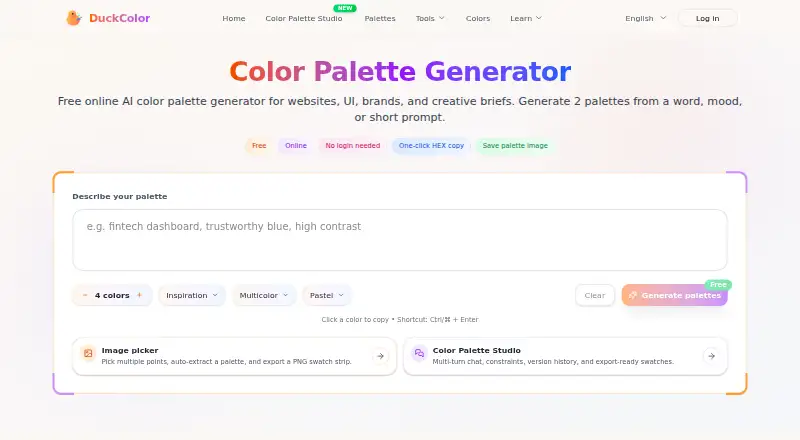
What DuckColor is
DuckColor is a web-based color tool that creates palettes from a word, mood, or short prompt for websites, UI, brands, and other creative work. Each run gives two named options with descriptions and HEX values. You can adjust the number of colors, palette type, style, and color family; the described range is four to eight colors. Image Picker extracts key colors from an uploaded image and can save them as a swatch image. Palette Studio supports iterative adjustments, constraints, version history, and PNG or table swatches. The site also offers a mixer for blending colors by ratio and comparing digital color-space results with a paint-style mix. Its contrast checker gives WCAG-based guidance, including AA and AAA. You can copy individual HEX codes or save palettes as swatch images. The free online plan requires no login, though usage limits such as rate limits or daily quotas may apply and can change. The Terms allow generated outputs to be used in personal or commercial projects, subject to those terms.
Who it suits
DuckColor suits designers and other creative users making palettes for websites, UI, brands, landing pages, or mood boards. It can also help users extract colors from images or check text and background contrast.
What it does well
- Generates two described palette options per run
- Offers image color extraction and swatch saving
- Palette Studio includes constraints and version history
- Provides WCAG-based contrast guidance
- Free plan does not require login
What to know first
- Rate limits or daily quotas may apply
- Usage limits can change
Limits
The free plan may be subject to rate limits or daily quotas, and those limits can change.
Plans
| Plan | Billed and limits | Price |
|---|---|---|
| Free | Free online palette generation · no login needed · usage limits such as rate limits or daily quotas may apply | Free |
As duckcolor.com lists them, read 4 Oct 2026. The maker's own page has the final word.
Getting started
- Open https://duckcolor.com/en in a web browser.
- Generate palettes from a word, mood, or short prompt.
- Adjust color count, palette type, style, or color family.
- Upload an image in Image Picker to extract its key colors.
- Use Palette Studio to refine a palette, or copy HEX codes and save swatches.
Verdict
DuckColor brings palette generation together with image extraction, color mixing, and contrast checking. The free plan needs no login, but usage limits may apply and can change.
Questions
How much does DuckColor cost?
The Free plan costs 0.00 USD.
Do I need an account to use DuckColor?
Free online palette generation requires no login. Some features are available without sign-in.
What can I export?
You can copy HEX codes and save palettes as swatch images. Palette Studio supports export-ready PNG or table swatches.
Can DuckColor extract colors from an image?
Yes. Image Picker extracts key colors from an uploaded image and can save the result as a swatch image.
Can I use generated palettes commercially?
The Terms grant a non-exclusive license to use generated outputs in personal or commercial projects, subject to the Terms.
What platform is DuckColor available on?
DuckColor is listed for web.
Facts from DuckColor's own pages
- Accessibility
- DuckColor checks text and background contrast and provides WCAG-based guidance, including AA/AAA guidance on the homepage. · duckcolor.com, 4 Oct 2026
- Accounts and usage limits
- Some features are available without sign-in, while the Terms say usage limits such as rate limits or daily quotas may apply and can change. · duckcolor.com, 4 Oct 2026
- Color mixer
- The site lists a free online Color Mixer for blending colors by ratio and comparing digital color-space results with a paint-style mix. · duckcolor.com, 4 Oct 2026
- Export and copying
- Users can copy individual HEX codes and save palettes as swatch images. · duckcolor.com, 4 Oct 2026
- Generated results
- The Terms grant users a non-exclusive license to use generated outputs in personal or commercial projects, subject to the Terms. · duckcolor.com, 4 Oct 2026
- Image extraction
- The Image Picker lets users upload an image, extract key colors, and save the result as a swatch image. · duckcolor.com, 4 Oct 2026
- Intended users
- The homepage describes the palette generator for website, UI, brand, and creative work, including product design, landing pages, and mood boards. · duckcolor.com, 4 Oct 2026
- Palette controls
- Users can choose color count, palette type, style, and color family; the page describes a range of 4–8 colors. · duckcolor.com, 4 Oct 2026
- Palette generation
- Each run returns two palette options, each with a name, description, and HEX color list. · duckcolor.com, 4 Oct 2026
- Palette Studio
- Color Palette Studio supports multi-turn iteration, constraints, version history, and export-ready PNG or table swatches. · duckcolor.com, 4 Oct 2026
- Privacy
- DuckColor says it may collect account details and technical usage data, and may share information with service providers such as hosting and analytics providers. · duckcolor.com, 4 Oct 2026
- Support
- The site lists [email protected] for support and policy or terms questions. · duckcolor.com, 4 Oct 2026
- What it does
- DuckColor generates color palettes from a word, mood, or short prompt for websites, UI, brands, and creative projects. · duckcolor.com, 4 Oct 2026
Where DuckColor stands on Freedom251
- AI Color Palette Generators#16 of 22