Freedom251 › AI Color Palette Generators

DesignTool AI Palette Generator
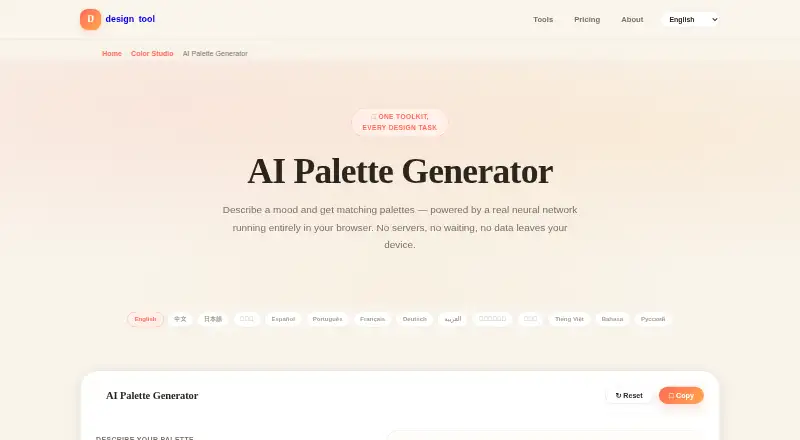
What DesignTool AI Palette Generator is
DesignTool AI Palette Generator matches a written mood or design description with color palettes from a curated library of 206 professionally designed palettes. It uses a MiniLM sentence-embedding model through ONNX Runtime in the browser to compare the meaning of a description with palette data. A keyword matcher can return results while the model loads and takes over if the model fails to load. The toolkit is offered in 14 languages, while the model supports more than 50. The maker says the text is processed in the browser and nothing is sent to a server. The model download is about 23 MB and the browser caches it after the first visit. Once the page has loaded, the tools can work offline, without an account or software installation. The palette data is described as original and free to use in commercial design work. The toolkit includes 19 design tools with unlimited use and exports in CSS, Tailwind, SCSS, and JSON. It also includes an accessibility checker. Built by a solo developer for designers and developers worldwide, the toolkit says its tools follow WCAG accessibility standards, with clear labels and full keyboard support. It is free, with no paid tiers, subscriptions, trial periods, or credit card requirement.
Who it suits
It suits designers and developers who want to find palettes by describing a mood, including people working in languages supported by the model. It may also suit users who need palette data for commercial design work or want browser-based tools that can work offline after loading.
What it does well
- Matches descriptions against 206 curated palettes.
- Keyword matcher can return results while the model loads.
- Text processing stays in the browser, according to the maker.
- Palette data is described as free for commercial use.
- Includes 19 tools, unlimited use, and four export formats.
What to know first
- The model download is about 23 MB.
- The listed platform is web.
Plans
| Plan | Billed and limits | Price |
|---|---|---|
| Always & Forever Free | All 19 design tools · unlimited use · CSS, Tailwind, SCSS and JSON exports | Free |
As designtool.tools lists them, read 7 Oct 2026. The maker's own page has the final word.
Getting started
- Open the DesignTool AI Palette Generator website in a browser.
- Describe the mood or design direction to find matching palettes.
- Use the keyword matcher while the model loads, if needed.
- Export using CSS, Tailwind, SCSS, or JSON.
Verdict
Choose DesignTool AI Palette Generator if you want to match a written mood to curated palettes and use a free toolkit with unlimited use. Look elsewhere if you need a platform other than web or want image color extraction, which the toolkit does not provide.
Questions
Is DesignTool AI Palette Generator free?
Yes. The Always & Forever Free plan is $0 and includes all 19 design tools with unlimited use. The toolkit has no paid tiers, subscriptions, trial periods, or credit card requirement.
What platforms does it support?
The listed platform is web. The maker says the tools can work offline once the page has loaded.
Does it send palette descriptions to a server?
The maker says text is processed in the browser and nothing is sent to a server. The model download is about 23 MB and is cached by the browser after the first visit.
What can I export?
The toolkit lists CSS, Tailwind, SCSS, and JSON exports.
Can I use its palettes in commercial work?
The palette data is described as original and free to use, including in commercial design work.
Who makes the toolkit?
It is built by a solo developer for designers and developers worldwide.
Facts from DesignTool AI Palette Generator's own pages
- Accessibility
- The maker says its tools follow WCAG accessibility standards, including clear labels and full keyboard support. · designtool.tools, 7 Oct 2026
- Audience
- The toolkit is built by a solo developer for designers and developers worldwide. · designtool.tools, 7 Oct 2026
- Fallback
- A keyword matcher provides instant results while the model loads and takes over if the model fails to load. · designtool.tools, 7 Oct 2026
- Founded
- 2024 · designtool.tools, 28 Sept 2026
- How it works
- It uses a MiniLM sentence embedding model via ONNX Runtime in the browser to match the meaning of a description to palettes. · designtool.tools, 7 Oct 2026
- Languages
- The page says the model supports more than 50 languages, and the toolkit is offered in 14 languages. · designtool.tools, 7 Oct 2026
- Offline use
- The maker says tools work offline once the page loads, with no account or software installation required. · designtool.tools, 7 Oct 2026
- Palette usage
- The palette data is described as original and free to use, including in commercial design work. · designtool.tools, 7 Oct 2026
- Pricing
- The toolkit says it has no paid tiers, subscriptions, trial periods, or credit card requirement. · designtool.tools, 7 Oct 2026
- Privacy
- The page says text is processed in the browser and nothing is sent to a server; the model download is about 23 MB and is cached by the browser after the first visit. · designtool.tools, 7 Oct 2026
- Purpose
- AI Palette Generator matches a described mood to palettes from a curated library of 206 professionally designed palettes. · designtool.tools, 7 Oct 2026
- Support
- The maker invites feedback and says user suggestions shape new tools and refinements. · designtool.tools, 7 Oct 2026
Where DesignTool AI Palette Generator stands on Freedom251
- AI Color Palette Generators#15 of 22