Freedom251 › AI Color Palette Generators

Color Utility
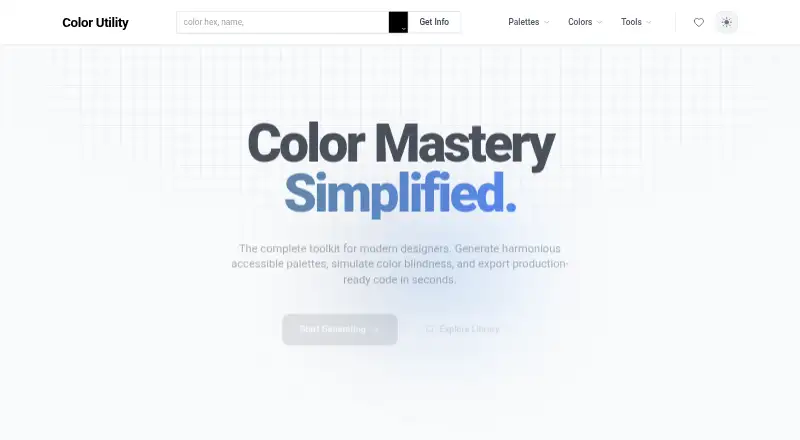
What Color Utility is
Color Utility is a web-based toolkit for building color palettes, checking color names, and exporting code. Its AI palette generator uses Gemini AI to create palettes from a description of the look or feeling a user has in mind. Designers can also enter a hex color to find its name or browse standard CSS colors. The color library includes thousands of named colors and standard definitions.
For palette discovery, the site presents contributor-curated trending collections that it says are updated daily, along with community palettes such as Colors of France, Germany Flag, and Japan Sun. Its accessibility tools can generate accessible palettes and simulate color blindness. The site also advertises exporting palettes as production-ready code. Color Utility describes itself as free forever, and its Free Forever plan is priced at $0. That plan includes accessible palette generation, color-blindness simulation, and code export. No sign-up is required, and the product runs on the web.
Who it suits
Color Utility suits designers who want to create palettes from a visual description, explore named colors, or check accessibility with color-blindness simulation. It also fits users who want code export without signing up.
What it does well
- Gemini AI generates palettes from a described vision.
- Color lookup accepts hex values and includes standard CSS colors.
- Library contains thousands of named colors and standard definitions.
- Trending palettes are said to update daily.
- Includes accessible palette generation and color-blindness simulation.
- Code export is included in the free plan.
What to know first
- Available on the web platform only.
- The listed free plan is the only plan described.
Limits
The Free Forever plan costs nothing and includes accessible palette generation, color-blindness simulation, and code export. The listed plan details do not describe other features or quotas.
Plans
| Plan | Billed and limits | Price |
|---|---|---|
| Free Forever | No sign-up required · accessible palette generation · color-blindness simulation · code export | Free |
As colorutility.com lists them, read 15 Oct 2026. The maker's own page has the final word.
Getting started
- Open https://colorutility.com/ in a web browser.
- Use the palette generator to describe a vision, or browse the color library and palettes.
- Generate accessible palettes or simulate color blindness as needed.
- Export production-ready code; no sign-up is required.
Verdict
Choose Color Utility if you need web-based palette creation, color reference, accessibility tools, and code export without an account. It may not suit someone looking for a non-web platform or a plan beyond Free Forever.
Questions
How much does Color Utility cost?
Its Free Forever plan is listed as free.
Do I need to sign up?
No. The site says no sign-up is required.
What platforms does it support?
Color Utility is available on the web.
What does the free plan include?
It includes accessible palette generation, color-blindness simulation, and code export.
Can it create palettes with AI?
Yes. The AI palette generator uses Gemini AI to create a palette from a described vision.
Can I look up color names?
Yes. You can find a name for a hex color and browse standard CSS colors.
Facts from Color Utility's own pages
- Accessibility
- The site says users can generate accessible palettes and simulate color blindness. · colorutility.com, 4 Oct 2026
- Accessible palettes
- The site says it can generate harmonious accessible palettes. · colorutility.com, 15 Oct 2026
- Access model
- The homepage describes access as free forever and says an account is not required. · colorutility.com, 15 Oct 2026
- AI palette generator
- The AI palette generator creates a palette from a described visual concept using Gemini AI. · colorutility.com, 15 Oct 2026
- API availability
- The homepage advertises code export but does not describe a public API or SDK. · colorutility.com, 15 Oct 2026
- App availability
- The maker page presents the product as a web toolkit and does not list native iOS, Android, Windows, macOS or Linux apps. · colorutility.com, 15 Oct 2026
- App-store rating
- The searched Chrome Web Store result was for a different product named Colorfy, not Color Utility, so no Color Utility extension rating was available. · chromewebstore.google.com, 15 Oct 2026
- Code export
- Color Utility advertises export of production-ready code. · colorutility.com, 15 Oct 2026
- Color-blindness simulation
- The toolkit includes simulation of color-vision deficiencies. · colorutility.com, 15 Oct 2026
- Color library
- The color library contains thousands of named colors and standard definitions. · colorutility.com, 15 Oct 2026
- Color names
- Users can enter a hexadecimal color to find its name and browse standard CSS colors. · colorutility.com, 15 Oct 2026
- Community palettes
- The homepage showcases collections such as Colors of France, Germany Flag, Italy Vibes, Ukraine Spirit, Japan Sun and Brazil Samba. · colorutility.com, 15 Oct 2026
- Design audience
- The product is positioned for designers and developers building accessible, scalable color schemes. · colorutility.com, 15 Oct 2026
- Documentation
- The maker page does not link to developer documentation, API reference or a help center. · colorutility.com, 15 Oct 2026
- Independent directory coverage
- Toolradar’s August 2026 color-tools ranking evaluates 22 products, but Color Utility is not included among the listed tools. · toolradar.com, 15 Oct 2026
- Independent praise
- No verified third-party praise specific to Color Utility was found in the opened non-maker pages. · toolradar.com, 15 Oct 2026
- Independent review availability
- The searched G2 results surfaced other color products rather than a Color Utility profile, so no G2 rating or review count was available. · g2.com, 15 Oct 2026
- Integration
- Gemini AI is the named AI service behind the described palette-generation feature. · colorutility.com, 15 Oct 2026
- Licence
- The homepage does not identify an open-source licence or claim that the product is open source. · colorutility.com, 15 Oct 2026
- Limit: business features
- The homepage does not describe team administration, collaboration controls, billing management or enterprise support. · colorutility.com, 15 Oct 2026
- Limit: export detail
- The homepage says code export is available but does not specify export languages or file formats. · colorutility.com, 15 Oct 2026
- Palette workflow
- The homepage groups palette generation, color lookup, a color library and community discovery in one toolkit. · colorutility.com, 15 Oct 2026
- Platform scope
- The maker presents Color Utility as a web experience accessed through colorutility.com. · colorutility.com, 15 Oct 2026
- Price and access
- The homepage describes the product as free forever and says no sign-up is required. · colorutility.com, 4 Oct 2026
Where Color Utility stands on Freedom251
- AI Color Palette Generators#14 of 22