Freedom251 › Music School Software

CogNote
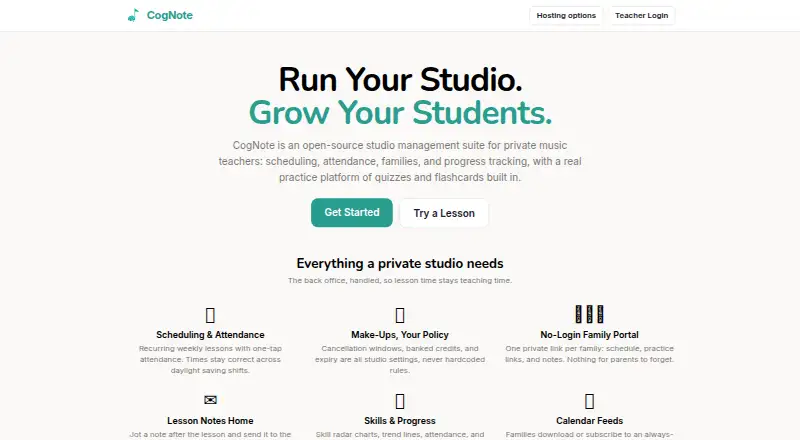
What CogNote is
CogNote is an open-source studio management suite for private music teachers, bringing scheduling, attendance, family communication, progress tracking, quizzes, and flashcards together. Teachers can set recurring weekly lessons and record attendance with one tap. Cancellation windows, banked credits, and credit expiry are configurable studio settings. Families can use a private link to view schedules, practice links, and notes without logging in; teachers can also email lesson notes. Progress views include skill radar charts, trend lines, attendance, and per-note quiz analytics. Students can open practice links without accounts and use note and symbol quizzes with instant feedback or SM-2 spaced-repetition flashcards. Practice tools render musical notation with clefs, key signatures, and more than 40 symbols. CogNote is MIT-licensed, supports self-hosting, and lets users export data at any time. Hosted Free has soft caps of five active students, five practice lessons, and five sheet music items; invoice sending remains free. Hosted Pro costs $5 a month and includes a 30-day full trial for new accounts. Self-hosting is free but requires running the stack, including Docker or Supabase, email, and backups.
Who it suits
CogNote suits private music teachers who need lesson administration and student practice tools. It also fits studios that want family access through private links or prefer to self-host and manage the required stack.
What it does well
- Recurring weekly lessons and one-tap attendance
- Families can view notes without logging in
- Students can practice without an account
- MIT-licensed with data export anytime
- Hosted Pro costs $5 a month
What to know first
- Hosted Free caps active students at five
- Hosted Free caps practice lessons at five
- Self-hosting requires managing the stack, email, and backups
Limits
Hosted Free has soft caps of five active students, five practice lessons, and five sheet music items; sending invoices remains free. Self-hosted use has unlimited students, lessons, and sheet music, but requires the user to run the stack.
Plans
| Plan | Billed and limits | Price |
|---|---|---|
| Hosted Free | Up to 5 active students · 5 practice lessons · 5 sheet music items · Invoice sending remains free · 30-day full trial first | Free |
| Self-hosted | Unlimited students, lessons, sheet music · User runs Docker/Supabase, email and backups · Optional own Stripe · Export anytime | Free |
| Hosted Pro | $5/mo · Unlimited students, lessons and sheet music · Same family portal and practice tools · Export or switch to self-host anytime · 30-day full trial for new accounts | $5 a month |
As cognote.studio lists them, read 15 Oct 2026. The maker's own page has the final word.
Getting started
- Visit cognote.studio.
- Choose self-hosting, Hosted Free, or Hosted Pro.
- For self-hosting, prepare to run the stack, including Docker or Supabase, email, and backups.
- For Hosted Pro, use the 30-day full trial included for new accounts.
- Set up lessons, family links, notes, and student practice tools.
Overview
CogNote brings studio administration and music-learning practice into one open-source product for private music teachers. It is a strong fit for teachers who want families to follow lesson information and students to practice without account setup. The draw is the connection between studio policies, progress tracking, and notation-based practice; the key trade-off is between hosted student caps and the work of running the software yourself.
Key features
Recurring weekly lessons, one-tap attendance, and scheduling that stays aligned across daylight-saving changes cover recurring studio routines without adding calendar corrections. Teachers can set cancellation windows, banked make-up credits, and credit expiry themselves, which is useful for studios with specific policies rather than a single fixed make-up rule.
Families use a private link to view schedules, practice links, and lesson notes without logging in. Teachers can also email notes, giving families two ways to receive lesson follow-up. Link-based access lowers friction, though teachers who prefer a family portal built around individual accounts may want a different approach.
Progress tracking combines skill radar charts, trend lines, attendance, and per-note quiz analytics. Students can practice with note and symbol quizzes that provide instant feedback, or use SM-2 spaced-repetition flashcards. Notes render on a staff with clefs, key signatures, and more than 40 musical symbols, making the practice tools specific to music rather than generic study cards. Students can start from a practice link without an account, and the site says the tools work well on tablets.
CogNote also supports student records, online payments, and calendar sync. The project is MIT-licensed, and users can export their data at any time. Those are useful safeguards for studios building around the product, but self-hosting shifts deployment and maintenance to the user.
Pricing
Self-hosted costs nothing and includes unlimited students, lessons, and sheet music. It is the uncapped option for teachers prepared to run the stack themselves, including Docker or Supabase, email, and backups. The software price is free, but operating it is not hands-off.
Hosted Free also costs nothing. It allows up to 5 active students, 5 practice lessons, and 5 sheet music items; sending invoices remains free. Those soft caps make it a practical way for a small studio to begin, but a growing roster or larger practice library may outgrow it.
Hosted Pro costs $5 a month and removes the stated limits on students, lessons, and sheet music. New accounts receive a 30-day full trial. It suits teachers who want hosted access without the Free plan's caps, while hosted users who stay free trade scale for avoiding the monthly charge. The stated terms give the monthly price and trial length, with no renewal terms to weigh.
Platforms
CogNote is available on the web or as a self-hosted deployment. Students can open practice links without accounts, and the site says the practice tools work well on tablets. Self-hosting is a meaningful option for users who want to run the software themselves, but it requires maintaining the supporting services.
Who it's for
CogNote is best for private music teachers who want scheduling, attendance, family communication, progress views, and music-specific practice in the same suite. Hosted Free suits a very small studio testing the workflow; Hosted Pro fits a teacher who wants hosted service with unlimited students, lessons, and sheet music. Self-hosting suits those willing to manage the stack in exchange for uncapped use. Teachers who do not need practice tools, or who do not want hosted caps or deployment responsibilities, have reason to look elsewhere.
Pros and cons
- Pros: Customizable cancellation and make-up-credit settings let studios choose their own policies.
- Pros: Private family and practice links work without account setup, reducing access hurdles for families and students.
- Pros: Music-specific quizzes, notation, spaced-repetition flashcards, and detailed progress views connect practice with studio administration.
- Pros: MIT licensing, data export, and an uncapped self-hosted plan give users control over deployment and data.
- Cons: Hosted Free has soft caps of 5 active students, 5 practice lessons, and 5 sheet music items, which can constrain a growing studio.
- Cons: Self-hosting requires running and maintaining the stack, including email and backups.
- Cons: Families use private links rather than a described account-based portal.
Alternatives
For a broader comparison of scheduling tools, browse Music Lesson Scheduling Software.
- Adagio is worth considering if you want a freemium option available on Android, iOS, and the web.
- Clefwise may suit teachers who want a free plan capped at 3 students, with scheduling, invoicing and online payments, a parent portal, and lesson notes.
- Nova Music is an option for iOS or web users seeking a free plan for up to 10 students, with scheduling, group lessons, basic attendance, messaging, a student portal, and 100 MB of storage.
- OPS is an alternative for musicians or organisations seeking free score-library and setlist tools.
- DuetStudio may fit teachers who want a free web plan with unlimited active and inactive students, scheduling, lesson notes and assignments, practice tracking, and manual invoicing.
- GroovConnect is another free web-based option.
- Harness may fit a small studio looking for a free web plan capped at 5 students, with scheduling, attendance, a family portal, and financial tracking.
- Shinnpad is a free web option for studios with up to 10 students that want scheduling, manual payment tracking, and a read-only parent portal.
Verdict
Choose CogNote if you teach music privately and want studio administration connected to student practice, especially if link-based access and customizable make-up policies suit your studio. Its main advantage is the breadth of music-specific learning and progress tools alongside lesson management. Look elsewhere if the hosted caps are too restrictive and you do not want to maintain a self-hosted stack.
Verdict
CogNote combines studio administration with practice and progress tools, and offers hosted and self-hosted options. Hosted Free has soft caps, while self-hosting requires maintaining the supporting services.
Questions
Is CogNote free?
Yes. Self-hosting and Hosted Free are each listed as free. Hosted Free has soft caps of five active students, five practice lessons, and five sheet music items.
How much does Hosted Pro cost?
Hosted Pro costs $5 a month. New accounts receive a 30-day full trial.
Can I self-host CogNote?
Yes. CogNote is MIT-licensed and offers a free self-hosted plan with unlimited students, lessons, and sheet music. You run the stack, including Docker or Supabase, email, and backups.
Which platforms does CogNote support?
CogNote is available on the web and as a self-hosted service. The site says student practice works well on tablets.
Can students use CogNote without accounts?
Yes. Students can open a practice link and begin without an account; families can also use private links to view schedules, practice links, and notes.
Can I export my data?
Yes. CogNote lets users export their data at any time.
Facts from CogNote's own pages
- API documentation
- The repository README points developers to ARCHITECTURE.md for folder layout, schema and API routes, and to CONTRIBUTING.md for development guidance. · github.com, 15 Oct 2026
- Billing
- CogNote can generate invoices from attendance and billing policies, email PDF invoices, record payment and export payment CSV files. · github.com, 15 Oct 2026
- Calendar feeds
- Families can download or subscribe to an always-current lesson calendar, with cancellations removed automatically. · cognote.studio, 15 Oct 2026
- Data export
- Teachers can export full studio data as JSON at any time, including after moving between hosted and self-hosted deployments. · cognote.studio, 15 Oct 2026
- Data practices
- The hosted service says it does not sell personal information, use advertising tracking or train AI models on student records. · cognote.studio, 15 Oct 2026
- Developer prerequisites
- Local deployment requires Node.js 18 or newer and Docker Desktop for the Supabase CLI. · github.com, 15 Oct 2026
- Events
- Teachers can create recital or studio events, collect family RSVPs and optionally send invitations and reminders. · github.com, 15 Oct 2026
- Family portal
- Each family receives a private link for schedules, practice links and notes without a login. · cognote.studio, 15 Oct 2026
- Hosting limits
- The hosted Free plan has soft caps of 5 active students, 5 practice lessons, and 5 sheet music items; invoice sending remains free. · cognote.studio, 30 Sept 2026
- Integrations
- The documented stack uses Supabase, Vercel, Resend or SMTP, Stripe, VexFlow and OpenSheetMusicDisplay. · github.com, 15 Oct 2026
- Lesson notes
- Teachers can save lesson notes and send them to families by email and through the portal. · cognote.studio, 15 Oct 2026
- License and data
- CogNote is MIT-licensed, can be self-hosted, and lets users export their data anytime. · cognote.studio, 30 Sept 2026
- Limit: lesson rescheduling
- An open October 6, 2026 issue says lessons cannot currently be moved directly; the workaround records a cancellation and a make-up, creating billing and schedule noise. · github.com, 15 Oct 2026
- Limit: prepaid lessons
- An open October 4, 2026 issue says invoices are generated after lessons and CogNote lacks prepaid lesson-credit packages. · github.com, 15 Oct 2026
- Limit: teacher calendar
- An open October 5, 2026 issue says parents have subscribable calendar feeds but teachers do not have an equivalent feed. · github.com, 15 Oct 2026
- Maker
- The hosted service is operated by Morales Piano Studio LLC under the CogNote Studio name. · cognote.studio, 15 Oct 2026
- Make-up policies
- Cancellation windows, banked credits and credit expiry are configurable studio settings. · cognote.studio, 15 Oct 2026
- Music notation
- The practice system renders staff notation with clefs, key signatures and more than 40 musical symbols. · cognote.studio, 15 Oct 2026
- Notation
- The practice tools render musical notes on a staff with clefs, key signatures, and more than 40 musical symbols. · cognote.studio, 30 Sept 2026
- Payment integration
- Manual payment instructions are supported by default, while teachers can optionally connect their own Stripe Checkout links and webhook. · github.com, 15 Oct 2026
- Practice
- Students can use note and symbol quizzes with instant feedback and SM-2 spaced-repetition flashcards. · cognote.studio, 30 Sept 2026
- Product
- CogNote is an open-source studio management suite for private music teachers, with scheduling, attendance, families, progress tracking, quizzes, and flashcards. · cognote.studio, 30 Sept 2026
- Progress tracking
- Student views include skill radar charts, trend lines, attendance summaries and per-note quiz analytics. · cognote.studio, 15 Oct 2026
- Quizzes
- Students can take note and symbol-identification quizzes with immediate feedback and optional per-question timing. · cognote.studio, 15 Oct 2026
Where CogNote stands on Freedom251
- Music School Software#1 of 26
- Music Lesson Scheduling Software#1 of 24