Freedom251 › Music School Software
Adagio
What Adagio is
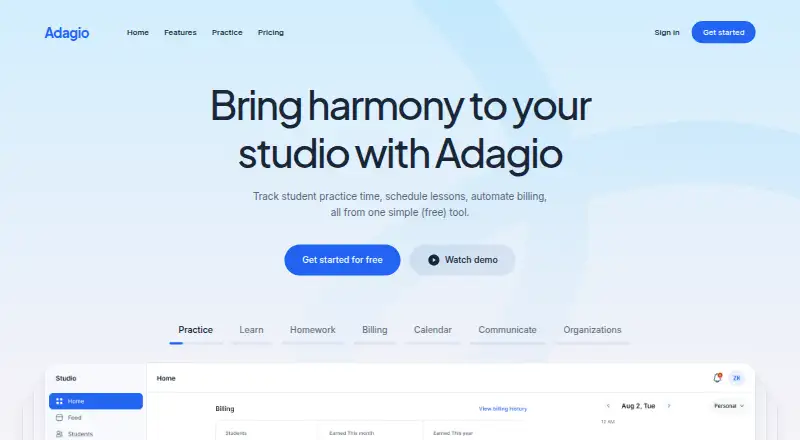
Adagio is a web and mobile app for music teachers managing classrooms or studios and helping students stay engaged between lessons. Teachers can schedule lessons, assign homework, keep lesson or class notes, track practice time, and handle billing and invoices. Students can use the Practice app to log sessions, notes, and to-do lists; comments, a social feed, and levels and points for practice sessions are also listed. Students can download the app through Apple or Google app stores by searching for Musopen. Sharing practice data is opt-in, and may include sessions, assigned homework, goals, and notes. Invoices can be created manually or after a completed lesson, with options such as PayPal and overdue-invoice email reminders. The Organization Plan supports multiple teachers and classrooms, administrative oversight, and shared class access. The free plan is $0 USD/mo and includes unlimited students, a calendar, lesson scheduler, homework, goals, class feed, billing, and a free website. Premium costs $5 USD/mo and adds automated billing and invoices, custom domain support, newsletters, practice audio, and free Musopen Pro membership. Adagio is available on web, iOS, and Android.
Who it suits
It suits music teachers who manage students, lessons, practice, and billing, as well as schools or large studios needing multiple teachers and shared class access. Students must be at least 13 years old, and practice-data sharing requires opt-in.
What it does well
- Free plan includes unlimited students and a lesson scheduler.
- Teachers can track student practice time.
- Students can log sessions, notes, and to-do lists.
- Invoices can follow completed lessons.
- Organization Plan supports multiple teachers and classrooms.
What to know first
- Users must be at least 13 years old.
- Students must opt in to share practice data.
- Internet transmission cannot be guaranteed completely secure.
Limits
The Free Plan does not include Premium features such as automated billing and invoices, custom domain support, newsletters, or practice audio. Premium costs $5 USD per month.
Plans
| Plan | Billed and limits | Price |
|---|---|---|
| Free Plan | $0 USD/mo · Track practice time · Unlimited students · Calendar · Lesson scheduler · Assign homework · Set goals · Class feed · Billing · Free website | Free |
| Organization | $10 USD/mo · All Pro features · Unlimited classes · Administrative control · Multiple teachers per classroom · Shared class access · Move students and teachers between classes | $10 a month |
| Premium plan | $5 USD/mo · All Free Plan features · Automated billing and invoices · Custom domain support · Newsletters · Practice audio · Free Musopen Pro membership | $5 a month |
| Pro | $5 USD/mo · All Free features · Automated billing and invoices · Custom domain · Newsletters · Practice-session audio · Free Musopen Pro membership | $5 a month |
As adagio.org lists them, read 14 Oct 2026. The maker's own page has the final word.
Getting started
- Visit https://adagio.org/.
- Choose the Free Plan at $0 USD/mo or Premium at $5 USD/mo.
- Use the web app or access Adagio on Android or iOS.
- Students can search for Musopen in the Apple or Google app stores to download the Practice app.
- Students opt in to sharing practice data with teachers.
Overview
Adagio is a studio-management platform for music teachers who want to coordinate lessons and keep students practicing between them. It is best suited to independent teachers who need a broad set of classroom tools without a per-student cap; schools and larger studios have an organization option.
The free tier is unusually capable for day-to-day teaching, while Premium adds automation and extras for $5 USD/mo. Its main trade-offs are that student practice sharing is opt-in and users must be at least 13.
Key features
Lesson scheduling, homework, goals, lesson notes, attendance, and a class feed cover much of the routine work of running lessons. Students can log practice sessions, notes, and personal to-do lists in the Practice app, while teachers can track practice time. Comments, a social feed, and levels and points tied to practice sessions provide ways to sustain engagement between classes, though teachers see shared practice data only if students opt in.
Billing supports manual invoices or invoice generation after a completed lesson, with digital payment options such as PayPal and email reminders for overdue invoices. The distinction between billing in the free plan and automated billing on Premium matters: teachers can handle billing without upgrading, but automation requires the paid tier. Adagio also describes API connections for bringing existing tools and data into its platform.
Organization accounts support multiple teachers and classrooms, administrative oversight, and shared class access, making the product more relevant to schools and larger studios than a single-teacher setup alone. Students can find the Practice app in the Apple or Google app store by searching for Musopen.
Students must be at least 13. The privacy policy says Adagio does not share personally identifiable information with other organizations for marketing or promotional use, and describes commercially reasonable security measures while noting that internet transmission cannot be guaranteed completely secure.
Pricing
| Plan | Price | What it includes |
|---|---|---|
| Free Plan | free (billed $0 USD/mo) | Unlimited students, calendar, lesson scheduler, homework, goals, class feed, billing, and a free website |
| Premium plan | $5 a month (billed $5 USD/mo) | All Free Plan features, automated billing and invoices, custom domain support, newsletters, practice audio, and free Musopen Pro membership |
| Organization Plan | Custom pricing | Multiple teachers and classrooms, administrative oversight, and shared class access |
The free plan’s unlimited-student allowance makes it a practical fit for teachers who can manage billing manually and do not need Premium extras. At $5 USD/mo, Premium is a modest step up for teachers who want automated invoices, custom-domain support, newsletters, or practice audio. Schools and larger studios needing shared administration should consider the Organization Plan, which uses custom pricing.
Platforms
Adagio supports Android, iOS, and web. Its student Practice app is distributed through the Apple and Google app stores under the search name Musopen.
Who it's for
Adagio is a strong fit for independent music teachers who want scheduling, student records, practice tracking, and billing without a student cap on the free tier. Premium makes more sense when invoice automation or its additional communication and practice tools are worth $5 USD/mo. Schools and large studios can look to the Organization Plan for multi-teacher access and oversight. It is not suited to users under 13, and teachers who need practice data without each student’s opt-in should look elsewhere.
Pros and cons
- Pros: The free tier allows unlimited students and includes scheduling, homework, goals, billing, and a website, reducing the need to pay simply as a studio grows.
- Pros: Students have their own practice logging tools, and the opt-in sharing model gives them control over whether practice records reach a teacher.
- Pros: Premium’s $5 USD/mo price adds automated billing and invoices alongside custom-domain support, newsletters, and practice audio.
- Cons: Automated billing is reserved for Premium, so teachers wanting that workflow cannot rely on the free plan alone.
- Cons: Student practice data is shared only with opt-in, limiting visibility for teachers who expect automatic reporting.
- Cons: The minimum age of 13 rules out younger students as users under the Terms of Use.
Alternatives
For a broader comparison of lesson tools, see Music Lesson Scheduling Software.
- Clefwise is worth considering if an iOS and web tool with a three-student free tier and parent portal fits better than Adagio’s unlimited-student approach.
- Nova Music may suit teachers who want a free plan capped at 10 students that includes group lessons, direct messaging, and 100 MB file storage.
- CogNote is an alternative for readers who prefer self-hosted software, and its maker describes it as built by a working piano studio for daily use.
- DuetStudio is another web-based option with a free plan for unlimited active and inactive students.
- Harness is a web alternative with a free Hobby tier capped at five students.
- AMES is a cross-platform alternative whose Standard plan charges a transaction fee on successful payments.
- OPS is another freemium option for web and iOS.
- Trio is another freemium option for web.
Verdict
Choose Adagio if you are a music teacher who wants an uncapped free roster, lesson-management tools, and a path to automated billing for $5 USD/mo. Its biggest appeal is how much studio work the free tier covers; look elsewhere if students are under 13 or if you need practice data shared without student opt-in.
Verdict
Adagio brings lesson management, student practice, and billing into one platform, with a free tier and a $5 USD/mo Premium plan. Its opt-in data sharing and stated age requirement are relevant for teachers and organizations evaluating student use.
Questions
How much does Adagio cost?
The Free Plan costs $0 USD/mo. Premium costs $5 USD/mo.
What does the free plan include?
It includes unlimited students, a calendar, lesson scheduler, homework, goals, class feed, billing, and a free website.
Which platforms does Adagio support?
Adagio is available on Android, iOS, and the web.
Can students share practice data with teachers?
Yes. Students must opt in, and shared information can include practice sessions, assigned homework, goals, and notes.
Who makes Adagio?
Adagio says it was created by the team behind Musopen.org and is developed by a California-based registered 501(c)(3) nonprofit.
Does Adagio support organizations with several teachers?
Yes. Its Organization Plan supports multiple teachers and classrooms, administrative oversight, and shared class access.
Facts from Adagio's own pages
- Age requirement
- The Terms of Use say users must be at least 13 years old. · adagio.org, 4 Oct 2026
- API
- The homepage says users can bring current tools and connect data via API. · adagio.org, 4 Oct 2026
- API integration
- Adagio says it can connect a user's existing tools and data through an API. · adagio.org, 14 Oct 2026
- Apple compatibility
- The Practice app requires iOS 16.4 or later and is listed for iPhone and Apple Vision. · apps.apple.com, 14 Oct 2026
- Apple privacy disclosure
- Apple's listing says the app may track diagnostics and link contact information, audio data and diagnostics to users. · apps.apple.com, 14 Oct 2026
- App stores
- The maker says students can download the Practice app through the Apple or Google app stores by searching for Musopen. · adagio.org, 4 Oct 2026
- Billing
- Invoices may be created manually or generated after completed lessons, with overdue email reminders and paid-versus-outstanding summaries. · adagio.org, 14 Oct 2026
- Calendar
- The calendar manages lessons and performances, supports day, week and month views, and sends reminders. · adagio.org, 14 Oct 2026
- Communication
- The feature set includes in-app messaging, notes and email communication among teachers, students and parents. · adagio.org, 14 Oct 2026
- Company history
- Wikipedia identifies Musopen founder Aaron Dunn, a May 2006 launch and Palo Alto, California operations. · en.wikipedia.org, 14 Oct 2026
- Data handling
- The privacy policy says collected information includes IP address, user ID, pages visited, cookies, names, email addresses and contact submissions. · adagio.org, 14 Oct 2026
- Data sharing
- Adagio says it does not share personally identifiable information for other organizations' marketing, while allowing service-provider sharing when necessary. · adagio.org, 14 Oct 2026
- Documentation
- The official help center contains getting-started, mobile-app, student, calendar, assignments, groups, feed, organization, notes, billing and newsletter guides. · adagio.org, 14 Oct 2026
- Google Play distribution
- Google Play lists at least 10,000 downloads and an October 1, 2026 update date. · play.google.com, 14 Oct 2026
- Headquarters
- Tarzana, California, United States · adagio.org, 28 Sept 2026
- Homework
- Teachers can create assignments for one or multiple students, monitor completion status, group students and send automated reminders. · adagio.org, 14 Oct 2026
- Licence and ownership
- The terms describe Adagio code, interfaces and content as proprietary materials and prohibit reverse engineering, decompiling or disassembly. · adagio.org, 14 Oct 2026
- Limit: goals bug
- An Apple reviewer reported that entering a 120-minute goal incorrectly marked it complete after two minutes. · apps.apple.com, 14 Oct 2026
- Limit: offline use
- A Google Play reviewer reported that statistics and recording a practice session were unavailable offline. · play.google.com, 14 Oct 2026
- Limit: timer behavior
- Google Play reviewers reported timer problems around sessions longer than one hour; the developer replied that the issue was fixed. · play.google.com, 14 Oct 2026
- Maker
- Adagio says it was created by the team behind Musopen.org and is developed by a California-based registered 501(c)(3) nonprofit. · adagio.org, 4 Oct 2026
- Maker address
- The privacy policy gives Adagio's contact address as 5227 Shirley Ave., Tarzana, California 91356. · adagio.org, 14 Oct 2026
- Maker identity
- Adagio says it was built by the educators, musicians and staff behind Musopen.org and is operated by a California 501(c)(3) nonprofit. · adagio.org, 14 Oct 2026
- Nonprofit finances
- Musopen's 2025 filing summary shows $98,660 revenue, $65,303 expenses and $88,435 net assets. · projects.propublica.org, 14 Oct 2026
Where Adagio stands on Freedom251
- Music School Software#2 of 26
- Music Lesson Scheduling Software#2 of 24