Freedom251 › Process Orchestration Software

Cloudflare Workflows
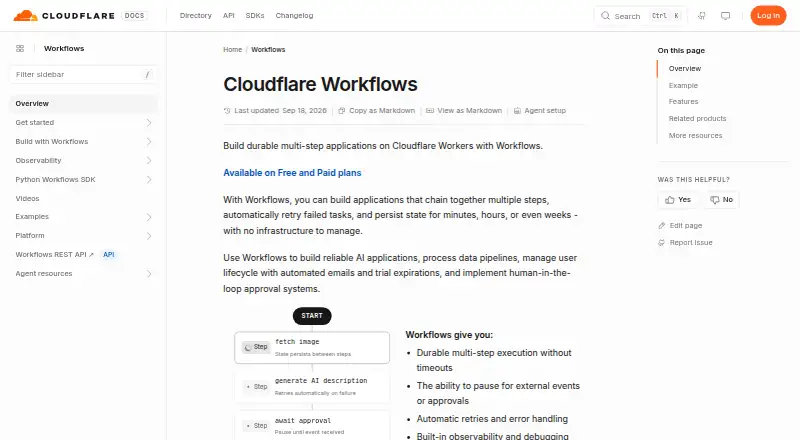
What Cloudflare Workflows is
Cloudflare Workflows lets developers build durable, multi-step applications on Cloudflare Workers without managing infrastructure. It can retry failed tasks, handle errors and preserve state for minutes, hours or weeks. A workflow can pause for seconds, hours or days, or wait for a webhook, user input or an external system response before continuing. Instances can be triggered, paused, resumed or terminated through code or an API. Workflows can call Fetch API requests and Cloudflare services including R2, KV and D1, and can be invoked through the Workers API, Wrangler CLI or REST API. Billing covers CPU time, requests, persisted storage and executed steps; waiting or sleeping does not incur CPU time. The Workers Free plan includes Workflows subject to usage limits. Paid pricing starts at 5 /mo, and paid plans allow up to five minutes of CPU time per invocation. A step has unlimited wall-clock duration, but its CPU time is subject to the configured limit. Workflows cannot be deployed to Workers for Platforms namespaces. The documentation directs users to the Workers community on Discord for questions and discussion.
Who it suits
Workflows may suit developers building long-running, multi-step applications on Cloudflare Workers that need retries, persistent state or pauses while awaiting outside input. It is not suited to deployments in Workers for Platforms namespaces.
What it does well
- Retries failed tasks and preserves state.
- Can wait for webhooks or external responses.
- Waiting and sleeping do not incur CPU time.
- Can call Cloudflare services including R2, KV and D1.
What to know first
- Free plan usage limits apply.
- Paid pricing starts at 5 /mo.
- CPU time remains subject to configured limits.
- Cannot deploy to Workers for Platforms namespaces.
Limits
Workers Free includes 100,000 requests per day shared with Workers, 10 ms CPU per invocation, 1 GB-month storage, 3,000 steps per day, 100 MB persisted state per instance, and 1,024 steps per Workflow. Workers Paid includes 10 million requests and 30 million CPU milliseconds per month before additional usage charges; paid plans allow up to five minutes of CPU time per invocation.
Plans
| Plan | Billed and limits | Price |
|---|---|---|
| Workers Free | Included with the Workers Free plan; usage limits apply. · 100,000 requests per day shared with Workers · 10 ms CPU per invocation · 1 GB-month storage · 3,000 steps per day · 100 MB persisted state per instance · 1,024 steps per Workflow | Free |
| Workers Paid | Included with the Workers Paid plan; usage-based charges apply for requests, CPU time, storage, and steps. · 10 million requests per month included, then $0.30 per additional million · 30 million CPU milliseconds per month included, then $0.02 per additional million · 1 GB-month storage included, then $0.20/ GB-month · 500,000 steps per month included, then $0.80/ additional 100,000 per month · 1 GB persisted state per instance · 10,000 steps per Workflow by default | On request |
As developers.cloudflare.com lists them, read 29 Sept 2026. The maker's own page has the final word.
Getting started
- Open the Workflows documentation website.
- Choose Workers Free or Workers Paid.
- Build a workflow for Cloudflare Workers.
- Invoke it through the Workers API, Wrangler CLI, or REST API.
- Use the Workers community on Discord for questions and discussion.
Cloudflare Workflows is a cloud service for developers building durable, multi-step applications on Cloudflare Workers. It is especially suitable for teams already using Workers that need retries, persistent state, long pauses, or approval steps. Its durable execution and CPU-free waiting are compelling, but usage charges and a Workers for Platforms restriction limit where it belongs.
Overview
Workflows coordinates application steps without requiring you to operate orchestration infrastructure. Failed tasks can retry automatically, and state can persist for minutes, hours, or weeks. That makes it a good fit for processes that must survive a failed request, delayed dependency, or temporary outage rather than finish in one uninterrupted invocation.
Waiting does not consume CPU time, which can make long pauses economical. Billing still applies to requests, CPU time, persisted storage, and executed steps, so busy or finely divided workflows require cost monitoring. Workflows also cannot be deployed to Workers for Platforms namespaces, ruling it out for that deployment model.
Key features
- Durable steps: Automatic retries and error handling reduce the recovery code your application must own. Persisted state supports genuinely long-running processes.
- Scheduled waiting: step.sleep() and step.sleepUntil() pause execution for seconds, hours, or days without using CPU time while asleep.
- External events and approvals: A workflow can wait for webhooks, user input, or an external system response, making it suitable for human tasks and approval gates as well as automated jobs.
- Programmatic control: Instances can be triggered, paused, resumed, or terminated through code or an API. Invocation is available through the Workers API, Wrangler CLI, or REST API.
- Cloudflare integrations: Workflows can make Fetch API requests and call Cloudflare services such as R2, KV, and D1, keeping orchestration close to Workers-based applications.
- Scale and lifecycle: Up to 50,000 concurrent runs, workflow versioning, and unlimited wall-clock duration per step support substantial and evolving workloads. CPU time per invocation remains bounded by the configured limit.
Pricing
Cloudflare uses a freemium model, with paid service advertised from $5/mo. The free Workers Free plan costs $0.00 and shares 100,000 requests per day with Workers. It includes 10 ms CPU per invocation, 1 GB-month of storage, 3,000 steps per day, 100 MB of persisted state per instance, and 1,024 steps per Workflow. Those caps suit prototypes and modest automations, but daily requests and steps can become constraints quickly.
Workers Paid has custom pricing, with usage-based charges for requests, CPU time, storage, and steps. It includes 10 million requests per month, then charges $0.30 per additional million, and 30 million CPU milliseconds per month, then $0.02 per additional million. The plan is the more credible choice for production workloads, provided you can forecast step volume and persisted data. Sleeping remains CPU-free, but it does not eliminate request, storage, or step charges.
Platforms
Workflows is delivered as a cloud service through API and web tooling. It is designed for Cloudflare Workers deployments and can be managed with the Workers API, Wrangler CLI, or REST API. It does not support Workers for Platforms namespaces, a decisive limitation for multi-tenant platform deployments.
Who it's for
Choose Workflows if your application already runs on Workers and needs durable retries, delayed execution, external callbacks, or human approvals. It is well matched to provisioning, asynchronous processing, scheduled follow-ups, and other long-running workflows that benefit from Cloudflare services such as R2, KV, or D1. It is a weaker fit for teams seeking a self-hosted orchestrator, broad non-Cloudflare deployment, or predictable flat pricing.
Pros and cons
- Pro: Automatic retries, error handling, and persisted state cover failure and delay without a separate orchestration system.
- Pro: Sleeping and waiting consume no CPU time, improving the economics of long pauses.
- Pro: Webhooks, user input, and API lifecycle controls support workflows that include people and external systems.
- Con: Usage-based billing spans requests, CPU, storage, and steps, making costs less predictable than a simple subscription.
- Con: The free tier has shared daily request, CPU, storage, step, and state caps that can restrict growing workloads.
- Con: Workers for Platforms namespaces are unsupported, excluding that deployment route.
Alternatives
For a broader process-orchestration catalog, see Process Orchestration Software.
- Joget is a freemium, multi-platform option with a free tier for three users and an unlimited-workflow Starter plan.
- Bonita offers a free plan with 150 process instances per month and no time limit, across web, desktop, API, and self-hosted deployments.
- Camunda provides free self-managed development and testing with production usage listed separately.
- Dapr is free for development and non-critical workloads, with durable workflows and native integrations.
- Bizagi Modeler suits process modeling, with a free one-user plan and local storage.
- Cadence is open source with no license key, usage limits, or per-execution fee.
- Hatchet offers pay-as-you-go usage with 1 million runs and 1 million events per month free.
- Inngest has a free plan with five seats, 50,000 executions, and 500,000 ingested events.
Verdict
Cloudflare Workflows is a strong choice for Workers developers whose applications need durable, retryable steps and long waits, especially when Cloudflare data services are part of the design. Its main reason to choose it is durable execution without CPU cost during waiting. Look elsewhere if you need Workers for Platforms deployment, self-hosting, or a simpler fixed-price model.
Verdict
Cloudflare Workflows combines durable steps, retries and waiting periods for applications built on Workers. Check the plan limits and deployment restriction against your intended use.
Questions
Is Cloudflare Workflows free?
It is included with the Workers Free plan, subject to usage limits. The pricing note lists paid plans from $5/mo.
How can a Workflow be invoked?
It can be invoked through the Workers API, Wrangler CLI, or REST API.
Can a Workflow wait for an external event?
Yes. It can wait for webhooks, user input, or responses from external systems before continuing.
What does Workers Free include for Workflows?
The listed limits include 3,000 steps per day, 10 ms CPU per invocation, 1 GB-month storage, and 100 MB persisted state per instance.
Can Workflows deploy to Workers for Platforms namespaces?
No. Workflows does not support deployment to Workers for Platforms namespaces.
Who makes Cloudflare Workflows?
Cloudflare is the maker. The company is listed as founded in 2009 and headquartered in San Francisco, California, USA.
Facts from Cloudflare Workflows's own pages
- API access
- Workflows can be invoked through the Workers API, Wrangler CLI, or REST API. · developers.cloudflare.com, 29 Sept 2026
- Deployment restriction
- Workflows cannot be deployed to Workers for Platforms namespaces because Workflows do not support Workers for Platforms. · developers.cloudflare.com, 29 Sept 2026
- Durable execution
- Workflows supports durable steps with automatic retries and error handling. · developers.cloudflare.com, 29 Sept 2026
- External events
- A Workflow can wait for webhooks, user input, or external system responses before continuing. · developers.cloudflare.com, 29 Sept 2026
- Founded
- 2009 · developers.cloudflare.com, 28 Sept 2026
- Headquarters
- San Francisco, California, USA · developers.cloudflare.com, 28 Sept 2026
- Instance management
- Workflow instances can be triggered, paused, resumed, and terminated programmatically or through an API. · developers.cloudflare.com, 29 Sept 2026
- Integrations
- The documentation identifies Fetch API requests and Cloudflare services including R2, KV, and D1 as services a Workflow can call. · developers.cloudflare.com, 29 Sept 2026
- Limits
- A Workflow step has unlimited wall-clock duration, but its CPU time is subject to the configured limit; paid plans allow up to five minutes of CPU time per invocation. · developers.cloudflare.com, 29 Sept 2026
- Purpose
- Cloudflare Workflows lets developers build durable multi-step applications on Cloudflare Workers without managing infrastructure. · developers.cloudflare.com, 29 Sept 2026
- Retries and state
- Workflows can automatically retry failed tasks and persist state for minutes, hours, or weeks. · developers.cloudflare.com, 29 Sept 2026
- Scheduling
- Workflows can pause for seconds, hours, or days using step.sleep() and step.sleepUntil(). · developers.cloudflare.com, 29 Sept 2026
- Support
- The Workflows documentation directs users to the Workers community on Discord to ask questions and discuss the platform. · developers.cloudflare.com, 29 Sept 2026
- Usage billing
- Workflows are billed for CPU time, requests, persisted storage, and executed steps, while waiting or sleeping does not incur CPU time. · developers.cloudflare.com, 29 Sept 2026
Where Cloudflare Workflows stands on Freedom251
- Process Orchestration Software#13 of 31