Freedom251 › Time Clock Software

Clockspot
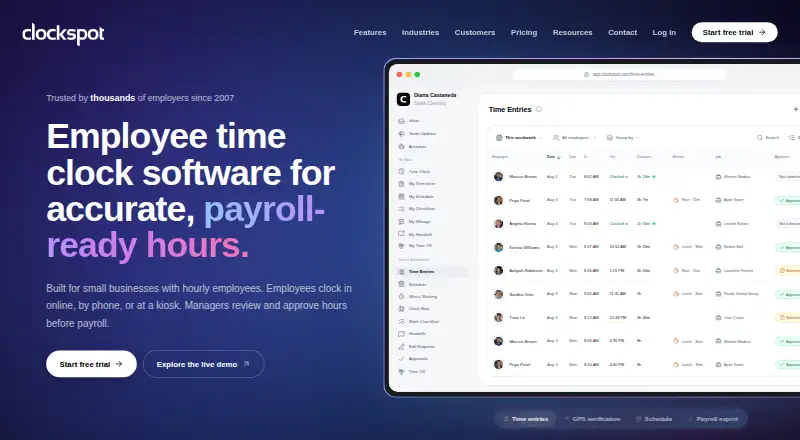
What Clockspot is
Clockspot is paid employee time-clock software for small businesses. It tracks hourly employees’ time, supports manager review and timesheet approval, and prepares attendance reports and payroll exports. Employees can clock in through a web browser, shared kiosk, or phone, with no app installation required. Mobile clock-in, break tracking, and geofencing are available. GPS coordinates may be recorded at clock-in or clock-out when location access is granted, alongside work-site GPS areas, approved IP networks, and approved browsers. Managers can create recurring or one-time shifts, publish assigned or open work, collect responses, and review coverage. Time-entry edits retain before-and-after values and the person who made each change; administrators can access workspace-wide audit reports. Payroll files support ADP RUN, Gusto Smart Import, Paychex Flex, SurePayroll, QuickBooks Desktop IIF, and CSV. Approved paid time can be sent to eligible U.S. QuickBooks Online companies. Pricing is $25 a month, with a 30-day trial.
Who it suits
Clockspot suits small businesses tracking hourly workers across web, kiosk, or phone clock-ins. It also fits managers who need scheduling, approvals, audit trails, and payroll exports.
What it does well
- Supports web, kiosk, and phone clock-ins
- Includes geofencing and break tracking
- Maintains before-and-after time-entry changes
- Exports payroll files for several systems
- Offers a 30-day trial
What to know first
- No free plan
- Starts at $25 a month
- QuickBooks Online support is limited to eligible U.S. companies
- No formal service-level agreement with credits
Limits
The $25 a month plan includes the owner account and one employee; each additional employee costs $6 a month. The trial lasts 30 days, and QuickBooks Online transfers do not calculate payroll or assign payroll pay types.
Plans
| Plan | Billed and limits | Price |
|---|---|---|
| One plan with every feature included | $25 per month minimum; owner account + 1 employee included; additional employees $6/month each · 30 days free · no card needed · cancel anytime | $25 a month |
As clockspot.com lists them, read 8 Oct 2026. The maker's own page has the final word.
Getting started
- Open the Clockspot website
- Start the 30-day free trial
- Create the owner account
- Add employees at $6 a month each
- Let employees clock in through a web browser, kiosk or phone
- Configure schedules, location checks and payroll exports
Verdict
Clockspot covers time capture, scheduling, approvals, audits, and payroll exports without requiring an employee app. Review its monthly cost and service-level limitation before choosing it.
Questions
Does Clockspot offer a free plan?
No. It offers a 30-day free trial, and the listed paid plan is $25 a month.
What does the 25.00 USD plan include?
It includes the owner account and one employee. Additional employees cost $6 a month each.
Which clock-in methods are supported?
Employees can clock in on the web, at a shared kiosk or by phone, without installing an app.
Can Clockspot export payroll data?
Yes. It provides downloads for ADP RUN, Gusto Smart Import, Paychex Flex, SurePayroll, QuickBooks Desktop IIF and CSV.
Does it integrate with QuickBooks Online?
Approved paid time can be sent to eligible U.S. QuickBooks Online Essentials, Plus or Advanced companies. Clockspot does not calculate payroll or assign payroll pay types.
Facts from Clockspot's own pages
- Availability limit
- Clockspot targets 99.9% uptime and says it does not currently offer a formal service-level agreement with service credits. · clockspot.com, 8 Oct 2026
- Clock-in options
- Employees can clock in on the web, at a shared kiosk, or by phone; the site says no app installation is required. · clockspot.com, 8 Oct 2026
- Founded
- 2007 · clockspot.com, 28 Sept 2026
- GPS and location checks
- Clockspot can record GPS coordinates at clock-in or clock-out when employees grant location access, and supports work-site GPS areas, approved IP networks, and approved browsers. · clockspot.com, 8 Oct 2026
- Native app requirement
- The features page says employees can use Clockspot from any phone or computer with internet and do not need to install an app. · clockspot, 8 Oct 2026
- Other integrations
- Clockspot offers a ChatGPT connection for questions about employee time and approved corrections. · clockspot.com, 8 Oct 2026
- Payroll exports
- Clockspot provides downloadable payroll files for ADP RUN, Gusto Smart Import, Paychex Flex, SurePayroll, QuickBooks Desktop IIF, and CSV. · clockspot.com, 8 Oct 2026
- QuickBooks Online
- Clockspot can send approved paid time to U.S. QuickBooks Online companies on Essentials, Plus, or Advanced, but does not calculate payroll or assign payroll pay types. · clockspot.com, 8 Oct 2026
- Scheduling
- Managers can create recurring or one-time shifts, publish assigned or open work, collect responses, and review coverage. · clockspot.com, 8 Oct 2026
- Security
- Clockspot says it encrypts data in transit with TLS and at rest with AES-256, uses access controls, and conducts regular security assessments and code reviews. · clockspot.com, 8 Oct 2026
- Support
- Customers can contact the support team through the website’s email support form. · clockspot.com, 8 Oct 2026
- Timesheet audit trail
- Clockspot records time-entry changes with before-and-after values and the person who made the change; workspace-wide audit reports are for administrators. · clockspot.com, 8 Oct 2026
- What it does
- Clockspot tracks hourly employees’ time, supports manager review and timesheet approval, and prepares reports and payroll exports. · clockspot.com, 8 Oct 2026
- Who it is for
- Clockspot describes itself as employee time-clock software for small businesses and says it has customers in all 50 states and 72 countries. · clockspot.com, 8 Oct 2026
Where Clockspot stands on Freedom251
- Time Clock Software#12 of 28