Freedom251 › Chaos Engineering Platforms

Chaos Toolkit
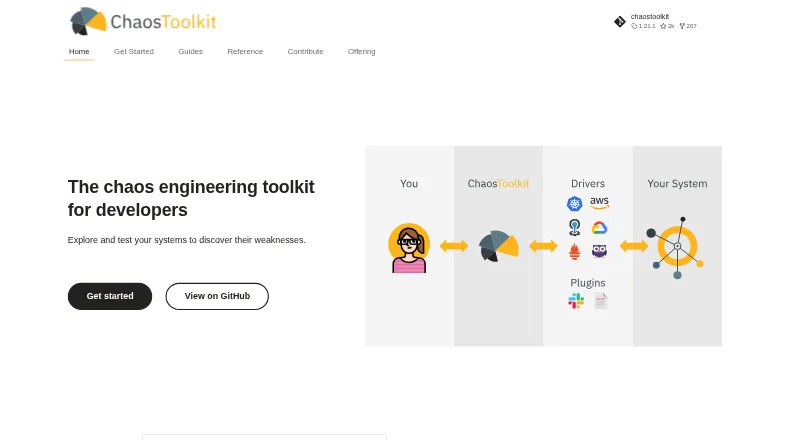
What Chaos Toolkit is
Chaos Toolkit is a free, open-source toolkit for developers who want to investigate how systems respond to disruption and find weaknesses. An experiment states a steady-state hypothesis, includes probes to check that condition, and defines a method using actions and probes. If the system fails the steady-state check, the method is not run and the experiment must stop. Experiments can be stored as JSON or YAML, making them suitable for collaboration and orchestration alongside code. The toolkit exposes an Open API for extending support to systems and can be embedded in a CI/CD chain. Listed integrations include AWS, Azure, Google Cloud Platform, Kubernetes, Kafka, Slack, Datadog, Grafana, OpenTelemetry, and Prometheus. The standalone CLI is licensed under Apache 2.0 and is implemented in Python 3; official support is for Python 3.8 and later, and testing has been limited to CPython. Installation instructions cover macOS, Debian or Ubuntu, and Windows, using pip. Users can add extensions after installing the CLI and core library. Reliably is a separate platform, not the standalone CLI.
Who it suits
Chaos Toolkit suits developers who want to define repeatable chaos experiments and include them in a CI/CD workflow. It may also suit teams that want experiments expressed in JSON or YAML and extended through integrations.
What it does well
- Free standalone CLI under Apache License 2.0.
- Experiments can be stored as JSON or YAML.
- Can be embedded in a CI/CD chain.
- Includes a safety gate based on steady state.
- Listed integrations include Kubernetes and major cloud services.
What to know first
- Official Python support starts at version 3.8.
- Tested only against CPython.
- Extensions require the CLI and core library first.
Limits
The CLI officially supports Python 3.8 and later, and has only been tested against CPython.
Plans
| Plan | Billed and limits | Price |
|---|---|---|
| Chaos Toolkit | open-source CLI · free forever · standalone toolkit | Free |
As chaostoolkit.org lists them, read 15 Oct 2026. The maker's own page has the final word.
Getting started
- Open the Chaos Toolkit website.
- Follow the Python setup instructions for macOS, Debian or Ubuntu, or Windows.
- Install the CLI using pip.
- Install the core library and extensions for the facets of chaos engineering you need.
- Declare experiments in JSON or YAML and use them in your workflow.
Chaos Toolkit is an open-source chaos engineering toolkit for developers who want to express system experiments as code. Its strongest safeguard is a steady-state check that can stop an experiment before its method runs; teams seeking a managed platform should look elsewhere.
Overview
The toolkit lets teams define experiments in JSON or YAML, keep them alongside other code, and use them for collaboration and orchestration. Each experiment states a steady-state hypothesis and probes to test it, then specifies a method of actions and probes. If the system fails the steady-state check, the method does not run and the experiment must bail out. That makes the design a sensible fit for teams that want a clear precondition before injecting faults, though the safety gate does not replace careful experiment design.
Key features
Experiments and extensibility
Experiments can be embedded in a CI/CD chain, making the toolkit relevant to teams that want chaos checks to become part of their delivery workflow. Its Open API supports extensions for different systems, and users can add extensions after installing the CLI and core library. The extension directory includes integrations for AWS, Azure, Google Cloud Platform, Kubernetes, Kafka, Slack, Datadog, Grafana, OpenTelemetry and Prometheus.
Kubernetes support, cloud and network fault injection, experiment scheduling and blast-radius controls are supported. Together, these capabilities cover several common needs for controlled experiments, while the code-oriented model favors developers comfortable maintaining experiment definitions and a Python-based CLI.
Runtime and deployment
The standalone CLI is implemented in Python 3, officially supports Python 3.8 and later, and has been tested only against CPython. The installation guide covers Python setup on macOS, Debian or Ubuntu, and Windows, with the CLI installed using pip. Teams using other Python implementations should account for that testing scope.
Chaos Toolkit is self-hosted and open source under Apache License 2.0. Reliably is a separate platform, with SaaS, private SaaS and on-premises options; those deployment choices are not part of the standalone CLI.
Pricing
Chaos Toolkit: free. The plan is the open-source CLI, free forever under Apache License 2.0. It suits teams able to install and run a self-hosted tool and manage their own experiments and extensions. There is no paid tier or managed service within this plan; teams wanting a platform offering can consider Reliably separately.
Platforms
The toolkit lists API, Linux, macOS, self-hosted, web and Windows platforms. Its installation guide specifically covers macOS, Debian or Ubuntu, and Windows, and describes a Python-and-pip CLI installation. The listed platforms make it broadly relevant across environments, but the supported runtime remains Python 3.8+ with CPython as the only tested implementation.
Who it's for
Chaos Toolkit is best for development and operations teams that want free, self-hosted chaos experiments stored and orchestrated like code, particularly when a steady-state gate and CI/CD embedding suit their workflow. It is less suitable for buyers who want a hosted service bundled with the toolkit, or teams unwilling to maintain a Python CLI and its extensions.
Pros and cons
- Pros: JSON or YAML experiment definitions can live alongside code, supporting collaboration and orchestration in familiar workflows.
- Pros: A failed steady-state check prevents the experiment method from running, providing a meaningful safety gate.
- Pros: The CLI is free forever and Apache-licensed, with extensions spanning major cloud, infrastructure, messaging and observability tools.
- Cons: The standalone offering is self-hosted, so teams seeking SaaS or managed operations need another product.
- Cons: The CLI requires Python 3.8 or later, and only CPython has been tested, narrowing confidence for other Python runtimes.
- Cons: Users install extensions after the CLI and core library, adding setup and maintenance work for the facets they need.
Alternatives
For a broader comparison, see Chaos Engineering Platforms.
- ChaosBlade is another free option; consider it if its support for three system platforms, four programming-language applications and 200+ experiment scenarios better matches your target systems.
- Reliably is the alternative to consider if you want a freemium platform and its open-source, no-lock-in approach.
- Chaos Mesh is a free, open-source cloud-native platform that runs on Kubernetes; pick it when a Kubernetes-specific platform is the priority.
- PowerfulSeal is a free, self-hosted Kubernetes chaos-testing option installed with pip or Docker; consider it for that narrower setup.
- Toxiproxy is another free option, with Windows, macOS and Linux platforms.
- chaosd is a free option for Linux.
- FaultMesh offers a freemium web option.
- Krkn is a free option for Linux.
Verdict
Choose Chaos Toolkit if your team wants a free, open-source way to define self-hosted chaos experiments as code and values a steady-state check that can halt an experiment before its method runs. Its main trade-off is operational ownership: installation, runtime compatibility and extensions are yours to manage, and the CLI is not a hosted platform.
Verdict
Chaos Toolkit provides a code-oriented way to define and run experiments, with a steady-state check that can halt an experiment before its method runs. Its standalone CLI is free, but users should note the stated Python support and CPython testing scope.
Questions
Is Chaos Toolkit free?
Yes. The standalone open-source CLI is free forever under the Apache License 2.0.
Which platforms does it support?
The listed platforms are API, Linux, macOS, self-hosted, web and Windows. Installation instructions cover macOS, Debian or Ubuntu, and Windows.
What runtime does the CLI use?
It is implemented in Python 3 and officially supports Python 3.8 and later. It has only been tested against CPython.
Can experiments be integrated with development workflows?
Yes. Experiments can be stored as JSON or YAML for collaboration and orchestration alongside code, and the toolkit can be embedded in a CI/CD chain.
Which integrations are listed?
The extension directory lists AWS, Azure, Google Cloud Platform, Kubernetes, Kafka, Slack, Datadog, Grafana, OpenTelemetry and Prometheus.
Does Chaos Toolkit offer SaaS?
The standalone offering is an open-source CLI. SaaS, private SaaS and on-premises options are described for Reliably as a separate platform.
Facts from Chaos Toolkit's own pages
- Automation
- The toolkit is designed to run inside CI/CD workflows. · chaostoolkit.org, 15 Oct 2026
- Community
- The project invites contributions through issue reports, issue voting, project stars, community Slack, pull requests and extension proposals. · chaostoolkit.org, 28 Sept 2026
- Community support
- The project directs users to community Slack, Stack Overflow, GitHub issues and a project email address. · github.com, 15 Oct 2026
- Container architectures
- Docker Hub lists official images for linux/amd64 and linux/arm64. · hub.docker.com, 15 Oct 2026
- Containers
- Official container documentation lists latest, basic and full images, with Alpine and Debian-based variants. · chaostoolkit.org, 15 Oct 2026
- Core projects
- The project includes separate CLI, core-library, Kubernetes, addons, reporting and bundler projects. · chaostoolkit.org, 15 Oct 2026
- Deployment options
- The offering page describes a standalone open source CLI; it distinguishes Reliably as a separate platform with SaaS, private SaaS and on-premises options. · chaostoolkit.org, 28 Sept 2026
- Discovery
- The chaos discover command can inspect an integration and produce a discovery report used to bootstrap experiments. · chaostoolkit.org, 15 Oct 2026
- Experiment as code
- Experiments can be stored as JSON or YAML files so teams can review, version and orchestrate them like code. · chaostoolkit.org, 15 Oct 2026
- Experiment execution
- A basic experiment is run with the command chaos run experiment.json. · github.com, 15 Oct 2026
- Experiment format
- Experiments can be declared and stored as JSON or YAML files for collaboration and orchestration like other code. · chaostoolkit.org, 28 Sept 2026
- Experiment model
- Experiments use probes to collect system information and actions to perform operations against the system. · chaostoolkit.org, 15 Oct 2026
- Experiments
- An experiment declares a steady-state hypothesis and probes to validate it, plus a method made up of actions and probes. · chaostoolkit.org, 28 Sept 2026
- Extension methods
- Extensions can be implemented as Python functions, external processes or HTTP endpoints. · chaostoolkit.org, 15 Oct 2026
- Extensions
- After installing the CLI and core library, users can install extensions for different facets of chaos engineering. · chaostoolkit.org, 28 Sept 2026
- Independent limit: extension dependency
- Hysen Labs says platform-specific actions depend on separately installed extensions and that extension maintenance can become a compatibility risk. · hysenlabs.com, 15 Oct 2026
- Independent limit: hosted control plane
- Zaira Labs says the file-driven CLI lacks the centralized scheduling, multi-tenant isolation and web UI associated with hosted chaos platforms. · zairalabs.ai, 15 Oct 2026
- Independent limit: interface
- Gremlin reports that the toolkit is CLI-only, which makes multi-system execution difficult without suitable cloud or orchestration drivers. · gremlin.com, 15 Oct 2026
- Independent limit: missing features
- Gremlin’s comparison lists no native scheduling, GUI or REST API in the core toolkit. · gremlin.com, 15 Oct 2026
- Independent praise: control
- Gremlin highlights the toolkit’s user-defined experiments and native rollback capability as strengths. · gremlin.com, 15 Oct 2026
- Independent praise: portability
- Gremlin’s comparison says Chaos Toolkit lets users define their own experiments and supports Docker, Kubernetes, bare-metal and cloud platforms. · gremlin.com, 15 Oct 2026
- Installation
- The documented installation method is pip install -U chaostoolkit inside a Python environment. · chaostoolkit.org, 15 Oct 2026
- Integrations
- The extension directory lists integrations including AWS, Azure, Google Cloud Platform, Kubernetes, Kafka, Slack, Datadog, Grafana, OpenTelemetry and Prometheus. · chaostoolkit.org, 28 Sept 2026
- Kubernetes operator
- A Kubernetes operator can watch experiment resources and launch Chaos Toolkit jobs to execute them. · chaostoolkit.org, 15 Oct 2026
Where Chaos Toolkit stands on Freedom251
- Chaos Engineering Platforms#1 of 25