Freedom251 › Legal Docketing Software
CaseDesk
What CaseDesk is
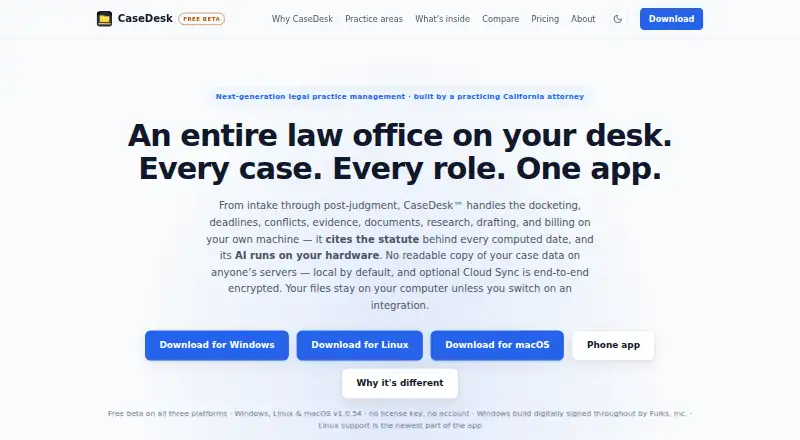
CaseDesk is legal practice management software for work from intake through post-judgment, including docketing, deadlines, conflicts, evidence, documents, research, drafting, and billing. It offers purpose-built matter fields and tools for 106 practice areas. Its deadline engine calculates jurisdiction-specific dates, accounts for court days and holidays, and cites the governing rule behind each result. The software includes a 13,400-entry legal reference library and live CourtListener search. Gmail and Outlook messages go to a review queue, where users choose whether to file them to a matter. By default, case data is stored locally in a SQLCipher-encrypted database; optional Cloud Sync stores encrypted ciphertext, while document files currently remain on users’ computers. The app can work offline, with internet connections used for enabled integrations and version checks. The phone companion runs in a browser and reads end-to-end-encrypted Cloud Sync; the maker says store apps for iPhone and Android are under review. Beta access is free for 90 days per machine, then permits two weeks of read-only access. CaseDesk Pro Monthly costs $29 a month per attorney.
Who it suits
CaseDesk is intended for licensed attorneys managing matters, deadlines, evidence, and billing. Its offline use and locally stored case data may suit attorneys who want to work without a continuous internet connection.
What it does well
- Matter tools cover 106 practice areas.
- Deadline results cite the governing rule.
- Case data is locally encrypted by default.
- The app can work offline.
What to know first
- Beta access switches to read-only after 90 days and a two-week grace period.
- Phone companion runs in a browser.
- Document files remain on users’ computers with Cloud Sync.
Limits
The free beta runs for 90 days from first use on a machine, followed by two weeks of read-only access for exporting data. Pro removes the beta expiry; the listed plans cost $29 a month or $290 a year per attorney.
Plans
| Plan | Billed and limits | Price |
|---|---|---|
| Free beta | 90 days · two-week read-only grace period | Free |
| CaseDesk Pro | Billed annually; automatic renewal at $290 per year. · 1 attorney · 1 licence key per year | $290 a year |
| Beta | Free during beta; each build runs free for 90 days from first run on a machine, followed by a two-week read-only grace period. · No credit card required · no beta end date stated · Windows, Linux, and macOS | Free |
| CaseDesk Pro Monthly | $29 / month; new key emailed each month · Per attorney · one licence covers that lawyer’s own installations · cancel any time | $29 a month |
| CaseDesk Pro Annual | $290 / year; automatic annual renewal · Per attorney · one licence covers that lawyer’s own installations · two months free · founder rate while continuously subscribed | $290 a year |
As casedesk.law lists them, read 20 Sept 2026. The maker's own page has the final word.
Getting started
- Visit https://casedesk.law/.
- Choose the free beta or a CaseDesk Pro monthly or annual plan.
- Install the app on Windows, Linux, or macOS for beta access.
- Use the phone companion in a browser to read encrypted Cloud Sync.
- Enable any integrations you want to use; the app can also work offline.
CaseDesk is legal practice management software for licensed attorneys, spanning intake through post-judgment work. It suits solo lawyers who want deadline calculations and broad matter tools in one desktop app; the short beta window and browser-based phone companion are important trade-offs.
Overview
CaseDesk brings docketing, conflict checks, evidence, documents, research, drafting and billing into a single legal workflow. Its 106 supported practice areas have purpose-built matter fields and tools, giving practices a more tailored starting point than a general-purpose organizer.
The breadth is compelling for attorneys seeking one system across a matter’s lifecycle, though it also means CaseDesk is more than a deadline calendar. For docketing-focused choices, see Legal Docketing Software; for broader workflow comparisons, see Legal Practice Management Software.
Key features
Deadlines, docketing and research
The deadline engine accounts for jurisdiction, court days and holidays, and cites the governing rule for each calculated date. National rules coverage, docket monitoring, rules-based dates and filing alerts make it a strong fit for practices that need deadline work connected to matters rather than maintained as a separate calendar. A 13,400-entry legal reference library and live CourtListener search add research access in the same product.
Email, integrations and AI
Gmail and Outlook messages enter a review queue, where users choose whether to file each message to a matter. That review step supports deliberate filing rather than automatic attachment of every synced email. Integrations include Google Calendar, Microsoft 365, Stripe, QuickBooks Online, Box, OneDrive, Google Drive, Dropbox, CourtListener and PACER RSS, among others.
Users can run a local AI model or connect their own Anthropic or OpenAI key. The maker says local-model processing stays on the user's machine, a useful option for lawyers who prefer not to send that processing to a hosted AI service; using a connected provider instead requires the user's own key.
Privacy, evidence and offline work
Case data is stored locally in a SQLCipher-encrypted database by default, with optional field-level and file-level encryption. Optional Cloud Sync stores encrypted ciphertext on maker-operated infrastructure that the maker says it cannot decrypt, while document files currently stay on users’ computers. The split matters: syncing does not mean case documents are stored in the cloud.
CaseDesk can hash and sign documents and anchor SHA-256 fingerprints to Bitcoin through OpenTimestamps; only the fingerprint is sent to public calendar servers. The app can work offline, with connections made for integrations users enable and version checks. This combination favors users who value local control, though it makes the phone companion less straightforward than a native mobile app: it runs in a phone browser and reads end-to-end-encrypted Cloud Sync.
Pricing
Beta and free access
The free beta requires no credit card and has no stated end date, but each build runs free for 90 days from its first run on a machine. After that, read-only access lasts two weeks for exporting data. This is useful for evaluating the workflow, not a durable free tier for ongoing case management.
A separate Free beta plan is also shown at no cost, with the same 90-day period and two-week read-only grace period. The beta offer lists Windows, Linux and macOS.
Paid plans
CaseDesk Pro Monthly costs $29 a month, billed monthly. It is per attorney, and one licence covers one lawyer’s own installations. It removes beta expiry and includes optional end-to-end-encrypted Cloud Sync and priority support; users can cancel any time, with a new key emailed each month. It fits lawyers who prefer flexibility over an annual commitment.
CaseDesk Pro Annual costs $290 a year, billed annually, with two months free and automatic renewal. It has the same per-attorney licence, installations, beta-expiry removal, optional Cloud Sync and priority support. Its lower effective monthly cost suits lawyers ready to commit for the year, but renewal is automatic. The CaseDesk Pro plan is also shown at $290 a year, billed annually, with automatic renewal and one attorney per licence key per year.
Platforms
CaseDesk lists Android, iOS, Linux, macOS and Windows. The beta offer names Windows, Linux and macOS, while phone access is through a browser-based companion rather than a native app; iPhone and Android store apps are under review. Attorneys wanting a phone-first native experience may find that distinction decisive. The whole app does not require internet access, though enabled integrations and version checks connect online.
Who it's for
CaseDesk is aimed at licensed attorneys, especially solo practitioners who can use a per-attorney licence and want practice-area-specific matter fields, deadline calculations and local data storage. Its broad scope is less attractive to someone who only needs a simple shared docket calendar or a native phone app. Support comes from its practicing-attorney builder, and replies may take a business day, so it is not positioned as immediate-response support.
Pros and cons
Pros
- Broad matter coverage: Intake-to-post-judgment tools and 106 practice areas can reduce the need to split core legal work across separate systems.
- Explainable deadline calculations: Court-day and holiday handling plus citations to governing rules help attorneys review why a date was calculated.
- Local-first security: Encrypted local storage, optional additional encryption and offline use suit practices that prioritize keeping case data on their own machines.
- Flexible AI choices: Local models or user-supplied provider keys let attorneys choose how AI processing is handled.
Cons
- Beta is temporary on each machine: The 90-day run and two-week read-only export period make free access unsuitable as a lasting operating plan.
- Cloud Sync does not sync document files: Users still keep documents on their computers, which limits the completeness of a cloud-based workflow.
- Phone access is browser-based: The companion lacks the immediacy of a native app, and store apps remain under review.
- Solo-oriented licensing: Paid licences cover one attorney, not a shared multi-lawyer seat pool.
Alternatives
AnchorLex is worth considering when a web-based docketing tool and a free entry point matter more than CaseDesk’s wider practice-management scope: its free plan covers five court orders per month and one sync calendar.
DocketBird may suit someone who needs daily tracking of one case rather than a full matter workflow; it also has a free library-access plan for law-school, university and public libraries that requires a prominent DocketBird website link.
LitDocket is an alternative for readers seeking web, API or self-hosted access; its Solo plan is $49 a month for up to 25 active cases, and read-only data access remains after its 14-day trial if a user does not subscribe.
AcclaimIP is another option, with annual prepaid per-seat licensing and pricing provided by quote.
DockItFlo is built for firms with 2–50 attorneys and includes AI calendaring, making it a possible fit for firms larger than CaseDesk’s one-attorney licence structure.
CourtDrive is an alternative for teams looking for an Android, iOS, web and API option; its Basic plan is $35 a month and includes up to three users and 250 uploads.
Deadlines.com may fit practices shopping specifically for case-based deadline coverage, with a 30+ case plan at $20 per case per month, unlimited users and nationwide coverage.
CalendarRules is another alternative to consider.
Verdict
CaseDesk is a strong choice for a licensed solo attorney who wants broad matter management, rule-cited deadline calculations and locally encrypted case storage in one product. Choose it for that combination and the option to work offline; look elsewhere if a durable free plan, shared multi-attorney licensing or native phone apps are essential.
Verdict
CaseDesk covers a wide legal matter workflow and combines deadline calculations with local encrypted case storage. Consider the beta time limit and browser-based phone companion when choosing how to use it.
Questions
Does CaseDesk have a free plan?
Yes. The beta is free for 90 days from first run on a machine, with a two-week read-only period afterward for exporting data. No credit card is required.
How much does CaseDesk Pro cost?
Pro Monthly is $29 a month per attorney. Pro Annual is $290 a year per attorney and renews automatically.
Which platforms does CaseDesk support?
The listed platforms are Android, iOS, Linux, macOS, and Windows. The phone companion runs in a browser; the maker says iPhone and Android store apps are under review.
Can CaseDesk work offline?
Yes. The app can work offline; connections are used for integrations the user enables and version checks.
How does CaseDesk store data?
Case data is stored locally in a SQLCipher-encrypted database by default, with optional field-level and file-level encryption. Optional Cloud Sync stores encrypted ciphertext, while document files remain on users' computers.
Who is CaseDesk for?
CaseDesk describes itself as a professional tool for licensed attorneys.
Facts from CaseDesk's own pages
- AI
- Users can run a local model or connect their own Anthropic or OpenAI key; the maker says local-model processing stays on the user's machine. · casedesk.law, 28 Sept 2026
- AI citation checks
- The changelog says AI answers can be checked against CaseDesk’s reference library and, when online checking is enabled, public case and California statute databases. · casedesk.law, 14 Oct 2026
- AI extensibility
- Users can supply Anthropic or OpenAI API keys, configure another OpenAI-compatible endpoint, or use local models. · casedesk.law, 14 Oct 2026
- AI quote checks
- The changelog says quotations of four or more words in AI answers are compared with text extracted from the user’s case documents. · casedesk.law, 14 Oct 2026
- Case-law search
- The October 13, 2026 release added a case-law page for searching opinions, viewing concurrences and dissents, seeing citing cases, and looking up citations. · casedesk.law, 14 Oct 2026
- Client portal
- The privacy policy says the optional client portal is served from the user’s computer and documents are hidden from portal clients unless individually made visible. · casedesk.law, 14 Oct 2026
- Cloud Sync
- Optional Cloud Sync stores encrypted ciphertext on infrastructure operated by the maker, which says it cannot decrypt the data; document files currently remain on users' computers. · casedesk.law, 28 Sept 2026
- Company legal name
- The official privacy policy identifies Fulks, Inc. as the publisher of CaseDesk. · casedesk.law, 14 Oct 2026
- Data security
- The privacy policy says case data is stored locally in a SQLCipher-encrypted database by default, with optional field-level and file-level encryption. · casedesk.law, 28 Sept 2026
- Deadline calculations
- The product includes manually entered and automatically computed deadlines in its calendar. · casedesk.law, 14 Oct 2026
- Deadlines
- Its deadline engine computes jurisdiction-specific deadlines, accounts for court days and holidays, and cites the governing rule for each computed date. · casedesk.law, 28 Sept 2026
- Documentation and support
- The support page provides system requirements, download information, and an email address for questions, bug reports, and feature requests. · casedesk.law, 14 Oct 2026
- Email integration
- Gmail and Outlook email sync into a review queue where users choose whether to file messages to a matter. · casedesk.law, 28 Sept 2026
- Evidence integrity
- CaseDesk can hash and sign documents and anchor their SHA-256 fingerprints to Bitcoin through OpenTimestamps; its privacy policy says only the fingerprint is sent to public calendar servers. · casedesk.law, 28 Sept 2026
- Evidence timestamping
- When the user requests document anchoring, CaseDesk sends a SHA-256 fingerprint to OpenTimestamps servers for commitment to Bitcoin; the policy says the public anchor cannot be recalled or deleted. · casedesk.law, 14 Oct 2026
- Founder
- The about page identifies Asaf David Fulks as CaseDesk’s founder and says he is a California-licensed attorney. · casedesk.law, 14 Oct 2026
- Free plan
- No · casedesk.law, 20 Sept 2026
- Hardware requirements
- The support page specifies 8 GB RAM except for local AI and about 3 GB of application disk space. · casedesk.law, 14 Oct 2026
- Integration controls
- Integrations are off until the user connects them with their own credentials, which the policy says are encrypted on the user’s computer. · casedesk.law, 14 Oct 2026
- Integrations
- The privacy policy lists Google Gmail and Calendar, AI providers, Stripe, QuickBooks Online, Twilio, Box, OneDrive, Google Drive, Dropbox, CourtListener, and PACER RSS integrations. · casedesk.law, 14 Oct 2026
- Legal library
- CaseDesk includes a 13,400-entry legal reference library and built-in live CourtListener search. · casedesk.law, 28 Sept 2026
- Legal references
- The product includes a legal-reference library, and its changelog describes updates to court rules and reference materials. · casedesk.law, 14 Oct 2026
- License and source availability
- The opened official pages describe paid and beta software licensing but do not state an open-source status or software licence. · casedesk.law, 14 Oct 2026
- Linux requirements
- The support page lists Ubuntu or Debian installation via .deb and other 64-bit Linux distributions via AppImage. · casedesk.law, 14 Oct 2026
Where CaseDesk stands on Freedom251
- Legal Docketing Software#1 of 26
- Legal Practice Management Software#8 of 140