Freedom251 › Docketing Software
DockItFlo
What DockItFlo is
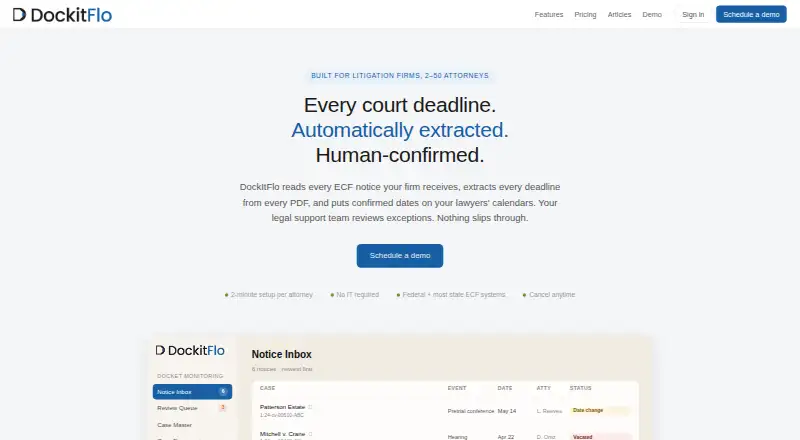
DockItFlo monitors court docket notices by extracting deadlines from ECF emails and attached PDFs, then routing dates to calendars or a human review queue. It reads the complete notice and attachments, can identify multiple dates, classifies events, and assigns each extraction a confidence score. Reviewers check extracted dates and deadline triggers before calendar delivery, and can edit, add, or remove dates. For federal notices, its rules engine suggests dates from triggering filings and applies FRCP Rule 6 weekend and federal-holiday rollovers; local-rule variations are flagged for review. State notices can be handled when courts support email notifications, but the FRCP rules engine applies only to federal notices. DockItFlo syncs with Google Calendar and Outlook. Its case document library organizes ECF filings and supports searches by type, title, and full text. It can wait for a future filing to calculate a dependent deadline and route it for human confirmation. The product is designed for litigation firms with 2 to 50 attorneys and no dedicated docketing department. Pricing is by attorney per month, with current pricing available by contacting DockItFlo. The company describes setup as two minutes per attorney, using a unique intake email, with no IT configuration required.
Who it suits
DockItFlo is aimed at small and mid-size litigation firms with 2 to 50 attorneys that lack a dedicated docketing department. It may suit firms that want docket dates reviewed by a person before they reach calendars.
What it does well
- Extracts multiple dates from notices and PDF attachments.
- Reviewers can edit, add, or remove dates.
- Syncs with Google Calendar and Outlook.
- Organizes ECF filings with full-text search.
- Includes a federal rules engine with Rule 6 rollover.
What to know first
- Pricing is available only by contacting DockItFlo.
- FRCP rules engine applies only to federal notices.
- State processing depends on court email notifications.
- Clio calendar integration is on the roadmap.
Limits
Pricing is on request and billed per attorney per month. The FRCP rules engine applies only to federal notices; state notices can be processed when courts support email notifications, with local-rule variation flagged for review.
Plans
| Plan | Billed and limits | Price |
|---|---|---|
| DockItFlo | Per attorney per month; contact DockItFlo for current pricing · AI calendaring included · pricing scales with firm size · built for firms with 2–50 attorneys | On request |
As dockitflo.com lists them, read 30 Sept 2026. The maker's own page has the final word.
Getting started
- Visit the DockItFlo website and schedule a demo.
- Contact DockItFlo for current per-attorney monthly pricing.
- Set up the unique intake email address.
- Allow two minutes per attorney for setup; no IT configuration is required.
- Connect Google Calendar or Outlook for date syncing.
Verdict
DockItFlo combines notice extraction, federal deadline suggestions, document search, and human review before dates reach a calendar. Firms should account for the federal-only rules engine and request current pricing before committing; the FAQ directs prospective customers to schedule a demo and states no trial period.
Questions
How is DockItFlo priced?
Pricing is on request and billed per attorney per month. Pricing scales with firm size.
Is there a free trial?
The FAQ directs prospective customers to schedule a demo before committing and does not state a free-trial period.
Which calendars does DockItFlo sync with?
It syncs with Google Calendar and Outlook. Clio calendar integration is on the roadmap.
Does it handle state court notices?
It can process state notices when the court system supports email notifications. Its FRCP rules engine applies only to federal notices.
How does DockItFlo use customer documents for AI training?
DockItFlo says it will not use substantive customer content, including client documents and court filings, to train general-purpose or foundation AI models.
What firm size is DockItFlo built for?
It is intended for small and mid-size litigation firms with 2 to 50 attorneys that do not have a dedicated docketing department.
Facts from DockItFlo's own pages
- AI data use
- DockItFlo says it will not use substantive customer content, including client documents and court filings, to train general-purpose or foundation AI models. · dockitflo.com, 30 Sept 2026
- Calendar integrations
- DockItFlo syncs with Google Calendar and Outlook; Clio calendar integration is on the roadmap. · dockitflo.com, 30 Sept 2026
- Case documents
- The Case Document Library organizes ECF filings by case and supports search by document type, title, and full text. · dockitflo.com, 30 Sept 2026
- Deadline extraction
- It reads the full notice email and PDF attachments, extracts multiple dates, classifies events, and assigns each extraction a confidence score. · dockitflo.com, 30 Sept 2026
- Dependent deadlines
- For deadlines dependent on a future filing, DockItFlo can create a waiting trigger and compute the date when that filing arrives, then route it for human confirmation. · dockitflo.com, 30 Sept 2026
- Federal rules
- Its federal rules engine suggests deadlines from triggering filings, applies FRCP Rule 6 weekend and federal holiday rollover, and flags local-rule variation for review. · dockitflo.com, 30 Sept 2026
- Human review
- Automated extractions and deadline triggers are reviewed before they reach the calendar, and reviewers can edit, add, or remove dates. · dockitflo.com, 30 Sept 2026
- Intended firms
- The product is built for small and mid-size litigation firms with 2 to 50 attorneys that do not have a dedicated docketing department. · dockitflo.com, 30 Sept 2026
- Product
- DockItFlo automates court docket monitoring by extracting deadlines from ECF notice emails and attached PDFs, then routing dates to calendars or a human review queue. · dockitflo.com, 30 Sept 2026
- Security
- The privacy policy says safeguards include encryption in transit and at rest, access controls, and audit logging. · dockitflo.com, 30 Sept 2026
- Setup
- The company describes setup as two minutes per attorney, using a unique intake email address, with no IT configuration required. · dockitflo.com, 30 Sept 2026
- State court coverage
- State notices can be processed when the court system supports email notifications, but the FRCP rules engine applies only to federal notices. · dockitflo.com, 30 Sept 2026
- Trial
- The FAQ directs prospective customers to schedule a demo before committing and does not state a free-trial period. · dockitflo.com, 30 Sept 2026
Where DockItFlo stands on Freedom251
- Docketing Software#13 of 24
- Legal Docketing Software#19 of 26