Freedom251 › Graphic Design Software

Calligra Stage
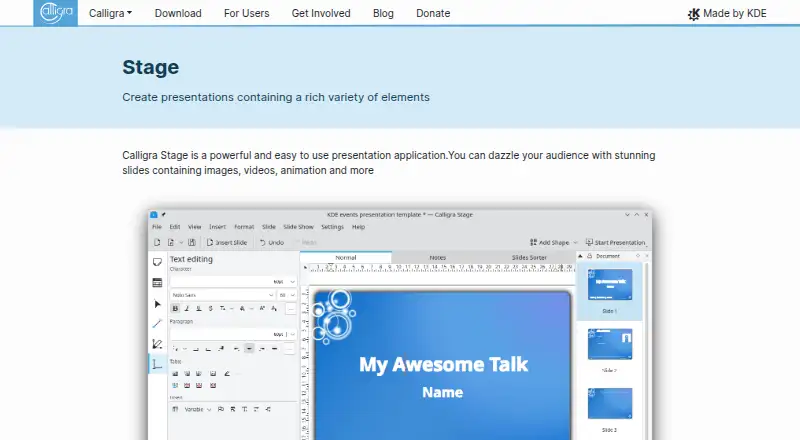
What Calligra Stage is
Calligra Stage is a free presentation application for Linux for creating slides with graphics, text, charts, and images. It supports multiple master slides in a presentation and provides a slide overview and notes during presentations. Stage uses OpenDocument natively for interchange with applications that support ODF, including Microsoft Office, and supports most ODF slide transitions. Its plugin system can add effects, content elements, and additional ways to manage presentations.
Stage is free software under the GPL-2.0-or-later license, with no paid plans or usage limits stated. Calligra is available through Linux distributions and Flathub. Components can be installed as standalone applications, and some installations allow modular component selection. The download page says Windows support is being worked on. KDE Applications links to a Stage handbook, a forum, and the #calligra chat room for help, as well as source code and a bug-reporting page.
Who it suits
Stage suits Linux users who need presentation software with OpenDocument support and presentation notes. It may also suit users who want to install Calligra components independently where their installation supports that choice.
What it does well
- Free software under GPL-2.0-or-later.
- Supports multiple master slides in one presentation.
- Uses OpenDocument natively.
- Includes slide overview and notes features.
- Available through Linux distributions and Flathub.
What to know first
- Listed platform support is Linux.
- Windows support is still being worked on.
- No free trial is listed.
Plans
| Plan | Billed and limits | Price |
|---|---|---|
| Free software | No paid plans or usage limits stated | Free |
As calligra.org lists them, read 11 Oct 2026. The maker's own page has the final word.
Getting started
- Install Calligra through a Linux distribution or Flathub
- Choose Stage as a standalone component where supported
- Create a presentation with text, graphics, charts, or images
- Select master slides and transition settings
- Use the slide overview and notes while presenting
Verdict
Calligra Stage offers Linux slide creation with OpenDocument support, master slides, and presenter features at no cost. Users who need Windows support should note that the download page says it is being worked on.
Questions
What does Calligra Stage do?
Stage creates presentations with slides containing graphics, text, charts, and images.
Which platforms support Stage?
Stage is supported on Linux. The download page says Windows support is being worked on.
How much does Stage cost?
Stage is free software. The listed plan is free, with no paid plans or usage limits stated.
What file format does Stage use?
Stage natively uses OpenDocument for interchange with applications that support ODF, including Microsoft Office.
Does Stage include presenter tools?
Yes. It provides a slide overview during presentations and a notes feature, and supports most ODF slide transitions.
Where can I get help or source code?
KDE Applications links to the Stage handbook, a forum, the #calligra chat room, Stage source code, and a bug-reporting page.
Facts from Calligra Stage's own pages
- Download
- Calligra is available through Linux distributions and Flathub; the download page says Windows support is being worked on. · calligra.org, 11 Oct 2026
- File format
- Stage natively uses the OpenDocument format for interchange with ODF supporting applications, including Microsoft Office. · calligra.org, 11 Oct 2026
- Founded
- 2010 · calligra.org, 28 Sept 2026
- Free plan
- Yes · calligra.org, 20 Sept 2026
- Installation
- Calligra components can be installed as standalone applications, and some installations allow users to select components modularly. · calligra.org, 11 Oct 2026
- Licensing
- Calligra Stage is free software, and the KDE Applications page lists its license as GPL-2.0-or-later. · apps.kde.org, 11 Oct 2026
- Master slides
- Stage supports multiple master slides in one presentation. · calligra.org, 11 Oct 2026
- Plugins
- A plugin system can add effects, content elements and ways to manage presentations. · calligra.org, 11 Oct 2026
- Presenter features
- The application provides a slide overview during presentations and a notes feature. · calligra.org, 11 Oct 2026
- Presenter mode
- Yes · calligra.org, 20 Sept 2026
- Purpose
- Calligra Stage is a presentation application for creating slides with graphics, text, charts and images. · calligra.org, 11 Oct 2026
- Release
- The KDE Applications page lists Calligra Stage release 26.08.1 dated 2026-09-10. · apps.kde.org, 11 Oct 2026
- Source and bugs
- The KDE Applications page links to Stage source code and a bug reporting page. · apps.kde.org, 11 Oct 2026
- Support
- The KDE Applications page links to the Stage handbook, a forum and the #calligra chat room for help. · apps.kde.org, 11 Oct 2026
- Supported platforms
- linux · calligra.org, 20 Sept 2026
- Transitions
- Stage supports most ODF slide transitions. · calligra.org, 11 Oct 2026
Where Calligra Stage stands on Freedom251
- Graphic Design Software#111 of 150
- Presentation software#69 of 93
- Design tools#112 of 146