Freedom251 › Book Formatting Software

Adobe InDesign
What Adobe InDesign is
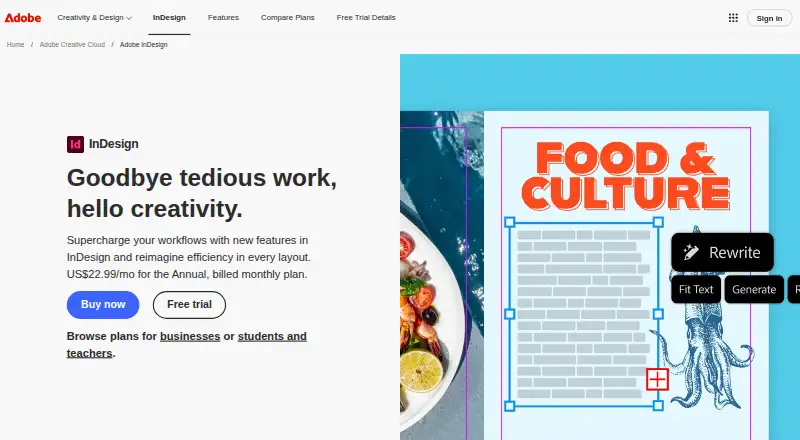
Adobe InDesign is a professional page-layout application for creating, preparing, and publishing content for print, web, and tablet apps. Its publishing formats include brochures, digital magazines, eBooks, posters, and presentations. Precise typography controls and access to Adobe Fonts support detailed text work, while a template library and brand kit add resources for building consistent layouts. Adobe describes Flex Layout, layout-aware Rewrite, PDF-to-InDesign conversion, generated alt text, and Generative Expand among its layout and AI-related features.
InDesign is a desktop app for macOS and Windows, available through a membership plan. It works closely with Photoshop, Illustrator, and Acrobat; Adobe Stock is also named on its poster-design page. Sharing assets, collecting feedback, and collaborating with stakeholders are included. The InDesign plan lists 100GB of cloud storage and 25 monthly generative credits. Creative Cloud Pro options include 20+ apps, and team plans list 1TB of cloud storage. There is no free plan, but the full version is available as a seven-day trial. Versions 21.3 and later require at least 8GB RAM and an internet connection for activation, subscription validation, and online services.
Who it suits
InDesign suits designers and publishing teams producing print and digital layouts who need typography controls, templates, or presentation design. It is also relevant to people working alongside Photoshop, Illustrator, or Acrobat, or sharing assets and feedback with stakeholders.
What it does well
- Creates brochures, digital magazines, eBooks, posters, and presentations.
- Precise typography controls and access to Adobe Fonts.
- Includes templates, presentation design, and a brand kit.
- Works with Photoshop, Illustrator, and Acrobat.
- Includes tools for sharing assets, feedback, and stakeholder collaboration.
What to know first
- There is no free plan.
- The full-version trial lasts seven days and converts to paid membership unless canceled.
- There is no mobile app.
- Versions 21.3 and later require at least 8GB RAM.
Limits
There is no free plan. The trial lasts seven days and converts to a paid Creative Cloud membership unless canceled before it ends; the InDesign plan lists 100GB cloud storage and 25 monthly generative credits.
Plans
| Plan | Billed and limits | Price |
|---|---|---|
| Creative Cloud Pro for students and teachers | Annual, billed monthly; $19.99/mo first year, then $39.99/mo · 20+ apps · 4,000 monthly generative credits · 100GB storage · eligibility required | $19.99 a month |
| InDesign | Annual, billed monthly · 100GB cloud storage · 25 monthly generative credits · InDesign plus Adobe Express Premium | $22.99 a month |
| InDesign annual prepaid | Annual plan, prepaid · 100GB cloud storage · Adobe Fonts · Adobe Express · Adobe Portfolio | $263.88 a year |
| Creative Cloud Pro | Annual, billed monthly; $34.99/mo first 3 months, then $69.99/mo · 20+ apps · 4,000 monthly generative credits · 100GB storage · Firefly and Adobe Express Premium | $34.99 a month |
| InDesign for teams | Annual, billed monthly, per license · 1TB cloud storage · 25 monthly generative credits · Adobe Express Premium · business features | $37.99 a month |
| Creative Cloud Pro for teams | Annual, billed monthly, per license · 20+ apps · 4,000 monthly generative credits · Firefly · business features | $99.99 a month |
As adobe.com lists them, read 15 Oct 2026. The maker's own page has the final word.
Getting started
- Visit the Adobe InDesign product website.
- Choose an InDesign or Creative Cloud membership plan.
- Start the seven-day full-version trial if you want to try it before membership.
- Install the desktop app on macOS or Windows.
- Cancel before the trial ends to avoid conversion to a paid Creative Cloud membership.
Verdict
Choose InDesign for desktop page layout when you need its range of publishing formats, typography controls, and Adobe app integrations. Look elsewhere if you need a free plan or a mobile app; ongoing access requires a membership plan.
Questions
Is Adobe InDesign free?
No. There is no free plan, though a seven-day trial of the full version is available.
What happens after the seven-day trial?
It converts to a paid Creative Cloud membership unless canceled before the trial ends.
Which operating systems does InDesign support?
It is a desktop app for macOS and Windows.
Does InDesign have a mobile app?
No. The listed app is for desktop.
What do the listed plans include?
The InDesign plan lists 100GB cloud storage and 25 monthly generative credits. Creative Cloud Pro plans list 20+ apps, while InDesign and Creative Cloud Pro team plans list 1TB cloud storage.
What computer requirements are listed for newer versions?
For versions 21.3 and later, Adobe lists at least 8GB RAM and an internet connection for activation, subscription validation, and online services.
Facts from Adobe InDesign's own pages
- Accessibility
- InDesign can generate image alt text and export table structure information for accessible PDF and EPUB documents. · helpx.adobe.com, 15 Oct 2026
- AI and layout features
- The product page describes Flex Layout, layout-aware Rewrite, PDF-to-InDesign conversion, generated alt text, and Generative Expand. · adobe.com, 12 Oct 2026
- Brand kit
- Yes · adobe.com, 23 Sept 2026
- Cloud documents
- Cloud documents provide sharing, autosave and access to earlier versions on surfaces where InDesign is installed. · adobe.com, 15 Oct 2026
- Collaboration
- Adobe says InDesign includes features for sharing assets, receiving feedback, and collaborating with stakeholders. · adobe.com, 12 Oct 2026
- Company
- Adobe says it was founded in 1982 by John Warnock and Charles Geschke. · adobe.com, 12 Oct 2026
- Company founded
- LinkedIn lists Adobe as founded in 1982. · linkedin.com, 15 Oct 2026
- Company headquarters
- LinkedIn lists Adobe headquarters at San Jose, California. · linkedin.com, 15 Oct 2026
- Company size
- LinkedIn lists Adobe as a public software-development company with 10,001+ employees. · linkedin.com, 15 Oct 2026
- Data Merge
- Data Merge combines CSV or TXT records with an InDesign document to generate batches such as letters, envelopes or labels. · adobe.com, 15 Oct 2026
- Desktop app
- Yes · adobe.com, 23 Sept 2026
- Desktop requirements
- Adobe lists Windows and macOS system requirements; the requirements for versions 21.3 and later specify at least 8GB RAM and an internet connection for activation, subscription validation, and online services. · helpx.adobe.com, 12 Oct 2026
- Documentation
- Adobe provides a desktop help center with user guides, release notes, technical requirements, troubleshooting, scripting and plug-in documentation. · helpx.adobe.com, 15 Oct 2026
- Flex Layout
- Flex Layout dynamically adapts layout elements when content changes and can produce alternate layouts quickly. · adobe.com, 15 Oct 2026
- Free plan
- No · adobe.com, 23 Sept 2026
- Generative AI
- Features include AI Assistant, layout-aware Rewrite, Generative Expand and AI-generated image alt text. · adobe.com, 15 Oct 2026
- Illustration tools
- No · adobe.com, 23 Sept 2026
- Integrations
- Official integrations include Adobe Illustrator, Photoshop, Adobe Express, Adobe Capture, Bridge, Creative Cloud Libraries and InCopy. · helpx.adobe.com, 15 Oct 2026
- Latest release
- The September 2026 InDesign 21.6 release updated rendering technology, added keyboard-shortcut helper text and fixed multiple crash and export issues. · helpx.adobe.com, 15 Oct 2026
- Licence
- InDesign is proprietary commercial software distributed through Adobe membership plans rather than an open-source licence. · adobe.com, 15 Oct 2026
- Limit: Flex Layout
- TechRadar reports that Flex Layout cannot resize objects within the layout, limiting its otherwise useful responsive-layout workflow. · techradar.com, 15 Oct 2026
- Limit: learning curve
- Independent reviewers say the extensive interface and feature set take time to learn, especially for beginners. · softwareadvice.com, 15 Oct 2026
- Limit: performance
- Reviewers report occasional slowness, high RAM use, freezes, crashes and slow exports, particularly with complex documents. · getapp.com, 15 Oct 2026
- Limit: subscription cost
- Reviewers and TechRadar criticize the recurring subscription price and lack of a perpetual purchase option, especially for occasional users and small teams. · techradar.com, 15 Oct 2026
Where Adobe InDesign stands on Freedom251
- Book Formatting Software#3 of 11
- Desktop Publishing Software#14 of 30
- Brochure Makers#11 of 20
- Flyer Makers#11 of 20
- Designing Solutions#20 of 29
- Content Creation tools#23 of 31
- Graphic Design Software#113 of 150
- Design tools#110 of 146
- Poster Design Software#30 of 39