Freedom251 › Digital Painting Software

Clip Studio Paint
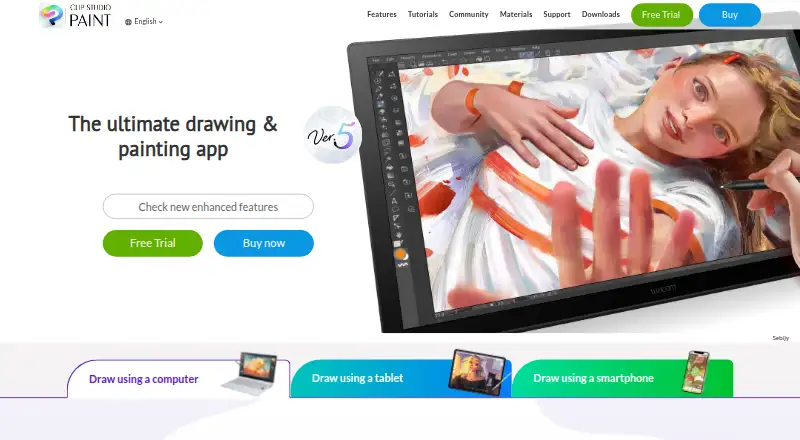
What Clip Studio Paint is
Clip Studio Paint is a digital art app for making illustrations, comics, webtoons, and animations. Its drawing tools include customizable brushes, and users can pose and adjust 3D reference models to help with characters and backgrounds. Comic features include panel frames, speech balloons, text, effect lines, screentones, and multi-page project management. Animation tools include a light table and onion-skin features: PRO supports simple animation up to 24 frames, while EX includes full-length animation tools. Monthly and annual plans include 10GB of cloud data, with an option to increase capacity. Clip Studio Assets offers downloadable brushes and materials, and GOLD can be used to buy materials there. The app supports Windows, macOS, iPad, iPhone, Android, and Chromebook, with web also listed. PRO is described for concept artists, illustrators, and designers; EX is for comic artists, manga artists, and animators. Listed monthly prices include US$0.99 for PRO and US$2.49 for EX. Windows and macOS perpetual editions are listed at US$63 for PRO and US$277 for EX; Update Passes are separate.
Who it suits
PRO is described for concept artists, illustrators, and designers. EX is described for comic artists, manga artists, and animators who want multi-page management and full-length animation tools.
What it does well
- Customizable brushes and adjustable 3D reference models.
- Comic tools include multi-page project management.
- EX includes full-length animation tools.
- Monthly and annual plans include 10GB of cloud data.
- Free trials are available for up to six months, varying by platform.
What to know first
- No free plan is listed.
- Perpetual Ver. 5.0 licenses are limited to Windows and macOS.
- Feature updates for perpetual licenses require a separately purchased Update Pass.
- Cloud plans include 10GB, with increased capacity optional.
Limits
The PRO plan supports simple animation up to 24 frames, while full-length animation tools are included with EX. Monthly and annual plans include 10GB of cloud data, with the option to increase storage capacity. Perpetual Ver. 5.0 editions are for Windows and macOS, and feature updates require a separately purchased Update Pass.
Plans
| Plan | Billed and limits | Price |
|---|---|---|
| Clip Studio Paint PRO annual/monthly plan | billed monthly · For concept artists, illustrators, and designers · Available on iPad, Android, Windows, macOS, and iPhone · Includes new features, bonus materials, and 10GB of cloud storage | $0.99 a month |
| Clip Studio Paint EX annual/monthly plan | For comic artists, manga artists, and animators · Includes multi-page management and full-length 2D animation features · Available on iPad, Android, Windows, macOS, and iPhone | On request |
| Clip Studio Paint PRO Ver. 5.0 perpetual license | Windows and macOS only · Pay once and use Version 5.0 indefinitely · Update Pass available separately | $63 a month |
| Clip Studio Paint EX Ver. 5.0 perpetual license | Windows and macOS only · Includes PRO features plus comic and animation features · Update Pass available separately | $277 a month |
| Clip Studio Paint PRO Annual / Monthly Plan | US$0.99~/month · iPad · Android · Windows · macOS · iPhone · up to 3 months free for first-time subscribers · 10GB cloud data | $0.99 a month |
| Clip Studio Paint PRO Update Pass | US$10.99 annually · Windows / macOS · one year of updates · first month free for first-time users | $10.99 a year |
| Clip Studio Paint EX Annual / Monthly Plan | US$2.49~/month · iPad · Android · Windows · macOS · iPhone · up to 3 months free for first-time subscribers · 10GB cloud data | $2.49 a month |
| Clip Studio Paint EX Ver. 5.0 Edition | US$277.00 · Windows / macOS · perpetual license | $277, paid once |
The first 8 of 10 plans, as clipstudio.net lists them, read 23 Sept 2026. The maker's own page has the final word. Every plan
Getting started
- Visit the Clip Studio Paint website.
- Choose a monthly or annual PRO or EX plan, or a perpetual Windows or macOS edition.
- Download the version for a listed platform: Windows, macOS, iPad, iPhone, Android, or Chromebook.
- Use the available free trial if you want to try the app before subscribing.
- For a perpetual edition, purchase an Update Pass separately if you want feature updates.
Verdict
Clip Studio Paint offers drawing, comic, and animation tools across desktop and mobile platforms. Compare PRO and EX against the features you need, and note that perpetual licenses and Update Passes have different terms.
Questions
Is there a free plan or trial?
There is no free plan. Free trials are available for up to six months, with duration varying by platform.
How much does Clip Studio Paint cost?
The listed subscription prices are US$0.99 per month for PRO and US$2.49 per month for EX. Perpetual Ver. 5.0 editions are listed at US$63.00 for PRO and US$277.00 for EX; Update Passes cost US$10.99 per year for PRO and US$31.99 per year for EX.
Which platforms can I use?
The download page lists Windows, macOS, iPad, iPhone, Galaxy, Android, and Chromebook versions. A web platform is also listed.
What is the difference between PRO and EX?
PRO supports simple animation up to 24 frames. EX includes full-length animation tools and multi-page project management.
Can I buy a perpetual license?
Yes. Perpetual Ver. 5.0 editions are listed for Windows and macOS. A separately purchased Update Pass provides feature updates.
Who makes Clip Studio Paint?
The maker is Clip Studio Paint, headquartered in Tokyo, Japan. It was founded in 1991.
Facts from Clip Studio Paint's own pages
- 3D references
- Users can pose and adjust 3D reference models and use them to help draw characters and backgrounds. · clipstudio.net, 30 Sept 2026
- Animation
- Animation tools include a light table and onion-skin features, and PRO supports simple animation up to 24 frames while EX includes full-length animation tools. · clipstudio.net, 30 Sept 2026
- Asset materials
- Clip Studio Assets offers downloadable brushes and materials, and GOLD can be used to purchase materials there. · clipstudio.net, 30 Sept 2026
- Brushes and drawing
- The app includes customizable brushes designed to provide the feel of traditional materials. · clipstudio.net, 30 Sept 2026
- Cloud storage
- Annual and monthly plans include 10GB of cloud data, with the option to increase storage capacity. · clipstudio.net, 30 Sept 2026
- Comic tools
- Comic tools include panel frames, speech balloons, text, effect lines, screentones, and multi-page project management. · clipstudio.net, 30 Sept 2026
- Desktop app
- Yes · clipstudio.net, 23 Sept 2026
- File compatibility
- The product supports saving projects in compatible and industry-standard file formats for work across creative software. · clipstudio.net, 30 Sept 2026
- Founded
- 1991 · clipstudio.net, 23 Sept 2026
- Free plan
- No · clipstudio.net, 23 Sept 2026
- Headquarters
- Tokyo, Japan · clipstudio.net, 23 Sept 2026
- Illustration tools
- Yes · clipstudio.net, 23 Sept 2026
- Intended users
- The maker describes PRO as suited to concept artists, illustrators, and designers, and EX as suited to comic artists, manga artists, and animators. · clipstudio.net, 30 Sept 2026
- Mobile app
- Yes · clipstudio.net, 23 Sept 2026
- Perpetual license limits
- The perpetual Ver. 5.0 license is available only for Windows and macOS, and a separately purchased Update Pass provides feature updates. · clipstudio.net, 30 Sept 2026
- Platform availability
- The download page lists Windows, macOS, iPad, iPhone, Galaxy, Android, and Chromebook versions. · clipstudio.net, 30 Sept 2026
- Purpose
- Clip Studio Paint is a digital art app for creating illustrations, comics, webtoons, and animations. · celsys.com, 30 Sept 2026
- Security and compliance
- The official pages opened for this research did not state a security certification or compliance standard. · clipstudio.net, 30 Sept 2026
- Paid from
- 0.99 · clipstudio.net, 23 Sept 2026
- Support and learning
- The maker provides official tutorials and instructional videos, a Q&A community, and a support team. · clipstudio.net, 30 Sept 2026
- Trial availability
- The maker offers free trials of up to six months, with trial duration varying by platform. · clipstudio.net, 30 Sept 2026
Where Clip Studio Paint stands on Freedom251
- Digital Painting Software#29 of 46
- Comic Creation Software#21 of 30
- Graphic Design Software#108 of 150
- Designing Solutions#21 of 29
- Design tools#106 of 146