Freedom251 › Digital Painting Software
SeePaint
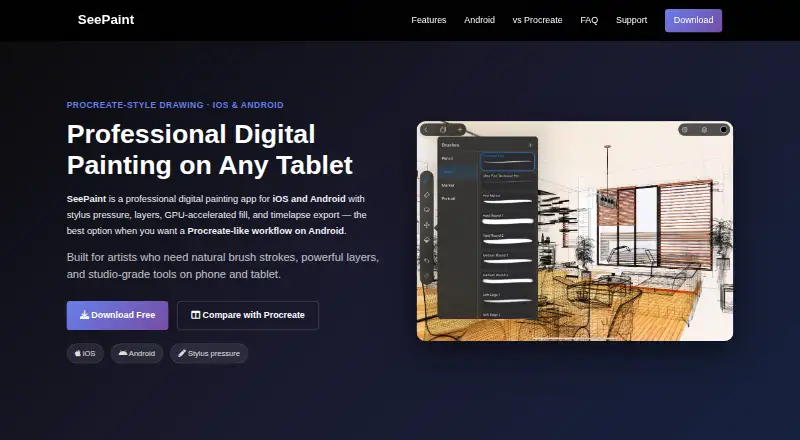
What SeePaint is
SeePaint is a digital painting app for iOS and Android, made by Laitu Technology for digital artists and illustrators. On supported devices, it uses Apple Pencil, S Pen, and other active styluses for pressure and tilt input. Layers include blend modes, opacity, transforms, and non-destructive editing. Drawing tools include straight, triangle, and circle rulers, GPU-accelerated flood fill, editable vector text layers, and magic wand and lasso selection. Built-in assistants include perspective guides, isometric and 2D grids, graph paper, dot grids, and triangle guides. The app can record the drawing process and export a shareable timelapse video. Finished work can be exported as PSD, TIFF, PDF, PNG, or JPEG, while native project files preserve layers, guides, and edits. PSD exports can be used in Photoshop, Clip Studio Paint, and SAI. The Android app runs on most phones and tablets with Android 7.0 or later. Artwork, brushes, palettes, and project files are stored locally by default. SeePaint is free to download; optional Pro products include monthly and yearly subscriptions and a lifetime purchase, with prices and availability varying by region.
Who it suits
SeePaint suits digital artists and illustrators who want mobile painting tools, layer editing, and stylus input. Android users should check that their device runs Android 7.0 or later.
What it does well
- Supports pressure and tilt with active styluses on supported devices.
- Native project files preserve layers, guides, and edits.
- Exports PSD, TIFF, PDF, PNG, and JPEG.
- Can record and export drawing timelapses.
- Artwork and project files are stored locally by default.
What to know first
- Optional Pro purchase prices and availability vary by region.
- Stylus pressure and tilt depend on supported devices.
- Android support is listed for Android 7.0 or later.
Limits
The free download includes the Free plan, while advanced features are unlocked through optional Pro products. Pro offerings include monthly, yearly, and lifetime purchases, with availability varying by region.
Plans
| Plan | Billed and limits | Price |
|---|---|---|
| Free | Free to download · optional Pro subscription unlocks advanced features | Free |
| Pro subscription | Optional paid products include monthly subscription, yearly subscription, and lifetime purchase · prices and availability may vary by region | On request |
As sketchflowlab.com lists them, read 9 Oct 2026. The maker's own page has the final word.
Getting started
- Download SeePaint on an iOS or Android device
- Use a supported Apple Pencil, S Pen, or active stylus if desired
- Create artwork with layers, guides, rulers, and selection tools
- Save projects in SeePaint's native format or export to a listed format
- Choose an optional monthly, yearly, or lifetime Pro purchase for advanced features
Verdict
SeePaint combines painting tools, guides, layers, and several export formats in mobile apps. It is free to download, while optional Pro purchases have region-dependent pricing and availability.
Questions
Is SeePaint free?
SeePaint has a free plan and is free to download. Optional Pro products unlock advanced features.
Which devices does it support?
SeePaint supports iOS and Android. The FAQ says the Android app runs on most phones and tablets using Android 7.0 or later.
What file formats can it export?
Exports include PSD, TIFF, PDF, PNG, and JPEG. Native project files preserve layers, guides, and edits.
Can SeePaint work with Photoshop?
PSD exports can be used in Photoshop, Clip Studio Paint, and SAI.
How is artwork stored?
Artwork, drawings, brushes, color palettes, and project files are stored locally on the device by default.
Who builds SeePaint?
Laitu Technology identifies itself as the builder of SeePaint.
Facts from SeePaint's own pages
- Analytics
- The terms say the app may collect limited analytics and device information through third-party SDK services and says this information is not used to personally identify users or sell their data. · sketchflowlab.com, 9 Oct 2026
- Billing
- The terms say Apple processes iOS in-app purchases and handles billing, refunds, and transaction records. · sketchflowlab.com, 9 Oct 2026
- Data storage
- The terms say artwork, drawings, brushes, color palettes, and project files are stored locally on the device by default. · sketchflowlab.com, 9 Oct 2026
- Device support
- The FAQ says the Android app runs on most Android 7.0 or later phones and tablets. · sketchflowlab.com, 9 Oct 2026
- Drawing tools
- It includes straight, triangle, and circle rulers, GPU-accelerated flood fill, editable vector text layers, and magic wand and lasso selection. · sketchflowlab.com, 9 Oct 2026
- File formats
- SeePaint supports export to PSD, TIFF, PDF, PNG, and JPEG, and its native project files preserve layers, guides, and edits. · sketchflowlab.com, 9 Oct 2026
- Guides
- Built-in drawing assistants include perspective guides, isometric and 2D grids, graph paper, dot grids, and triangle guides. · sketchflowlab.com, 9 Oct 2026
- Headquarters
- Hong Kong · sketchflowlab.com, 28 Sept 2026
- Integrations
- PSD exports can be used in Photoshop, Clip Studio Paint, and SAI. · sketchflowlab.com, 9 Oct 2026
- Layers
- Its layer system includes blend modes, opacity, transforms, and non-destructive editing. · sketchflowlab.com, 9 Oct 2026
- Maker and audience
- The maker identifies Laitu Technology as the builder and describes SeePaint as intended for digital artists and illustrators. · sketchflowlab.com, 9 Oct 2026
- Product
- SeePaint is a digital painting app for iOS and Android aimed at digital artists and illustrators. · sketchflowlab.com, 9 Oct 2026
- Stylus support
- It supports pressure and tilt with Apple Pencil, S Pen, and other active styluses on supported devices. · sketchflowlab.com, 9 Oct 2026
- Support
- The maker lists a support center, feedback form, and [email protected] for help and feedback. · sketchflowlab.com, 9 Oct 2026
- Timelapse
- The app can record the drawing process and export shareable timelapse videos. · sketchflowlab.com, 9 Oct 2026
Where SeePaint stands on Freedom251
- Digital Painting Software#27 of 46