BrowserOS neo
What BrowserOS neo is
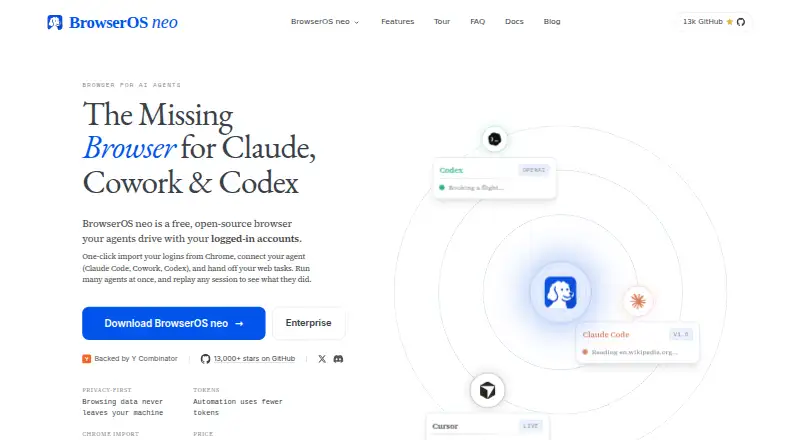
BrowserOS neo is a free, open-source browser that lets AI agents work through browser sessions already signed in on the user's machine. Agents can open tabs, navigate, click, and read pages, while multiple agents can work in separate tabs as the user continues browsing. It connects through MCP to tools including Claude Code, Claude Cowork, Cursor, Codex, VS Code, Zed, and GitHub Copilot. BrowserOS neo saves each run as a video that can be scrubbed and replayed. Its maker says sessions, screenshots, replays, settings, and logins remain on the local machine rather than being sent to a server it owns. It can import Chrome logins in one click and provides agents with compact page snapshots instead of raw HTML. The browser runs on Linux, macOS, and Windows and uses Chromium. It is licensed under AGPL-3.0. Users bring their own AI provider keys, and agents share existing signed-in sessions; per-agent profile isolation is listed as a roadmap item.
Who it suits
BrowserOS neo may suit people who want agents to use their existing signed-in browser sessions locally. It is available for Linux, macOS, and Windows, but requires users to supply AI provider keys.
What it does well
- Free and open source under AGPL-3.0
- Sessions and logins remain on the user's machine
- Multiple agents can work in separate tabs
- Runs on Linux, macOS, and Windows
What to know first
- Users must bring their own AI provider keys
- Agents share signed-in browser sessions
- Per-agent profile isolation is a roadmap item
Limits
The free plan requires your own AI provider keys. Agents share the browser's signed-in sessions; per-agent profile isolation is a roadmap item.
Plans
| Plan | Billed and limits | Price |
|---|---|---|
| BrowserOS neo | Free and open source under AGPL-3.0 · bring your own AI provider keys · runs locally | Free |
As browseros.ai lists them, read 7 Oct 2026. The maker's own page has the final word.
Getting started
- Visit https://browseros.ai/.
- Choose the version for Linux, macOS, or Windows.
- Bring your own AI provider keys.
- Connect a supported agent through MCP.
- Use the browser sessions you are signed into.
BrowserOS neo is a local, open-source Chromium browser that gives AI agents control of websites through your existing signed-in accounts. It suits technically confident users who want automation on their own computers and can provide separate AI-provider credentials. Its strongest case is private, replayable browser work; its biggest compromises are shared login sessions and the responsibility for those provider keys.
Overview
BrowserOS neo lets an agent open tabs, follow links, press controls, and read live pages as though it were operating your browser. Because it works inside sessions you already use, it can address practical tasks such as inbox administration, trip planning, comparing prices, searching for jobs, drafting marketing posts, and following up with sales leads. The same capability means you should only connect accounts where delegated actions are acceptable.
The software runs locally. Sessions, screenshots, replay videos, settings, and logins remain on your machine rather than being transmitted to a server operated by the maker. A one-click Chrome login import can reduce migration work for an existing Chrome user. Local storage is a substantial privacy advantage, but it also leaves setup, machine security, and account permissions in your hands.
Key features
MCP connections
BrowserOS neo connects to agents through MCP, including Claude Code, Claude Cowork, Cursor, Codex, VS Code, Zed, and GitHub Copilot. That broad set makes it useful when your preferred assistant already lives in one of those tools. You bring your own AI provider keys, so there is no bundled model allowance; the ongoing provider cost and key management are yours.
Concurrent work and replay
Several agents can work simultaneously in separate tabs while you continue browsing. This can shorten multi-step workloads, although all agents draw on the browser sessions already signed in. Every run is saved as a scrubbable video, giving you a practical way to review what happened or revisit a useful sequence rather than relying on a text log.
Token-conscious automation
The agent receives compact page snapshots instead of raw HTML and can batch actions in one call. That design is intended to reduce token use and can make repetitive navigation more economical with your chosen provider, though actual savings depend on that provider and the task.
Open-source, shared profiles
BrowserOS neo is released under AGPL-3.0, which is relevant to developers who want inspectable software or plan modifications. Agent profile isolation is on the roadmap rather than a current feature. Until then, agents share the browser's signed-in sessions, an important boundary for households, teams, or accounts with different permission levels.
Pricing
BrowserOS neo — free. The plan is free and open source under AGPL-3.0, runs locally, and requires you to bring your own AI provider keys. There is no free trial because the product is already free, and no separate paid tier or included provider quota is stated. It is a good fit for individuals who already pay for or otherwise have access to a compatible AI provider. It is less suitable if you want one subscription covering both browser automation and model usage.
Platforms
BrowserOS neo uses the Chromium engine and is offered for Linux, macOS, and Windows. The browser-agent entry specifically identifies macOS and Windows as supported platforms. Local execution is consistent across the product's privacy model, but the published platform information does not promise identical behavior across operating systems.
Who it's for
Choose it if you want agents to act in real, authenticated websites while keeping browser data on your own computer. Developers and automation-oriented users will benefit most from MCP support, open source, concurrent tabs, and replayable runs. It is a poor match for anyone seeking isolated profiles per agent, a hosted service that handles model access, or a turnkey experience without managing provider keys and account risk.
Pros and cons
Pros
- Local privacy: logins, settings, screenshots, sessions, and replays stay on your machine.
- Useful agent coverage: MCP links several major coding and assistant environments.
- Auditable runs: scrubbable video replays make agent activity easier to inspect.
- Parallel operation: separate tabs allow multiple agents to work while you browse.
- No software charge: the free AGPL-3.0 release lowers the barrier for personal use and experimentation.
Cons
- Shared logins: agents use existing browser sessions, while per-agent isolation remains a roadmap item.
- Bring your own keys: model access and its costs are separate from the browser.
- High account responsibility: an agent can act inside authenticated services, so mistakes affect real accounts.
- Platform ambiguity: the general listing includes Linux, but the browser-agent entry names only macOS and Windows.
Alternatives
BrowserOS is the closest alternative if you want a free, open-source browser with built-in AI agents across extension, Linux, macOS, and Windows. Norton Neo is a better choice for broad device coverage and included unlimited AI, with VPN allowances tied to its default-browser status. Pick Comet for a free, closed-source browser on Android, iOS, macOS, or Windows. Arc Search fits readers wanting a free mobile browser rather than local MCP automation. Aside suits users who prefer freemium routines with monthly credits and a bring-your-own subscription model. Genspark AI Browser offers a no-subscription, no-limit on-device tier, while its team plan costs $30 a month. MoltBrowser is another free-forever, fully open-source option. Polar is worth considering if starting credits, daily credits, and paid individual features matter more than an entirely local browser.
Verdict
BrowserOS neo is a strong recommendation for developers and privacy-conscious individuals who want MCP-connected agents to perform real browser tasks locally and leave a replay behind. Choose it for local control, open source, and transparent runs. Look elsewhere if shared authenticated sessions are unacceptable or if you want model access, quotas, and profile isolation included in a managed plan.
Verdict
BrowserOS neo combines local browser sessions with MCP connections to several AI agents and replayable runs. Its shared-session model and requirement for provider keys are important to consider.
Questions
How much does BrowserOS neo cost?
The plan is free and open source under AGPL-3.0.
Is there a free trial?
No. BrowserOS neo is listed as free, with no free trial.
Which platforms does it support?
Linux, macOS, and Windows are listed.
Which AI agents can connect?
It connects through MCP, including Claude Code, Claude Cowork, Cursor, Codex, VS Code, Zed, and GitHub Copilot.
Where does browser data stay?
The maker says sessions, screenshots, replays, settings, and logins remain on your machine and are not sent to a server it owns.
Do agents get separate browser profiles?
Agents use the browser sessions already signed in. Per-agent profile isolation is listed as a roadmap item.
Facts from BrowserOS neo's own pages
- Agent integrations
- The product connects to AI agents through MCP, including Claude Code, Claude Cowork, Cursor, Codex, VS Code, Zed, and GitHub Copilot. · browseros.ai, 7 Oct 2026
- Automation
- The agent receives compact page snapshots instead of raw HTML and can batch actions in one call, which the maker says uses fewer tokens. · browseros.ai, 7 Oct 2026
- Chrome import
- The homepage says BrowserOS neo can import logins from Chrome in one click. · browseros.ai, 7 Oct 2026
- Limit: AI provider
- Users bring their own AI provider keys. · browseros.ai, 7 Oct 2026
- Limit: shared logins
- Agents use the browser sessions already signed in, and per-agent profile isolation is listed as a roadmap item. · browseros.ai, 7 Oct 2026
- Live browsing
- Agents can open tabs, navigate, click, and read the web while signed in as you. · browseros.ai, 7 Oct 2026
- Local data
- The maker says sessions, screenshots, replays, settings, and logins remain on your machine and are not sent to a server it owns. · browseros.ai, 7 Oct 2026
- Open source
- BrowserOS neo is open source under the AGPL-3.0 license. · browseros.ai, 7 Oct 2026
- Parallel agents
- Multiple agents can work at once in their own tabs while you continue browsing. · browseros.ai, 7 Oct 2026
- Platforms
- It supports macOS, Windows, and Linux x64; Linux downloads are available as AppImage and DEB packages. · browseros.ai, 7 Oct 2026
- Session replay
- Each run is saved as a scrubbable video that can be replayed later. · browseros.ai, 7 Oct 2026
- Support
- The maker directs teams considering a rollout to contact the people who build BrowserOS neo. · browseros.ai, 7 Oct 2026
- Use cases
- The maker lists inbox productivity, trip planning, price comparison, job search, marketing posts, and sales follow-ups as use cases. · browseros.ai, 7 Oct 2026
- What it does
- BrowserOS neo is a free, open-source browser that lets AI agents browse using the accounts you are signed into. · browseros.ai, 7 Oct 2026
Where BrowserOS neo stands on Freedom251
- AI Browsers#6 of 23