
MoltBrowser
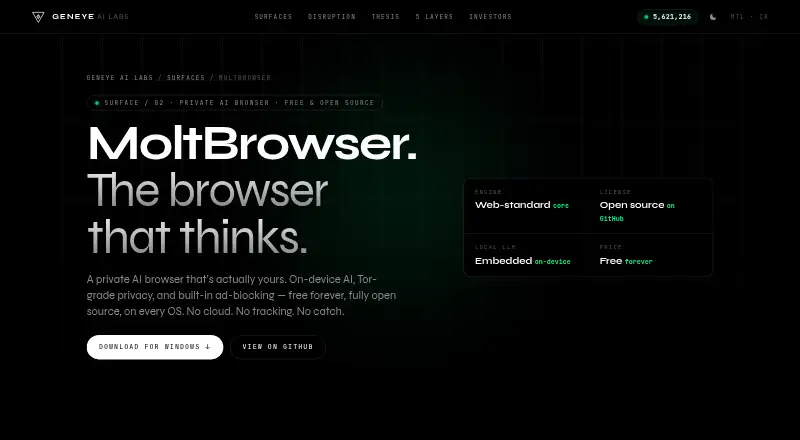
What MoltBrowser is
MoltBrowser is a free, open-source AI browser for macOS, Windows, and Linux, with a browser extension also listed. It runs open models such as Llama, Mistral, Phi, and Qwen locally; its README also documents the option to connect personal keys for OpenAI, Anthropic, Gemini, and OpenAI-compatible endpoints. Its page-aware AI can summarize articles, explain code, extract table data, and translate pages. A browser agent can click, scroll, navigate, and fill forms, with tasks that can be scheduled to run automatically.
The browser stores browsing memory and local AI conversations on the device, according to its maker. Conversation history can be searched, moved in or out as JSON, or deleted in one action. MoltNet routes traffic through Tor and offers exit-country selection. MoltShield blocks ads and trackers, including YouTube ads, and dismisses cookie-consent banners. The maker says MoltBrowser also alters device fingerprint signals and masks the user's IP address. Desktop builds are listed for Apple Silicon Macs, Windows 10/11 x64, and Linux x64; iOS and Android are in development. The project is GPLv3 licensed.
Who it suits
MoltBrowser suits people who want browser-based AI tools and automation, with locally run models and on-device browsing memory. It is also aimed at users seeking desktop access across macOS, Windows, or Linux and privacy features such as Tor routing and tracker blocking.
What it does well
- Runs several open models locally.
- AI can summarize, explain, extract, and translate.
- Agent can perform browser actions and scheduled tasks.
- Browsing memory stays on-device, according to the maker.
- Free and open source under GPLv3.
What to know first
- iOS and Android versions are still in development.
- Current release versions differ by platform.
- Free trial is not offered.
Limits
The free plan is listed as free forever and fully open source. No free-trial period is listed.
Plans
| Plan | Billed and limits | Price |
|---|---|---|
| Free forever | Free forever · fully open source | Free |
As geneye.ai lists them, read 7 Oct 2026. The maker's own page has the final word.
Getting started
- Open the MoltBrowser website.
- Choose a listed build for macOS, Windows, or Linux.
- Install the build for your platform.
- Use local open models, or connect a supported service with your own key.
Verdict
MoltBrowser combines page-aware AI, browser automation, and privacy features in a free desktop browser. Its mobile versions are still in development, and available release versions vary by platform.
Questions
How much does MoltBrowser cost?
Its Free forever plan is listed as free.
Is MoltBrowser open source?
Yes. It is described as fully open source, and its source code license is GPLv3.
Which platforms have desktop builds?
Builds are listed for macOS on Apple Silicon, Windows 10/11 x64, and Linux x64. The README notes that current release versions differ by platform.
Can I use my own AI service keys?
The README documents bring-your-own-key support for OpenAI, Anthropic, Gemini, and OpenAI-compatible endpoints.
Is there a mobile version?
The product page lists iOS and Android versions as in development.
Does MoltBrowser offer a free trial?
No free trial is listed; the pricing details show a free plan.
Facts from MoltBrowser's own pages
- Ad and tracker blocking
- MoltShield blocks ads, trackers, and YouTube ads using EasyList/uBlock filters and auto-dismisses cookie-consent banners. · geneye.ai, 7 Oct 2026
- AI models
- It runs open models such as Llama, Mistral, Phi, and Qwen locally, and its GitHub README also documents bring-your-own-key support for OpenAI, Anthropic, Gemini, and OpenAI-compatible endpoints. · github.com, 7 Oct 2026
- AI tools
- Its page-aware AI can summarize articles, explain code, extract table data, and translate pages. · geneye.ai, 7 Oct 2026
- Automation
- Its agent can click, scroll, navigate, and fill forms, with tasks that can be scheduled to run automatically. · geneye.ai, 7 Oct 2026
- Available desktop builds
- Download builds are listed for macOS on Apple Silicon, Windows 10/11 x64, and Linux x64; the README notes that current release versions differ by platform. · github.com, 7 Oct 2026
- Data portability
- AI conversation history can be searched and exported or imported as JSON, and stored data can be wiped in one click. · geneye.ai, 7 Oct 2026
- Extensions
- The product page advertises full Chrome extension compatibility; the GitHub README says it supports standard web-extension APIs and browser.ai.* APIs. · geneye.ai, 7 Oct 2026
- Fingerprint protection
- The maker says MoltBrowser scrambles device fingerprint signals and masks the user's IP address. · geneye.ai, 7 Oct 2026
- Founded
- 2025 · geneye.ai, 28 Sept 2026
- Headquarters
- Montréal, Canada · geneye.ai, 28 Sept 2026
- License
- The GitHub README identifies the source code license as GPLv3. · github.com, 7 Oct 2026
- Local memory
- MoltBrowser stores a personal memory of browsing activity on the device. · geneye.ai, 7 Oct 2026
- Mobile status
- The product page lists iOS and Android as in development. · geneye.ai, 7 Oct 2026
- Network privacy
- MoltNet routes traffic over Tor and lets users select an exit country from the menu bar. · geneye.ai, 7 Oct 2026
- Privacy
- The maker says local AI conversations stay on the computer and browsing memory is stored on-device. · geneye.ai, 7 Oct 2026
- Product
- MoltBrowser is an open-source AI browser with an embedded on-device model and built-in privacy features. · geneye.ai, 7 Oct 2026
- Support and contribution
- The project README welcomes contributions and says issues and pull requests are welcome. · github.com, 7 Oct 2026
Where MoltBrowser stands on Freedom251
- AI Browsers#8 of 23