Freedom251 › Letterhead Makers
Brother Creative Center
What Brother Creative Center is
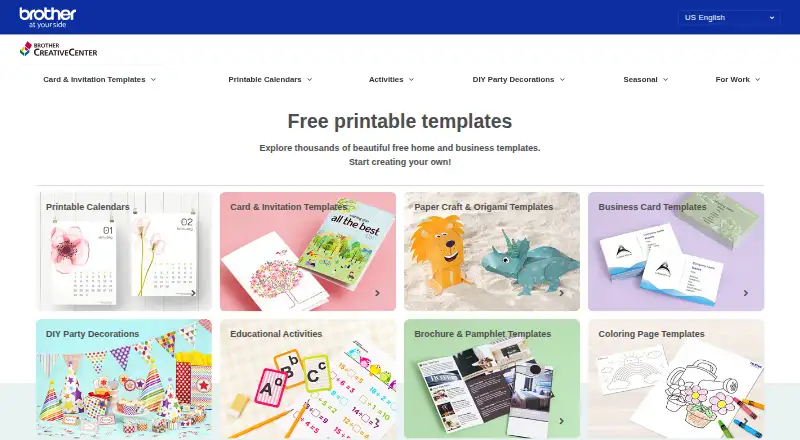
Brother Creative Center offers free printable projects for home, school, and work, with more than 2,000 templates. Users can personalize “Create Your Own” designs with photos, images, logos, and custom text; “Ready to Print” designs can be downloaded as PDFs. Categories include business cards, brochures, posters, greeting cards, invitations, party décor, and calendars. The browser editor is available on web, Android, and iOS, and templates can be printed on Brother or non-Brother printers. Brother describes the site as global and offers templates in 10 languages. Editing Create Your Own templates has listed requirements: Windows 10 with Edge or Chrome, iOS 11.2.5 with Safari, or Android 6.0.1 with Chrome. Adobe Reader is recommended for Ready to Print downloads to help avoid possible browser PDF viewer printing errors. Some content in certain countries requires a Brother Online account, and users may not sell or distribute content in the format provided by the platform for monetary gain. Brother says editable content will be discontinued on November 30, 2026; saved BCC files will no longer be accessible, while PDFs will remain available.
Who it suits
It suits people looking for printable designs for personal, school, or business projects. Users who rely on editable content should note the announced discontinuation and saved-file limitation.
What it does well
- More than 2,000 templates are free.
- Templates cover home, school, and work projects.
- Users can personalize designs with images and text.
- PDF downloads are available for Ready to Print designs.
- Templates can print on non-Brother printers.
What to know first
- Some content in certain countries requires an account.
- Editable content ends November 30, 2026.
- Saved BCC files will no longer be accessible.
Limits
The service is free, but some content in certain countries requires a Brother Online account. Brother says editable content will be discontinued on November 30, 2026, after which saved BCC files will no longer be accessible; PDF files will remain available.
Plans
| Plan | Billed and limits | Price |
|---|---|---|
| Free | All templates and decorations are free · more than 2,000 templates | Free |
As creativecenter.brother lists them, read 8 Oct 2026. The maker's own page has the final word.
Getting started
- Open https://www.creativecenter.brother/en-us
- Choose a Create Your Own template to personalize in the browser, or select a Ready to Print template
- For Create Your Own editing, use a listed supported browser and device configuration
- Add photos, images, logos, or custom text to an editable design
- Download a Ready to Print design as a PDF; Adobe Reader is recommended
- Print the design on a Brother or non-Brother printer
Overview
Brother Creative Center is a free browser-based library for creating printable projects for home, school, and work. It suits people who want a ready-made starting point for a physical print, especially a household or small business using a Brother or other printer. Its range is broad, but the planned end of editable content makes it a poor fit for projects that need to remain editable after November 30, 2026.
Key features
The library has more than 2,000 templates in two formats: “Create Your Own” designs to personalize, and “Ready to Print” files to download as PDFs. Categories range from business cards, brochures, and posters to greeting cards, invitations, party décor, and calendars. That breadth makes it useful for occasional print jobs across home and work without paying for a template subscription.
With Create Your Own, users can add photos, images, logos, and custom text in a browser editor, then print the result. The specified editing environments are Windows 10 with Edge or Chrome, iOS 11.2.5 with Safari, and Android 6.0.1 with Chrome. Those requirements matter for older devices or other browser setups. Ready to Print PDFs can be used without the editor; Brother recommends Adobe Reader to avoid possible print errors from browser PDF viewers.
Templates are printable on Brother and non-Brother printers, and the global site offers templates in 10 languages. Uploaded information is temporarily stored on Brother's server and deleted shortly after the visit or editing session ends. The terms say user information and data will not be shared outside the Brother group. Some content in certain countries requires a Brother Online account, and users may not sell or distribute content in the platform-provided format for monetary gain.
Brother plans to discontinue editable content on November 30, 2026. Saved BCC files will no longer be accessible, though PDF files will remain available. That change gives current users a clear reason to save finished work as PDF, while anyone choosing a tool for ongoing editable projects should look elsewhere.
Pricing
Free: free. The plan includes all templates and decorations, with more than 2,000 templates. There is no paid tier described, so the trade-off is the service's defined scope: printable template work, rather than a broader paid design offering. The editable-content discontinuation also shortens the useful life of projects kept in BCC format.
Platforms
Brother Creative Center is available on web, Android, and iOS, with editing through a browser. Ready to Print files download as PDFs. The stated editor requirements name specific operating systems and browsers, so platform availability alone does not guarantee that every device or browser combination supports Create Your Own editing.
Who it's for
This is a sensible choice for people who need free, practical printables for invitations, calendars, business cards, or similar projects and can save final work as PDF. It is less suitable for users who need to keep their designs editable over time, sell or redistribute the supplied content in its original format, or use content that requires an account in their country without one.
Pros and cons
- Pros: More than 2,000 templates and decorations are free, covering both home and business print needs.
- Pros: Users can personalize designs with their own photos, images, logos, and text, and print on non-Brother printers.
- Pros: Ready to Print templates are downloadable PDFs, which will remain available after editable content ends.
- Cons: Saved BCC files will become inaccessible after November 30, 2026, limiting the value of keeping work in the editable format.
- Cons: Editing depends on specific OS and browser combinations, and some country-specific content requires a Brother Online account.
- Cons: Content cannot be sold or distributed in the platform-provided format for monetary gain.
Alternatives
For a wider directory of options, browse Print Design Template Libraries. Choose FotoJet if you want freemium online collage making and basic editing tools across Linux, macOS, Windows, and web. Apollo's Templates is a fit for people seeking free downloads with no account, payment, signup, or watermark, plus personal and commercial use.
Canva offers a no-cost plan for one person with a core design editor and templates and content library. PosterMyWall may suit users who also want free downloads, social publishing, a content planner, and signup forms. PublishMedia is a different kind of option: its free tier opens and views Publisher and Office files, but does not edit or export them.
Visme offers a free Basic plan with 500 MB storage and 50 slides or pages per project. VistaCreate is another free option, with design templates, royalty-free photos, videos, and vectors, editing tools, and social media scheduling in its Starter plan. Adobe Express Video has a free plan with 25 generative credits per month, more than 155,000 templates, and 5 GB storage.
Verdict
Choose Brother Creative Center for a broad, free selection of printable templates that you can personalize and save as PDF, especially for one-off home, school, or business needs. Its printer flexibility and ready-to-print files are useful strengths. Look elsewhere if keeping editable projects accessible is central to your workflow: Brother's planned cutoff makes long-term reliance on its editor a poor bet.
Verdict
Brother Creative Center offers a broad set of free printable templates and browser editing. The planned end of editable content makes the remaining PDF availability especially relevant to users planning to save projects.
Questions
How much does Brother Creative Center cost?
The listed Free plan costs nothing. All templates and decorations are free.
What platforms does it support?
The listed platforms are Android, iOS, and web. Create Your Own editing has specific browser and device requirements.
What can I make with its templates?
Categories include business cards, brochures, posters, greeting cards, invitations, party décor, and calendars.
Can I use a printer that is not made by Brother?
Yes. Brother says templates can be printed on Brother and non-Brother printers.
What happens to editable content in 2026?
Brother says it will discontinue editable content on November 30, 2026. Saved BCC files will no longer be accessible, while PDF files will remain available.
Do I need an account?
Some content in certain countries requires a Brother Online account.
Facts from Brother Creative Center's own pages
- Browser and device requirements
- The FAQ lists Windows 10 with Edge or Chrome, iOS 11.2.5 with Safari, and Android 6.0.1 with Chrome for editing Create Your Own templates. · creativecenter.brother, 8 Oct 2026
- Editable designs
- Users can personalize templates with photos, images, logos, and custom text, then print them. · creativecenter.brother, 8 Oct 2026
- Founded
- 2007 · creativecenter.brother, 28 Sept 2026
- Headquarters
- Nagoya, Japan · creativecenter.brother, 28 Sept 2026
- Home and school
- The site offers printable templates for home, school, and work. · creativecenter.brother, 8 Oct 2026
- PDF requirement
- The FAQ recommends Adobe Reader to download Ready to Print templates and to avoid possible browser PDF viewer print errors. · creativecenter.brother, 8 Oct 2026
- Printer compatibility
- Templates can be printed on non-Brother printers as well as Brother printers. · creativecenter.brother, 8 Oct 2026
- Privacy and data sharing
- The terms say user information and data will not be shared outside the Brother group. · creativecenter.brother, 8 Oct 2026
- Project categories
- Templates include business cards, brochures, posters, greeting cards, invitations, party décor, and calendars. · creativecenter.brother, 8 Oct 2026
- Ready to print
- Ready to Print templates can be downloaded as PDF files. · creativecenter.brother, 8 Oct 2026
- Support
- The site lists a US phone number for questions about the editable-content discontinuation: 1-877-276-8437, Monday through Friday, 9 AM to 9 PM ET. · creativecenter.brother, 8 Oct 2026
- Supported languages
- Brother describes Creative Center as a global website offering templates in 10 languages. · creativecenter.brother, 8 Oct 2026
- Template types
- It offers over 2,000 templates in “Create Your Own” and “Ready to Print” formats. · creativecenter.brother, 8 Oct 2026
- Terms and limitations
- Some content in certain countries requires a Brother Online account, and users may not sell or distribute content in its platform-provided format for monetary gain. · creativecenter.brother, 8 Oct 2026
- Upcoming service change
- Brother says it will discontinue editable content on November 30, 2026; saved BCC files will no longer be accessible, while PDF files will remain available. · creativecenter.brother, 8 Oct 2026
- User data handling
- Uploaded user information is temporarily stored on Brother's Creative Center server and deleted shortly after the visit or editing session ends. · creativecenter.brother, 8 Oct 2026
- What it does
- Brother Creative Center provides free professionally designed printable projects for home and business use. · creativecenter.brother, 8 Oct 2026
Where Brother Creative Center stands on Freedom251
- Letterhead Makers#2 of 26
- Print Design Template Libraries#4 of 28