Freedom251 › Sales Appointment Scheduling Software
Booking Engine
What Booking Engine is
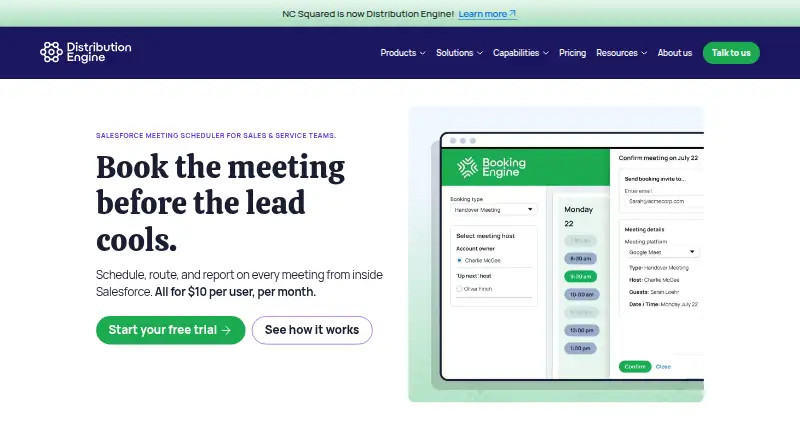
Booking Engine schedules and routes meetings from within Salesforce. It is a managed package that runs entirely in the customer’s Salesforce org, where sales and service representatives can book from Lead, Case, or Contact records using team availability and routing rules. Assignments can follow territory, account ownership, round robin, or next availability. Representatives can also share personal booking pages so customers can choose an open slot and confirm a meeting.
The service syncs calendars in both directions with Google Calendar and Microsoft Outlook, and generates meeting links for Google Meet, Microsoft Teams, and Zoom. Automatic reminders go to guests, who can reschedule or cancel in one click. Salesforce reports and dashboards show meeting KPIs such as bookings, no-shows, conversion, and reschedules. The maker says booking data, availability checks, and routing rules stay inside Salesforce and customer data does not leave the org.
Booking Engine costs $10 per user per month when billed annually, with a five-licence minimum. A 30-day production trial is available through Salesforce AppExchange without a credit card. The subscription includes onboarding and same-day support. It is web-based and is presented for sales and service teams, including SDRs, account executives, customer success representatives, and support agents.
Who it suits
Booking Engine suits sales and service teams that schedule customer meetings from Salesforce records and need routing based on territory, ownership, round robin, or availability. It is also a fit for teams that want booking activity and meeting outcomes in Salesforce reports and dashboards.
What it does well
- Books meetings from Salesforce Lead, Case, and Contact records.
- Routes meetings by territory, ownership, round robin, or availability.
- Syncs with Google Calendar and Microsoft Outlook in both directions.
- Creates links for Google Meet, Microsoft Teams, and Zoom.
- Tracks meeting KPIs in Salesforce reports and dashboards.
- Guests can reschedule or cancel from reminders in one click.
What to know first
- Requires Salesforce and does not work with HubSpot Sales Hub.
- Annual billing and a minimum of five licences apply.
- There is no free plan.
Limits
There is no free plan. The lowest listed paid plan is $10 per user per month billed annually, with a minimum of five licences.
Plans
| Plan | Billed and limits | Price |
|---|---|---|
| Standard | annually · all features included · minimum 5 licences · volume and nonprofit discounts · 30-day production trial | $10 a month |
| Booking Engine | Per user per month; pricing page says plans are billed annually · All features included · Minimum of 5 licences · Volume and nonprofit discounts available | $10 a month |
As distributionengine.com lists them, read 15 Oct 2026. The maker's own page has the final word.
Getting started
- Open the Booking Engine page on Salesforce AppExchange.
- Start the 30-day production trial without a credit card.
- Use Booking Engine within your Salesforce org.
- Set team availability and routing rules.
- Book meetings from Lead, Case, or Contact records, or share a personal booking page.
Verdict
Choose Booking Engine if your sales or service team works in Salesforce and wants scheduling, routing, reminders, and meeting reporting inside that org. Look elsewhere if you use HubSpot Sales Hub or need a free plan; paid access starts at five licences and is billed annually.
Questions
How much does Booking Engine cost?
The Booking Engine plan is $10 per user per month, billed annually, with a minimum of five licences. Volume and nonprofit discounts are available.
Is there a free plan or trial?
There is no free plan. A 30-day production trial is available through Salesforce AppExchange without a credit card.
Which platforms and calendars does it support?
Booking Engine is web-based. It syncs with Google Calendar and Microsoft Outlook in both directions.
Which video meeting services can it use?
It generates meeting links for Google Meet, Microsoft Teams, and Zoom.
Does it work with HubSpot Sales Hub?
No. Booking Engine does not work with HubSpot Sales Hub as the CRM.
Where does it keep booking data?
The maker says booking data, availability checks, and routing rules live inside the customer’s Salesforce org, and customer data does not leave that org.
Facts from Booking Engine's own pages
- Advanced routing
- Routing can use account ownership, territories, availability, skills, workload or round-robin logic. · help.distributionengine.com, 15 Oct 2026
- API and SDK availability
- The Booking Engine help section lists installation, configuration, bookings and releases, but does not list a public Booking Engine API or SDK section. · help.distributionengine.com, 15 Oct 2026
- AppExchange package type
- Salesforce identifies it as a Salesforce app with native-app, managed-package and Lightning App Builder characteristics. · appexchange.salesforce.com, 15 Oct 2026
- AppExchange trial terms
- The listing specifies a 30-day production trial, paid use after trial and a minimum order of five licences. · appexchange.salesforce.com, 15 Oct 2026
- AppExchange version
- Salesforce AppExchange lists Booking Engine version 4.1.1, last updated August 19, 2026, and first listed March 26, 2025. · appexchange.salesforce.com, 15 Oct 2026
- Booking
- Reps can book meetings from Salesforce Lead, Case, or Contact records using team availability and routing rules. · distributionengine.com, 7 Oct 2026
- Booking links
- Reps can share personal booking pages so customers can select an available slot and confirm a meeting. · distributionengine.com, 7 Oct 2026
- Booking templates
- Administrators can define booking types with duration, purpose, host rules and filters. · help.distributionengine.com, 15 Oct 2026
- Calendar integrations
- It supports two-way calendar sync with Google Calendar and Microsoft Outlook. · distributionengine.com, 7 Oct 2026
- Calendar synchronization
- Two-way synchronization is provided for Google Calendar and Microsoft Outlook. · distributionengine.com, 15 Oct 2026
- Company headquarters
- LinkedIn lists headquarters in London, England. · uk.linkedin.com, 15 Oct 2026
- Company size
- LinkedIn lists Distribution Engine as an 11–50 employee software-development company. · uk.linkedin.com, 15 Oct 2026
- CRM limitation
- Booking Engine does not work with HubSpot Sales Hub as the CRM. · distributionengine.com, 7 Oct 2026
- Data location
- The maker states that booking data, availability checks and routing rules remain in Salesforce and that data does not leave the org. · distributionengine.com, 15 Oct 2026
- Documentation scope
- The Booking Engine help center lists installation, 26 configuration articles, booking guidance and four latest-release articles. · help.distributionengine.com, 15 Oct 2026
- Founded
- LinkedIn lists the company as founded in 2011. · uk.linkedin.com, 15 Oct 2026
- Guest access
- Guests can select times through a web interface without having Salesforce accounts. · help.distributionengine.com, 15 Oct 2026
- Headquarters
- Wilmington, Delaware, United States; London, United Kingdom · distributionengine.com, 28 Sept 2026
- HubSpot limitation
- Booking Engine does not work with HubSpot Sales Hub as the CRM; HubSpot Marketing leads must first be pushed into Salesforce. · distributionengine.com, 15 Oct 2026
- In-record scheduling
- Users can book meetings directly from Salesforce Lead, Case or Contact records. · distributionengine.com, 15 Oct 2026
- Intended users
- The product is presented for sales and service teams, including SDRs, account executives, customer success reps, and support agents. · distributionengine.com, 7 Oct 2026
- Legal identity and ownership
- Distribution Engine is the trading name of NC Squared, Inc. and NC Squared Limited; the maker describes the business as employee-owned. · distributionengine.com, 15 Oct 2026
- Limit: assignment flexibility
- A G2 reviewer reports that assigning leads by some criteria is insufficiently flexible. · g2.com, 15 Oct 2026
- Limit: configuration visibility
- G2 reviewers say settings can be spread across screens or levels, making troubleshooting harder. · g2.com, 15 Oct 2026