Bluefish
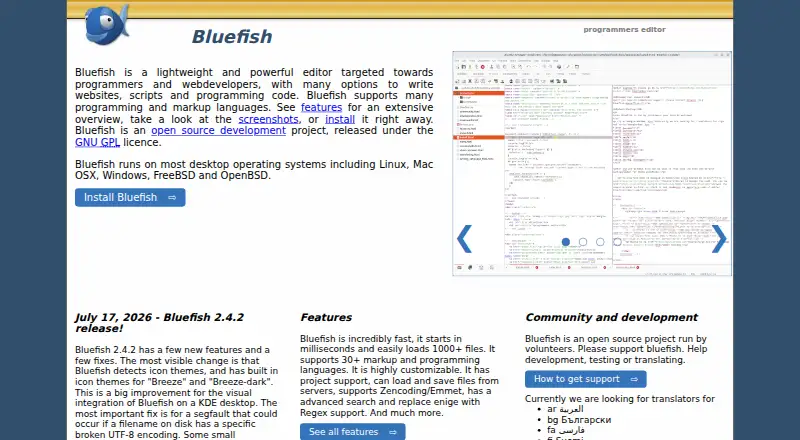
What Bluefish is
Bluefish is a free desktop editor for programmers and web developers building websites, scripts, and other code. It runs on Linux, macOS, and Windows and supports more than 30 markup and programming languages. Editing tools include regular-expression search and replace, code folding, auto-completion, and automatic tag closing. Its multi-document interface can open 1,000 or more documents, and the project says it has tested more than 10,000 open at once. Project support restores settings automatically. Through gvfs, users can work with remote files over FTP, SFTP, HTTP, HTTPS, WebDAV, CIFS, and other protocols. Bluefish can integrate with external tools such as make, lint, weblint, xmllint, tidy, and javac, or run custom programs and scripts. The project is open source under the GNU GPL. Community support is volunteer-run through a mailing list and bug tracker. One limitation applies to the Flatpak build: its strict security settings block links to certain system tools and the web browser, while Bluefish’s internal functions continue to work.
Who it suits
Bluefish suits programmers and web developers who want a desktop editor for code across Linux, macOS, or Windows. Its remote-file support and integrations may suit people working with external tools or files on other systems.
What it does well
- Free and released under the GNU GPL.
- Supports more than 30 markup and programming languages.
- Can open 1,000 or more documents.
- Works with remote files over several protocols.
- Integrates external tools and custom scripts.
What to know first
- Flatpak restrictions block integration with some system tools.
- Volunteer-run community support is provided through mailing lists and a bug tracker.
Plans
| Plan | Billed and limits | Price |
|---|---|---|
| Bluefish | GNU GPL software · desktop editor | Free |
As bluefish.sourceforge.io lists them, read 4 Oct 2026. The maker's own page has the final word.
Getting started
- Visit https://bluefish.sourceforge.io/.
- Choose the desktop version for Linux, macOS, or Windows.
- Install Bluefish using the available route for your platform.
- Open a project to have its settings restored automatically, or open files directly.
- If using the Flatpak build, account for its restrictions on system-tool and browser integration.
Overview
Bluefish is a lightweight desktop editor for programmers and web developers writing websites, scripts, and code. It suits people who want a free, open-source editor across Linux, macOS, or Windows, with broad language support and project-aware settings. Its breadth is a strength; the Flatpak build is a poor fit if your work relies on system tools or browser integration.
Key features
Bluefish supports more than 30 markup and programming languages, making it a flexible choice for people who move between web markup and code rather than focus on one language. Its multiple-document interface can open 1,000 or more documents; the project says more than 10,000 were tested simultaneously. That capacity may matter to users managing large collections of files, though it is not a reason by itself to choose Bluefish.
Project support automatically restores settings for each project, which helps keep work organized when switching between sites or codebases. Editing tools include regular-expression search and replace, code folding, auto-completion, and automatic tag closing. Together, these cover useful day-to-day editing needs without making Bluefish a full integrated development environment.
Through gvfs, Bluefish can work with remote files over FTP, SFTP, HTTP, HTTPS, WebDAV, CIFS, and other protocols. It can also integrate external programs such as make, lint, weblint, xmllint, tidy, and javac, or run custom programs and scripts. That combination suits workflows involving remote files and existing tools, with an important exception: the Flatpak build’s strict security restrictions block integration with system tools such as make, pylint, and weblint, as well as the web browser. Its internal functionality remains available, but users who depend on those integrations should choose another build or editor.
Pricing
Bluefish is free: the Bluefish plan costs nothing and provides GNU GPL software as a desktop editor. There is no paid tier or free trial to weigh against it. The GNU GPL license also makes Bluefish an open-source project, but community and support are volunteer-run through a mailing list and bug tracker. Commercial support can be requested from the project manager; it is not part of the free plan.
Platforms
Bluefish is a desktop editor for Linux, macOS, and Windows, with extension support and remote development. Platform choice matters most for the Flatpak build: its security restrictions can prevent the system-tool and browser integrations that distinguish a more connected workflow. The project describes those restrictions but states no security certification or compliance standard.
Who it's for
Bluefish is a sensible fit for web developers and programmers who want a free desktop editor that spans many languages, handles numerous open documents, restores project settings, and can work with remote files. Its external-tool support is valuable when the chosen build permits it. Users who need a fully integrated IDE, dependable system-tool access through Flatpak, or a support commitment beyond volunteer channels should look elsewhere.
Pros and cons
- Pro: More than 30 markup and programming languages make it useful across varied web and coding tasks.
- Pro: Project settings restore automatically, and remote-file support covers FTP, SFTP, HTTP, HTTPS, WebDAV, CIFS, and other protocols.
- Pro: It is free, open source under the GNU GPL, and runs on Linux, macOS, and Windows.
- Con: The Flatpak build blocks integration with system tools and the web browser, limiting its usefulness for workflows that depend on them.
- Con: Support is volunteer-run through a mailing list and bug tracker; commercial support requires contacting the project manager.
Alternatives
Choose Code editors to compare a broader set of editors, or PHP IDEs if PHP-focused options are your priority.
- PaizaCloud Cloud IDE is a paid, multi-platform option with a free plan that provides one server, a lifetime of up to 24 hours, and up to four hours of continuous running while the browser is open; consider it if that browser-open server workflow fits better than a desktop editor.
- ICEcoder is a free, browser-based code editor with an MIT-licensed IDE framework, making it an alternative for readers who prefer browser-based editing.
- Visual Studio Code is a free editor for Linux, macOS, Windows, and the web; consider it if you want to compare another free option across those platforms.
- Zed offers a free Personal plan with 2,000 accepted edit predictions and external-agent or API-key support; its free-forever terms make it worth considering if those capabilities matter to you.
- Apache NetBeans is free for commercial and non-commercial use under the Apache License 2.0; choose it if those license terms suit your use better than Bluefish’s GNU GPL.
- CodeLite is a free GPLv2 IDE whose plugin exception allows separately developed plugins to use any license; consider it if that IDE and plugin licensing model fits your needs.
- Eclipse PHP Development Tools is a free, open-source PHP IDE framework for Eclipse, making it a more directly PHP-oriented alternative.
- Geany is free downloadable software under the GNU General Public License version 2 or later; consider it if that licensing and distribution model is a better fit.
Verdict
Choose Bluefish if you want a free, cross-platform desktop editor with broad language coverage, automatic project settings, and remote-file access. Its strongest case is the range of editing and connection options in an open-source package. Look elsewhere if you depend on system tools or browser integration in the Flatpak build, or need more than volunteer-run support.
Verdict
Bluefish offers broad language support, project settings, remote-file access, and integrations in a free desktop editor. Check the Flatpak limitation if your workflow depends on system tools or a browser integration.
Questions
Is Bluefish free?
Yes. The Bluefish plan is listed as free, and the project is released under the GNU GPL license.
Which operating systems does Bluefish support?
Bluefish is available for Linux, macOS, and Windows.
Is Bluefish open source?
Yes. It is an open-source project released under the GNU GPL license.
Can Bluefish work with remote files?
Yes. Using gvfs, it supports FTP, SFTP, HTTP, HTTPS, WebDAV, CIFS, and other protocols.
What is the Flatpak limitation?
Its strict security restrictions block integration with system tools such as make, pylint, and weblint, and with the web browser. Internal functionality works as expected.
What support is available?
Community and support are volunteer-run through a mailing list and bug tracker. The project says commercial support can be requested by contacting its project manager.
Facts from Bluefish's own pages
- Documents
- Its multiple document interface can open 1,000 or more documents; the features page says more than 10,000 were tested simultaneously. · bluefish.sourceforge.io, 4 Oct 2026
- Editing tools
- Features include regular expression search and replace, code folding, auto-completion, and auto-tag-closing. · bluefish.sourceforge.io, 4 Oct 2026
- External tools
- Users can integrate external programs such as make, lint, weblint, xmllint, tidy, and javac, or run custom programs and scripts. · bluefish.sourceforge.io, 4 Oct 2026
- Flatpak limitation
- The Flatpak build's strict security blocks integration with system tools such as make, pylint, weblint, and the web browser, while internal functionality works as expected. · bluefish.sourceforge.io, 4 Oct 2026
- Founded
- 1998 · bluefish.sourceforge.io, 28 Sept 2026
- History
- The project history says Bluefish was started by Olivier Sessink, Chris Mazuc, and Neil Millar in 1998. · bluefish.sourceforge.io, 4 Oct 2026
- Languages
- Bluefish supports more than 30 markup and programming languages. · bluefish.sourceforge.io, 4 Oct 2026
- License
- Bluefish is an open source project released under the GNU GPL license. · bluefish.sourceforge.io, 4 Oct 2026
- Platforms
- The project says Bluefish runs on Linux, Mac OS X, Windows, FreeBSD, and OpenBSD; installers are listed for Linux distributions, macOS, and 64-bit Windows. · bluefish.sourceforge.io, 4 Oct 2026
- Projects
- Project support restores settings for each project automatically. · bluefish.sourceforge.io, 4 Oct 2026
- Purpose
- Bluefish is a lightweight editor for programmers and web developers to write websites, scripts, and programming code. · bluefish.sourceforge.io, 4 Oct 2026
- Remote files
- Using gvfs, Bluefish supports remote files over FTP, SFTP, HTTP, HTTPS, WebDAV, CIFS, and other protocols. · bluefish.sourceforge.io, 4 Oct 2026
- Security
- The project page describes the Flatpak build's strict security restrictions but does not state a security certification or compliance standard. · bluefish.sourceforge.io, 4 Oct 2026
- Support
- Community and support are volunteer-run through a mailing list and bug tracker; the project says commercial support can be requested by contacting its project manager. · bluefish.sourceforge.io, 4 Oct 2026
Where Bluefish stands on Freedom251
- PHP IDEs#3 of 23
- Code editors#27 of 45