Freedom251 › Restaurant Catering Software
BEO HQ
What BEO HQ is
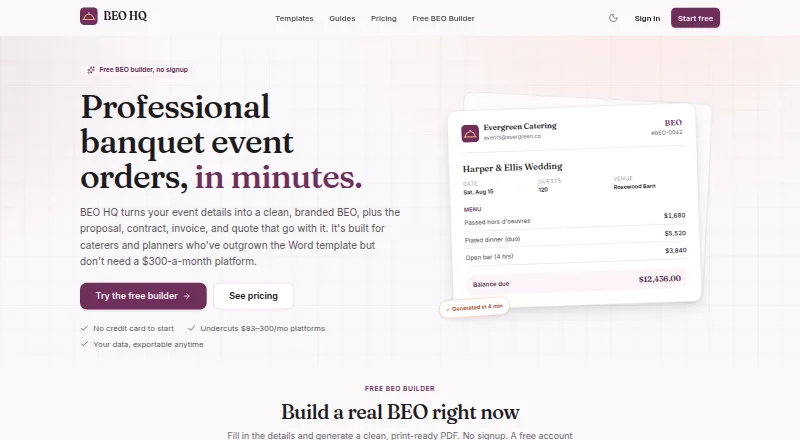
BEO HQ turns event details into banquet event orders and related catering documents. A shared set of event information can generate BEOs, proposals, contracts, invoices, and quotes, while the builder calculates service charges, taxes, deposits, and balances. Users can save client, venue, and menu records and duplicate past events. The menu library supports courses, per-person or per-item pricing, and dietary and allergen flags. Starter includes QuickBooks and CSV export; Pro adds client approval links and e-signatures with an audit trail. BEO HQ says it does not process payments, so customers retain their own payment setup. The company describes the web product as built for solo caterers and independent planners. The free plan is limited to one BEO and one catering invoice, and its PDFs carry a small BEO HQ footer credit. Starter costs $19 a month and Pro costs $39 a month. The first paid subscription has a 30-day money-back guarantee, once per customer.
Who it suits
BEO HQ is intended for solo caterers and independent planners who prepare event orders and related documents. Its reusable records and menu tools suit repeat event workflows.
What it does well
- Creates BEOs, proposals, contracts, invoices, and quotes.
- Calculates service charges, taxes, deposits, and balances.
- Reusable client, venue, and menu records.
- Starter includes QuickBooks and CSV export.
- Pro offers e-signatures with an audit trail.
What to know first
- Free plan allows one BEO and one invoice.
- Free-plan PDFs include a BEO HQ footer credit.
- Does not process payments.
- Staff scheduling is not included.
Limits
The free plan allows one BEO and one catering invoice, and its PDFs include a small BEO HQ footer credit. Starter is $19 a month; Pro is $39 a month.
Plans
| Plan | Billed and limits | Price |
|---|---|---|
| Free | forever · 1 banquet event order · 1 catering invoice · PDF has small BEO HQ footer credit | Free |
| Starter | monthly · Unlimited BEOs, invoices, proposals, contracts and quotes · kitchen sheets · packing lists · payment schedules · watermark-free PDFs · reusable clients, venues and menus · duplicate-last-event · calendar feed · QuickBooks and CSV export | $19 a month |
| Starter annual | annually · Starter features | $190 a year |
| Pro | monthly · Everything in Starter · e-signature with audit trail · client approval links · custom branding and logo · change-log and versioning · unlimited team members | $39 a month |
| Pro annual | annually · Pro features | $390 a year |
As beohq.com lists them, read 20 Oct 2026. The maker's own page has the final word.
Getting started
- Visit the BEO HQ website.
- Start with the free plan or use the listed 14-day trial.
- Enter event details to create banquet event orders and related documents.
- Save client, venue and menu records for reuse.
- Choose Starter at $19 a month for unlimited documents, kitchen sheets, packing lists, QuickBooks and CSV export.
- Choose Pro at $39 a month for e-signatures, approval links, custom branding and unlimited team members.
Overview
BEO HQ is a web-based catering document and event-planning tool for solo caterers and independent planners. It is strongest when one event’s details need to carry through several documents and calculations; it is not a payment processor or a staff-scheduling system.
Key features
BEOs, proposals, contracts, invoices, and quotes are generated from shared event data, helping keep the paperwork for an event together rather than rebuilding its details for each document. The builder calculates service charges, taxes, deposits, and balances, which makes it useful for preparing event totals while leaving payment collection to the customer’s existing setup.
Saved client, venue, and menu records, plus the ability to duplicate a past event, suit businesses handling repeat clients or similar bookings. Menus can be organized by course, priced per person or per item, and marked for dietary and allergen details. Starter adds kitchen sheets and packing lists; Pro adds shareable approval links and e-signatures with an audit trail.
BEO HQ says users can import and export freely and take their documents and financials with them. The terms identify Stripe for payments and Supabase, Vercel, and Cloudflare for infrastructure. Questions can be sent to [email protected].
Pricing
The Free plan costs nothing and permits one banquet event order and one catering invoice. Its PDFs carry a small BEO HQ footer credit, so it works as a narrow starting point, not a sustainable option for a busy operation.
Starter costs $19 a month, billed monthly. It removes the document cap and adds kitchen sheets, packing lists, reusable clients, venues, and a menu library, plus QuickBooks and CSV export. It is the practical fit for a solo operator who needs ongoing document production and exports but does not need client sign-off inside the product.
Pro costs $39 a month, billed monthly. It includes Starter features, e-signatures, client approval links, custom branding, and unlimited team members. Those additions make the higher tier relevant when approvals, signed documents, or a larger team are part of the workflow; a solo caterer who can manage approvals elsewhere may not need to pay the difference.
A 14-day trial is available. The first paid subscription has a 30-day money-back guarantee, once per customer. Neither paid plan processes payments, so businesses must retain their own payment setup.
Platforms
BEO HQ runs on the web. It does not offer staff scheduling or payment processing, so teams needing either as part of the same system should look elsewhere.
Who it's for
BEO HQ is best suited to solo caterers and independent planners who want event documents, menu details, and calculations tied to a shared event record. Starter is the sensible choice for regular use; Pro suits teams or businesses that want customer approvals and signatures built into the document flow. The one-order, one-invoice free cap is better for a limited trial than ongoing work.
Pros and cons
- Pro: Shared event details feed five document types, reducing the need to rebuild an event for each piece of paperwork.
- Pro: Reusable records and event duplication support recurring clients and bookings.
- Pro: Starter includes QuickBooks and CSV export, while the company says users can import and export freely.
- Con: The free plan allows just one BEO and one catering invoice, and its PDFs carry a product footer credit.
- Con: Payment processing and staff scheduling are not included, leaving those workflows outside BEO HQ.
Alternatives
For a broader category search, browse Restaurant Catering Software. CaterOps, Catertoo, and Puree are also web-based freemium options with free plans. Choose Agilysys Sales & Catering if a paid web product is a better fit; pricing requires contacting Agilysys for a demo.
Caterease is worth considering if you need software across Android, iOS, macOS, web, and Windows; it has no free plan, and its Enhance modules cost $25 a month each when billed annually. ChefDesk is a paid option with a free trial across Android, iOS, macOS, web, and Windows; its pricing is based on outlets and modules. BuildMenu is another paid web option. CaterFlow is a paid alternative with a free trial on Android, iOS, and web.
Verdict
Choose BEO HQ if you are a solo caterer or independent planner who wants recurring event paperwork and calculations organized around one set of details, with Starter providing unlimited documents at $19 a month. Look elsewhere if you need payment processing, staff scheduling, or a free plan that can handle more than one BEO and one catering invoice.
Verdict
BEO HQ organizes catering documents and calculations around shared event details, with approvals and signatures on Pro. The free plan is tightly capped, and users need their own payment setup.
Questions
What does BEO HQ cost?
The Free plan costs nothing. Starter is $19 a month, and Pro is $39 a month. A 14-day trial is listed.
What is included in the free plan?
It allows one banquet event order and one catering invoice. PDFs include a small BEO HQ footer credit.
What platforms does BEO HQ support?
BEO HQ runs on the web.
Which plan includes QuickBooks and CSV export?
Starter includes QuickBooks and CSV export.
Does BEO HQ process payments?
No. BEO HQ says customers keep their own payment setup.
What does Pro add?
Pro adds e-signatures, client approval links, custom branding and unlimited team members. Its e-signatures include an audit trail.
Facts from BEO HQ's own pages
- Age requirement
- The service requires users to be at least 18 years old. · beohq.com, 20 Oct 2026
- Authorized persons
- The filing lists Brandon Rodrigues and Danielle Rodrigues as authorized members. · search.sunbiz.org, 20 Oct 2026
- Automatic calculations
- The builder calculates service charges, taxes, deposits, balances and per-guest totals. · beohq.com, 20 Oct 2026
- Branded PDFs
- The product exports print-ready BEO PDFs with three layouts, a logo and business colors. · beohq.com, 20 Oct 2026
- Calculations
- The builder calculates service charges, taxes, deposits, and balances. · beohq.com, 28 Sept 2026
- Calendar statuses
- A calendar shows events by date and stage from inquiry through completed, with running totals. · beohq.com, 20 Oct 2026
- Client approvals
- Pro provides shareable approval links through which clients can view, approve and sign documents. · beohq.com, 20 Oct 2026
- Company status
- The Florida Division of Corporations lists Handler Labs LLC as active. · search.sunbiz.org, 20 Oct 2026
- Data portability
- The company says users can import and export documents and financial data freely. · beohq.com, 20 Oct 2026
- Documents
- The product generates BEOs, proposals, contracts, invoices, and quotes from the same event data. · beohq.com, 28 Sept 2026
- Duplicate events
- A previous event can be cloned and edited for repeat formats. · beohq.com, 20 Oct 2026
- E-signatures
- Pro captures typed or drawn signatures and keeps an audit trail. · beohq.com, 20 Oct 2026
- Focus
- The maker positions BEO HQ for solo caterers and independent planners who need focused event documents rather than a full CRM. · beohq.com, 20 Oct 2026
- Founded
- The Florida filing shows an effective date of May 25, 2026 and a filing date of May 26, 2026. · search.sunbiz.org, 20 Oct 2026
- Funding
- Handler Labs says it is independent and self-funded with no investors. · handlerlabs.app, 20 Oct 2026
- Headquarters
- The state filing lists 5510 NW 38th Terrace, Coconut Creek, Florida 33073 as the principal and mailing address. · search.sunbiz.org, 20 Oct 2026
- Integrations
- Starter lists QuickBooks and CSV export for invoices and quotes. · beohq.com, 20 Oct 2026
- Integrations and exports
- Starter includes QuickBooks and CSV export. · beohq.com, 28 Sept 2026
- Intended users
- BEO HQ describes itself as built for solo caterers and independent planners. · beohq.com, 28 Sept 2026
- Kitchen documents
- Starter includes kitchen sheets and packing lists generated from event data. · beohq.com, 20 Oct 2026
- Legal disclaimer
- BEO HQ states that it is a document-preparation tool and does not provide legal, financial or tax advice. · beohq.com, 20 Oct 2026
- Legal entity
- Florida records identify the maker as HANDLER LABS LLC, a Florida limited liability company. · search.sunbiz.org, 20 Oct 2026
- Limit: free tier
- The free plan is limited to one BEO and one catering invoice, and its PDF carries a BEO HQ footer credit. · beohq.com, 20 Oct 2026
- Limit: operational depth
- BEO HQ deliberately excludes recipe costing, staff scheduling and inventory functions found in larger catering suites. · beohq.com, 20 Oct 2026
Where BEO HQ stands on Freedom251
- Restaurant Catering Software#3 of 33