Freedom251 › Minecraft Datapack Generators

Beet
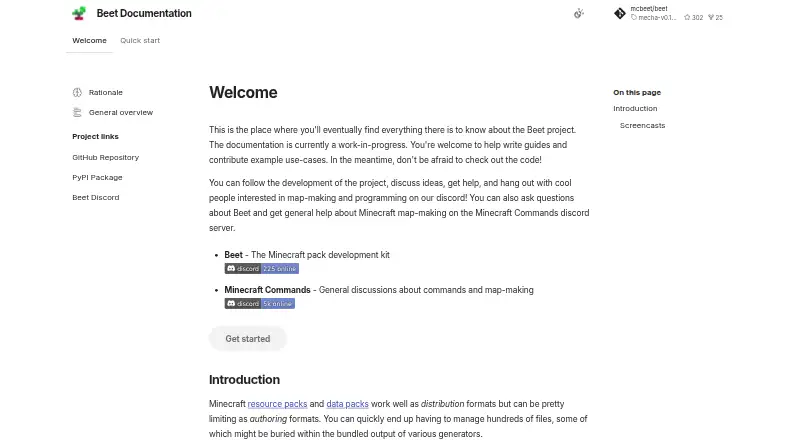
What Beet is
Beet is a free, open-source toolkit for developing Minecraft data packs and resource packs. It brings both pack types into one pipeline, and its library can create, read, edit, and merge zipped or unzipped packs. Files load only when needed; the documentation says this approach lets Beet handle packs with thousands of files instantly. Plugins can inspect, modify, transform, or generate pack resources during builds. The toolchain supports configurable builds, release workflows, watch mode, and linking generated packs to Minecraft. Beet provides a statically typed Python API with autocompletion and first-class pytest integration. Its documentation also describes integration with Sandstone, a Node.js and TypeScript framework for writing Minecraft commands. Beet is installed as a Python package using pip or uv, so Python and a Python package manager are prerequisites. Installation instructions cover Windows, macOS, and Linux. The project is MIT-licensed. The maker describes its documentation as a work in progress and invites contributions to guides and use cases.
Who it suits
Beet suits developers building or maintaining Minecraft data packs and resource packs, especially those who want a Python-based build pipeline and plugin system. Users need Python and a Python package manager before installing it.
What it does well
- Combines data pack and resource pack workflows.
- Plugins can transform or generate pack resources.
- Provides a typed Python API with autocompletion.
- Supports configurable builds and watch mode.
- Free and MIT-licensed.
What to know first
- Requires Python and a Python package manager.
- Documentation is a work in progress.
Plans
| Plan | Billed and limits | Price |
|---|---|---|
| Beet | Open-source Minecraft pack development kit | Free |
As mcbeet.dev lists them, read 4 Oct 2026. The maker's own page has the final word.
Getting started
- Visit https://mcbeet.dev/ and review the installation guide.
- Install Python and a Python package manager.
- Install Beet as a Python package with pip or uv.
- Follow the instructions for Windows, macOS, or Linux.
- Use Beet’s build workflow to create or manage packs.
Beet is a Python toolkit for developing Minecraft data packs and resource packs. It is best suited to developers who want programmable pack management and repeatable builds. Its unified pipeline and plugin system are compelling, but the Python prerequisite and work-in-progress documentation make it a less direct fit for newcomers.
Overview
Beet brings data-pack and resource-pack development into one toolchain, with a library for creating, reading, editing, and merging zipped or unzipped packs. That breadth is useful for projects that need pack operations automated rather than handled through a simple visual editor. The MIT-licensed project is free and open source.
Key features
Files load only when needed; the documentation says this lets Beet load packs with thousands of files instantly. That approach is a practical advantage for large packs, while plugins can inspect, modify, transform, or generate resources within the build pipeline. Configurable builds, release workflows, watch mode, and linking generated packs to Minecraft cover several stages of a development workflow.
The statically typed Python API includes autocompletion and first-class pytest integration, making Beet a stronger fit for developers who want pack tooling in a code-driven workflow. It also integrates with Sandstone, a Node.js and TypeScript framework for writing Minecraft commands. That connection may suit teams already using Sandstone, though Beet itself requires Python and a Python package manager, installed through pip or uv.
Beet supports function generation and both export formats. Its maker describes the documentation as a work in progress and invites contributions to guides and use cases. That caveat matters for users who rely on polished onboarding material; discussion and help are available through Beet Discord, with Minecraft Commands Discord serving broader map-making questions.
Pricing
Beet is free and open source. The Beet plan costs nothing and is described as an open-source Minecraft pack development kit. There is no paid tier described, so the core toolkit does not require a subscription. Users do need Python and a Python package manager before installing it.
Platforms
Beet supports Linux, macOS, and Windows. Its installation guide covers all three, but installation depends on having Python and a package manager in place.
Who it's for
Beet is a good choice for Minecraft pack developers comfortable with Python who want to automate pack changes, build configurable workflows, or extend processing through plugins. Its pytest integration and typed API also suit projects that treat pack work as software development. It is less suitable for someone seeking a point-and-click editor or a beginner-friendly setup with fully finished documentation.
Pros and cons
- Pros: One pipeline handles data and resource packs, including zipped and unzipped files.
- Pros: Plugins, configurable builds, release workflows, and watch mode support automation beyond basic editing.
- Pros: Free, open-source access across Linux, macOS, and Windows.
- Cons: Python and a package manager are prerequisites, adding setup for users who do not already work in Python.
- Cons: Work-in-progress documentation may leave newcomers wanting more complete guides.
Alternatives
For a wider set of tools, browse Minecraft Datapack Generators.
- Orca Minecraft Datapack Generator is worth considering if you prefer a freemium option that also runs on the web; its free plan includes 200 starter credits.
- Datapack Editor is another free option for Windows and Debian Linux users, with macOS support described as experimental and a stated Minecraft range of 1.20.2–1.20.6.
- Minecraft Datapack Compiler is a free alternative for users looking for a compiler, with versions for desktop platforms and an extension.
- Minecraft Datapack Language is a free, open-source option available through API, extension, and desktop platforms.
- Codexe Datapack Generator is a web-based freemium alternative whose free plan is billed free forever and includes 50K tokens.
- MCDatapacker is a free option for Linux and Windows users who want the core job without a paid tier.
- PackForge is a web-based freemium alternative with two free generations per month and a Crafter plan at $7.99 a month.
- RedScript is a free alternative available as an extension, on desktop platforms, and on the web.
Verdict
Choose Beet if you want a free Python toolkit that unifies pack management with extensible, configurable build workflows. Its main advantage is the programmable pipeline; look elsewhere if you need a point-and-click experience or more finished documentation to guide setup.
Verdict
Beet offers pack management, plugins, and configurable build workflows in a Python toolkit. Its documented integration with Sandstone and its work-in-progress documentation are worth considering when planning a setup.
Questions
Does Beet cost anything?
No. Beet is listed as a free, open-source Minecraft pack development kit.
What does Beet do?
It provides a shared pipeline and library for creating, reading, editing, and merging Minecraft data packs and resource packs.
Which platforms have installation instructions?
The installation guide covers Windows, macOS, and Linux.
What do I need before installing Beet?
You need Python and a Python package manager. Beet can be installed with pip or uv.
Is Beet open source?
Yes. The project is open source and its repository identifies the license as MIT.
Does Beet integrate with other tools?
Its documentation describes integration with Sandstone, a Node.js and TypeScript framework for writing Minecraft commands.
Facts from Beet's own pages
- Build workflows
- The toolchain supports configurable builds, release workflows, watch mode, and linking generated packs to Minecraft. · github.com, 4 Oct 2026
- Documentation status
- The maker describes the documentation as a work in progress and invites contributions to guides and use cases. · mcbeet.dev, 4 Oct 2026
- Installation
- Beet is a Python package installed with pip or uv, and requires Python and a Python package manager. · mcbeet.dev, 4 Oct 2026
- Integrations
- The documentation describes integration with Sandstone, a Node.js and TypeScript framework for writing Minecraft commands. · mcbeet.dev, 4 Oct 2026
- Lazy file handling
- Files are loaded transparently when needed, and the documentation says this lets Beet load packs with thousands of files instantly. · mcbeet.dev, 4 Oct 2026
- License
- The GitHub repository identifies the project license as MIT. · github.com, 4 Oct 2026
- Pack operations
- Its library can create, read, edit, and merge resource packs and data packs, including zipped and unzipped packs. · github.com, 4 Oct 2026
- Plugin system
- Plugins can inspect, modify, transform, or generate pack resources as part of the build pipeline. · mcbeet.dev, 4 Oct 2026
- Prerequisite
- Users need Python and a Python package manager installed before installing Beet. · mcbeet.dev, 4 Oct 2026
- Purpose
- Beet is a development toolkit for working with Minecraft data packs and resource packs. · mcbeet.dev, 4 Oct 2026
- Python API
- Beet provides a statically typed API with autocompletion and first-class pytest integration. · github.com, 4 Oct 2026
- Support
- The project documentation points users to Beet Discord for discussion and help and to Minecraft Commands Discord for general Minecraft map-making help. · mcbeet.dev, 4 Oct 2026
- Supported installation systems
- The installation guide provides instructions for Windows, macOS, and Linux. · mcbeet.dev, 4 Oct 2026
- Unified pipeline
- Beet brings data pack and resource pack tooling together in one pipeline. · mcbeet.dev, 4 Oct 2026
Where Beet stands on Freedom251
- Minecraft Datapack Generators#2 of 22