Freedom251 › Minecraft Datapack Generators
Datapack Editor
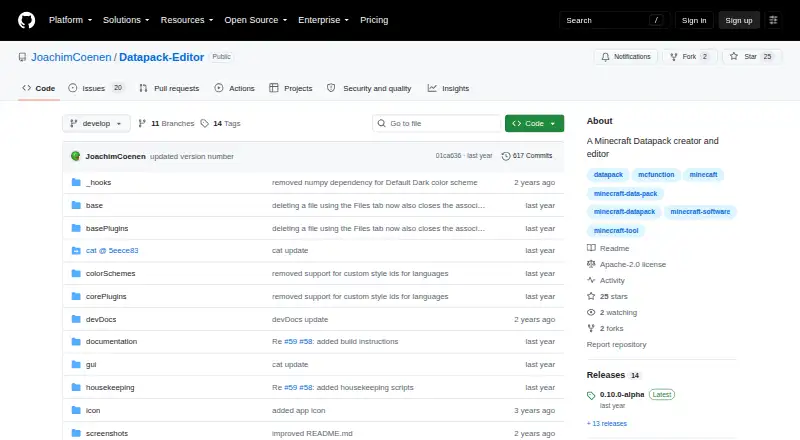
What Datapack Editor is
Datapack Editor is a free creator and editor for Minecraft datapacks. It supports Minecraft 1.20.2–1.20.6, corresponding to datapack versions 18–41. The editor offers syntax highlighting, detailed error checking, and suggestions and completion for mcFunction and JSON files, including nested constructs. You can create or open datapack projects, validate project files, and work with multiple project roots. Projects can declare dependencies on other datapacks through dependencies.json. For navigation, the editor includes Ctrl-click symbol navigation, multiple tabs and views, quick file opening, and search across files. Custom themes and plugins allow further customization. Windows instructions call for downloading and extracting a ZIP, then running start.cmd; Linux instructions say to extract the ZIP and run the Datapack Editor file. macOS support is experimental, and the README says users must build the app themselves. The repository lists an Apache-2.0 license. Its README also warns that Avast, AVG, and Zillya may flag the Windows executable as malware, describing those alerts as false positives.
Who it suits
It suits Minecraft datapack creators who want project validation and editing tools for mcFunction and JSON files. macOS users should be prepared to build the app themselves.
What it does well
- Free datapack creation and editing
- Validates mcFunction and JSON project files
- Supports multi-root projects and declared dependencies
- Includes symbol navigation and search across files
What to know first
- Minecraft support is listed for versions 1.20.2–1.20.6
- macOS support is experimental and requires building
- Some antivirus products may flag the Windows executable
Limits
The listed Minecraft range is 1.20.2–1.20.6. macOS support is experimental and requires users to build the app themselves.
Plans
| Plan | Billed and limits | Price |
|---|---|---|
| Free | Minecraft 1.20.2–1.20.6 · Windows and Debian Linux; macOS experimental and requires building the app | Free |
As github.com lists them, read 4 Oct 2026. The maker's own page has the final word.
Getting started
- Open the project's GitHub page.
- On Windows, download and extract the ZIP, then run start.cmd.
- On Linux, download and extract the ZIP, then run the Datapack Editor file.
- On macOS, build the app yourself; support is experimental.
- Create or open a datapack project, then validate its mcFunction and JSON files.
Overview
Datapack Editor is a free desktop editor for creating and maintaining Minecraft datapacks, with code assistance and project validation built around mcFunction and JSON files. It suits datapack authors who want a dedicated editor for supported Minecraft versions; the trade-off is that macOS users must build it themselves, and Windows users may encounter antivirus warnings.
Key features
Syntax highlighting, error checking, and code suggestions and completion cover mcFunction and JSON, including nested constructs. That combination can help authors spot problems while editing rather than relying only on a separate validation pass. The editor can also validate project files, though its supported version range is Minecraft 1.20.2–1.20.6, corresponding to datapack versions 18–41.
Project tools include creating or opening datapack projects, multi-root projects, and dependencies declared through dependencies.json. For larger or interconnected packs, those features offer a way to keep related work organized. Custom themes and plugins add room to adapt the editor, while symbol navigation, multiple tabs and views, quick file opening, and cross-file search help move around a project.
Pricing
Datapack Editor is free: its Free plan costs nothing and includes support for Minecraft 1.20.2–1.20.6 on Windows and Debian Linux. There is no paid tier to weigh against that core editor, and no free trial is needed. The main constraint is compatibility: authors targeting Minecraft versions outside the supported range should not assume the editor covers them.
Platforms
Windows and Linux users download and extract a ZIP; Windows users then run start.cmd, while Linux users run the Datapack Editor file. The Free plan specifies Debian Linux. macOS support is experimental and requires building the app yourself, making it a poor fit for anyone seeking a ready-to-run Mac download.
On Windows, Avast, AVG, and Zillya may flag the executable as malware; the project describes these warnings as false positives. That caveat is worth considering before installation. The repository uses the Apache-2.0 license, and users with questions, problems, or suggestions are directed to create an issue.
Who it's for
This is a strong fit for Minecraft datapack creators working with mcFunction and JSON in the supported version range, particularly those who value built-in validation, navigation, and project dependency support. It is less suitable for Mac users who do not want to build software themselves, or for authors who need support for Minecraft versions beyond 1.20.2–1.20.6.
Pros and cons
- Pros: Free access combines editing assistance with project validation, so authors can work and check mcFunction and JSON in one tool.
- Pros: Multi-root projects and declared datapack dependencies support more involved project structures.
- Pros: Search, symbol navigation, multiple views, and quick file opening make project navigation a defined part of the editor rather than an afterthought.
- Cons: The supported Minecraft range is limited to 1.20.2–1.20.6, which may rule it out for projects targeting other versions.
- Cons: macOS setup requires building the app, and support is experimental.
- Cons: Windows antivirus warnings can complicate installation, even though the project identifies them as false positives.
Alternatives
For a broader directory of tools for making datapacks, browse Minecraft Datapack Generators. Choose Orca Minecraft Datapack Generator if you want a freemium option available on the web as well as desktop platforms. Beet is a free, open-source Minecraft pack development kit for creators who prefer a kit rather than this dedicated editor.
Minecraft Datapack Compiler is another free option, including as an extension, for users looking for a compiler-oriented tool. Minecraft Datapack Language is free and open source under the MIT License, and may suit users seeking a language-focused option. Codexe Datapack Generator is web-based and freemium, making it an alternative for those who prefer a browser tool.
MCDatapacker is free on Linux and Windows, and its core job does not require a paid tier. PackForge is a web-based freemium choice for users who want generation features, with its Free plan capped at two generations per month, basic complexity, prompts up to 2,000 characters, and one Command Builder use monthly. Kore is a free alternative available on Linux, macOS, web, and Windows.
Verdict
Choose Datapack Editor if you create datapacks for Minecraft 1.20.2–1.20.6 and want a free desktop workspace that combines code assistance, validation, and project navigation. Look elsewhere if you need a ready-to-run macOS app or support for versions outside that range.
Verdict
Datapack Editor offers code editing, validation, and project navigation for supported Minecraft datapack versions. Its experimental macOS setup and the stated antivirus false positives are relevant installation considerations.
Questions
Is Datapack Editor free?
Yes. It is listed as free, with no free trial.
Which Minecraft versions does it support?
The README lists Minecraft 1.20.2–1.20.6, corresponding to datapack versions 18–41.
Which platforms can run it?
The listed platforms are Linux, macOS, and Windows. The Free plan identifies Windows and Debian Linux, while macOS is experimental and requires building the app yourself.
What kinds of files can it edit and validate?
It provides editing and validation for mcFunction and JSON project files.
Is Datapack Editor open source?
The GitHub repository lists an Apache-2.0 license.
Who makes Datapack Editor?
The maker's GitHub profile identifies Joachim Coenen and lists Munich.
Facts from Datapack Editor's own pages
- Code editing
- The editor provides syntax highlighting, detailed error checking, and code suggestions and completion for mcFunction and JSON files, including nested constructs. · github.com, 4 Oct 2026
- Customization
- The editor supports custom themes and plugins. · github.com, 4 Oct 2026
- Dependencies
- Projects can declare dependencies between datapacks using dependencies.json. · github.com, 4 Oct 2026
- License
- The GitHub repository lists an Apache-2.0 license. · github.com, 4 Oct 2026
- Linux download
- The Linux instructions say to download and extract the ZIP, then run the Datapack Editor file. · github.com, 4 Oct 2026
- macOS support
- macOS support is experimental, and the README says users must build the app themselves. · github.com, 4 Oct 2026
- Maker
- The maker’s GitHub profile identifies Joachim Coenen and lists Munich. · github.com, 4 Oct 2026
- Navigation
- Features include Ctrl-click symbol navigation, multi-tab and multi-view editing, quick file opening, and search across files. · github.com, 4 Oct 2026
- Project management
- Users can open or create datapack projects, validate project mcFunction and JSON files, and work with multi-root projects. · github.com, 4 Oct 2026
- Purpose
- Datapack Editor is a creator and editor for Minecraft datapacks. · github.com, 4 Oct 2026
- Security note
- The README warns that Avast, AVG, and Zillya may flag the Windows executable as malware and describes this as a false positive. · github.com, 4 Oct 2026
- Support
- The README directs users with questions, problems, or suggestions to create an issue. · github.com, 4 Oct 2026
- Supported Minecraft versions
- The README lists Minecraft 1.20.2–1.20.6, corresponding to datapack versions 18–41. · github.com, 4 Oct 2026
- Windows download
- The Windows instructions say to download and extract the ZIP, then run start.cmd. · github.com, 4 Oct 2026
Where Datapack Editor stands on Freedom251
- Minecraft Datapack Generators#3 of 22