Freedom251 › Audio Restoration Software
Antinode Clear (formerly Supertone Clear)
Visit Antinode Clear (formerly Supertone Clear) Alternatives Pricing
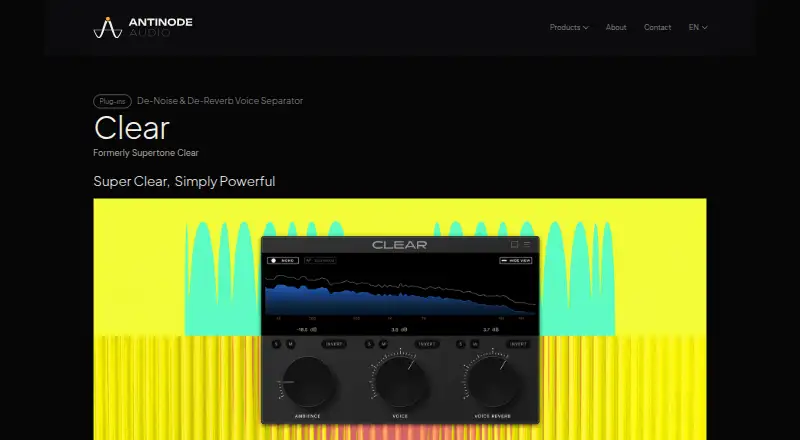
What Antinode Clear (formerly Supertone Clear) is
Antinode Clear is paid audio software for macOS and Windows. It processes audio in real time while providing two listed functions: voice isolation and reverb removal. Voice isolation separates vocal content from the incoming audio, while reverb removal addresses reverberation during the same live processing workflow. The product supports multiple platforms through its macOS and Windows versions, giving users a choice between those desktop operating systems. Antinode Clear was formerly known as Supertone Clear and is presented on Antinode Audio’s product site. Audio is the stated input type, and real-time operation is the listed processing mode. The feature set described for this entry includes voice isolation and reverb removal. Antinode Audio is headquartered in Daejeon, South Korea. There is no free plan, so access is offered as a paid product. Buyers considering it can focus on whether live voice isolation and reverb removal meet their needs and whether macOS or Windows is the suitable platform.
Who it suits
Antinode Clear suits users who need real-time processing for audio with voice isolation or reverb removal. It is intended for people working on macOS or Windows and choosing a paid desktop audio tool.
What it does well
- Processes audio in real time
- Includes voice isolation
- Removes reverb
- Supports macOS and Windows
- Works with audio input
What to know first
- No free plan
- Paid product
- Only audio input is listed
Limits
Antinode Clear has no free plan and is offered as paid software.
Plans
| Plan | Billed and limits | Price |
|---|---|---|
| Antinode Clear | One-time purchase for lifetime use; price including VAT · Trial mode outputs noise every 60 seconds and does not support saving or loading profiles | $49, paid once |
As antinodeaudio.com lists them, read 14 Nov 2026. The maker's own page has the final word.
Getting started
- Open the Antinode Audio Clear website
- Choose the macOS or Windows platform
- Install the paid product
- Provide audio input for real-time processing
- Use voice isolation or reverb removal
Verdict
Pick Antinode Clear if real-time voice isolation and reverb removal are the functions you need on macOS or Windows. Consider another product if you require a free plan or broader listed input types.
Questions
Is Antinode Clear free?
No. It is a paid product and has no free plan.
Which operating systems does it support?
The listed platforms are macOS and Windows.
What does Antinode Clear do?
It isolates voices and removes reverb from audio while processing in real time.
What input type is supported?
Audio is the listed input type.
Was it previously known by another name?
Yes. It was formerly called Supertone Clear.
Where is Antinode Audio headquartered?
The headquarters are in Daejeon, South Korea.
Facts from Antinode Clear (formerly Supertone Clear)'s own pages
- Apple Silicon
- Clear has native support for Apple Silicon M1, M2, and M3. · antinodeaudio.com, 14 Nov 2026
- Artifacts
- The maker says its voice-separation neural network separates voice from noise and reverb with minimum artifacts. · antinodeaudio.com, 14 Nov 2026
- Audio privacy
- The plug-ins process audio locally and do not collect, transmit, or store audio loaded or processed with them. · antinodeaudio.com, 14 Nov 2026
- Company location
- Antinode Audio Co., Ltd. lists its business address in Daejeon, Republic of Korea. · antinodeaudio.com, 14 Nov 2026
- Controls
- Three knobs control voice, ambience, and voice reverb. · antinodeaudio.com, 14 Nov 2026
- DAW formats
- Clear is offered as AU, VST3, VST, and AAX plug-ins for DAWs that support third-party plug-ins. · antinodeaudio.com, 14 Nov 2026
- De-voice
- Clear can remove unwanted noise, excessive reverb, or dialogue so background ambience can be used. · antinodeaudio.com, 14 Nov 2026
- Existing licenses
- Existing licenses remain valid as Clear, Air, and Shift continue under the Antinode name. · antinodeaudio.com, 14 Nov 2026
- Headquarters
- Daejeon, South Korea · antinodeaudio.com, 4 Oct 2026
- Intended users
- The maker names post-production engineers, video editors, streamers, and musicians as intended users. · antinodeaudio.com, 14 Nov 2026
- Operating systems
- Clear supports Windows 10 and later (64-bit only) and macOS 10.13 and later. · antinodeaudio.com, 14 Nov 2026
- Payments
- Card details for plug-in purchases are processed by the payment provider Paddle. · antinodeaudio.com, 14 Nov 2026
- Plug-in formats
- Clear is offered in AU, VST3, VST, and AAX formats for DAWs that support third-party plug-ins. · antinodeaudio.com, 14 Nov 2026
- Product purpose
- Antinode Clear is a de-noise and de-reverb voice-separation audio plug-in, formerly Supertone Clear. · antinodeaudio.com, 14 Nov 2026
- Real-time
- Clear processes audio in real time so the result can be heard while working, including clean speech for streamers. · antinodeaudio.com, 14 Nov 2026
- Real-time processing
- Clear processes audio in real time, a capability the maker highlights for streamers. · antinodeaudio.com, 14 Nov 2026
- Refunds
- All sales are final except where the terms of service or applicable law expressly require a refund. · antinodeaudio.com, 14 Nov 2026
- Sample rates
- Clear natively supports 44100 Hz, 48000 Hz, and 96000 Hz. · antinodeaudio.com, 14 Nov 2026
- Separation model
- A voice-separation neural network separates voice from noise and reverb with minimum artifacts. · antinodeaudio.com, 14 Nov 2026
- Support
- Questions about products or the transition can be sent to [email protected], and Zendesk provides customer support. · antinodeaudio.com, 14 Nov 2026
- Support contact
- The maker lists [email protected] for product and transition questions. · antinodeaudio.com, 14 Nov 2026
- Supported sample rates
- Native sample-rate support includes 44100Hz, 48000Hz, and 96000Hz. · antinodeaudio.com, 14 Nov 2026
- Systems
- Clear runs on Windows 10 and above, 64-bit only, and on macOS 10.13 and above. · antinodeaudio.com, 14 Nov 2026
- Trial limits
- Trial mode outputs noise every 60 seconds and does not support saving or loading profiles. · antinodeaudio.com, 14 Nov 2026
Where Antinode Clear (formerly Supertone Clear) stands on Freedom251
- Audio Restoration Software#10 of 24
- AI Speech Enhancement Software#20 of 35
- AI Noise Cancellation Software#16 of 24
- Voice isolation and noise suppression tools#6 of 8