Freedom251 › Audio Restoration Software

Aulio Studio
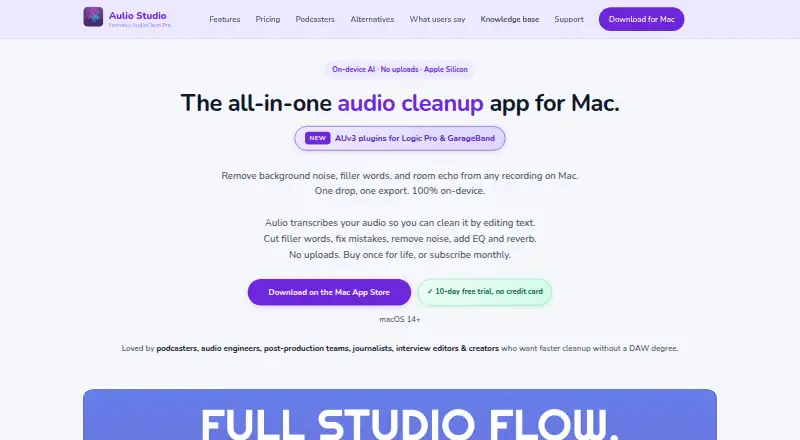
What Aulio Studio is
Aulio Studio is a macOS app for cleaning audio and video recordings. It removes background noise, filler words, stutters, long silences, and room echo. Before processing, users can hear a live A/B noise-reduction preview and adjust its strength. The app transcribes audio, and selecting transcript text exports the matching clip; the maker says transcription and filler removal support 99 languages. It also provides reverb, echo, warmth, loudness targets, and sound style profiles.
Aulio Studio accepts MP4 and MOV video and exports MP3, WAV, FLAC, M4A, and AIFF. Batch processing applies shared settings to multiple files, and job history lets users revisit earlier work. Audio processing runs on the Mac, and audio files are not uploaded. The privacy policy says anonymous diagnostics and analytics may be sent to the maker and Google Firebase. The Pro app adds AUv3 plugins for Logic Pro and GarageBand, which the maker says also work in other AUv3 hosts. It requires macOS 14 or later and is optimized for Apple Silicon and Intel processors. The full-access trial lasts 10 days and requires no credit card. Paid options start at $9.99 per month, with one-time plans at $49 and $99.
Who it suits
Aulio Studio suits Mac users who need to clean recordings, transcribe audio, export clips, or process multiple files with shared settings. It may also fit Logic Pro, GarageBand, and other AUv3-host users who want the Pro plugins.
What it does well
- Removes noise, fillers, stutters, silences, and room echo.
- Offers an adjustable live A/B noise-reduction preview.
- Transcript selection exports the corresponding audio clip.
- Batch processes multiple files and retains job history.
- Processes audio on the Mac without uploading audio files.
What to know first
- Requires macOS 14 or later.
- There is no free plan; the trial lasts 10 days.
- Logic Pro AUv3 plugins are excluded from the $49 one-time plan.
Limits
There is no free plan; the trial provides full access for 10 days. The $49 one-time plan does not include Logic Pro AUv3 plugins, while the $9.99-per-month plan includes them only while subscribed.
Plans
| Plan | Billed and limits | Price |
|---|---|---|
| Aulio Studio | $49 one-time · Noise, fillers & effects · transcription & clips · batch + all formats · on-device processing · no Logic Pro AUv3 plugins | $49, paid once |
| Aulio Studio Pro | $99 one-time · Noise, fillers & effects · transcription & clips · batch + all formats · on-device processing · Logic Pro AUv3 plugins | $99, paid once |
| Monthly | $9.99 /month · Noise, fillers & effects · transcription & clips · batch + all formats · on-device processing · Logic Pro AUv3 plugins while subscribed | $9.99 a month |
As auliostudio.com lists them, read 7 Oct 2026. The maker's own page has the final word.
Getting started
- Visit https://www.auliostudio.com/.
- Use a Mac running macOS 14 or later.
- Start the full-access 10-day trial without a credit card.
- Choose the $9.99-per-month plan, the $49 one-time plan, or the $99 one-time Pro plan.
Verdict
Choose Aulio Studio if you need Mac-based audio cleanup, transcript-linked clip export, or batch processing. Its full-access 10-day trial does not require a credit card. Look elsewhere if you need a free plan or use a system other than macOS 14 or later.
Questions
Is Aulio Studio free?
No. It offers a full-access 10-day free trial with no credit card required.
How much does it cost?
The Monthly plan is $9.99 per month. Aulio Studio costs $49 one-time, and Aulio Studio Pro costs $99 one-time.
Which platforms does it support?
It runs on macOS 14 or later and is optimized for Apple Silicon and Intel processors.
What audio and video formats does it handle?
It processes MP4 and MOV video and exports MP3, WAV, FLAC, M4A, and AIFF.
Does it work with Logic Pro or GarageBand?
The Pro app includes AUv3 plugins for Logic Pro and GarageBand. The maker says they also work in other AUv3 hosts.
Who makes Aulio Studio?
It is an independent Mac app built and maintained by founder and developer Amit Nadir.
Facts from Aulio Studio's own pages
- Batch processing
- Users can batch process multiple files with shared settings and revisit jobs in history. · auliostudio.com, 7 Oct 2026
- Effects
- It includes reverb, echo, warmth, loudness targets, and sound style profiles. · auliostudio.com, 7 Oct 2026
- Files and formats
- It processes MP4 and MOV video and exports MP3, WAV, FLAC, M4A, and AIFF. · auliostudio.com, 7 Oct 2026
- Integrations
- The Pro app includes AUv3 plugins for Logic Pro and GarageBand, and the maker says they work in other AUv3 hosts. · auliostudio.com, 7 Oct 2026
- Language support
- The maker says transcription and filler removal support 99 languages. · auliostudio.com, 7 Oct 2026
- Maker
- Aulio Studio is an independent Mac app built and maintained by founder and developer Amit Nadir. · auliostudio.com, 7 Oct 2026
- Noise preview
- The app offers live A/B preview and an adjustable noise-reduction strength control before processing. · auliostudio.com, 7 Oct 2026
- Privacy
- Audio processing runs on the Mac and audio files are not uploaded, while the privacy policy says anonymous diagnostics and analytics may be sent to the maker and Google Firebase. · auliostudio.com, 7 Oct 2026
- Purpose
- Aulio Studio is a Mac audio cleanup app that removes background noise, filler words, stutters, long silences, and room echo. · auliostudio.com, 7 Oct 2026
- Support
- Support is available through live chat and email, and the maker aims to respond within a few business days. · auliostudio.com, 7 Oct 2026
- System requirement
- The app requires macOS 14 or later and is optimized for Apple Silicon and Intel processors. · apps.apple.com, 7 Oct 2026
- Transcript editing
- It transcribes audio and lets users select transcript text to export the corresponding clip. · auliostudio.com, 7 Oct 2026
- Trial
- The maker offers a full-access 10-day free trial with no credit card required. · auliostudio.com, 7 Oct 2026
Where Aulio Studio stands on Freedom251
- Audio Restoration Software#11 of 24
- AI Speech Enhancement Software#24 of 35