Altair GraphQL Client
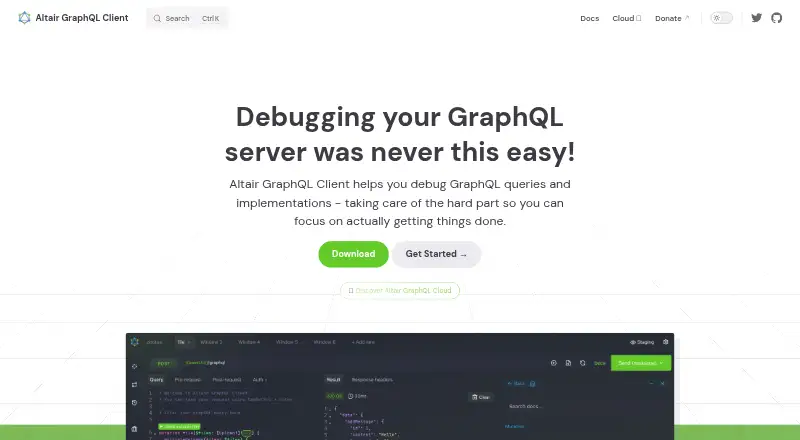
What Altair GraphQL Client is
Altair GraphQL Client is an IDE for running and debugging GraphQL queries, mutations, and subscriptions. It supports query formatting, multipart file uploads, and exporting query collections. Users can set environment variables for endpoints, headers, and queries, and browse schema types and operations in a documentation explorer. Pre-request and post-request scripts and an extensible plugin system provide further customization. Altair GraphQL Cloud adds centralized query management, collections, query versioning, and shareable query URLs. Official integration packages include Express and Koa middleware, a static build, and a Gatsby plugin. The Basic plan lists up to two team members and 20 queries; Pro costs $7.99 a month per user and lists unlimited teams, team members, and queries. Enterprise and Self hosted plans have no listed price. The maker says its web app is intended for quick or one-time use rather than full development because it has limitations. Documentation warns that GraphQL introspection can expose an API schema, while Content Security Policy support is beta and should be tested before production use.
Who it suits
Altair suits developers who need a GraphQL client with schema browsing, query tools, scripting, and optional team collaboration. Those considering the web app for ongoing development should account for its stated limitations.
What it does well
- Supports queries, mutations, and subscriptions.
- Includes schema documentation browsing.
- Offers pre-request and post-request scripts.
- Cloud adds versioning and shareable query URLs.
- Free Basic plan lists up to 20 queries.
What to know first
- Web app has limitations for full development.
- CSP support is beta.
- Introspection can expose an API schema.
- Maker does not obligate itself to support or update services.
Limits
The Basic plan lists up to two team members and 20 queries, with query history limited to 10 revisions. The web app is intended for quick or one-time use and is not recommended for full development.
Plans
| Plan | Billed and limits | Price |
|---|---|---|
| Pro | $ 7.99 per user/month · Unlimited team members · Unlimited teams · Unlimited queries · Unlimited collections · Query history | $7.99 a month |
| Basic | Free · Up to 2 team members · Up to 20 queries · Unlimited collections · Query history up to 10 revisions | Free |
| Self hosted | Free · Unlimited team members · Unlimited teams · Unlimited queries · Unlimited collections · Query history · Full control | Free |
| Enterprise | Custom · Unlimited team members · Unlimited teams · Unlimited queries · Unlimited collections · Query history · Full control | On request |
As altairgraphql.dev lists them, read 28 Sept 2026. The maker's own page has the final word.
Getting started
- Visit the Altair GraphQL Client website
- Choose the web app, desktop, extension, or self-hosted option
- Define environment variables for endpoints, headers, or queries
- Browse the schema documentation and run GraphQL operations
- Choose Basic or Pro for team features, if needed
Overview
Altair GraphQL Client is an IDE for running and debugging GraphQL queries, mutations, and subscriptions, best suited to developers who want request tools and schema browsing in one client. It pairs that focused workflow with optional cloud collaboration, but the web app is meant for quick or one-time use rather than full development.
Query formatting, multipart file uploads, collection export, reusable environment variables, scripts, and plugins give GraphQL work a useful range of tools. Teams that need shared management can add Altair GraphQL Cloud; people seeking a general-purpose API client may prefer a broader fit.
Compare related options in GraphQL Tools and API clients.
Key features
Build and inspect GraphQL operations
Altair runs and debugs queries, mutations, and subscriptions, with WebSocket support for subscription workflows. Its schema documentation explorer covers types and available operations, which helps developers navigate an API while composing requests. Formatting, multipart-specification file uploads, and collection export round out the day-to-day request work.
Reuse and extend workflows
Environment variables can be shared across endpoints, headers, and queries, reducing repeated edits when switching contexts. Pre-request and post-request scripts add hooks around requests, and the plugin system lets users extend the client. Official integration packages cover Express and Koa middleware, a static build, and a Gatsby plugin.
Cloud collaboration
Altair GraphQL Cloud centralizes query management and collections, keeps query versions, and provides shareable query URLs. That makes it more relevant to teams coordinating query work than to an individual who only needs a local client; the collaboration features are tied to Cloud rather than the core request tools.
Web app and security cautions
The maker positions the web app for quick or one-time use and does not recommend it for full development because of its limitations. For sustained work, the desktop or self-hosted options are more appropriate platform choices. GraphQL introspection can reveal an API schema, so the documentation advises considering whether to disable it in production. Content Security Policy support remains beta, and configurations should be tested before production use.
The privacy notice says Altair does not process sensitive personal information and describes organizational and technical procedures to protect personal information. Its terms provide an email contact but do not obligate the maker to maintain or support the services or provide updates, a meaningful consideration for teams depending on ongoing service support.
Pricing
Altair uses a freemium model, with a free plan and paid pricing from $7.99 per user/month. The plans distinguish sharply between capped team use and unlimited collaboration:
- Basic: Price not listed. It allows up to 2 team members and 20 queries, with unlimited collections and query history up to 10 revisions. It suits a small team with modest query needs, but the member and query caps constrain growth.
- Pro: $7.99 a month (billed $ 7.99 per user/month). It includes unlimited team members, teams, queries, and collections, plus query history. This is the clearest fit for teams that need broad collaboration without Basic’s query and membership ceilings; its per-user billing means cost scales with the team.
- Enterprise: Custom pricing. It includes the Pro plan’s stated unlimited members, teams, queries, and collections, plus full control. It is aimed at organizations needing those controls, with cost determined by custom pricing.
- Self hosted: Price not listed. It includes unlimited team members, teams, queries, and collections, query history, and full control.
The free plan is available, but its named Basic limits mean it is not equivalent to Pro’s unlimited query and team allowances.
Platforms
Altair is available as a web app and desktop software, with platform listings for extension, Linux, macOS, Windows, and self-hosted use. The web-app caveat makes desktop or self-hosted use a better choice for full development workflows.
Who it's for
Altair is a strong fit for GraphQL developers who want schema exploration alongside request composition, reusable environments, scripts, and extensibility. Teams can benefit from Cloud’s query versioning and shareable URLs, particularly when shared query management matters. It is less suitable for developers who expect the web app to serve as a full development environment, or organizations that require a support and update commitment from the maker.
Pros and cons
- Pro: The schema explorer, request formatting, file uploads, and collection export bring common GraphQL tasks into one focused client.
- Pro: Variables, request scripts, and plugins support reuse and customization across workflows.
- Pro: Cloud adds query versioning and shareable URLs for team coordination.
- Con: Basic caps teams at 2 members and 20 queries, so growing or query-heavy teams need a different plan.
- Con: The web app is explicitly not recommended for full development.
- Con: Beta CSP support needs production configuration testing, and introspection can expose a schema if left enabled.
- Con: The terms do not promise maintenance, support, or updates.
Alternatives
Apollo Studio is another freemium option, with a free plan for up to 3 developers, a router limited to 60 requests per minute, and one-day data retention. Apollo Client is a free alternative whose free plan also caps teams at 3 developers and includes community support, with a self-hosted GraphOS Router limited to 60 requests per minute and one-day data retention. GraphQL Hive offers a free Hobby plan with 1M operations per month, seven-day usage data retention, and unlimited seats, projects, organizations, and schema pushes. Hot Chocolate is a free, MIT-licensed option for commercial or private projects.
WunderGraph Cosmo has a free Developer plan for one federated graph, 10M requests per month, 10 subgraphs, one team member, and seven-day retention. gqlgen is a free Go library for building GraphQL servers, while GraphQL Kotlin is an Apache License 2.0 option and Strawberry GraphQL is an MIT-licensed open-source Python library.
Verdict
Choose Altair if you want a GraphQL-focused IDE that combines schema browsing, flexible request workflows, and optional cloud collaboration. Its strongest case is the breadth of tools around GraphQL operations; look elsewhere if you need a full-development web app, guaranteed ongoing support, or a platform better matched to a different GraphQL task.
Verdict
Altair offers a broad set of GraphQL query and schema tools, with collaboration features through its Cloud offering. Review the web-app limits, introspection warning, and beta CSP support before choosing how to use it.
Questions
Is Altair GraphQL Client free?
Yes. A free plan is listed. The Basic plan lists up to two team members and 20 queries.
How much does Pro cost?
Pro is $7.99 a month per user. It lists unlimited team members, teams, queries, and collections, along with query history.
Which platforms are available?
Altair is listed for web, Linux, macOS, Windows, extensions, and self-hosted use.
Can Altair help teams collaborate?
Altair GraphQL Cloud offers centralized query management, collections, query versioning, and shareable query URLs.
Does it support GraphQL subscriptions and WebSockets?
Yes. The client supports queries, mutations, and subscriptions, and WebSocket support is listed.
What should I know about security and CSP?
The documentation warns that GraphQL introspection can expose an API schema and suggests considering disabling it in production. Content Security Policy support is beta, and the maker recommends testing configurations before production use.
Facts from Altair GraphQL Client's own pages
- API documentation
- Yes · altairgraphql.dev, 20 Sept 2026
- Cloud collaboration
- Altair GraphQL Cloud offers centralized query management, collections, query versioning, and shareable query URLs. · altairgraphql.dev, 28 Sept 2026
- CSP support
- Content Security Policy support is marked beta, and the maker recommends testing configurations before production use. · altairgraphql.dev, 28 Sept 2026
- Environments
- Users can define environment variables and use them across endpoints, headers, and queries. · altairgraphql.dev, 28 Sept 2026
- Free plan
- Yes · altairgraphql.dev, 20 Sept 2026
- GraphQL support
- Yes · altairgraphql.dev, 20 Sept 2026
- Integrations
- Official integration packages include Express middleware, Koa middleware, a static build, and a Gatsby plugin. · altairgraphql.dev, 28 Sept 2026
- Platforms
- Altair is available as desktop apps for macOS, Windows, and Linux, browser extensions for Chrome and Firefox, and a web app. · altairgraphql.dev, 28 Sept 2026
- Privacy
- The privacy notice says it does not process sensitive personal information and describes organizational and technical procedures to protect personal information. · altairgraphql.dev, 28 Sept 2026
- Purpose
- Altair is a GraphQL IDE for running and debugging GraphQL queries, mutations, and subscriptions. · altairgraphql.dev, 28 Sept 2026
- Query tools
- The client supports query formatting, file uploads using the multipart specification, and exporting query collections. · altairgraphql.dev, 28 Sept 2026
- Schema docs
- Altair provides a documentation explorer for browsing GraphQL schema types, queries, mutations, and subscriptions. · altairgraphql.dev, 28 Sept 2026
- Scripts and plugins
- Altair supports pre-request and post-request scripts and an extensible plugin system. · altairgraphql.dev, 28 Sept 2026
- Security guidance
- The documentation warns that GraphQL introspection can expose an API schema and suggests considering disabling it in production. · altairgraphql.dev, 28 Sept 2026
- Paid from
- 7.99 · altairgraphql.dev, 20 Sept 2026
- Support
- The terms provide an email contact and state that the maker does not obligate itself to maintain or support the services or provide updates. · altairgraphql.dev, 28 Sept 2026
- Team workspaces
- Yes · altairgraphql.dev, 20 Sept 2026
- Web app limitation
- The maker says the web app is intended for quick or one-time use and is not recommended for full development because it has limitations. · altairgraphql.dev, 28 Sept 2026
- WebSocket support
- Yes · altairgraphql.dev, 20 Sept 2026
Where Altair GraphQL Client stands on Freedom251
- GraphQL Tools#1 of 32
- API clients#12 of 38