Freedom251 › Time Blocking Apps
Align
What Align is
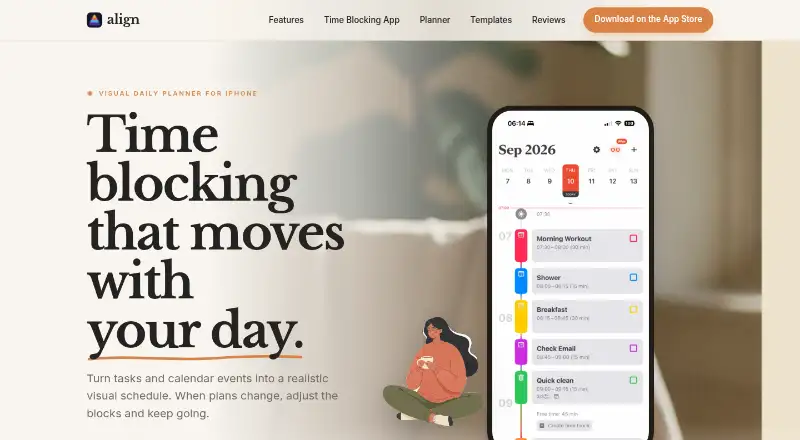
Align is an iPhone planner that puts tasks and calendar events into a visual time-blocked schedule. It imports events from calendars available through iOS, so existing commitments can sit alongside planned activities. You can drag or resize blocks as your day changes, set alerts for a block’s start or reminders in advance, and add checklist subtasks. Finishing every subtask marks its block complete. Blocks can repeat daily, weekly, monthly, or yearly. The free plan includes unlimited time blocks, calendar sync, recurring blocks, reminders, colors, icons, and drag-and-drop planning. Align Plus can shift later blocks while keeping their durations, and is available through optional subscriptions or a one-time purchase; prices are shown in the App Store. Align requires iOS 17 or later. It runs on iPad in iPhone compatibility mode, while other Apple platforms are not supported. The maker says data is stored locally or can sync to a private iCloud account.
Who it suits
Align suits people who want to organize daily tasks, routines, and existing calendar commitments with visual time blocks. It is for iPhone users, including iPad users willing to run it in iPhone compatibility mode.
What it does well
- Free plan includes unlimited time blocks and calendar sync.
- Blocks can repeat daily, weekly, monthly, or yearly.
- Checklist subtasks can mark a block complete.
- Per-block notification settings are available.
- Maker says data can sync to private iCloud.
What to know first
- Requires iOS 17 or later.
- Other Apple platforms are not supported.
- Align Plus prices are shown in the App Store.
Plans
| Plan | Billed and limits | Price |
|---|---|---|
| Align Plus Weekly | Align Plus premium features | On request |
| Align Plus Monthly | Align Plus premium features | On request |
| Align Plus Yearly | Align Plus premium features | On request |
| Align Plus Lifetime | Align Plus premium features | On request |
| Align Free | Core time blocking features; unlimited time blocks, calendar sync, recurring blocks, reminders, colors, icons, and drag-and-drop planning | Free |
| Align Plus | Optional in-app subscription or one-time purchase; pricing shown in the App Store · Advanced features; subscription options include weekly, monthly, and yearly plans, or a one-time purchase | On request |
As align.day lists them, read 22 Sept 2026. The maker's own page has the final word.
Getting started
- Install Align on an iPhone running iOS 17 or later.
- Allow it to import events from calendars available through iOS.
- Add tasks or commitments as time blocks.
- Set recurring schedules, reminders, or checklist subtasks as needed.
- Choose the free plan or review Align Plus options in the App Store.
Verdict
Align combines calendar events, recurring plans, reminders, and subtasks in a visual schedule, with core planning features on its free plan. Check the iOS requirement and App Store for Align Plus pricing before choosing it.
Questions
Is Align free?
Yes. Align Free includes unlimited time blocks, calendar sync, recurring blocks, reminders, colors, icons, and drag-and-drop planning.
What does Align Plus cost?
Prices are shown in the App Store. Align Plus is offered as optional in-app subscriptions or a one-time purchase, with weekly, monthly, yearly, and lifetime options listed.
Which devices can run Align?
Align requires iOS 17 or later on iPhone. It runs on iPad in iPhone compatibility mode; other Apple platforms are not supported.
Can Align sync with a calendar?
Yes. It imports events from calendars available through the device’s iOS calendar system.
How does Align handle privacy and payments?
The maker says app data is stored locally or synced to the user’s private iCloud account and says it does not collect, share, or sell personal data. Apple processes Align Plus payments, and Align says it does not collect or store payment information.
Does Align use analytics or crash reporting?
The maker says it uses PostHog for anonymous usage analytics and Firebase Crashlytics for anonymous crash reports and diagnostics.
Facts from Align's own pages
- Analytics and diagnostics
- Align says it uses PostHog for anonymous usage analytics and Firebase Crashlytics for anonymous crash reports and diagnostics. · align.day, 9 Oct 2026
- Calendar integration
- Align imports events from calendars available through the device’s iOS calendar system. · align.day, 9 Oct 2026
- Calendar sync
- Yes · align.day, 22 Sept 2026
- Free plan
- Yes · align.day, 22 Sept 2026
- Intended users
- The maker describes Align as a personal daily planner for people who want to organize tasks, routines, and existing calendar commitments with visual time blocks. · align.day, 9 Oct 2026
- Mobile platforms
- ios · align.day, 22 Sept 2026
- Notifications
- Users can set notifications when a block starts or reminders in advance, including per-block notification settings. · align.day, 9 Oct 2026
- Payments
- Apple processes Align Plus in-app purchase payments, and Align says it does not collect or store payment information. · align.day, 9 Oct 2026
- Planning method
- time blocking · align.day, 22 Sept 2026
- Platform limits
- Align is an iPhone app requiring iOS 17 or later; it runs on iPad in iPhone compatibility mode, and other Apple platforms are not supported today. · align.day, 9 Oct 2026
- Privacy
- The maker says app data is stored locally and can sync to the user’s private iCloud account; it says it does not collect, share, or sell personal data. · align.day, 9 Oct 2026
- Product
- Align is a visual time-blocking planner that puts tasks and calendar events into one schedule. · align.day, 9 Oct 2026
- Recurring blocks
- Time blocks can repeat daily, weekly, monthly, or yearly. · align.day, 9 Oct 2026
- Recurring tasks
- Yes · align.day, 22 Sept 2026
- Rescheduling
- Users can drag or resize blocks, and Align Plus can shift later blocks while preserving their duration. · align.day, 9 Oct 2026
- Subtasks
- Users can add checklist subtasks to a time block, and completing all subtasks marks the parent block finished. · align.day, 9 Oct 2026
- Support
- The maker lists in-app help documentation, email support, and blog posts as support channels. · align.day, 9 Oct 2026
Where Align stands on Freedom251
- Time Blocking Apps#8 of 31
- Daily Planner Apps#76 of 137