Freedom251 › AI Screenshot-to-Code Tools

AI Pic2Code
What AI Pic2Code is
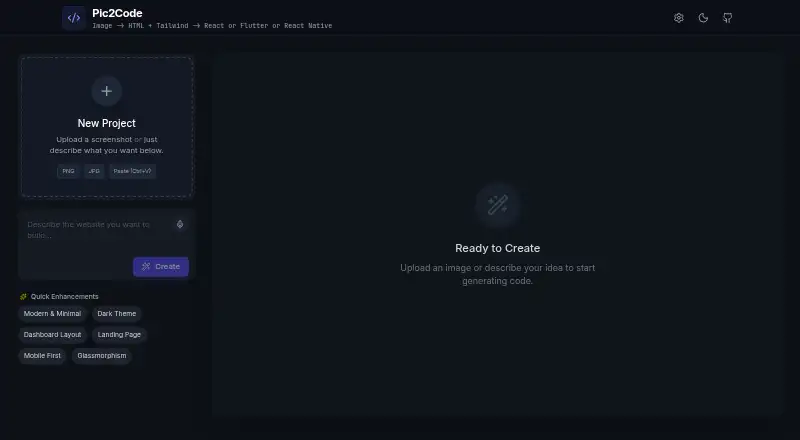
AI Pic2Code converts UI screenshots and design images into frontend code. It can generate HTML with Tailwind CSS, React JSX with Tailwind, Flutter UI in Dart, and React Native components. The interface supports drag-and-drop image uploads, an image preview, and a multi-tab viewer for generated code. It also includes color palette extraction, voice input, and dark and light modes. The tool supports Google Gemini and OpenRouter models, including Claude, GPT-4o, DeepSeek, Grok, and Qwen. The project describes itself as frontend-only: AI requests go directly from the browser, with no backend, server, or storage. Its installation instructions call for Gemini and OpenRouter API keys in a local .env.local file, followed by cloning the project, installing dependencies with npm, and running it locally. The free plan costs nothing and requires no sign-up. The project is listed for web and self-hosted use. Vue and Angular output, ZIP export, local history, custom Tailwind theme generation, and AI cleanup are planned additions, not current features.
Who it suits
It suits developers and designers who want to turn UI mockups into code or prototype responsive web pages. Users can choose browser-based access or run the project locally.
What it does well
- Generates code for four frontend targets.
- Free to use with no sign-up.
- Supports Gemini and OpenRouter models.
- Includes image preview and color palette extraction.
- Offers voice input and dark and light modes.
What to know first
- Requires Gemini and OpenRouter API keys for installation.
- Figma import is not available.
- GitHub sync is not available.
- ZIP code export is not available.
Plans
| Plan | Billed and limits | Price |
|---|---|---|
| Free | Free to use · no sign-up required | Free |
As seeb4coding.in lists them, read 7 Oct 2026. The maker's own page has the final word.
Getting started
- Open the AI Pic2Code website for web access.
- For local use, clone the project repository.
- Add Gemini and OpenRouter API keys to a local `.env.local` file.
- Install the dependencies with npm.
- Run the project locally.
Verdict
AI Pic2Code covers several frontend targets and provides both browser access and self-hosted installation. Its project describes browser-direct AI requests with no backend or storage; several listed additions remain on the roadmap.
Questions
How much does AI Pic2Code cost?
The Free plan costs nothing. The tool is free to use and requires no sign-up.
What code can it generate?
It generates HTML with Tailwind CSS, React JSX with Tailwind, Flutter UI in Dart, and React Native components.
Which AI providers does it support?
It supports Google Gemini and OpenRouter models, including Claude, GPT-4o, DeepSeek, Grok, and Qwen.
Can I run AI Pic2Code myself?
Yes. It is listed as self-hosted and web software. Local installation instructions call for API keys in `.env.local`, cloning the project, installing dependencies with npm, and running it locally.
Does it import Figma designs or sync with GitHub?
No. Figma import and GitHub sync are unavailable.
Facts from AI Pic2Code's own pages
- AI providers
- The tool supports Google Gemini models and OpenRouter models, including Claude, GPT-4o, DeepSeek, Grok, and Qwen. · github.com, 7 Oct 2026
- API credentials
- The installation instructions call for Gemini and OpenRouter API keys in a local .env.local file. · github.com, 7 Oct 2026
- Architecture
- The project describes itself as frontend-only, with no backend, server, or storage, and says AI requests are made directly from the browser. · github.com, 7 Oct 2026
- Code outputs
- It generates HTML with Tailwind CSS, React JSX with Tailwind, Flutter UI in Dart, and React Native components. · github.com, 7 Oct 2026
- Code viewer
- A multi-tab code viewer displays generated code for HTML, React, Flutter, and React Native. · github.com, 7 Oct 2026
- Design tools
- The tool includes color palette extraction from an image, voice input, and dark and light modes. · github.com, 7 Oct 2026
- Image input
- The interface includes drag-and-drop image upload and an image preview modal. · github.com, 7 Oct 2026
- Install and run
- The repository provides instructions to clone the project, install dependencies with npm, and run it locally. · github.com, 7 Oct 2026
- Intended users
- The maker describes the tool as helping developers and designers turn UI mockups into working code and rapidly prototype or build responsive web pages. · blog.seeb4coding.in, 7 Oct 2026
- Purpose
- AI Pic2Code converts UI screenshots or design images into clean frontend code. · github.com, 7 Oct 2026
- Roadmap
- The listed planned features include Vue and Angular output, ZIP export, local history, custom Tailwind theme generation, and AI cleanup. · github.com, 7 Oct 2026
- Support
- The project lists [email protected] as its contact email. · github.com, 7 Oct 2026
Where AI Pic2Code stands on Freedom251
- AI Screenshot-to-Code Tools#1 of 24