3D Slash
by 3D Slash
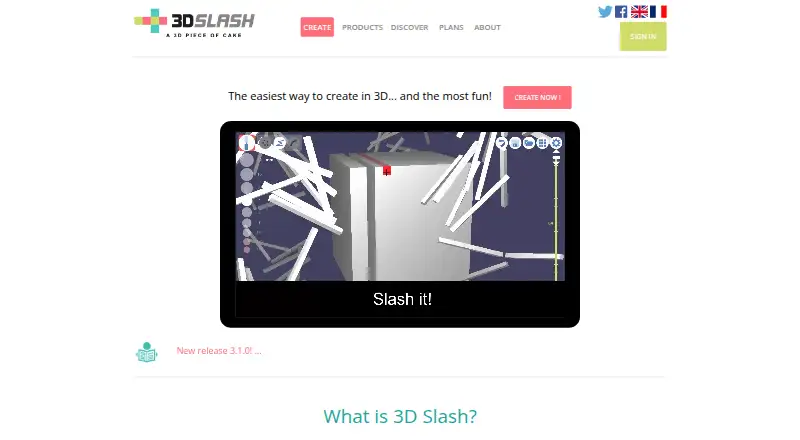
What 3D Slash is
3D Slash is a modeling tool built around shaping forms by hammering or rebuilding a cube. Users can paint, add 3D text or logos, and move, resize, flip, or combine parts. Models can start from STL or OBJ files, images, photographs, rounded shapes, or additional STL and OBJ objects. Pictures or text can be projected as decals or engravings. The product supports sculpting, animation, and 3D print export, with STL and OBJ listed for plans; release notes also mention GLB, FBX, and Collada output. It runs in a browser and as downloadable Windows, macOS, and Linux apps. The desktop app works locally and synchronizes when connected. A free plan includes seven cube sizes and eight standard colors. Premium costs $2 a month billed annually, totaling $24, with school and professional account bundles also available.
Who it suits
3D Slash suits non-designers, children, makers, teachers, businesses, prototype designers, jewel designers, and architects.
What it does well
- Browser and desktop access
- Modeling from STL or OBJ files
- Image-based sculpting and engravings
- 3D print export support
- Free plan available
What to know first
- Free desktop app cannot save work
- Free exports are queued
- Premium requires annual billing
- Free plan has seven cube sizes
Plans
| Plan | Billed and limits | Price |
|---|---|---|
| Free | Web version · online storage · 7 cube sizes · 8 standard colors · desktop app trial with no export · queued STL/OBJ exports | Free |
| Premium | annually - total $24 · High resolution · full colors and decals · desktop app · immediate STL/OBJ export · folders | $2 a month |
| Schools — 50 accounts | annually - total $144 · 50 managed accounts · Premium features · teacher dashboard · live student file viewing | $12 a month |
| Schools — 100 accounts | annually - total $288 · 100 managed accounts · Premium features · teacher dashboard · live student file viewing | $24 a month |
| Schools — 200 accounts | annually - total $576 · 200 managed accounts · Premium features · teacher dashboard · live student file viewing | $48 a month |
| Schools — 500 accounts | annually - total $1440 · 500 managed accounts · Premium features · teacher dashboard · live student file viewing | $120 a month |
| Professionals — 10 accounts | annually - total $240 · 10 managed accounts · Premium features · contributor accounts · working groups and folder access policies | $20 a month |
| Professionals — 25 accounts | annually - total $600 · 25 managed accounts · Premium features · contributor accounts · working groups and folder access policies | $50 a month |
The first 8 of 10 plans, as 3dslash.net lists them, read 9 Oct 2026. The maker's own page has the final word. Every plan
Verdict
3D Slash offers approachable shape-based modeling across web and desktop platforms, with imports, decals, sculpting, and print-oriented exports. The free tier supports basic creation, while paid plans add higher resolution, colors, immediate exports, folders, or managed accounts.
Facts from 3D Slash's own pages
- Animation tools
- Yes · 3dslash.net, 21 Sept 2026
- API
- The API can embed a 3D Slash model viewer in a webpage, and a professional module can be integrated into a site's workflow with a customizable interface. · 3dslash.net, 9 Oct 2026
- Collaboration
- School and professional offers support managed student or contributor accounts, shared folders, and classroom, project, or gallery access policies. · 3dslash.net, 9 Oct 2026
- Engraving and decals
- Users can project pictures or text onto a model and use them as decals or engravings. · 3dslash.net, 9 Oct 2026
- Export formats
- The plans page says users can export STL or OBJ, while the app release notes also mention GLB, FBX, and Collada export. · 3dslash.net, 9 Oct 2026
- Free plan
- Yes · 3dslash.net, 21 Sept 2026
- Free tier limits
- Free users have seven cube sizes, eight standard colors, queued exports, and can try the desktop app but cannot save work or export STL files from that app. · 3dslash.net, 9 Oct 2026
- Headquarters
- Paris, France · 3dslash.net, 28 Sept 2026
- Import and precision
- Users can start from STL or OBJ files, work at high precision, sculpt from an image or photograph, and insert rounded shapes or additional STL and OBJ files. · 3dslash.net, 9 Oct 2026
- Integrations
- The maker describes direct sharing to MyMiniFactory and integration with Google Drive and Thingiverse. · 3dslash.net, 9 Oct 2026
- Intended users
- The maker describes it as a tool for non-designers and children, and lists makers, teachers, businesses, prototype designers, jewel designers, and architects among its users. · 3dslash.net, 9 Oct 2026
- Modeling tools
- Features include hammering or rebuilding shapes, painting, creating 3D text or logos, and moving, resizing, flipping, or combining parts. · 3dslash.net, 9 Oct 2026
- Offline app
- The downloadable desktop app works locally and synchronizes with the account when connected; the maker describes it as more powerful than the browser version. · 3dslash.net, 9 Oct 2026
- Platform access
- both · 3dslash.net, 21 Sept 2026
- 3D print export
- Yes · 3dslash.net, 21 Sept 2026
- Sculpting tools
- Yes · 3dslash.net, 21 Sept 2026
- Security and compliance
- The plans page says the service backs up users' work, tracks contributors, and keeps a history for each file. · 3dslash.net, 9 Oct 2026
- Support
- The maker lists [email protected] for questions and API inquiries. · 3dslash.net, 9 Oct 2026
- Trial access
- The maker says users can try the desktop app for free after registering, but does not state a trial duration. · 3dslash.net, 9 Oct 2026
- What it does
- 3D Slash lets users create models by using tools to “slash a cube.” · 3dslash.net, 9 Oct 2026
Where 3D Slash stands on Freedom251
- Diy Makers#3 of 23
- 3D modeling software#36 of 147