
123 ToDo
What 123 ToDo is
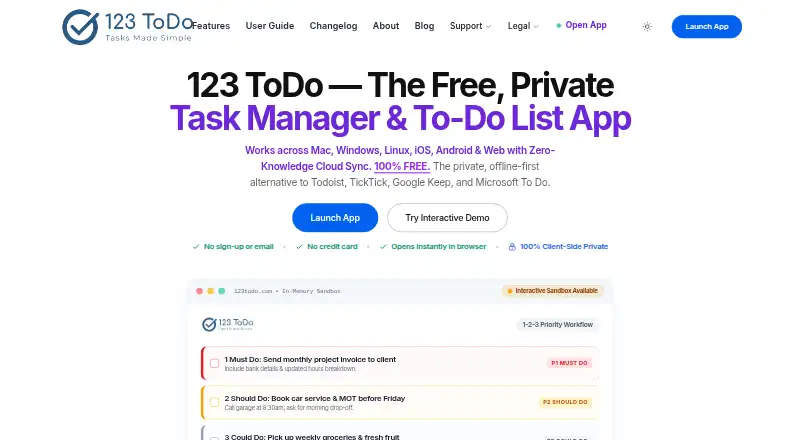
123 ToDo combines task management with a voice-notes mode for capturing work by speech. Tasks can be sorted into Must Do (P1), Should Do (P2), Could Do (P3), and On Hold (P4), with due dates, weekday schedules, and options to defer tasks to the next day or week. Recurring tasks roll over when completed. Color-coded projects can contain nested subtasks, and wide desktop screens can show projects as Kanban columns. Voice mode supports hands-free dictation, spoken punctuation, and commands to add tasks or notes. Notes can include up to three photos, added by drag-and-drop, clipboard screenshots, or a mobile camera. The importer accepts files from Todoist, TickTick, Google Keep, Google Tasks, and Microsoft To Do. The PWA works offline, stores data locally, and creates automatic snapshots every 24 hours. Optional encrypted sync is available through 123ToDo Cloud Sync or Google Drive AppData Sync. The maker says data is encrypted on-device before sync and the service does not hold the decryption key. The service is free and runs on Android, iOS, Linux, macOS, web, and Windows.
Who it suits
Voice notes mode is described for trade contractors, builders, and field work, while task manager mode is aimed at office professionals and knowledge workers. It may also suit people who need offline task access, recurring work, and nested subtasks.
What it does well
- Four priority levels organize task importance.
- Recurring tasks roll over when completed.
- Offline PWA access and local snapshots.
- Supports imports from five named services.
- Workspaces export as human-readable JSON.
What to know first
- Photo attachments are limited to three per note.
- Encrypted sync is optional rather than automatic.
Limits
The free plan allows up to three photo attachments per note. The maker says task counts, project counts, and note lengths are unlimited.
Plans
| Plan | Billed and limits | Price |
|---|---|---|
| Free | Priority-based task management · Recurring tasks · Subtask checklists · Offline PWA access · Encrypted cross-device sync | Free |
| 123 ToDo | Free forever · Uncapped tasks · unlimited projects · unlimited note lengths · up to 3 photos per note · sync included | Free |
As 123todo.com lists them, read 22 Sept 2026. The maker's own page has the final word.
Getting started
- Visit https://www.123todo.com/.
- Choose task manager mode for office or knowledge work, or voice notes mode for field work.
- Use the web app or an Android, iOS, Linux, macOS, or Windows option.
- Import supported Todoist, TickTick, Google Keep, Google Tasks, or Microsoft To Do data if needed.
- Enable 123ToDo Cloud Sync or Google Drive AppData Sync for cross-device synchronization if desired.
Verdict
123 ToDo brings prioritized tasks, recurring schedules, subtasks, and voice capture together in a free service. Its offline access and optional sync are useful distinctions, though notes have a three-photo limit.
Questions
How much does 123 ToDo cost?
The listed Free plan costs nothing, and the product is described as free forever.
Is there a free plan or trial?
Yes, there is a free plan. There is no free trial.
Which platforms does 123 ToDo support?
The listed platforms are Android, iOS, Linux, macOS, web, and Windows.
Does it work offline?
The PWA works offline and stores data locally; offline access is listed for web and mobile.
Can I synchronize data across devices?
Optional encrypted synchronization is available through 123ToDo Cloud Sync or Google Drive AppData Sync.
What are the note attachment limits?
Each note can have up to three photo attachments.
Facts from 123 ToDo's own pages
- Attachments
- Each note can have up to 3 photo attachments, with file drag-and-drop, clipboard screenshots, and mobile camera capture. · 123todo.com, 12 Oct 2026
- Data portability
- Users can export their workspace as human-readable JSON. · 123todo.com, 12 Oct 2026
- Free plan
- Yes · 123todo.com, 22 Sept 2026
- Imports
- The importer accepts Todoist CSV, TickTick backup CSV, Google Keep and Google Tasks JSON, and Microsoft To Do CSV. · 123todo.com, 12 Oct 2026
- Intended users
- The maker describes voice notes mode as designed for trade contractors, builders, and field work, and task manager mode for office professionals and knowledge workers. · 123todo.com, 12 Oct 2026
- Limits
- The maker says task counts, project counts, and note lengths are unlimited; photo attachments are limited to 3 per note. · 123todo.com, 12 Oct 2026
- Offline access
- web_and_mobile · 123todo.com, 22 Sept 2026
- Offline and backups
- The PWA works offline, stores data locally, and creates automatic local snapshots every 24 hours. · 123todo.com, 12 Oct 2026
- Priorities
- Tasks can be organized into Must Do (P1), Should Do (P2), Could Do (P3), and On Hold (P4) priorities. · 123todo.com, 12 Oct 2026
- Privacy policy
- The privacy policy says tasks, notes, timestamps, photos, and personal information are processed client-side and stored locally by default. · 123todo.com, 12 Oct 2026
- Product
- 123 ToDo is a task manager and voice notes app with task management and rapid voice notes modes. · 123todo.com, 12 Oct 2026
- Projects and subtasks
- Users can organize tasks in color-coded projects, create nested subtasks, and view projects as Kanban columns on wide desktop screens. · 123todo.com, 12 Oct 2026
- Recurring tasks
- Yes · 123todo.com, 22 Sept 2026
- Scheduling
- Tasks support due dates, weekday scheduling, next-day and next-week deferral, and recurring tasks that roll over on completion. · 123todo.com, 12 Oct 2026
- Security
- The maker says data is encrypted on the device using AES-256-GCM before sync and that the service does not hold the decryption key. · 123todo.com, 12 Oct 2026
- Subtasks
- Yes · 123todo.com, 22 Sept 2026
- Support
- The site lists [email protected] for bug reports and enhancement suggestions. · 123todo.com, 12 Oct 2026
- Sync
- Optional encrypted synchronization is available through 123ToDo Cloud Sync powered by Cloudflare D1 or Google Drive AppData Sync. · 123todo.com, 12 Oct 2026
- Voice notes
- Voice mode supports hands-free dictation, spoken punctuation, and commands to add tasks or notes. · 123todo.com, 12 Oct 2026
Where 123 ToDo stands on Freedom251
- To-do list apps#29 of 150