The Titanium PowerBook G4 is a memorable piece of Apple design, but it is not one fixed machine: the family spans the original 2001 models and a substantially revised 2002 DVI generation. Today, it makes sense mainly as vintage hardware or a collectible, and the condition of the individual unit matters more than its original specifications.
What the Titanium PowerBook G4 was
Apple introduced the 15.2-inch Titanium PowerBook G4 in January 2001. The thin widescreen notebook launched in 400 MHz and 500 MHz configurations, with a DVD-ROM drive and a listed weight of 5.3 pounds. Apple advertised up to five hours of battery life; that was a launch-era claim, not a prediction for a decades-old battery. Apple’s January 2001 announcement provides the original specifications.
As an Amazon Associate I earn from qualifying purchases.
The name covers multiple revisions. In April 2002, Apple announced faster Titanium models with a higher-resolution display and updated graphics and connectivity. In September 2003, Apple introduced an aluminum 15-inch PowerBook as the TiBook’s successor. A review or buying decision that treats all Titanium PowerBooks as identical misses the most useful distinctions.
Do these 3 things before closing this tab:
1Scan for outdated or missing drivers - takes under a minute2Repair Windows errors before they cause bigger problems3Fix the driver behind crashes, sound loss and screen glitches2001 original vs. 2002 DVI revision
| Feature | 2001 original | 2002 DVI revision |
|---|---|---|
| Processor configurations | 400 MHz and 500 MHz | Configurations up to 800 MHz |
| Display | 15.2-inch widescreen; Apple’s launch material places it in the 1152-by-768-class generation | 1280 by 854 pixels |
| Graphics | Original-generation graphics | ATI Radeon 7500 |
| Video connection | DVI not listed in the launch announcement | DVI |
| Networking | Gigabit Ethernet not listed in the launch announcement | Gigabit Ethernet |
| Listed weight | 5.3 pounds | 5.4 pounds |
The 2002 announcement also listed up to five hours of battery life, again as Apple’s period claim rather than a current expectation. For full revision details, see Apple’s April 2002 announcement.
#1 Best Overall

- Connector Size: 7.7mm x 2.5mm 1
- DC-Output : 24.5V-2.65A-65W AC- Input : 100-240V 1.2A 50/60 Hz
- BULL-TECH Compatible with Apple PowerBook G4 Series: PowerBook G4 (1GHz/867MHz), PowerBook G4 (15-inch FW800), PowerBook G4 (15-inch 1.5/1.33GHz), PowerBook G4 (17-inch) PowerBook G4 (17-inch 1.33GHz), PowerBook G4 (17-inch 1.5GHz), PowerBook G4*
How it compares with the aluminum successor
Apple explicitly described its September 2003 aluminum 15-inch PowerBook as succeeding the Titanium model. The change was more than a new case material: Apple highlighted AirPort Extreme, Bluetooth, FireWire 800, USB 2.0, and a backlit keyboard on the upper configuration. The 2003 launch configurations were 1.0 GHz and 1.25 GHz, with listed weights of 5.6 pounds and US launch prices of $1,999 and $2,599, respectively. Those prices describe the 2003 launch, not present-day used-market value.
| Consideration | Titanium PowerBook G4 (2002 DVI generation) | Aluminum PowerBook G4 (2003 successor) |
|---|---|---|
| Case | Titanium | Aluminum |
| Wireless and I/O features highlighted by Apple | DVI and Gigabit Ethernet | AirPort Extreme, Bluetooth, FireWire 800, and USB 2.0 |
| Backlit keyboard | Not listed in the cited 2002 announcement | Included on the upper configuration |
| Best fit | Someone drawn to the Titanium design and its place in Apple’s notebook history | Someone who prioritizes the later model’s listed connectivity and keyboard feature set |
Apple’s transition announcement gives the successor specifications and context: Apple, September 16, 2003. Apple CEO Steve Jobs called it the model that “succeeds the legendary Titanium PowerBook G4”; that is Apple’s description of the transition, not an independent verification of every historical claim in the release.
Rank #2
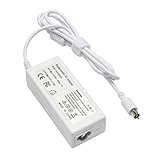
- output: 24.5V~2.65A~65W Input: 100~240V~1.2A 50/60Hz
- Connecter size: 7.7mm/2.5mm
- Package: 1x Ac adapter & 1x Ac power cable
- Condition:100% OEM compatible, works as original part,12 months replacement waranty
What contemporary and later reviews tell us
In a May 2001 hands-on, Macworld’s Dennis Sellers wrote that he had used a 500 MHz model for about three weeks and was impressed overall, while noting an irritating flaw. The available excerpt does not identify the flaw, so it cannot support a more specific claim. Read the Macworld hands-on.
What’s actually slowing this PC down?
Pick the symptom - the matching free tool is one click away.
A later Macworld retrospective by Christopher Phin reflects on the design and on wear in his own example, including coating wear and the possibility of trackpads becoming worn and unreliable. That personal account is a useful reason to inspect a particular machine, not evidence of a measured failure rate across the whole family. Read the Macworld retrospective.
Rank #3

- AN AMAZING MAC AT A SURPRISING PRICE — With an incredibly portable and durable aluminum design, up to 16 hours of battery life,* and the A18 Pro chip, MacBook Neo is ready to go wherever school takes you.
- FOUR STUNNING COLORS. ONE DURABLE DESIGN — Choose from four beautiful colors — Silver, Blush, Citrus, or Indigo — each with a color-coordinated keyboard. And MacBook Neo is made with a durable recycled aluminum enclosure that helps it reach 60 percent recycled content by weight — the most ever in any Apple product.*
- FLY THROUGH EVERYDAY ASSIGNMENTS — Whether you’re cramming for finals, using Apple Intelligence* to summarize class notes, creating presentations, or even playing the latest Apple Arcade game,* MacBook Neo delivers the performance and AI capabilities you need to get things done.
- UP TO 16 HOURS OF BATTERY LIFE — MacBook Neo delivers all day battery life, so you can power through from early morning classes to late night study sessions without worrying about plugging in.
- A VIBRANT 13-INCH DISPLAY* — The gorgeous Liquid Retina display on MacBook Neo supports 1 billion colors, so photos and videos pop and text is crisp for easy reading.
Is a Titanium PowerBook G4 worth buying today?
It can be worthwhile for a collector, a vintage-computing enthusiast, or someone who specifically wants the TiBook’s design and historical character. It is a poor choice if you need a dependable everyday computer: its original specifications are historical, and the cited sources do not establish current performance against modern workloads, current repair-part availability, or a reliable used-market price. Treat any purchase as a condition-dependent vintage-hardware decision, not as a way to get a modern laptop cheaply.
Independent reader supportYour contribution helps us test, update, and keep practical guides available for everyone.What to check before buying a used TiBook
Ask for clear, close photographs and, if possible, see the machine operating. Verify the exact revision rather than relying on a broad listing title, then check the components and wear points that can be assessed directly.
Rank #4

- Quad-core 8th-Generation Intel Core i5 Processor
- Brilliant Retina Display with True Tone technology
- Touch Bar and Touch ID
- Intel Iris Plus Graphics 645
- Ultrafast SSD
- Revision and configuration: Confirm the processor configuration and whether the machine is the original generation or the 2002 DVI revision. The DVI model’s display resolution and listed connections differ materially.
- Display: Check that the screen turns on and remains usable, and inspect it for visible damage.
- Trackpad: Test movement and clicks across the usable surface; Macworld’s retrospective notes that a trackpad can become worn and unreliable.
- Case and hinges: Look closely for coating wear and visible damage around the case and hinges.
- Optical drive: Ask the seller to demonstrate that the DVD-ROM drive works, rather than assuming it does because it was part of the original product description.
- Charging and battery: Confirm that the computer charges. Ask about battery behavior, but do not treat Apple’s original “up to five hours” claim as evidence of how long an aged battery will last.
The cited material does not quantify how often these parts fail or establish whether replacement parts are currently available. A seller’s demonstration and the specific unit’s condition are therefore more useful than a blanket reliability claim.
Quick Recap
Best Value

- 9Th-generation 6-Core Intel Core i7 Processor
- Brilliant Retina Display with True Tone technology
- Touch Bar and Touch ID
- Radeon Pro 555x Graphics with 4GB of video Memory
- Ultrafast SSD
Product prices and availability are accurate as of the date/time indicated and are subject to change. Any price and availability information displayed on Amazon at the time of purchase will apply.




