Free tools Windows power users keep installed
One-click scans. No signup required.
The AOC AGON PRO AGP277QKDC is a 26.5-inch WOLED gaming monitor with two modes: 2560×1440 at up to 540Hz, or 1280×720 at up to 720Hz. The faster mode trades away three-quarters of the QHD pixel count, so the key question is whether that extra refresh rate matters more to you than image sharpness. In Club386’s review, QHD at 540Hz was the more compelling choice for most players; 720p looked rough on a screen this size.
What you get in each refresh-rate mode
The monitor’s native resolution is 2560×1440, commonly called QHD. At that resolution it supports up to 540Hz. Dual Frame Mode switches to 1280×720 HD to reach up to 720Hz. The figures describe different resolution-and-refresh combinations, not a 720Hz QHD mode.
As an Amazon Associate I earn from qualifying purchases.
| Mode | Resolution | Maximum refresh rate | Practical trade-off |
|---|---|---|---|
| Native QHD | 2560×1440 | 540Hz | Higher detail and the more versatile choice for everyday desktop use and gaming. |
| Dual Frame HD | 1280×720 | 720Hz | Higher refresh ceiling, but only one quarter as many pixels as QHD. |
The 720Hz option is best understood as a specialist motion-priority setting for competitive play, not an across-the-board upgrade. Club386 reviewer Samuel Willetts found that 720p could look rough on a 27-inch-class screen and concluded that QHD/540Hz was the prime way to use the monitor in most cases. The same review described the monitor as a stronger fit for competitive gaming than for someone seeking a larger, sharper 4K display. Read Club386’s review.
Quick wins for a faster PC:
Scan for outdated or missing drivers - takes under a minuteDriver Scan →Repair Windows errors before they cause bigger problemsFix Now →Panel, brightness and image quality
AOC specifies a 26.5-inch, flat 16:9 fourth-generation WOLED panel with a native pixel density of 110.9 pixels per inch. Its official brightness figures vary with the size of the bright area: 335 nits at 100% APL, 600 nits at 10% APL, and 1,500 nits at 1.5% APL. The 1,500-nit figure applies to a small highlight area, not a full-screen brightness level. AOC’s product specifications also list a 0.03ms GtG response time; that is the manufacturer’s specification, not a guarantee of identical results in every use condition.
#1 Best Overall

- ULTRA-FAST GAMING: Experience gaming at a new level with a 280Hz refresh rate and 0.3ms response time, delivering unparalleled smoothness and precision.
- CURVED FOR IMMERSION: The 1500R curvature provides a more engaging and immersive viewing experience, perfect for gaming and multimedia.
- VIVID COLORS AND CONTRAST: Enjoy vibrant visuals with HDR readiness and a high dynamic contrast ratio, enhancing every detail in your games and movies.
- COMFORT AND FLEXIBILITY: Flicker-Free technology and Adaptive Sync combine to ensure comfort during long gaming sessions and fluid, tear-free gameplay.
- ERGONOMIC DESIGN: Features extensive adjustability with tilt, swivel, and height options, along with VESA compatibility for diverse mounting possibilities.
What the independent measurements show
In Club386’s review, the tested unit measured 272 nits peak SDR brightness at the default 70% brightness setting and 404 nits at 100%. With UniformBrightness enabled, the reviewer measured a maximum of 382 nits and an average Delta E of 1.06, compared with an average Delta E of 2.06 at the default setting. UniformBrightness therefore improved the measured average colour accuracy in that test while reducing its maximum brightness.
The review also measured luminance deviations up to 3% and colour-uniformity deviations up to 6.0 Delta E. Willetts noted minor text fringing and middling colour uniformity. These are results from one reviewer’s test settings and unit, not official AOC specifications or a promise about every individual monitor. They are useful points to weigh if you plan to use the display for text-heavy work or care strongly about consistent colour across the panel. Club386’s findings and test context.
Rank #2

- 27” FULL HD IPS DISPLAY: Experience crisp 1920x1080 resolution and vibrant colors on a 27-inch widescreen IPS panel with wide 178° viewing angles and a 16:9 aspect ratio.
- 240Hz Native / 260Hz Overclocked Refresh Rate & 0.5ms MPRT Response Time: Dominate fast-paced games with ultra-smooth motion and razor-sharp visuals, thanks to a 240Hz native refresh rate with up to 260Hz overclocking over both HDMI and DisplayPort, plus an ultra-fast 0.5ms (MPRT) response time.
- ADAPTIVE-SYNC TECHNOLOGY: Enjoy tear-free, stutter-free gameplay with Adaptive-Sync support that keeps visuals fluid and synchronized with your GPU.
- ILT-ADJUSTABLE & VESA COMPATIBLE: Customize your setup with tilt functionality (-3° ~ 21°) and 100x100mm VESA mount support for ergonomic flexibility.
- FLICKER-FREE + LOW POWER USAGE: Flicker-Free technology helps reduce eye strain during long sessions, and Eco Mode keeps power usage efficient (22W typical).
Ports, USB-C and desk setup
AOC lists two HDMI 2.1 inputs, one DisplayPort 2.1 UHBR 20 input, and USB-C with DisplayPort Alt Mode and up to 65W USB Power Delivery. The display also has a USB hub with three downstream ports, a KVM switch, and a 3.5mm headphone output. The KVM can help switch connected peripherals between two computers, while USB-C may carry video and power to a compatible laptop. Check AOC’s English manual and your devices’ specifications to confirm which connection and mode they support.
The stand offers 150mm of height adjustment, tilt, swivel and pivot. AOC lists a 100×100mm VESA mounting pattern for an alternative arm or mount. The monitor’s physical flexibility and cable-management features may matter as much as the refresh-rate headline if it will serve a multi-device desk.
Rank #3

- Immersive Visuals: 32-inch curved QHD (2560x1440) VA panel with a 1500R curvature for an immersive gaming experience, featuring a 180Hz refresh rate and 0.5ms response time (MPRT) for smooth and responsive gameplay.
- Wide Color Gamut: Covers over 120% of the sRGB color space and boasts an 80,000,000:1 SmartContrast ratio, delivering vibrant and lifelike images with deeper blacks and brighter colors.
- Seamless Connectivity: Equipped with 2x DisplayPort 1.4, 2x HDMI 2.0 ports, and an audio line-out for convenient connectivity to gaming consoles, laptops, and desktops.
- Eye Care and Warranty: AOC LowBlue Mode and Flicker-Free Technology for comfortable extended gaming sessions, backed by a 3-year zero-bright-dot warranty, 3-year advance replacement, and 1-year accidental damage coverage.
- BETTER CONSOLE GAMING: AGON by AOC gaming monitors are designed to maximize the performance of your consoles by unleashing up to 120Hz frame rate (exact performance depends on consoles) and ultra low latency, giving you an edge over your opponents
Who should choose the AGP277QKDC?
It fits competitive players who prioritize speed
If your main use is competitive gaming and you value a very high refresh ceiling, this model offers both 540Hz at native QHD and a 720Hz option at HD. The native mode already provides an unusually high refresh rate without the severe resolution cut. The higher ceiling is most relevant if you have a specific reason to prioritize motion over detail and are comfortable using 720p.
Look elsewhere if resolution or general-purpose clarity comes first
For a larger, sharper desktop image, this 26.5-inch QHD monitor is not aimed at the same priorities as a 32-inch 4K/240Hz display. Buyers who want OLED but do not need a 540Hz ceiling may also find lower-refresh models more appropriate. Club386’s review-time comparisons included a similarly priced 500Hz QD-OLED, cheaper 280Hz OLED options and older 360Hz QD-OLED displays; those are comparison categories, not current price guarantees.
Rank #4

- 24" FULL HD IPS GAMING DISPLAY Experience smooth and vivid gameplay on a 23.8-inch Full HD IPS panel with wide viewing angles and accurate color reproduction.
- 180HZ REFRESH RATE Enjoy ultra-smooth gaming with up to 180Hz refresh rate via both DisplayPort 1.4 and HDMI 2.0 connections.
- 0.5MS RESPONSE TIME React faster with 0.5ms MPRT response time, helping reduce motion blur and ghosting in fast-paced games.
- ADAPTIVE-SYNC & HDR READY Reduce screen tearing with Adaptive-Sync support and enjoy enhanced contrast with HDR Ready compatibility.
- MODERN FRAMELESS DESIGN Features a sleek frameless design with DisplayPort 1.4, HDMI 2.0, VESA mount compatibility, and gaming-focused OSD controls.
Price and warranty depend on your region
Club386 listed the AGP277QKDC at £799 in the UK in its review published on 19 August 2026. That is a dated UK review price, not a live offer or a worldwide price; check local retailers for the current cost. Club386 rated the monitor “Club386 Recommended,” while identifying the 720p image, colour uniformity and minor text fringing as drawbacks. The review gives its full verdict and price context.
AOC’s regional product page lists a three-year warranty, and the company’s launch announcement says its warranty includes OLED burn-in protection. Warranty terms can differ by country, so confirm the local statement and follow the panel-care requirements that apply to your unit. AOC’s launch announcement.
Best Value
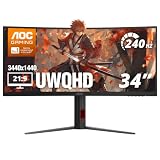
- 34” CURVED ULTRAWIDE DISPLAY: Immerse yourself in panoramic visuals with a 34" 1500R curved VA panel and cinematic 21:9 aspect ratio at UWQHD 3440x1440 resolution.
- ULTRAFAST 240HZ REFRESH RATE: Gain the upper hand in fast-paced titles with an ultra-smooth 240Hz refresh rate via DisplayPort and 240Hz via HDMI.
- 0.3MS MPRT RESPONSE TIME: Enjoy seamless transitions and near-instant reactions with a super-fast 0.3ms response time, eliminating motion blur and ghosting.
- AMD AMD FreeSync PREMIUM: Say goodbye to screen tearing and stutter with AMD FreeSync Premium support for fluid gameplay on both AMD and NVIDIA systems.
- VERSATILE CONNECTIVITY: Includes 1x DisplayPort 1.4 and 2x HDMI 2.1 ports, plus earphone out for private audio during intense gaming sessions.
Verdict
The AGP277QKDC’s most persuasive proposition is not simply “720Hz OLED.” It is the combination of native QHD at 540Hz and a 720p/720Hz mode for players willing to trade image detail for a higher refresh ceiling. Club386’s review backs QHD/540Hz as the better default for most uses, with the 720Hz mode reserved for a narrower motion-first preference. Before buying, compare its local price and warranty with your alternatives, and decide honestly whether you would use the lower-resolution mode.
Quick Recap
Product prices and availability are accurate as of the date/time indicated and are subject to change. Any price and availability information displayed on Amazon at the time of purchase will apply.




