For reading a menu, label, or other small print through your phone, a camera magnifier app can offer more than simply pinching to zoom—but there is no evidence here that a dedicated app universally beats the camera app. Google’s Magnifier adds tools such as word search, visual effects, and low-light brightness adjustment, but Google says it requires a Pixel 5 or later. If you have another Android phone, check the alternatives below or use its camera app.
Is there a magnifying-glass app for Android?
Yes. Google’s Magnifier uses the phone’s camera to enlarge small text and details, including distant text such as a restaurant menu behind a counter. Google’s Play listing describes word search, effects intended to make low-contrast text easier to see, automatic brightness adjustment in low light, and the option to capture a photo and zoom in on it. The listing also describes a Quick tap shortcut on supported Pixel phones. Google Magnifier on Google Play
As an Amazon Associate I earn from qualifying purchases.
Compatibility is the key qualification: Google says Magnifier is available on Pixel 5 and later phones. Do not assume this particular app will install on a different Android device. Availability and app details can change; the listing showed an update date of September 2, 2026 when checked for this article. Google’s Android accessibility overview
Free tools Windows power users keep installed
One-click scans. No signup required.
Camera magnification or screen magnification: which do you need?
These features solve different problems. Use a camera magnifier to view physical text or objects in front of you. Use Android’s built-in screen magnification when the content is already on your phone—for example, small text in an app or a webpage. Google documents full-screen and partial-screen modes, a settings panel on Android 14 and later, and magnification up to 8x; the exact controls can vary with Android version and device. Google’s instructions for screen magnification
#1 Best Overall
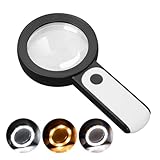
- HIGH POWER MAGNIFICATION: This magnifying glass provide Optical high magnification, allowing users with low vision to read text, no matter the size.
- ULTRA BRIGHT 18 LED WITH 3 MODES: The built-in energy-saving 18 LED lights provides extra luminance to ensure an overall better reading experience even at night or dark places. The stepless dimmable 3 lighting modes (cold, warm and mixed) can be switched based on different light condition, which can reduces visual fatigue, which is very useful for people with macular degeneration or far-sightedness/feyopia.
- EASY TO USE: Comes completely assembled, just requires 3x AAA batteries (not included). Easy to operate with a simple ON / OFF button switch, making it perfect for the elderly or those requiring an intuitive magnification system.
- LARGE LENS(Diameter 3.15"): Magnifies without optical distortion. Optimal to enhance reading and viewing very fine details in books, newspapers, magazines, photographs, maps, electronics, miniatures, jewelry, pill bottles, medications, hobbies, models, and crafts of all kinds.
- PERFECT GIFT FOR THE ELDERLY: Great magnifier for seniors, Most elderly have difficulty reading the small print on coupons, prescription,medical bottle.clear magnifier with light also a great choice for those who have low or impaired vision of most types.
Does Google’s Magnifier beat ordinary camera zoom?
That depends on the phone, the text, and which controls help you most. Google’s listing explains what Magnifier can do, but it does not provide a controlled comparison against a phone’s regular camera app. Google Play reviewers report different experiences: one found the app and camera similar in a well-lit room, while another preferred the camera app’s video mode for quick reading. Other reviewers said the magnifier and flashlight were useful. These are individual opinions, not representative tests. Google Play listing and reviews
The practical difference is the extra reading and viewing tools. Word search can help locate a term in text, while visual effects may make low-contrast material easier to distinguish. A captured image gives you a still view to enlarge, rather than requiring you to keep the camera aimed at the subject. Try the same text in both apps: steadiness, focus, glare, and readability matter more than the zoom number alone.
Rank #2

- 5X MAGNIFICATION & LARGE 100MM LENS: The 100mm (4 in.) lens offers a wide viewing area, making it easier for seniors to read books, newspapers, labels, and fine print
- REAL GLASS LENS, NOT ACRYLIC: Made from real glass and precision-ground for clear, distortion-free images and excellent clarity
- ERGONOMIC SOFT-GRIP HANDLE: The soft rubberized handle provides a comfortable, non-slip grip for easy handling during extended use
- PROTECTIVE LENS HOUSING: The lens is securely encased to help prevent damage from accidental drops and everyday use
- AVAILABLE SINCE 2019: This magnifier has been offered since 2019 and is suitable for reading, books, newspapers, hobbies, insect observation, classroom science, crafts, and inspection.
What can you use if you don’t have a Pixel?
Your regular camera app is the simplest option to try first. If you want dedicated controls, other Play Store camera magnifiers advertise features beyond live zoom. Those are developer-listed features, not independent evaluations of how well each app works.
| Option | Advertised tools | What to know |
|---|---|---|
| Regular camera app | Camera zoom and the camera controls available on your device | Can be convenient for quick viewing; performance depends on your phone and lighting. |
| weZoom Magnifying Glass | Magnification, color filters and threshold adjustment, exposure compensation, manual or autofocus, and freeze of the live preview | Features are described by the Play Store listing, which showed an update date of December 3, 2025. |
| Magnify: Magnifier & Reader | Live magnifier, OCR, text-to-speech, contrast and color filters, freeze frame, torch, offline operation, and TalkBack support | Features and privacy statements are the developer’s own listing claims; the listing showed an update date of August 16, 2026. |
Check the listing and your device’s compatibility before installing any app. If a magnifier’s result is hard to read, changing the light, angle, focus, or contrast may help more than increasing zoom further.
Rank #3

- HIGH POWER MAGNIFICATION: With two precision lenses offering high magnification, this magnifying glass delivers powerful, distortion-free clarity—perfect for reading fine print, labels, and details with ease. Ideal for anyone with vision challenges
- LARGE 5" LENS AND LIGHTWEIGHTED: The 5 inch large and wide magnifying lens without optical distortion. Optimal to enhance reading and viewing details in books, newspapers, magazines, photographs, maps, electronics,jewelry, medications, hobbies,and crafts of all kinds. The weight is only 200g, is very lightweighted compared with other magnifying glass in market (most are about 300g)
- Ultra-Bright LED Lighting with UV Bonus: Enjoy brilliant illumination from 24 energy-efficient LEDs, making reading in any light a breeze. Plus, the built-in UV light helps reveal hidden security marks on currency, stamps, and collectibles
- Simple One-Button Operatio: Ready to use right out of the box! Just press the button to turn it on, insert 3 AAA batteries (not included), and you're set. Designed with simplicity in mind—great for seniors and those who prefer hassle-free gadgets
- A Thoughtful Gift for All Ages: Whether it's helping a senior read medication instructions or sparking curiosity in a young explorer, this lighted magnifier is both practical and inspiring. A ideal companion for reading, crafting, and discovering the tiny wonders of everyday life
How do I enlarge text and other content already on Android?
Open Android’s accessibility settings and look for magnification, font size, display size, contrast and color options, or Select to Speak. The exact menu names and placement depend on the device maker and Android version. Google’s accessibility overview covers these options and says Select to Speak can read selected content or use the camera to read or describe something. Android accessibility options
For screen magnification specifically, Google’s support page describes full-screen or partial-screen enlargement and says magnification can range up to 8x. This applies to what is displayed on the phone, not printed text viewed through the camera. Set up screen magnification
Quick Recap
Best Value

- Real optical glass vs acrylic lenses: Each handheld 3X magnifying glass has been designed with optical grade glass lenses, which have been shaped, ground, and polished to precision optical standards
- Usable vertically or horizontally: Designed for many applications, this powerful magnifier can be utilized both vertically and horizontally
- High quality optical grade glass lenses: The extra-wide, large glass magnifying lens provides exceptionally clear images without distortion
- Lightweight & durable design: Weighing less than a pound, this handheld magnifier will provide comfortable viewing for any amount of time
- Lifetime warranty & money back guarantee: If you are dissatisfied for any reason with this product, please return it for a prompt refund at any time
Rank #4

- 5IN Large Crystal Clear Optical Lens : 5 inch large magnifying glass with light provide a larger field of view, allowing you to read more at once and reduce eye fatigue. Adopts premium PMMA Lens, 10x greater impact resistance, 6% higher light transmission and 50% less weight than traditional glass lenses, you can enjoy distortion-free and crystal-clear image for longer time with less hand fatigue. Great magnifying glass for reading books, magazines, bibles, maps, stamps, pill bottles or for jewelry, coins, hobbies and crafts.
- Rechargeable & Battery Indicator Ligh DESIGN: With built-in 1150mAh battery, this large magnifying glass can be used for 3.5-7 Hours based on different light modes. This rechargeable magnifying galss come with a USB C cable, you can freely charge it with adopter, computer or power bank. Convenient for outdoor or travel. Besides, this magnifier with light has 4 battery indicator light can so you can know when should to charge or when the charging is over.
- 10X 30X High Power Magnification: This handhold maginfying glass has 2 lens, the 10X large lens for normal reading, and the 30X additional inlet has higher magnification so you can use it to magnify smaller details. The mini lens of this magnifier is designed be a distance when placed flat on a horizontal surface, so when use, you can just put it flat on your book or newspaper and move it for reading. And you can also lift it slightly away from the book to achieve a larger magnification effect.
- 13 LED Lights with 3 Modes: Lighted magnifying glass equiped with 13 LED lights, so you can enjoy reading or working even at low-light environments. The 12 LED lights has 3 adjustable brightness level for the large lens, and the rest 1 LED light provide illumiation for the smlle lens. You can freely adjust light based on different light condition, which can reduces visual fatigue. This magnifier for reading is friendly for low vision seniors or macular degeneration.
- Gift for Senior or Kids: Dedign with ergonomic handle, this magnifying glass with light can reduces hand strain, friendly for reading lovers. This magnifying glass for close work not only suitable for low-vision elderly people for reading but also suitable for kids for exploring nature. This magnifier is great gifts for seniors for Christmas, birthday, Father's day, Mother's day and a great exploration gift for kids.
How to choose a setup for small print
- Printed or distant text: Try your camera app first; use a camera magnifier if its extra focus, filter, freeze, or reading tools suit the task.
- Text on your phone: Try Android’s built-in screen magnification, font size, or display size controls.
- Hard-to-read contrast: Look for contrast or color options, while remembering that results depend on the material and lighting.
- Reading aloud: Select to Speak or an app that advertises text-to-speech may help; check whether the feature works with the content you need.
- Prefer not to use a phone: A handheld magnifying glass is an optional alternative, not a requirement.
Product prices and availability are accurate as of the date/time indicated and are subject to change. Any price and availability information displayed on Amazon at the time of purchase will apply.
Recommended Free Tools




