Starting in May 2024, Android devices began rolling out support for AirTag-like trackers—small Bluetooth tags that help you locate lost items using Google’s Find My Device network. The big shift is that Android isn’t just detecting one specific company’s tag anymore; it’s enabling third-party trackers to participate in the same locating ecosystem.
This guide is the practical reference: what’s changing, what you need to check on your phone, how setup works in the real world, what can go wrong, and how these trackers compare to Apple AirTag behavior.
As an Amazon Associate I earn from qualifying purchases.
Quick context: Apple’s AirTag relies on Apple’s ecosystem and Precision Finding with iPhone hardware. Android’s approach centers on Find My Device and the broader Android “crowd” of nearby devices to help relay signals when your tag isn’t within direct Bluetooth range.
What Android’s AirTag-like trackers are (and what they aren’t)
AirTag-like trackers on Android are small, battery-powered devices that advertise themselves over Bluetooth (and some models add features like NFC for quick identification). Your phone can then use the Find My Device app to show the last known location and help you ring the tracker when you’re nearby.
#1 Best Overall

- 📱 Global Cloud Positioning – Works with both Google's Find Hub and Apple Find My (Not for GPS & Huawei)
- 📢 Loud Alert Sound – Built-in speaker with up to 105dB for quick locating
- 🔋 Far Superior Battery Life – Up to 2 years battery life on Android and ios
- 💧 IP65 Waterproof – It provides protection against rainwaterand splashes
- 🔊 Visualize Distance – Visualize distance using UWB technology within Bluetooth range, allowing you to immediately see the distance
They’re not a universal replacement for every kind of “lost item” problem. If the tag is inside a sealed bag in another room or the battery is dead, you still won’t get magic results. Performance also depends on whether your phone and nearby Android devices can participate in location relays.
Why this matters: the “find network” problem
A Bluetooth tag alone can only be detected when you’re fairly close. The advantage of AirTag-like systems is the network effect: if other compatible Android phones pass by (with the right settings enabled), they can anonymously report that they saw your tag.
That’s what turns “I can only find it in my living room” into “I can find it after it’s been carried across town.” In many locations, this works because there are lots of Android phones nearby all the time—especially in cities, transit hubs, and malls.
What changes in May 2024
The May 2024 rollout centered on expanding Find My Device support so more third-party trackers can participate in the locating network—using Android’s established services rather than requiring you to buy only one brand or only one ecosystem.
Practically, that means you should start seeing a broader lineup of trackers designed to work with Android’s Find My Device features, with a more consistent setup flow and better out-of-range locating compared to older “Bluetooth only” designs.
Compatibility checklist: phones, apps, and OS versions
Before you buy, verify you can actually use the features. Compatibility has two parts: the phone’s ability to use the Find My Device network and the tracker’s ability to sync with it.
Rank #2

- 📱 Designed for Android 9 and above, some devices may require additional system updates to ensure optimal compatibility.
- 🌍 Seamlessly integrates with the Google Find My Device network, leveraging over 1 billion Android devices worldwide for crowdsourced tracking, helping you locate items anytime, anywhere.
- 🎒 Compact and lightweight design, easily attaches to keys, wallets, bags, and more, portable and suitable for travel, daily commutes, and various scenarios.
- ⚙️ Requires a series of setup steps via the Google Find My Device app, with clear instructions, ideal for users willing to spend a little time configuring.
- 📍 View your item’s location through the app, with position updates every 3-30 minutes, helping you keep track of your belongings.
Phone requirements
- Android 9+ is commonly required for core Bluetooth tracking features, but newer versions tend to work more reliably with background scanning and notifications.
- Google Play services and Find My Device app must be available and up to date.
- Make sure Location is enabled, since the system needs it for accurate device reporting.
App requirements
- Find My Device (or the relevant tracker companion flow inside Google services) must be installed/available on your phone.
- Notifications must be allowed so you actually get alerts when the tracker is found, when it moves, or when you need to relocate it.
Network requirements
- A working internet connection on your phone is required to view location history and map updates.
- Trackers need a battery level adequate for periodic broadcasts. When the battery dies, the tracker can’t be detected.
How AirTag-like trackers work on Android
Most Android AirTag-like trackers follow this pattern:
Do these 3 things before closing this tab:
1Fix the driver behind crashes, sound loss and screen glitches2Clear out junk files and repair common Windows errors3Scan for outdated or missing drivers - takes under a minute- Broadcast: The tracker periodically broadcasts a Bluetooth signal.
- Nearby detection: Your phone can detect it directly and show a nearby estimate.
- Network relays: Other eligible Android phones in the area detect the tag and report anonymous sightings.
- Mapping: You can view the latest known location inside Find My Device.
- Ringing: If you’re close, your phone can trigger an audible sound (if the tag includes a speaker).
Some tracker models also include an NFC chip. In those cases, tapping with your phone can display identifying details—useful if someone finds your item and wants to return it.
How to set up a tracker on Android (step-by-step)
Setup varies by brand, but the process is usually consistent: pairing → naming → assigning → confirming alerts.
Step 1: Update the essentials
- Open Settings → Security & privacy (or Privacy) and ensure you have an active Google account sign-in.
- Update Google Play services, Find My Device, and any tracker companion app (if the product box asks you to).
- Restart your phone if the app isn’t detecting available devices after installation.
Step 2: Put the tracker into pairing mode
- Remove the tracker’s battery tab (if included) or press and hold the pairing button.
- Wait for the tracker status LED (if it has one) to indicate pairing mode.
- Keep the tracker within 1–3 meters of your phone.
Step 3: Pair inside the tracker flow
- Open Find My Device on your phone.
- Choose the option to Add device or Set up a tracker (wording changes slightly by app version).
- Select the tracker when it appears.
- Name it (for example: Keys, Backpack, Luggage) and confirm.
Step 4: Enable location and notification permissions
- Go to Settings → Location and ensure it’s turned on.
- In app settings, confirm Notifications are allowed for Find My Device.
- If the phone prompts for Bluetooth permissions, allow them. Tracking relies on Bluetooth discovery.
Step 5: Test it while you’re still close
- Trigger a Find / Ring action from the app.
- Walk 5–10 meters away and confirm it updates the last known status rather than only showing an old timestamp.
- Check the battery indicator if the app provides one.
Do this testing on day one. If you discover missing permissions later, it can take longer to interpret why the tracker seems “stuck.”
Choosing a tracker: requirements and practical buying criteria
Not all “Bluetooth tags” are equal. Buy for the features you’ll actually use.
Free tools Windows power users keep installed
One-click scans. No signup required.
What to verify before purchase
- Android compatibility: Look for explicit “works with Find My Device” (or a brand’s published Android support statement).
- Network support: The best experience uses the shared locating network; avoid tags marketed only as basic Bluetooth.
- Ringing: Prefer a model with a speaker if you often misplace items in your home.
- Battery type: Replaceable batteries are easier for long-term travel; rechargeable tags may require more frequent charging.
- Form factor: Keychain size matters. Many people ditch the “luggage tag” after it’s too bulky.
Buying scenarios
- Keys & bags: Choose something you can attach securely and that supports ringing.
- Suitcases: Look for stronger waterproofing and a battery you can trust on long trips.
- Wallets: Use a thin tag, and expect weaker tracking if the item stays inside a metal case or faraday-blocking wallet.
Using the tracker day to day
Once set up, the workflow should feel boring—in a good way.
Rank #3

- Dual-System Compatibility: Our tracker tags work seamlessly with both iOS and Android systems, covering mainstream devices. This Bluetooth tracker pairs effortlessly with Apple's “Find My” or Google's “Find Hub” app without subscription fees. (Note: Cannot pair with iOS and Android devices simultaneously.)
- Device Sharing: Using new Android features or iOS 17, you can share air tracker tag access with others via Google Find Hub or the “Find” app, allowing them to view real-time location maps of your items.
- Privacy Protection: Both iOS and Android “Find” networks transmit data through encrypted, anonymous networks. No location information, history, or item-related data is stored, this dual system tracker ensuring comprehensive user privacy protection.
- High-Volume Alert: Close-Range Search—The app displays the distance to lost items (Bluetooth range up to 36 meters) to narrow your search area. Trigger an 80-100 decibel alert from the built-in speaker via Google Find Hub or Apple's Find My app—ideal for locating items in cluttered spaces like sofa crevices or drawers. Even if the item is out of sight, a single button press activates the smart tracker tag's alert.
- Simple Setup: This tracker for android or iOS pairs effortlessly with Android or iOS devices in seconds, automatically adapting to your chosen platform (connects to only one platform at a time).
Find it when it’s nearby
- Open Find My Device and select your tracker.
- Tap Ring (or Find) to trigger the sound.
- Move slowly; Bluetooth signal strength changes quickly through walls and floors.
Find it when you’re not nearby
- Check the last known location timestamp.
- Use the map view to get a general area, then physically search.
- If updates are infrequent, that doesn’t always mean the tracker failed—sometimes it just hasn’t been detected by enough nearby devices.
Maintain it like you would any accessory
- Replace/charge the battery based on the app’s indicator, not the “weeks” you remember from last time.
- Keep firmware/app updates enabled for the tracker companion app (if the brand provides one).
- If you change phones or accounts, follow the tracker’s transfer process rather than ignoring it.
Privacy, security, and anti-tracking controls
AirTag-like ecosystems work only if they manage privacy carefully. Android-focused tracker systems generally use anonymous relays and location reporting tied to your account for your own visibility.
That said, the biggest privacy risk people worry about is being followed by a stranger’s tag. Look for built-in anti-tracking behavior.
What you should expect
- Anti-stalking/anti-tracking alerts: The system can warn you if an unknown tracker appears around you for a while.
- Anonymous relaying: Nearby phones report sightings without exposing their owner’s identity to you or to the tracker.
- Account-bound access: Your map view should only show trackers registered to your account.
What you should check on your phone
- Confirm the Find My Device app has the correct permissions (location, Bluetooth as needed).
- Review notification settings so you receive anti-tracking and find alerts.
- Keep your OS and Google apps updated; privacy controls often improve via background policy updates.
Troubleshooting when tracking doesn’t work
If a tracker seems “offline” or the location doesn’t update, work through causes in a smart order. Most issues are permissions, battery, or app/network settings.
Quick wins for a faster PC:
Fix the driver behind crashes, sound loss and screen glitchesFind Drivers →Clear out junk files and repair common Windows errorsFree Scan →1) Last known location isn’t updating
- Check tracker battery: If the tag has an indicator, verify it isn’t dead or critically low.
- Verify internet access: Your phone needs connectivity to fetch updated location.
- Confirm permissions: Location and notifications should be enabled for Find My Device.
- Reduce battery restrictions: In Android battery settings, ensure the app isn’t put to sleep aggressively.
2) The tracker won’t ring nearby
- Move closer (under 10 meters) and try again.
- Confirm the tracker isn’t muted from a low-battery state (some tags quiet speakers to conserve power).
- Toggle Bluetooth off/on and retry.
3) Setup fails or the tracker doesn’t appear
- Restart your phone and put the tracker back into pairing mode.
- Use a single phone account for setup. Switching accounts mid-pairing can leave a ghost entry.
- If the brand provides a companion app, ensure you have it installed and updated.
4) You bought it used or it was previously registered
Many trackers are bound to an account. If you can’t pair or the tracker appears to be owned, request a transfer reset from the previous owner or follow the manufacturer’s unpairing/transfer steps. Expect some form of verification to prevent hijacking.
5) You just switched phones
- Sign in to the same Google account you used originally.
- Check whether the tracker transfer wizard is required for that brand.
- After signing in, open Find My Device and confirm the tracker shows up.
Common mistakes to avoid
- Assuming it’s purely GPS: These tags are Bluetooth-based; they don’t have their own GPS receiver.
- Ignoring notification permissions: If you don’t allow alerts, you’ll see fewer “found” updates and miss anti-tracking warnings.
- Using a low-signal location: Basements, elevators, and metal enclosures can reduce detection.
- Letting battery run too low: Many trackers keep broadcasting longer than you’d expect, but performance collapses near the end of life.
- Not testing on day one: A quick ring test saves you later troubleshooting time.
AirTag vs Android trackers: feature-by-feature
Here’s how the two ecosystems typically compare. Real-world results vary by phone model and the specific tracker hardware, but the tradeoffs are consistent.
| Feature | Apple AirTag ecosystem | Android AirTag-like trackers (Find My Device) |
|---|---|---|
| Primary locating method | Apple network + Precision Finding on supported iPhones | Find My Device network relays + nearby detection |
| Nearby guidance | Often strong with Precision Finding (U1 hardware on supported iPhones) | Usually depends on phone hardware; many models offer ring + signal-based proximity |
| Out-of-range updates | High-quality depending on Apple device density | Works well in dense Android areas; less in rural locations |
| Third-party tag availability | Primarily AirTag branding (though ecosystem extensions exist) | Many brands can participate if they’re built for Find My Device support |
| Best-fit user | iPhone users wanting tight nearby guidance | Android users wanting network-based locating across brands |
FAQs
Do these Android trackers need a subscription?
Most Find My Device tracker experiences don’t require a paid subscription. You do need a functioning Google account and the app’s permissions enabled. Some premium tracker brands may bundle optional features, but the core network locating is typically free.
Rank #4
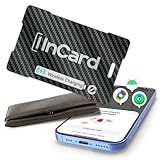
- 🥇【Dual-System Item Locator】Our wallet tracker natively compatible with both Google's "Find Hub" and Apple's "Find My" networks. It pairs quickly and directly without requiring additional apps. Leveraging Google and Apple's cloud networks, it eliminates the fear of loss.
- 🌍【Located at a Glance】 Whether your item is lost in the office, parking lot, park, mall, a friend's house, or farther away, you can quickly pinpoint its general area with our spotminders tracking card on Google/Apple Maps and navigate directly to retrieve it.
- 🔍️【Extended Bluetooth Range】Even if your lost item is over 330 feet away, our wallet tracker card's extended Bluetooth range combined with Google’s exclusive "Find Hub" distance prediction feature allows you to easily identify and locate your items.
- 📢【Ultra-High Decibel Ringtone Alert】Tearing the place apart but still can't find your item? Simply tap the "Play Sound" button on the Google or iOS app, and as long as our wallet tracking card is within Bluetooth range, it will emit a ringtone. With a volume exceeding 90 decibels, the sound remains clearly audible even when covered by obstacles.
- 🔋【Wireless Charging】This tracker was made with high-quality lithium battery raw materials and certified by multiple authoritative institutions, it undergoes rigorous pressure testing procedures to compatible with universal wireless chargers on the market for convenient plug-and-play charging. Single charge provides up to 6 months of battery life. We provide 2 years of 24/7 after-sales technical support, allowing you to rely on our product with confidence and no need to worry about failure or technical issues during use.
Will it work if my phone battery is dead?
Your phone can’t receive or show locations if it’s off. However, the tracker can still be detected by other participating Android phones in the area. When you turn your phone back on, you can view the last known updates.
Can I use one tracker with multiple phones?
Usually, a tracker is registered to a single account. Some ecosystems offer household sharing, but tag sharing support depends on the tracker model and the current policy of the service. Check the setup screen when adding the tracker to your account.
What happens if I lose the tracker and buy a new one?
Register the new tracker normally. If your old tracker still has battery, it may continue to report last known sightings. If the tracker is replaced due to theft, consider removing the old device from your account after you verify the replacement is working.
Do these trackers support NFC tap-to-identify?
Some models include NFC for “tap to see info” behavior. It’s not universal. If NFC is present, the purchase listing and setup screens typically mention it.
Bottom Line
Android getting AirTag-like trackers starting in May 2024 is a meaningful upgrade: it expands Find My Device beyond single-brand tags and gives more people a network-backed way to locate lost items. If you choose a tracker built for Find My Device and set it up with correct permissions, the experience is practical and consistent.
Windows Errors? Fix Them Before They Spread
Repair common Windows errors and clear accumulated junk for a smoother, more stable PC - no reinstall needed.Free scan · no reinstallCrashes, No Sound, or Screen Glitches?
Random freezes, missing sound and display glitches usually trace back to one bad driver. Find and replace yours safely.Free scan · under a minuteYour best results will come from basic hygiene: update apps, keep permissions enabled, test ring-to-find early, and watch the battery indicator. With that, these tags become a low-effort safety net for keys, bags, and luggage.
Quick Recap
Product prices and availability are accurate as of the date/time indicated and are subject to change. Any price and availability information displayed on Amazon at the time of purchase will apply.




