Do these 3 things before closing this tab:
1Fix the driver behind crashes, sound loss and screen glitches2Clear out junk files and repair common Windows errors3Scan for outdated or missing drivers - takes under a minuteYou can build a repeatable 3D context workflow with these tools, but the names do not describe one integrated product chain. Cityweft and Shapezo describe ways to generate site context from map data; Tripo3D handles model conversion; CityEngine supports procedural city authoring and export; and the UK Site3D at site3d.co.uk is civil-engineering software for roads and sites. Treat each as a separate stage, and validate every file handoff in the application that will use it.
What each tool does in this workflow
The documented roles overlap only at a high level. A listed export or integration is not proof that a particular file will preserve georeferencing, metadata, materials, or editable structure when opened by another named tool.
As an Amazon Associate I earn from qualifying purchases.
| Tool | Documented role | Formats and handoffs documented | What not to assume |
|---|---|---|---|
| Cityweft | Web platform and API for generating 3D site context. | Its page describes integrations and exports spanning architecture, CAD, BIM, GIS, and visualization tools; it does not establish a specific file format for every handoff discussed here. | Do not infer that an export will retain a particular coordinate system, layer structure, or metadata in a target application without checking the downloaded file. |
| Shapezo | Generation, review, and editing of map-derived buildings, terrain, water, and vegetation. | The vendor describes exports for 3D, BIM, GIS, and game-engine workflows, but the cited page does not establish a direct connection to every other tool in this workflow. | Map-derived context is not, on that basis alone, a surveyed or authoritative engineering model. |
| Tripo3D | Model conversion and related model handling. | Its API documentation lists GLTF, FBX, USDZ, OBJ, STL, and 3MF as target formats, with conversion options. | The cited documentation does not establish Tripo3D as a source of geographically authoritative site data. |
| Esri CityEngine | Procedural city authoring and export. | Its documentation covers exports for CGA models, manually drawn and static models, and terrain meshes, with routes to other 3D authoring tools, ArcGIS Online, web, or VR. Specific format availability and interface can depend on CityEngine version. | Do not assume a chosen export route carries every scene property needed downstream. |
| Site3D at site3d.co.uk | UK civil-engineering software for road and site design. | The vendor describes IFC export for BIM collaboration. | This is a distinct civil-design role, not evidence of a direct integration with the other products here. “Site3D” is also used by an unrelated product, so confirm the vendor identity. |
Cityweft’s page, accessed in 2026, states that pricing starts at €30 per single export. That is a vendor pricing claim rather than a verified quote; check the live price and terms before budgeting. The cited Shapezo page does not state a comparable price.
Free tools Windows power users keep installed
One-click scans. No signup required.
How to build a reproducible pipeline
Start with a small representative area and a specific downstream use. A context model for visualization may tolerate different detail and authority than a model used to inform civil or BIM design. This workflow is a practical sequence, not a claim that all five products have been tested together.
#1 Best Overall
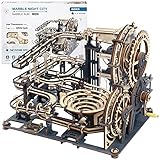
- New wooden marble run!Build it with 294 pieces and 10 marbles.The end result is pretty cool.It has a crank that uses large gears to move marbles up to the top of the machine where they roll down into different channels.
- Different from other wood puzzles,black-grey appearance,metal nameplate and acrylic pieces to make the finished product more visually interesting and allowing the balls to be seen in action more.
- Great instruction booklet with big and detailed pictures makes it easy to identify the parts and makes the instruction clear.There is one spare parts sheet in case you broke critical pieces during assembly.Also you can contact us anytime.
- It's a great alternative when you've tired of jigsaw puzzle.This one was more advanced. This marble run model can be put on a bookshelf and believe that your friends will always ask you what it is and want a demonstration.
- This STEM puzzle will be outstanding Christmas or Birthday gift for those who loves to work with wood and loves a challenge,it will take around 7 hours' concentration to assemble properly.
- Define the project. Record the area of interest, intended use, required level of authority, coordinate reference system (CRS), units, and the layers you need. Identify the destination application before selecting an export route.
- Select a context source. Choose Cityweft or Shapezo based on the geographic coverage, source data, editable layers, georeferencing, formats, update controls, and target-software workflow you need. Both vendors describe map-derived site context, but the available vendor pages do not establish identical coverage or output quality, and do not support an independent winner.
- Export a small test area. Save the source project and record the export date, area, selected layers, CRS, units, format, and settings. Open the result in its intended destination and check coordinates, scale, orientation, and layer organization before processing the full area.
- Convert only when needed. Use Tripo3D when model conversion or related model handling is part of the workflow. Log the input and output formats and conversion settings. In the receiving application, inspect scale, orientation, topology, and materials; conversion does not establish geographic accuracy.
- Use CityEngine for its authoring or export role. If procedural city authoring or a CityEngine export route is required, note the installed CityEngine version and selected route. Open the result downstream and verify that the geometry and scene information you rely on survived.
- Bring in Site3D only for the intended civil-design task. If you mean the UK road-and-site design product at site3d.co.uk, keep that work distinct from general context generation. For IFC collaboration, check units, coordinate alignment, and the receiving BIM application rather than assuming that IFC export guarantees a correct handoff.
- Preserve the run. Keep source files, intermediate exports, configuration notes, and a short validation record together. A second person should be able to identify the inputs, repeat the settings, and see what was checked at each handoff.
What to validate at every handoff
File extensions alone do not prove that a model is fit for its next job. Check the properties that matter to the intended use in the target application, not just whether the file opens.
- Location and units: confirm that the model lands in the expected place and at the expected scale. Preserve the CRS and coordinate details alongside the export, then verify them against the opened file.
- Geometry: inspect orientation, missing or duplicated geometry, topology, and terrain continuity at representative points.
- Structure: check whether layers, object names, and editable components remain organized as needed.
- Materials and textures: look for missing, altered, or disconnected materials after conversion or export.
- Downstream usability: test the actual application and workflow that will consume the file. A format appearing in a vendor’s list does not establish successful exchange between a specific pair of applications.
How to choose between Cityweft and Shapezo
Cityweft and Shapezo are the two tools in this group described as sources for site context. The available vendor descriptions do not provide an independent, like-for-like comparison, so evaluate them against the same project area and requirements rather than treating either description as proof of superior accuracy or coverage.
Rank #2

- 5-in-1 City Model Kit: Cubicfun 3D puzzle of New York model kit is a project to build iconic NYC mordern architectures including the Statue of Liberty, Brooklyn Bridge, Chrysler Building
- Ideal Gift for Children: Designed to be enjoyable and challenging, this buiding model kit is an ideal birthday gift or Christmas gift for children. Building a three-dimensional craft helps develop a child’s creativity, concentration and confidence to complete a complex project. Recommend for above 8 years old
- Funny Family Activity: Compared to finishing it alone, it is better for adults and children to work together and enjoy a funny family time. Following the instruction booklet to assemble the numbered pieces makes it much easier. No tool and glue needed
- Perfect Room Decoration: Durable material and realistic design make the city model set a striking centerpiece for your home to show the first impression of New York. Finished size: 14.57" x 8.86" x 16.54"
- Exceptional After-Sales Service: We take pride in providing outstanding customer satisfaction. Should you have any concerns or inquiries, our dedicated support team is here to assist you promptly. Your happiness and the joy of your little one are our top priorities
- Compare geographic availability and the source and date of the underlying data for your area.
- Check which layers can be selected or edited, and whether useful metadata is present in the export.
- Test georeferencing and coordinate handling in your destination software.
- Confirm the exact output format and supported target workflow you need, rather than relying on a broad category such as “BIM” or “GIS.”
- Assess how updates and repeated exports are handled, and record the settings needed to reproduce a result.
- Compare current costs for the specific export or workflow you plan to use; Cityweft’s page accessed in 2026 gives a starting figure, not a verified quote for every use.
Keep the Site3D name and scope clear
This article refers to Site3D at site3d.co.uk, presented by its vendor as UK civil-engineering software for roads and sites. The vendor describes IFC export for BIM collaboration. An unrelated product also uses the Site3D name, so identify the vendor before applying any product-specific claim. Nothing in the cited material establishes that the UK application directly integrates with Cityweft, Shapezo, Tripo3D, or CityEngine.
Quick Recap
Best Value

- BUILD A WOODEN MOTORCYCLE: Assemble the Cruiser V-Twin from 156 model parts, with 12 spare pieces included. This 3D wooden puzzle is a hands-on model building project for adults who enjoy classic motorcycles and mechanical details.
- SEE THE MECHANISM MOVE: Explore moving pistons, a steerable front wheel and a rubber-band-powered pull-back mechanism. Build the motorcycle yourself, then demonstrate its movement on a suitable flat surface.
- A FOCUSED HOBBY PROJECT: Follow the included assembly instructions to connect the wooden parts without glue. The manufacturer's estimated build time is about 3 hours; your pace will vary with experience. Handle small parts carefully during assembly.
- COMPACT MODEL FOR DISPLAY: The assembled motorcycle measures approximately 7.09 x 2.36 x 3.39 inches (18 x 6 x 8.6 cm), at 1:13 scale. Show your finished build on a desk or shelf and enjoy the exposed wooden details.
- A GIFT FOR MOTORCYCLE ENTHUSIASTS: Give a hobby kit to a dad, husband, friend or model builder who enjoys making things. Supplied as an unassembled wooden kit, the Cruiser V-Twin offers both a building activity and a finished display model.
Rank #4

- Build your own tractor: Assemble a mechanical 3D wooden puzzle from 148 wooden parts, with 16 spare parts included. This tractor model kit is designed for adults and teens ages 15+ who enjoy hands-on model building.
- Mechanical motion: A rubber-band motor drives the tractor forward and backward. Turn the steerable front wheels, open the hood and explore the moving pistons as you bring your farm tractor model to life.
- A rewarding build: Plan approximately 3 hours for this intermediate, 3/5 difficulty project; actual time varies with experience. Laser-cut plywood parts assemble without glue. Assembly requires a craft knife, scissors and three coins up to 16 mm in diameter; these items are not included.
- Compact display model: The finished tractor measures 6.22 x 2.83 x 4.69 inches (L x W x H) at 1:20 scale. Made in Poland, this wooden model kit for adults combines a hands-on building project with a detailed model to display.
- Parts and instructions included: The kit contains 4 plywood sheets with model parts, 16 spare parts, assembly instructions, 20 toothpicks, 2 elastic bands, a candle for waxing and sandpaper. A hands-on gift for tractor enthusiasts and model builders.
Rank #3

- Build a working mechanical clock: Assemble 378 wooden parts, with 43 spare parts included. The vintage wall clock uses a pendulum and a counterweight-driven mechanism
- An expert-level project: Designed for patient, experienced adult builders. Allow approximately 8 hours for assembly; time varies with experience, and setup and adjustment require care
- No glue required: Follow the color step-by-step manual and prepare moving parts with the included sandpaper and wax. Careful sanding, waxing and gear alignment are part of the build
- Prepare for setup: The instructions call for a craft knife, scissors and sand or salt for the counterweight. Level the clock, wind it and adjust the pendulum as directed
- Made in the EU: An engineered-wood clock kit for hands-on hobbyists who enjoy mechanical models. Assembled size: approximately 26.77 H x 11.26 W x 3.35 D inches
Product prices and availability are accurate as of the date/time indicated and are subject to change. Any price and availability information displayed on Amazon at the time of purchase will apply.




