Free tools Windows power users keep installed
One-click scans. No signup required.
You can try a new tech hobby this weekend without buying gear: use a phone or computer to make a tiny game, explore a virtual circuit, identify a bird, or try one of six other hands-on activities. Aim for one small result—not mastery—and check the limits of any free tool before relying on it.
Pick a hobby that fits how you like to spend time
These nine ideas fall into three broad groups: building, observing, and making. Choose one based on what you have—a phone, a computer, or both—and whether you would rather create something or investigate the world around you.
As an Amazon Associate I earn from qualifying purchases.
| Hobby | Best fit | Weekend-sized first step |
|---|---|---|
| Vibe coding | Build a small software tool | Describe a simple utility and inspect the generated result |
| Virtual electronics | Explore circuits without physical parts | Place a few virtual components and change a small piece of code |
| Simple game making | Make an interactive story or mechanic | Create a short branching story or tiny arcade interaction |
| Aircraft tracking | Investigate flights overhead | Look up an aircraft you can see using a tracking service |
| Bird identification | Pair an outdoor walk with phone-based identification | Listen for birds and try identifying a sound with an app |
| Satellite and ISS tracking | Plan a brief skywatching session | Find a predicted pass and look from a suitable spot |
| 3D modeling | Make digital objects from shapes | Combine basic shapes or cut a hole in an object |
| Music making | Experiment with sounds and loops | Assemble a short loop or song in a digital audio workstation |
| Video editing | Turn phone clips into a short edit | Trim clips, arrange them, and add a title or subtitles |
Build something small on a computer
1. Try vibe coding
Describe a modest tool—such as a recipe organizer or expense tracker—to an AI coding tool, then review what it creates. Keep the request narrow enough that you can understand the result and test whether it does what you asked.
Free access to AI tools may be limited. Treat generated code and commands as suggestions to inspect, not instructions to run blindly; a small project is a safer place to learn how the output works.
#1 Best Overall

- 35+ Guided Electronics Projects: Progress from LEDs and buttons to RFID access, real-time clocks, motion and distance sensing, environmental monitoring, motor control and interactive displays for STEM learning, coding clubs and maker projects
- More I/O and Memory for Larger Builds: The MEGA 2560 R3 provides 54 digital I/O pins, including 15 PWM outputs, 16 analog inputs, 4 hardware serial ports and 256 KB flash for projects that combine more sensors, controls and displays
- 200+ Components for Prototyping: Includes LCD1602, RC522 RFID, RTC, DHT11, HC-SR501 PIR, ultrasonic and water-level sensors, GY-521, MAX7219, keypad, joystick, rotary encoder, relay, SG90 servo, stepper motor, DC motor, breadboard and more
- Learn, Modify and Create: Follow 35+ guided lessons with example code, then adjust sensor thresholds, timing, display text, motor behavior and control logic to turn structured exercises into access systems, monitors, alarms and interactive projects
- Organized for Repeatable Learning: Pre-soldered modules, a solderless breadboard, storage case and small-parts box reduce setup time and keep sensors, LEDs, ICs, wires and other components easy to find between projects
2. Explore virtual electronics
An online circuit simulator lets you place components such as LEDs or buttons and experiment with how a circuit behaves. Try changing a small part of the code or circuit and observe what happens. For an introductory experiment, you can explore the idea without buying components or soldering.
3. Make a simple game
Choose one interaction: a short branching story, a character that dodges an obstacle, or another tiny arcade mechanic. A small finished experiment teaches more than a sprawling game idea left half-built. You can expand it later if the process is enjoyable.
Rank #2

- 30+ Guided Electronics Projects: Start with LEDs and build toward LCD1602 displays, RFID access, motion detection, distance sensing, motor control and environmental monitoring for STEM learning, coding clubs, classrooms and hobby projects
- 200+ Components Across 63 Types: Includes an ELEGOO UNO R3 controller, LCD1602, RC522 RFID, RTC, HC-SR501 PIR sensor, ultrasonic sensor, DHT11, GY-521, MAX7219, keypad, joystick, relay, SG90 servo, stepper motor, breadboard and more
- Begin Without Soldering: Pre-soldered modules, a solderless breadboard, organized storage case and small-parts box reduce setup time and help beginners move from lesson to lesson while keeping LEDs, ICs, wires and sensors easy to find
- Learn, Modify and Create: Program the ELEGOO UNO R3 board with Arduino IDE using the included PDF tutorial and example code, then adjust sensor thresholds, timing, display text and motor behavior to turn guided lessons into original projects
- Flexible Power and Project Setup: Includes a 9 V, 1 A power supply, breadboard power module, 9 V battery and USB cable to support controller, breadboard and module experiments without sourcing basic setup accessories separately
4. Try 3D modeling
Use a browser-based tool or free modeling software to make a simple object by combining shapes or cutting holes. The first goal is to learn how digital forms fit together, not to produce a print-ready design. A 3D printer is a possible later extension, not a requirement for learning modeling.
Do these 3 things before closing this tab:
1Scan for outdated or missing drivers - takes under a minute2Repair Windows errors before they cause bigger problems3Fix the driver behind crashes, sound loss and screen glitches5. Make a short piece of music
Open a digital audio workstation and use its included sounds to arrange a short loop or song. You do not need to read notation or play an instrument to experiment with rhythm, layers, and timing. Check the current terms and included content of any particular tool; “free” does not necessarily mean every feature or use is included.
Rank #3
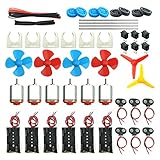
- Pay attention: Please read the instructions or pictures carefully, use the correct circuit diagram to avoid short circuit, short circuit will produce high temperature and Causing accessory damage
- Shaft Propeller Aperture:2mm/0.078"; Diameter:60mm/2.36"; Number of vane:4 vane and 3 vane;colour:Red & Blue & Yellow&Green&Clear(Random Color)
- DC Motors Color:Siler+Red;Voltage:DC 3V-12V;No-load speed: 9000RPM- 25000RPM ±10%; Motor Body Diameter:27mm/1.06";Shaft Size:10x2.0mm/0.39"x0.08"(L*D);Motor Body Length;38mm/1.46"
- High torque Strong magnetic Brushed Electric 130 MOTOR, can be used for Science Educational models, DIY STEM toys, etc.. It is recommended to use a 3V battery drive to avoid high-speed operation affecting the motor life.
- Package including:6pcs DC motor,6pcs 9V Battery Clip Connector,6pcs 2 x AA Battery Holder,6pcs motor mounting bracket,6pcs boat rocker switches,12pcs x electronic wire(25cm),8pcs Plastic wheels,4pcs 2*100mm shaft,4pcs 4 vanes propeller,2pcs 3 vanes propeller and 40cmΦ3 Heat shrink tube
6. Edit a phone video
Start with clips already on your phone. Trim them, arrange a short sequence, then add a title or subtitles and music. A simple editor can be a better first step if advanced software feels complicated or runs poorly on your computer.
Explore what is happening around you
7. Track an aircraft overhead
When you spot an aircraft, use a flight-tracking website or app to investigate its displayed information. Services can draw on transponders and other sources, but not every aircraft will necessarily appear. Treat the tracker as a way to explore available data, not a guarantee that every flight can be identified.
Rank #4

- Used for: DIY electronic circuits, DIY electronic circuit production, learning electronic circuits, learning electronics tools,learning breadboard kit,beginner electronics kit,learning pcb soldering kit,college electrical engineering kit,learning electronic component kit
- Features: Our kit also includes a 30X magnifying glass with jewelry attachments, which makes it easier to view the component models. There are also commonly used components such as capacitors, resistors, potentiometers, integrated circuits, speakers, motors, protoboards, breadboards, which can meet the DIY needs of beginners in electronics.
- All the parts are packed in a large transparent electronic component kit box. The box contains various sizes of small transparent compartments, making it easier for you to find the parts you need.
- include: Capacitors kit, LED kit, Triode kit, IC kit,PCB kit,Breadboard kit,Jumper kit,Diodes kit,Potentiometer kit, USB Port,DC power jack,Pin,resistor assortment kit Header,Terminals,Tactswitch,buzzers,piezoelectric ceramics,connecting terminal,hex stud,motor,speakers,magnifying glass。 Electronics Components Kit Assortment,PCB Board Prototype Kit for Electronic Projects,DIY Electronics Components Kit Assortmen,Electronic Component Assortment Box Kit
8. Identify birds by sound and sight
Take a phone outdoors and listen for birds. The article describes Merlin Bird ID as a free option with an audio-identification feature, giving you a way to start without specialist equipment. Binoculars can help you see birds farther away, but they are optional; they are not needed to try app-based identification.
Outdated Drivers Are Slowing You Down
One free scan finds every outdated or missing driver and matches the right update for your exact hardware.Free scan · exact hardware matchWindows Errors? Fix Them Before They Spread
Repair common Windows errors and clear accumulated junk for a smoother, more stable PC - no reinstall needed.Free scan · no reinstall9. Track satellites and the ISS
Use a tracking website to find a predicted pass, then choose an outdoor vantage point and look at the right time. Visibility depends on timing and viewing conditions, and a useful portion of a pass may last only a few minutes. The How-To Geek article dated August 29, 2026, says the ISS travels at around 17,500 mph; that is the article’s stated figure, not a fresh measurement verified here.
Best Value

- BUILD BREADBOARD CIRCUITS AND MINI PROJECTS - Create LED indicators, button inputs, traffic-light sequences, light-activated circuits, RGB effects and buzzer alarms for electronics practice, classroom demonstrations and maker projects
- 235 PARTS FOR REPEATABLE EXPERIMENTS - Includes a 400-tie-point solderless breadboard, power module, jumper wires, Dupont wires, potentiometer, buttons, LEDs, resistors, capacitors, diodes, transistors, buzzers and light-sensitive components
- LEARN HOW CORE COMPONENTS WORK - Use the 74HC595 to expand outputs, the 4N35 optocoupler to explore signal isolation, PN2222 transistors to switch loads and 1N4007 diodes for polarity protection and rectification experiments
- POWER AND REWIRE PROJECTS QUICKLY - Use the breadboard power module for selectable 3.3 V or 5 V rails, while rigid jumpers and female-to-male leads simplify connections; use a suitable 6.5–9 V DC input and do not exceed 9 V
- COMPONENT KIT WITH CLEAR EXPECTATIONS - A controller board, programming cable and wall power adapter are not included; use a compatible microcontroller for coded projects and follow the current tutorial, datasheets and wiring guidance
Keep learning after the first experiment
If your weekend project sparks a longer interest, free self-paced courses can provide a next step. Cisco describes its Networking Academy as offering free courses, including beginner Python. The National Science Foundation’s computing education resources list Scratch and one-hour coding activities for students and families. Course catalogs and access terms can change, so check the linked pages for current details.
Quick Recap
Product prices and availability are accurate as of the date/time indicated and are subject to change. Any price and availability information displayed on Amazon at the time of purchase will apply.




