For a college laptop setup, the most useful accessory depends on what your computer cannot do comfortably: add a mouse or keyboard for easier input, a hub for missing ports, a charger that meets its power needs, or lighting and audio for your study space. PCWorld’s August 25, 2026 guide listed the nine items below at $30 to $99. Those are the article’s price snapshots, not guaranteed current prices or stock.
Start with the problem you want to solve
These are optional tools, not a checklist every student needs. Choose for your routines: a mouse and keyboard change how you work at a desk; a hub and charger address connection and power needs; the remaining items improve a particular study-space setup. PCWorld’s descriptions and prices below come from its August 25, 2026 guide; they are not independent test results.
As an Amazon Associate I earn from qualifying purchases.
- Move between classes: A wireless mouse or fold-flat headphones may be easier to carry than a desk mat, monitor, or speakers.
- Set up a fixed desk: A mat, keyboard, monitor lamp, external display, or speakers may be more useful if you regularly study in one place.
- Check before buying: Confirm your laptop’s ports, display inputs, charging requirements, and the exact accessory’s specifications. A product name alone does not guarantee compatibility.
Input and desk comfort
Logitech Signature M650 wireless mouse — listed at $40
PCWorld describes a lightweight, sculpted wireless mouse with smooth scrolling and thumb-side back and forward buttons. It supports Bluetooth and 2.4GHz wireless connections and is described as running for up to two years on its included AA battery. The article says it sometimes falls below $30 on sale; that is not a guaranteed price. Consider it if you prefer a separate mouse for coursework or navigating between pages.
Corsair MM350 Pro desk mat — listed at $30
The 36-inch-wide mat gives a mouse a larger surface and can cover part of a desk. PCWorld describes its fabric as washable, waterproof, and stain-resistant. Check the dimensions against your desk before ordering; a wide mat can be awkward in a small dorm room or shared workspace.
#1 Best Overall

- 5-in-1 Connectivity: Equipped with a 4K HDMI port, a 5 Gbps USB-C data port, two 5 Gbps USB-A ports, and a USB C 100W PD-IN port. Note: The USB C 100W PD-IN port supports only charging and does not support data transfer devices such as headphones or speakers.
- Powerful Pass-Through Charging: Supports up to 85W pass-through charging so you can power up your laptop while you use the hub. Note: Pass-through charging requires a charger (not included). Note: To achieve full power for iPad, we recommend using a 45W wall charger.
- Transfer Files in Seconds: Move files to and from your laptop at speeds of up to 5 Gbps via the USB-C and USB-A data ports. Note: The USB C 5Gbps Data port does not support video output.
- HD Display: Connect to the HDMI port to stream or mirror content to an external monitor in resolutions of up to 4K@30Hz. Note: The USB-C ports do not support video output.
- What You Get: Anker 332 USB-C Hub (5-in-1), welcome guide, our worry-free 18-month warranty, and friendly customer service.
G.Skill KM250 keyboard — listed at $45
PCWorld points to RGB lighting, a rotary volume dial, switches and keycaps, and built-in foam dampening. The dampening may be relevant in a shared room, but it does not establish that the keyboard is quiet or eliminates typing noise. Check its connection type and layout against your laptop, operating system, and preferences before buying.
Screen and lighting
Sceptre R1500 monitor — listed at $99
PCWorld describes a 24-inch, 1080p display with a slight curve and HDMI connection, plus an additional HDMI port. It may suit a desk where a second screen would help, but it is less convenient to carry between classes. Confirm that your laptop can output video through a compatible connection and that the monitor’s dimensions fit your space.
Rank #2

- Sleek 7-in-1 USB-C Hub: Features an HDMI port, two USB-A 3.0 ports, and a USB-C data port, each providing 5Gbps transfer speeds. It also includes a USB-C PD input port for charging up to 100W and dual SD and TF card slots, all in a compact design.
- Flawless 4K@60Hz Video with HDMI: Delivers exceptional clarity and smoothness with its 4K@60Hz HDMI port, making it ideal for high-definition presentations and entertainment. (Note: Only the HDMI port supports video projection; the USB-C port is for data transfer only.)
- Double Up on Efficiency: The two USB-A 3.0 ports and a USB-C port support a fast 5Gbps data rate, significantly boosting your transfer speeds and improving productivity.
- Fast and Reliable 85W Charging: Offers high-capacity, speedy charging for laptops up to 85W, so you spend less time tethered to an outlet and more time being productive.
- What You Get: Anker USB-C Hub (7-in-1), welcome guide, 18-month warranty, and our friendly customer service.
Quntis monitor lamp — listed at $40
The monitor lamp is described as directing light onto the desk, with dimming, adjustable color temperature, and a wireless controller. It is a desk accessory rather than a substitute for room lighting. Confirm that its mounting arrangement suits your monitor.
The Tool Desk
Outbyte Driver Updater FREEScan for outdated or missing drivers - takes under a minuteDriver Scan →Outbyte PC Repair FREERepair Windows errors before they cause bigger problemsFix Now →Audio for a room or a commute
Creative Pebble V3 speakers — listed at $40
PCWorld describes these as 16-watt speakers with USB connection for laptop setup and Bluetooth for audio from a phone or tablet. They are a desk-based option when you want sound without wearing headphones. Consider whether speakers suit your living arrangement and shared-space habits.
Rank #3

- 5-in-1 USB-C Hub: Experience comprehensive connectivity featuring a Power Delivery input, two USB-A 2.0 ports, a USB-A 3.0 port, and an HDMI port. (Note: The USB-C power delivery input port is only for connecting an external wall charger to power your laptop and cannot power peripheral devices.)
- 90W Pass-Through Charging: Achieve optimal charging with 90W pass-through power to your laptop, supported by a total input of 100W, with the hub reserving 10W for operational efficiency. (Note: Wall charger not included.)
- Quick Data Transfers: Accelerate your productivity with rapid data transfers using a high-speed 5Gbps USB 3.0 port and two 480Mbps USB 2.0 ports.
- 4K HDMI Display: Enhance your visual experience with a hub capable of delivering 4K resolution at 30Hz in both mirror and extend modes. Please note that this hub is compatible with MacBook (macOS 12 and newer), Windows 10 and 11, ChromeOS, and laptops equipped with DP Alt Mode and Power Delivery. Note: This device is not compatible with Linux.
- What You Get: Anker USB-C Hub (5-in-1, 4K HDMI), welcome guide, 18-month warranty, and our friendly customer service.
Anker Soundcore Q20i headphones — listed at $45
The article describes active noise cancellation, a fold-flat design, USB-C charging, and up to 60 hours of battery life. Those features may suit travel or listening in a shared space, but noise cancellation should not be treated as a guarantee of silence. Check device compatibility and charging needs.
Independent reader supportYour contribution helps us test, update, and keep practical guides available for everyone.Power and ports
Ugreen Nexode 65W charger — listed at $40
PCWorld describes a compact GaN charger with folding prongs that can charge a laptop, phone, and headphones simultaneously. The 65W figure identifies the charger’s stated total power class; it does not by itself confirm that it can charge every laptop at full speed, or that three devices will each receive the power they need at once. Check your laptop’s required wattage, supported charging standard, and the charger’s output profile for your devices before relying on it as your main charger.
Rank #4

- [7-in-1 Multi-port USB C Hub] Acer USBC adapter macbook is made of Aluminum material, expands a USB-C port to 7 ports (1*HDMI 4K@30HZ, 2*USB 3.1, 1*USB-C, 1*Type-C PD charging, 1*MicroSD card slot, 1*SD card slot). The USB hub expands your work from home, office, or on the go. 📌Note: Please connect the power supply with the PD port to provide sufficient power for the USB C hub dongle .
- [4K USB-C to HDMI Adapter] This USB C to hdmi adapter can mirror or extend your screen with an HDMI port. You can use USBC hub to directly stream 4K@30Hz or full HD 1080P video to HDTV, monitors, and projector, which also bring an immersive 3D resolution experience. 📌Note: USB-C devices should support USB Type-C DP Alt Mode(Video transmission function), and 📌NOT for 4K@60Hz and 2K@144Hz.
- [100W Power Delivery] The USB C multiport adapter features Type C fast charge PD port to provide up to 100W of high-speed charging for laptops. Get your USB C devices charged, No Worry about the power while using the other functions. Ideal for MacBook Pro/Air and other USB-C devices. 📌Ensure your laptop's USB-C port supports PD protocol and use a 65W+ charger for best performance.
- [Efficient 5Gbps Data Transfer] Two high-speed USB-A 3.1 ports and one USB-C port enable fast data transfer up to 5Gbps. The USBC dongle can expand your work efficiency either from home or the office. 📌Note: ONLY Support Data Transfer, NOT Support video/audio.
- [Wide Compatibility] The USB C dongle adapter crafted with a high-quality aluminum housing for enhanced durability and heat dissipation. USB hub for laptop is for MacBook Pro, MacBook Air, Acer, XPS, Laptops and Works on Windows, ChromeOS, Linux, Mac OS X 10.5 or higher. 📌Please turn on the Samsung DeX Mode on the Samsung Galaxy Tablet before you use it.
Anker 7-in-1 USB-C hub — listed at $40
PCWorld describes using the hub to connect a monitor, keyboard, speakers, flash drive, SSD, and SD or microSD cards. That list describes possible connection types, not a promise that every device can be used at once or at full speed. Confirm the exact hub’s ports and power specifications, and check whether your laptop’s USB-C port supports the data, video, or power features you need. A USB-C connector alone does not guarantee all of those capabilities.
Quick Recap
Best Value
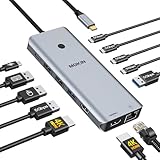
- 【Complete 13-IN-1 Dock Solution】This laptop docking station dual monitor features 2 HDMI ports, an RJ45 Ethernet port, 4 x USB-C 3.0 ports, 2 x USB-A 3.0 ports, 2 x USB-A 2.0 ports, and a USB-C power charging port (100W Max). In addition, this USB C docking station with 2 HDMI 𝐨𝐧𝐥𝐲 𝐜𝐨𝐦𝐩𝐚𝐭𝐢𝐛𝐥𝐞 𝐰𝐢𝐭𝐡 𝐥𝐚𝐩𝐭𝐨𝐩 𝐰𝐢𝐭𝐡 𝐓𝐡𝐮𝐧𝐝𝐞𝐫𝐛𝐨𝐥𝐭 𝟑/𝟒, 𝐅𝐮𝐥𝐥-𝐅𝐮𝐧𝐜𝐭𝐢𝐨𝐧𝐚𝐥 𝐔𝐒𝐁 𝐂 𝐩𝐨𝐫𝐭
- 【Dual 4K Ultra HD Display】 This USB C hub 2 monitors lets you max set up dual 4K@60Hz Display with laptop DP1.4 protocol, boosting efficiency for both your work and daily life. 𝗗𝘂𝗲 𝘁𝗼 𝗢𝗦 𝗹𝗶𝗺𝗶𝘁𝗮𝘁𝗶𝗼𝗻𝘀, 𝗺𝗮𝗰𝗢𝗦 𝗹𝗮𝗽𝘁𝗼𝗽𝘀 𝗼𝗻𝗹𝘆 𝘀𝘂𝗽𝗽𝗼𝗿𝘁 𝗦𝗦𝗧 𝗺𝗼𝗱𝗲, 𝗺𝗲𝗮𝗻𝗶𝗻𝗴 𝗮𝗹𝗹 𝗰𝗼𝗻𝗻𝗲𝗰𝘁𝗲𝗱 𝗲𝘅𝘁𝗲𝗿𝗻𝗮𝗹 𝗺𝗼𝗻𝗶𝘁𝗼𝗿𝘀 𝘄𝗶𝗹𝗹 𝘀𝗵𝗼𝘄 𝘁𝗵𝗲 𝘀𝗮𝗺𝗲 𝗺𝗶𝗿𝗿𝗼𝗿𝗲𝗱 𝗱𝗶𝘀𝗽𝗹𝗮𝘆
- 【Privacy Protection-Lock Button】Short-Press to turn off your screens, the screen lock button protects sensitive information at any time.
- 【Blazing-Fast Data Transfer and Wired Network】Move files in seconds with multiple 5Gbps USB ports that offer 10x the speed of USB 2.0. Complement your wireless connection with the stable, high-performance 1000Mbps RJ45 network port for seamless video calls, large downloads, and lag-free online gaming
- 【100W PD Charging for Your Laptop and Devices】The dedicated USB-C Power Delivery port delivers up to 100W USB-C charging to power your laptop efficiently while the USB C hub dual monitor is in use. 𝗡𝗼𝘁𝗲 𝗧𝗵𝗲 𝗽𝗮𝗰𝗸𝗮𝗴𝗲 𝗰𝗼𝗻𝘁𝗮𝗶𝗻𝘀 𝗼𝗻𝗹𝘆 𝘁𝗵𝗲 𝗽𝗿𝗼𝗱𝘂𝗰𝘁, 𝘁𝗵𝗲 𝘂𝘀𝗲𝗿 𝗺𝗮𝗻𝘂𝗮𝗹 𝗮𝗻𝗱 𝘁𝘄𝗼 𝗰𝗮𝗯𝗹𝗲𝘀. 𝗖𝗵𝗮𝗿𝗴𝗲𝗿 𝗻𝗼𝘁 𝗶𝗻𝗰𝗹𝘂𝗱𝗲𝗱. 𝗠𝗮𝗸𝗲 𝘀𝘂𝗿𝗲 𝗮 𝟭𝟬𝟬𝗪 𝗮𝗱𝗮𝗽𝘁𝗲𝗿 𝗶𝘀 𝗮𝘃𝗮𝗶𝗹𝗮𝗯𝗹𝗲 𝘁𝗼 𝗺𝗲𝗲𝘁 𝘁𝗵𝗲 𝗿𝗲𝗾𝘂𝗶𝗿𝗲𝗺𝗲𝗻𝘁𝘀 𝗳𝗼𝗿 𝗰𝗵𝗮𝗿𝗴𝗶𝗻𝗴 𝘂𝗻𝗱𝗲𝗿 𝗳𝘂𝗹𝗹 𝗹𝗼𝗮𝗱
Check these details before ordering
- Current price and stock: All nine prices are snapshots reported in PCWorld’s August 25, 2026 article. Prices and availability can change; check the retailer’s listing before buying.
- Exact model: Match the product name and model, then check the current listing’s dimensions, included accessories, and specifications.
- Ports and charging: For a hub or charger, compare the laptop’s documentation with the accessory’s stated port, power, and charging support.
- Fit and use: Measure desk accessories and decide whether an item is practical for your campus routine or primarily for a fixed study space.
- Returns: Read the seller’s current return terms, particularly if compatibility is uncertain.
Product prices and availability are accurate as of the date/time indicated and are subject to change. Any price and availability information displayed on Amazon at the time of purchase will apply.




