A minimalist home office works best when it removes friction, not when it follows a fixed shopping list. Start with a chair that fits, a usable desk, a properly placed display, and lighting that suits your tasks. Add only the tools your work and room actually need. Ergonomic guidance supports arranging a workstation to fit the person; it does not establish that minimalist furniture itself improves focus.
What makes a home office essential?
There is no single workstation arrangement that fits everyone. Your body, tasks, room, and existing equipment determine what is useful. OSHA recommends fitting workstation components to the user, while the practical goal of a minimalist setup is to keep necessary tools accessible and the work surface usable—not to buy less for its own sake.
As an Amazon Associate I earn from qualifying purchases.
Think of the eight items below as options to assess, not a universal checklist. A laptop stand, desk lamp, or document holder may solve a specific problem; skip it if your setup already works without one.
1. An adjustable chair that fits you
Choose a chair by its fit and support for your body and work, not by an “ergonomic” label. CCOHS notes that a chair advertised as ergonomic is not automatically suitable; when possible, try it in the position and work situation where you will use it. Consider whether its seat height adjusts and whether its support feels appropriate for your task and body dimensions. CCOHS guidance on ergonomic chairs
#1 Best Overall
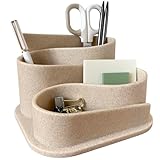
- Design Excellence: Elevate your workspace with our aesthetic desk organizer. Minimalist modern design complements any office decor and it's a perfect desk accessory for women seeking both functionality and style in home or work environments
- Premium Construction: Crafted from durable materials for lasting performance. Sleek modern desk accessories with clean lines and an elegant finish. The stable base prevents tipping even when fully loaded with pens, pencils and office supplies
- Versatile Organization: Perfect desk pen organizer for teachers, students and professionals. Keeps pens, pencils, paperclips and small office supplies neatly arranged while being compact in design to maximize small desk organization
- Practical Storage Solution: Transform cluttered surfaces into organized workspaces. Multiple compartments designed for desk essentials; Ideal for home office, dorm room, classroom or corporate setting.
- Thoughtful Gift Choice: Surprise colleagues with cute desk organizers and accessories. Essential addition to any work desk essentials collection; Practical yet stylish office desk accessories women appreciate for both function and beauty
2. A desk or work surface with clear space
Your work surface needs room for the display in front of you and for the keyboard and pointer close enough to use without reaching. Keep regularly used items within easy reach and move seldom-used objects out of the working area. The aim is functional space: cable clips or a small organizer are optional if they help preserve it, not proven focus tools. OSHA guidance on desks
3. A monitor or laptop display at a comfortable position
Place the display directly in front of you. OSHA advises a viewing distance of at least 20 inches, with 20–40 inches as its general preferred range; its guidance also places the top line of the screen at or below eye level. Treat these as setup guidance, then adjust viewing distance and text size so you can read comfortably without leaning forward. OSHA guidance on monitors
Rank #2
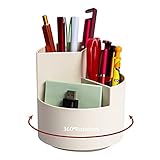
- [360-degree rotatable design] This rotating pen holder can be turned up to 360-degree rotation. It spins smoothly all around without getting stuck. Easy to access, easy to get from any angle. Save time to find your pen or pencils, always keep your desk tidy and organized. And it enables you to improve your working efficiency.
- [3 Independent Compartments Design] This desktop pen organizer has three slots in different heights to meet your various needs. The highest slot can put tall brushes, pencils, pens, rulers, pencil knives. The medium slot can put short brushes, concealer pen, mascara, scissors. The lowest slot can put lipsticks, nail polish, beauty blender, erasers, tapes, etc.
- [Multipurpose Desktop Organizer] This pen organizer can be used not only for stationery/office supplies, but also for your makeup tools and small household items. You can put it in the study, desk, office, kitchen, living room or bedroom to store and organize items.
- [Versatile Design] A classic style gives this spinning organizer a versatile look that blends in with any office or home décor. High-quality ABS makes it reliable and long-lasting, while a warm cute color adds a touch of charm.and organize items.
- [Safe Shopping] This desk pencil holder is the best present you give to friends and family, suitable for yourself, students, and teenagers. Hope you have a good shopping. If there is any problem with the product, please let us know immediately, we will solve the problem as soon as possible.
4. A laptop stand, if the screen is too low
If your laptop screen sits below a comfortable viewing height, raising it can help you position the display. A stable stand is one option; EU-OSHA also mentions a stable substitute such as books. Check that the raised screen remains steady and that you can still type and use a pointer without awkward reaching. If the laptop’s built-in keyboard and trackpad are no longer comfortable to use, an external keyboard and mouse may let you position the inputs separately from the screen. EU-OSHA telework guidance
Do these 3 things before closing this tab:
1Clear out junk files and repair common Windows errors2Scan for outdated or missing drivers - takes under a minute3Repair Windows errors before they cause bigger problems5. A keyboard and pointer within easy reach
Arrange your keyboard and mouse—or another pointer—so you can use them without reaching. OSHA treats keyboard and pointer choice and placement as parts of workstation setup. Laptop users may benefit from separate input devices when raising the screen, but the right arrangement depends on the person and task; no particular keyboard or mouse style is best for everyone. OSHA workstation components
Rank #3

- Mesh Pen Holder for Desk: Multipurpose 3 compartments desk organizer (8*4*4in), Suitable for storing pens, pencils, scissors, sticky notes, paper clips, etc. Keep your desk tidy and organized.
- Premium Material: Made of high-quality metal and mesh, durable and sturdy, not easy to deform or break. The smooth surface is easy to clean and will not scratch your desktop or other items.
- Convenient Design: The pen holder has three compartments, which can hold different types of stationery and supplies. The design is simple and practical, and the size is suitable for most desks.
- Sticky notes holder: The mesh pen holder has a sticky notes holder which is convenient for jotting down important reminders, to-do lists, or phone numbers.
- Wide Application: This pen holder is suitable for office, school, home, and other places. It can help you organize your desk, keep your stationery and supplies in order, and make your work more efficient.
6. A desk lamp when paper tasks need it
If you regularly read or write on paper and the room lighting is not enough, a directed task light can illuminate your documents. Adjust existing lights, window coverings, and screen position first, and aim the lamp so it lights the work rather than reflecting into the display. OSHA puts it plainly: “Position task lighting (for example, a desk lamp) so the light does not reflect on the screen.” OSHA workstation-environment guidance and CCOHS guidance on eye discomfort
7. A document holder for frequent paper-and-screen work
If your work regularly switches between paper and the screen, a document holder can keep reference pages close to you and the monitor. Position it in relation to your monitor, keyboard, and chair so you can consult the page without repeatedly reaching or turning far. It is a task-specific aid, not a necessary accessory for screen-only work. OSHA workstation components
Rank #4

- 【Enough Capacity】Set of 3 compartments pen holder, 1 top tray, 1 notebook holder, and 2 drawers which have enough storage to allow for office supplies organization. Large capacity, multifunction help you arrange the desk accessories and stationaries clean and tidy.The best and safest storage option for you. Perfect Size:7.6*5.5* 3.9inch
- 【Practical Desk Caddy】This Ideal desktop storage box is practical for organizing and categorizing small office essentials like iPads, pencils, markers, scissors, sticky notes, notebooks, paper clips, and more, enabling you to maximize your workspace and achieve a more tidy and orderly desk appearance
- 【Convenient And Multifuction】This Desk Caddy is no installation required not only perfect for storing your desktop stationery and many other desk widgets but also great for storing your makeup brushes, nail polishes, lipsticks, and other small personal items sorted by type. The transparent drawer makes it way easier to find what you need! and You can put any other daily necessities on the organizer, It helps you keep your stuff organized
- 【Premium Material】This storage drawer organizer is crafted from durable ABS plastic, ensuring its strength and solidity for long-term use. The smooth operation of its drawers allows for easy opening and closing. Additionally, its waterproof design makes it effortless to clean, maintaining its pristine appearance over time
- 【Best Choice】The all-in-one desk pen organizer be certain to bring our customers more convenience in the office and be popular in our daily life. If you have any questions, please feel free to contact us and we'll help to solve it in 24 hours. You take NO RISK by ordering today
8. Simple cable management and a small organizer
Cable clips or a compact organizer can keep necessary items from spreading across the desk and help preserve clear working space. Use them only where they solve a real placement or clutter problem. Official workstation guidance supports adequate desk space and orderly arrangement; it does not show that cable management or organizers independently improve concentration.
Set up the workspace as a system
Desk space, chair fit, display position, keyboard, pointer, and lighting affect one another. For example, raising a laptop can improve the screen’s position but make its built-in keyboard less convenient. Make adjustments in the context of the complete setup rather than buying one item in isolation. NIOSH’s work-from-home guidance likewise emphasizes optimizing the work environment rather than prescribing a universal arrangement.
Quick Recap
Best Value

- 【Ample Storage Space】The dual monitor stand features two magnetic pen holders and a drawer, allowing you to easily organize your desk accessories and office supplies, keeping your workspace clear and tidy for easier access.
- 【Work with ease】The Gianotter monitor stand for desk can adjust the monitor height to eye level, reducing neck and eye strain, improving posture, and enhancing focus and work efficiency.
- 【Maximize desktop space】By raising the monitor height, the space underneath the computer stand can be utilized for storing your mouse, keyboard, or other office supplies, maximizing your desktop area.
- 【No Assembly Required】This monitor riser allows you to skip the hassle of assembly—just unbox it and effortlessly transform cluttered desktop areas, decorating your desktop to enhance your workspace aesthetics!
- 【Quality Assurance】This desk shelf for monitor is meticulously crafted with a perfect design ratio and high-strength metal materials, ensuring exceptional support performance to easily meet your needs. Whether you're raising your monitor or optimizing your workspace, it's the ideal choice to revitalize your desktop! (USPTO patented product)
- Clear enough space for your screen, keyboard, and pointer to sit in usable positions.
- Set the chair and display for your body and task; keep the display in front of you and use OSHA’s distance and height guidance as a starting point.
- Place the keyboard and pointer within easy reach. If a laptop screen needs raising, check whether separate input devices would make typing more comfortable.
- Adjust room lighting and the display to control reflections. Add a task lamp only if paper work still needs illumination.
- Add a document holder, organizer, or cable management only when it addresses a recurring need.
Product prices and availability are accurate as of the date/time indicated and are subject to change. Any price and availability information displayed on Amazon at the time of purchase will apply.




