Recommended Free Tools
These seven optical-illusion ideas turn on a simple distinction: the printed object is real, but the puzzling image it produces depends on where you look, whether you use a mirror, or how its silhouette is read. The examples below are a mix of classic designs named in a 2017 showcase and one contemporary print listing. Not all seven have a verified, currently downloadable model or confirmed print instructions, so check the original model page before committing filament.
What makes a printed optical illusion work?
A 3D print does not break geometry. It arranges real surfaces so a particular view—or a reflection—suggests a shape that seems contradictory. Different designs use different mechanisms: some rely on forced perspective, some on reflections, and some on ambiguous outlines. A Bridges 2020 proceedings paper classifies Sugihara-style impossible objects by mechanism, visual effect, and construction, underscoring that there is no single recipe for the effect.
As an Amazon Associate I earn from qualifying purchases.
To print a design, you need a solid 3D model, not just a mathematically thin curve. Science Buddies explains that an STL represents an object as a surface made from triangles. Depending on the project, a designer may provide an STL directly or a file workflow that exports printable geometry.
Seven illusion ideas to explore
1. Impossible triangle
A Penrose-style triangle presents a continuous triangular outline whose apparent connections suggest an impossible object. A physical version may use forced perspective: from its intended viewing position, separated or differently oriented sections line up into one convincing outline. The 2017 showcase names both an impossible triangle and a Penrose triangle, but those names alone do not establish that every model uses the same construction. Check the chosen model’s demonstration view before printing.
#1 Best Overall

- The mirascope takes small objects and uses an optical illusion to create a 3D holographic projection
- The mirascope uses Mirrors to transform real objects into optical illusions
- Experiment with other objects like coins or dice to create new 3D illusions
- Includes mirascope, plastic frog and instructions
- Recommended for ages 8 years and up
2. Ambiguous mirror cylinder
This design family makes an object and its reflection appear to have different outlines. Matsemann’s open-source project describes figures that can look circular from one view and square from another, and says its figures are exported as STL for printing. The mirror is part of the demonstration, not an optional decoration: arrange it and the object as shown by the designer.
3. Impossible arrow or yes/no object
In the impossible-arrow example explained by Science Buddies, the arrow points right when viewed directly. Rotate the object 180 degrees and it appears to point right again; view it in a mirror and it appears to point left. The effect comes from viewpoint and reflection, not from a violation of physical geometry. The 2017 showcase also names a “yes/no” object, but the available description does not establish that it is the same design, so treat them as related examples rather than interchangeable model names.
Rank #2
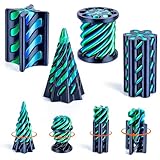
- [Mesmerizing Optical Illusion Design]: Experience the "impossible" with our precision-engineered 3D printed fidget toy set. Featuring a unique spiral passthrough mechanism, these 3D printed fidgets create a captivating visual illusion where parts seamlessly glide through each other. Unlike basic impossible cone fidget toys, our innovative geometric design challenges perception and keeps both kids and adults mesmerized for hours of tactile play.
- [Premium Precision-Crafted Quality]: Quality you can feel in every 3D printed fidget. Each 3Dgenius 3d printed desk toy is crafted from high-density material and undergoes strict precision sanding. We guarantee a burr-free, silky-smooth touch and a "zero-jam" sliding mechanism, ensuring your sensory experience is seamless, quiet, and built to last.
- [Instant Stress Relief & Focus Boost]: Transform your workspace into a sanctuary of calm. These sensory toys are specially designed to melt away anxiety, beat work burnout, and overcome writer's block. The repetitive, soothing push-pull motion helps reset your focus and regulate tension during hectic work or study schedules. The 3D printed toy set is the ultimate relaxing tool for neurodivergent individuals or anyone needing a mental break.
- [Portable & Versatile For Any Setting]: Compact, and lightweight—the fidget toy is your perfect on-the-go companion. Whether you're in a office, a classroom, or commuting, these pocket-sized 3D printed fidget toys provide endless entertainment. It’s an engaging way to spark interest in math and geometry for kids, while serving as a sophisticated kinetic sculpture for an adult's office desk.
- [The Ultimate Gift for Creative Minds]: Searching for a standout present? Our 4-pack impossible pyramid and cone set is the ideal gift for fidget toy lovers, puzzle enthusiasts, and fans of clever engineering. Wrapped in fun and artistic flair, it’s a thoughtful choice for birthdays, holidays, or stocking stuffers that will surprise and delight anyone who appreciates high-tech, 3D-printed art.
4. Curved-hole illusion
A curved-hole design is named in the 2017 showcase, but the available description does not establish its precise geometry, intended angle, or print settings. Before downloading a model, look for a demonstration that shows the actual object from more than one angle and confirms what appears to pass through it. Do not infer the mechanism from the name alone.
The Tool Desk
Outbyte Driver Updater FREEFix the driver behind crashes, sound loss and screen glitchesFind Drivers →Outbyte PC Repair FREERepair Windows errors before they cause bigger problemsFix Now →5. Twist cylinder
The twist cylinder is another named showcase example. Its exact visual change and construction are not documented in the available description, so verify the model page’s demonstration before choosing a file. In particular, check whether the effect depends on rotating the print, viewing it from a fixed direction, or using a reflection.
Rank #3

- Mirascope creates a stunning 3D visual holographic projection using a small object.
- Adorable plastic frog comes included with the mirascope, so you can see how it works.
- There are different visual effects that you can choose from and they are simply amazing to see.
- The mirascope is great for adults
- Friends and family will definitely be amazed by the visual effects and projections of the object.
6. Anamorphic square
An anamorphic design uses a distorted three-dimensional form that reads as a regular two-dimensional square from a chosen viewing direction. The showcase names an anamorphic square, but does not establish a specific downloadable model or its required viewing position. A good model page should make the intended viewpoint clear; without that guidance, the print may look like an arbitrary irregular shape rather than a square.
7. Infinity Cylinder
MakerWorld’s Infinity Cylinder listing describes a print-in-place “tunnel-of-light” effect. Its listing includes a no-support setup and a profile of 0.2 mm layer height, two walls, and 30% infill. Those are settings for that listing’s profile, not general settings for illusion prints. Follow the original listing’s current instructions and license terms; it carries restrictions on redistribution.
Rank #4

- [12 UNIQUE 3D PRINTED FIDGET TOYS]: Explore a colorful 12-pack featuring spiral cones, pyramids, cubes, cylinders, twisted columns and other geometric shapes. This assorted 3D printed fidget toy set offers more designs to push, pull, twist and display than a basic impossible cone fidget toy.
- [MESMERIZING IMPOSSIBLE PASSTHROUGH MOTION]: Slide the interlocking sections in either direction and watch the shapes appear to pass through one another. The spiral passthrough design creates an engaging optical illusion and satisfying push-pull experience for hands-on play.
- [VIBRANT THREE-COLOR 3D PRINTED DESIGN]: Each sensory fidget toy features an eye-catching rose red, dark blue and green finish that looks different from every angle. Slight layer lines and variations in color placement are normal characteristics of the multicolor 3D printing process.
- [COMPACT DESK FIDGETS FOR EVERYDAY PLAY]: Measuring approximately 2.13 to 2.56 inches tall, these lightweight 3D printed desk toys fit easily on a desk or in a travel bag. Enjoy the geometric fidget set during work breaks, study time, travel or hands-on activities.
- [COLORFUL 12-PACK GIFT SET]: With 12 assorted designs in one package, this impossible cone and spiral fidget toy set is easy to share with kids, teens and adults. A creative choice for birthdays, holiday gifts, stocking stuffers, party favors, prize boxes and fans of geometric desk toys.
How to choose a model before you print
- Watch the model’s demonstration. Confirm what the object should look like, the angle that produces the effect, and whether the design needs a mirror or a particular rotation.
- Check that a printable file is actually available. A name in a video is not proof that a current model download exists. Look for a solid print-ready file, such as an STL, or documented steps for exporting one.
- Read the listing’s print and assembly notes. Use only the orientation, support, material, layer-height, wall, infill, and assembly guidance documented for that specific model. The Infinity Cylinder profile is not a template for the other designs.
- Check the license before sharing or adapting a file. Follow the terms on the original model page, especially where redistribution is restricted.
- Plan how you will print it. Owning a printer is one route, not a requirement established for these projects. A makerspace or printing service may be another option, but availability and costs depend on your location.
Ways to make a design of your own
Matsemann’s project documents an STL-based workflow for ambiguous cylinders. The divisbyzero project describes a different route: select two 2D curves, preview the resulting form, and export an OpenSCAD file intended for printing. It also lists printable accessories, including a stand and a mirror stand. These are distinct workflows; use the documentation for the one you choose rather than assuming the files or settings are interchangeable.
Quick wins for a faster PC:
Clear out junk files and repair common Windows errorsFree Scan →Scan for outdated or missing drivers - takes under a minuteDriver Scan →Repair Windows errors before they cause bigger problemsFix Now →For a weekend project, the practical dividing line is whether the model page gives you enough to reproduce the intended effect: a confirmed file, a clear demonstration angle, and print or assembly instructions. If one of those is missing, treat the design as an idea to investigate, not a guaranteed ready-to-print project.
Quick Recap
Product prices and availability are accurate as of the date/time indicated and are subject to change. Any price and availability information displayed on Amazon at the time of purchase will apply.




