To livestream reliably for a remote audience, plan the session, make sure your upload connection can sustain the stream, rehearse the full setup, choose latency that fits the interaction, and decide privacy and chat settings before you go live. The specific settings below are for YouTube; check your platform’s equivalent controls if you stream elsewhere.
1. Plan the session and choose a suitable setup
A simple run-of-show keeps a remote event moving and helps you spot gaps before viewers arrive. Write down the order of segments, who is speaking, any transitions, and when you will take questions. Keep the outline flexible enough to handle delays or audience participation.
As an Amazon Associate I earn from qualifying purchases.
Match the streaming method to the event
- Mobile: Suitable for a quick update or an event where moving around matters.
- Webcam: A straightforward choice for a stationary presenter and a simple setup.
- Encoder: Better suited when you need overlays or want to connect camera and audio hardware. YouTube describes these as distinct ways to start a live stream; consult its streaming tips for the available paths.
Choose the least complicated method that meets the event’s needs. More equipment and software can add control, but they also add points to test.
2. Protect upload bandwidth and stream quality
Your upload connection carries the live video to the platform. A fast download-speed test does not show whether upload capacity is sufficient. Check the outbound speed where you will stream, then compare it with the total bitrate of your video and audio settings.
#1 Best Overall
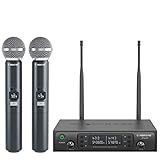
- ENHANCED SIGNAL RELIABILITY: Harnessing the power of Auto Scan, the UHF wireless karaoke microphone system rapidly identifies the least-interference frequency to sync. This advanced feature of the wireless microphone & system increases anti-interference ability and decreases interference between each channel. The wireless DJ microphone system also has lock function to lock selected frequency. 2x100 Selectable UHF frequencies allows multiset operation of up to 16 transmitters simultaneously
- PREMIUM WIRELESS PERFORMANCE: Dual UHF cordless mic system with selectable frequency. Channel 1: 536.57 - 561.32 MHz (100 frequencies). Channel 2: 562.37 - 587.12 MHz (100 frequencies). The microphone wireless employs PLL frequency synthesized technology to provide hassle-free sound transmission, minimum dropouts, and maximum feedback rejection. Smooth and quick IR synchronization. Long range operation for this microfono inalambrico set of 290 ft – 328 ft line of sight
- REFINED SOUND CLARITY: With specially tuned EQ, the dynamic microphone delivers an output frequency response curve with fuller low frequencies, bright high frequencies, and a balanced midrange. Employing a cardioid polar pattern, the microfonos inalambricos professional ensures precise sound pickup and effectively rejects ambient noise. Additionally, the replaceable mic wireless head design extends product lifespan and ensures ongoing optimal performance
- DURABLE METAL CONSTRUCTION: Built with a sleek metal design, the UHF mic receiver and wireless professional microphone not only offer a premium look and feel but also ensure extended durability and an enhanced user experience. Moreover, the handheld microphone's mute function provides added convenience and flexibility, allowing for quick control during performances. Suitable cordless microphone for church, wedding, karaoke, DJ gigs, public speaking, etc
- BOX CONTENTS: 1 x dual channel wireless metal receiver for long operation, 2 x UHF handheld microphone wireless,1 x 1/4’’ audio cable, 1 x 6.5 mm to 3.5 mm adapter, 1 x power adapter, 2 x antenna, 2 x anti-rolling ring, 4 x AA battery for 16 hrs long hour use, 1 x user manual, 4 x rubber feet. You can conveniently source all necessary components from our store, enabling the quick and efficient setup of your system according to your specific needs
YouTube’s general setup guidance recommends leaving 20% headroom above the total bitrate. That margin helps accommodate variability; it does not guarantee an uninterrupted stream, especially on a shared network where other people or devices may use capacity. For computer-based streaming, YouTube’s filming tips recommend Ethernet.
Choose an encoder profile deliberately
Resolution, frame rate, codec, and bitrate work together. Higher-resolution or higher-frame-rate video generally needs more capacity, so choose settings your connection can sustain rather than selecting the highest available option by default. YouTube publishes its encoder recommendations and values in Choose live encoder settings, bitrates, and resolutions; use the row that matches your intended resolution, frame rate, and codec. Options and recommendations can differ on other services.
Rank #2

- HIGH Vocal Quality & JBL Original Pro Sound - The crystal clear clarity of JBL wireless microphones means they won't stuck, delay or distort. Your voice will sound on point, with the back of the amazing JBL Original Pro sound.
- RECHARGEABLE DUAL CHANNEL UHF WIRELESS RECEIVER - No need to fly alone, unless you want to take center stage, of course. Connect two wireless microphones together and hear both voices mixed seamlessly through the speaker for up to 6 hours of playback.
- PLUG AND PLAY - When you want to be heard, you want to be heard now. JBL wireless microphones have a super simple setup. Simply turn on the receiver and wireless microphone and you're ready to go instantly.
- MICROPHONES COME WITH REPLACEABLE AA BATTERIES - JBL wireless microphones come with easy-to-replace AA batteries, so put your slot all night long.
3. Rehearse the entire path before the event
A successful encoder connection alone does not prove that viewers will hear clearly or see the intended picture. Run a rehearsal using representative speech, movement, camera framing, and any transitions or overlays you plan to use.
- Check the source setup: Confirm camera framing, lighting, microphone input, and any connected hardware.
- Start a test stream or rehearsal: Use the same settings and network you expect to use for the event.
- Inspect the preview: Confirm the picture, motion, and audio are present and at acceptable levels before announcing the event.
- Check viewer access: Open the watch page and verify that the event is reachable as intended. If possible, check it on a phone as well as the streaming computer.
- Monitor during the broadcast: Keep an eye on audio, video, and the platform’s stream-health indications rather than assuming the setup will remain trouble-free.
If clearer speech is a priority, a USB microphone is one optional category of audio input to consider. No particular model is established as best; the rehearsal is what confirms whether your chosen microphone and room setup work for this event.
Rank #3

- 【Professional Wireless System with Studio Sound】 Experience crystal-clear, real-time audio perfect for live vocals and performances. This wireless microphone system utilizes transmission and a 1-to-1 chip to deliver studio-quality sound. The cardioid dynamic microphones ensure professional vocal reproduction, making it an ideal wireless karaoke microphone and more.
- 【Exceptional 262ft Wireless Range】 Move with complete freedom across large venues. Our system provides reliable coverage up to 262 feet, maintaining stable connections for stage performances, church services, outdoor events, and wedding ceremonies without dropouts.
- 【Extended 40-Hour Battery Life】 Enjoy marathon performance sessions. Each handheld wireless microphone features a built-in rechargeable battery for up to 40 hours of use, supported by quick Type-C charging to minimize down time between events.
- 【Universal Compatibility】 Connect seamlessly to your existing audio setup. The receiver's standard 1/4″ output works with PA systems, mixers, karaoke machines, powered speakers, and most professional audio equipment.
- 【Complete 4-Mic Package for Group Use】 Perfect for bands, family entertainment, and group performances. This all-inclusive set includes four professional dynamic microphones with non-slip grips, designed for energetic use and comfortable handling.| Note: The wireless receiver will randomly assign a channel when paired with the microphone.
4. Match live-stream latency to the kind of interaction you want
Latency is the delay between what happens at the stream source and what a viewer sees. Lower latency can make questions and replies feel more immediate, but it leaves less time for buffering and can increase buffering risk. Normal latency provides more buffering room and suits streams that do not depend on rapid back-and-forth.
| YouTube mode | When it may fit | Trade-off and resolution limit |
|---|---|---|
| Normal latency | Presentations or events where immediate chat replies are not essential. | More buffering room; interaction is less immediate. YouTube’s low-latency and ultra-low-latency modes exclude 4K, so check the platform’s current controls if resolution matters. |
| Low latency | Events where timely chat interaction matters. | YouTube says most viewers experience under 10 seconds, but this is not a guarantee for each viewer; buffering risk is higher than with normal latency. 4K is excluded. |
| Ultra-low latency | Highly interactive sessions where prompt audience exchange is important. | YouTube says most viewers experience under five seconds, not that every viewer will. Buffering risk is higher, and 4K is excluded. |
These timings and limits are YouTube’s platform statements, not universal performance promises. For details on the trade-offs and settings, see Understand live streaming latency.
Rank #4

- Superb Sound Quality: Featuring a professional cardioid dynamic capsule, this wireless microphone system ensures clear, pristine sound reproduction, and eliminates distractions from background noise and howling. Perfect for church gatherings, weddings, gym class, meetings, lectures or karaoke.
- Stable Wireless Connectivity: Our receiver provides an impressive 200ft/60m operating range, allowing for unrestricted presentations indoors and outdoors. With 10 channels on each microphone and bodypack, our 4-microphone system supports up to 40 simultaneous sets without interference.
- Versatile Compatibility: Our wireless microphones support a wide range of devices, including mixers, karaoke machines, amplifiers, and powered speakers. Simply connect it using the provided 1/4" (6.35mm) audio cable for optimal sound output.
- Effortless Setup: Just open the receiver and microphone, and they will automatically pair. Refer to the video guide for instructions. The bodypack has a MUTE button, avoiding disturbing others when multiple users are using it. Each microphone or bodypack requires 2 AA batteries (not included).
- Package Includes: 2 x handheld microphones, 2 x bodypacks, 2 x headset microphones, 2 x lavalier microphones, 1 x receiver, 2 x mic covers, 2 x anti-slip rings, 1 x 6.35mm audio cable, 1 x power adapter, and 1 x manual.
5. Decide privacy, chat, and monitoring roles in advance
Before the event, confirm who should be able to watch and who will manage audience interaction. YouTube provides public, private, and unlisted visibility options; choose the one that matches your purpose and verify the setting in the live stream controls. Do not include personal information in the video, overlays, or chat unless you intend to disclose it.
Do these 3 things before closing this tab:
1Repair Windows errors before they cause bigger problems2Fix the driver behind crashes, sound loss and screen glitches3Clear out junk files and repair common Windows errors- Set visibility: Decide whether the broadcast should be public, private, or unlisted, then check the setting before starting.
- Assign chat moderation: Decide who will watch chat and respond, remove inappropriate messages, or escalate issues while the presenter continues.
- Keep a monitoring plan: Identify who will watch stream health and useful real-time signals such as concurrent viewers and chat rate. These metrics describe activity; they do not prove that viewers are satisfied.
YouTube’s live stream settings guide explains its controls. Its live-stream metrics guide describes signals available during a broadcast. Platform settings and labels may change, so verify the current controls before an important event.
Or let it run in the cloud
For a live event, the tips above help you prepare your own camera, microphone, and streaming setup. If instead you want an uploaded video or playlist to keep a YouTube channel live 24/7, StreamNeo runs it from the cloud: upload the video, add your YouTube stream key, and go live. Nothing has to stay on at home; it streams the upload as made, up to 4K 60fps, at one flat price per slot, and automatically recovers if YouTube drops the stream. The first day is free with no card. Monthly is $9.99 per month. This service plays uploaded videos, not camera footage, and streams to YouTube only. Start your free day with StreamNeo.
Quick Recap
Product prices and availability are accurate as of the date/time indicated and are subject to change. Any price and availability information displayed on Amazon at the time of purchase will apply.




