To help cordless-tool batteries stay useful, avoid deliberately draining them flat, let hot packs cool before charging, store them dry and within the temperature guidance for their platform, use the correct battery and charger, and inspect packs for damage. These habits follow manufacturer care instructions, but the available guidance does not quantify how many years or how much capacity they add.
1. Recharge before the battery is completely drained
Stop working when a tool’s power drops substantially rather than deliberately running the battery until it is flat. DEWALT says to stop using a pack when tool power decreases substantially and warns that completely running it down may damage it. Makita likewise advises removing and charging the pack when the tool slows or labors. DEWALT’s battery guidance and Makita’s Battery Care Guide describe this for their products.
As an Amazon Associate I earn from qualifying purchases.
There is no need to recharge after every brief use. Milwaukee says partial-discharge charging does not create a memory effect and that the pack need not be run down first: “It is not necessary to run down the battery pack before placing it on the charger.” This is guidance for Milwaukee lithium-ion packs, not a universal rule for every battery chemistry or platform. Milwaukee’s battery-pack instructions
2. Let a hot battery cool before charging
A pack can become hot during heavy work. Allow it to cool before charging and follow the charging temperature range in the manual for that exact battery and charger. Makita states: “Allow a hot battery to cool before charging.” Milwaukee’s cited manual says a pack that is too hot or cold will not charge until it returns to an acceptable temperature.
#1 Best Overall

- 【Long-Lasting 2-Pack 8Ah High Capacity】Power up your tools with this upgraded 8Ah (8000mAh) replacement for Dewalt 20V Max batteries. Delivers consistent, high performance and extended run time. This 2-pack ensures your workflow remains uninterrupted, keeping you ready for any task.
- 【Grade A】Our commitment starts with certified Grade A lithium cells—the foundation of true performance and durability. Every battery pack integrates 4th-gen smart chips and pure copper connectors, designed to deliver a reliable balance of power output and operational safety. Backed by 20 years of professional power expertise.
- 【4th-Gen Chip with 9 Safeguards】Each battery pack is equipped with a complete 9-layer protection system, covering over-charge, over-discharge, short circuit, over-current, over-voltage, performance monitoring, over-temperature, and reverse-charge prevention.
- 【Broad Tool Compatibility】This 20V high-capacity battery pack is designed for use with a wide range of 20V Max cordless power tools and compatible chargers. It fits tool models that use battery interfaces such as DCB200, DCB201, DCB203, DCB204, DCB205, DCB208, DCB2010.
- 【Safety & Reliability】FCC, CE & RoHS Certified for safety. Durable PC+ABS shell with flame-retardant and impact-resistant protection.
Temperature limits differ by product. DEWALT Canada’s June 2026 article gives a charging range of 40°F–105°F for the DEWALT products covered; it warns that charging outside the specified range can permanently reduce runtime. That range should not be applied to other brands or to DEWALT products not covered by the article. DEWALT Canada’s charging guidance
3. Store packs dry and at a stable temperature
For a break between jobs, keep batteries in a dry place away from moisture and avoid leaving them in hot locations. Milwaukee warns that extended storage above 120°F can cause permanent capacity loss. That threshold comes from its cited manual and is not a general safe-storage limit for all battery packs.
Rank #2

- Power Through Longer Jobs:Our 20V 12Ah lithium-ion batteries pack 50% more capacity than other 20V 12Ah replacements, equal to 4.5× 6.0Ah battery power. Ideal for heavy tasks, it keeps your Dewalt tools running longer, cutting down on interruptions.
- Extended Runtime & Smart Protection:The 12.0Ah capacity and zero memory effect mean minimal power loss. Enjoy 70% longer runtime than other Dewalt 20V MAX battery 12Ah alternatives. Charge anytime without capacity worries, ensuring efficient, uninterrupted work.
- Stable Operation:This's batteries guard against overheating, over-voltage, and more. It maintains stable power, protects your tools, and extends battery life, giving you worry-free use.
- Quick LED Status Check:LED indicators show battery charge and usage instantly. A glance tells you how much power's left, helping you plan and avoid work stoppages. Stay informed and in control on the job.
- 6-Battery Universal Compatibility Pack: Works with all Dewalt 20V tools & chargers (DCD/DCF/DCG/DCS series, etc.). 24-month warranty, 24/7 support.
For longer periods without use, remove the battery from the tool and check its own manual for storage charge and inspection intervals. The cited instructions differ: DEWALT advises charging before storage longer than six months, while Milwaukee’s manual says to charge after about a year of storage. Those are brand-specific directions, not interchangeable schedules. Milwaukee’s battery-pack instructions
Free tools Windows power users keep installed
One-click scans. No signup required.
4. Match the battery and charger to the tool platform
Do not assume a battery fits or can be safely charged by any cordless tool or charger. Use a genuine pack and a charger approved for the tool’s battery platform. DEWALT recommends authentic batteries for performance and safe compatibility. Makita warns that non-genuine or altered batteries may interfere with electronic communication among the pack, charger, and tool, creating fire and injury risks. Milwaukee specifies compatibility within its M12, M18, and MX FUEL families; those families are not universal substitutes for one another.
Rank #3
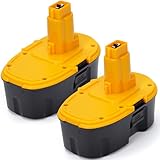
- 【High Capacity & Extended Runtime】Upgrade your tools with 18V 5.0Ah Ni-MH batteries. Each pack delivers steady power and longer run time, helping you finish projects faster without frequent recharging. Perfect for home renovation, woodworking, or construction sites.
- 【Precise Compatibility】Fully compatible with DC9096, DC9071, DW9071, DW9095, DW9096 18V cordless tools and chargers. Built to meet OEM performance standards — install easily and work smoothly without memory effect or capacity loss.
- 【Durable, Safe & Reliable】Constructed with high-quality Ni-MH cells and intelligent protection circuits. Safeguards your tools from overcharging, overheating, and short-circuiting. Designed for consistent output and long battery life even in tough working conditions.
- 【Eco-Friendly & Cost-Efficient】Rechargeable up to 1,000+ cycles. Reduce waste and save money while maintaining strong, stable performance. The rugged ABS housing ensures resistance to impact and vibration.
- 【Trusted Quality & Support】Each battery undergoes strict QC testing before shipment. We provide reliable after-sales service and quick response within 24 hours — your satisfaction is always guaranteed.
When replacing a pack, check the tool and charger documentation for the exact platform and approved battery. Makita’s Battery Care Guide and Milwaukee’s manuals and downloads provide manufacturer-specific guidance.
5. Keep batteries clean and take damaged packs out of service
Wipe a battery with a clean, slightly damp cloth if needed; DEWALT says not to use solvents. Milwaukee also warns against water and solvents. Keep metal objects away from exposed terminals, since Makita cautions that contact can create a hazard.
Rank #4

- Battery Type: Li-Ion, Voltage: 18V, Capacity: 6000mAh, Quantity: 2 Pack Replacement for Ryobi Batteries
- Compatible with P102, P103, P104, P105, P107, P108, P109 Ryobi 18V system cordless tools.
- LED Indicator: Visualization of residual power with the LED Indicator, remind you to get ready to charge before your battery is low and a full battery make sure your work is done without recharging.
- Built in premium Lithium battery,and over-charging, over-discharging, over-voltage, over-current, and over-heating protections, protect your battery from damage.
- customer service team is on call 24 hours a day to address any issues you may have.
Do not use a pack with visible damage or cracks, and do not try to repair, service, or disassemble it. Follow the manufacturer’s instructions for service and disposal rather than putting a damaged battery back to work. DEWALT battery guidance, Makita’s Battery Care Guide, and Milwaukee’s battery-pack instructions
How long should a cordless-tool battery last?
DEWALT Support gave a typical estimate of about two to three years or 300 to 500 charge cycles, whichever comes first, in 2024. DEWALT defines a cycle as using a fully charged battery until fully discharged and then recharging it, and notes that capacity aging is irreversible. This is a DEWALT estimate, not an industry-wide guarantee or a measured lifespan extension attributable to the five habits. DEWALT Support’s battery FAQ
Best Value

- 【Battery Specifications】: Rechargeable battery | Type: Lithium-ion | Voltage: 20V | Capacity: 6000mAh | Package: 1 pack Replacement Battery. lithium-ion battery provide extended runtime, letting you complete tasks more efficiently with fewer interruptions
- 【Wide Compatibility】: Compatible with Original 20V cordless power tools and chargers.Compatible with models DCB200, DCB201, DCB203, DCB204, DCB205, DCB206 and DCB107, DCB112, DCB115, DCB118 and so on, and fits DCD/DCF/DCG cordless power tools
- 【Safe & Reliable】: Designed with advanced safety features to prevent overload, overheating, short circuits, and voltage errors, Ensuring safe and reliable operation every time
- 【LED Power Indicator】: Equipped with a 4-stage LED power indicator that shows remaining power and charging status in real time, so you can plan your work and avoid unexpected downtime
- 【After-Sales Service】: This battery is refundable and replaceable within 30 days of purchase and comes with a 12-month after-sales servic. Enjoy 24/7 professional customer service, ensuring you're supported every step of the way
If a pack no longer provides useful runtime, inspect it for damage and consult the tool’s manual or manufacturer support about replacement. Choose a genuine, compatible pack and approved charger for that platform rather than relying on a battery described as universally compatible.
Quick Recap
Product prices and availability are accurate as of the date/time indicated and are subject to change. Any price and availability information displayed on Amazon at the time of purchase will apply.




