Secure remote access for a financial institution comes down to five risk-based practices: set authentication strength by risk and require MFA for remote and privileged access, harden remote-access channels and switch off what you do not need, secure every endpoint that connects (including personal devices), limit and monitor administrative access, and keep the access architecture and its software patched and deliberately chosen. Together they follow the expectations in the Federal Financial Institutions Examination Council’s (FFIEC) August 2021 guidance on authentication and access, supported by National Institute of Standards and Technology (NIST) and Cybersecurity and Infrastructure Security Agency (CISA) guidance. None of them guarantees security, and none names a single product or architecture that is right for every institution.
Scope: which remote access this guide covers
This guide addresses access to institutional systems by employees, administrators, contractors, and other third parties who connect from outside the institution’s network. That includes VPN sessions, remote desktop, remote support tools, and cloud administration consoles. It is not a checklist for consumer digital banking. The FFIEC guidance covers authentication across user groups, and customer-facing online banking has its own risk profile, transaction controls, and fraud considerations. Where the guidance applies to both, the examples below refer to workforce and third-party access unless stated otherwise.
As an Amazon Associate I earn from qualifying purchases.
Practice 1: Set authentication strength through risk assessment and require MFA for remote and privileged access
The FFIEC’s 2021 guidance, Authentication and Access to Financial Institution Services and Systems, treats risk assessment as the basis for choosing authentication practices. Different user groups and access scenarios carry different risk, so the same login standard should not apply to every account. The guidance supports layered security, and it identifies single-factor authentication as a weakness. Where single-factor authentication combined with other layers is not adequate for high-risk users or transactions, MFA or an equivalent-strength control can reduce risk more effectively.
The Tool Desk
Outbyte Driver Updater FREEScan for outdated or missing drivers - takes under a minuteDriver Scan →Outbyte PC Repair FREERepair Windows errors before they cause bigger problemsFix Now →What counts as multifactor authentication
The FFIEC defines MFA as requiring more than one distinct authentication factor. It discusses memorized secrets, out-of-band devices, one-time-password devices, biometrics, and cryptographic keys. The guidance notes that these factors differ in usability and strength and can have different vulnerabilities, so a factor should be chosen for the user and the access it protects rather than by default. A password plus a text message is still MFA, but it is not the same control as a hardware-backed cryptographic factor.
#1 Best Overall

- Proven security at scale: Over 9 years and millions of cards issued with no known remote hacks, while military‑grade EAL6+ security keeps your private keys locked inside the chip. Your cryptocurrencies stay strongly protected from online attackers.
- Tap once to manage your entire crypto wallet across 90 blockchains - no USB cables or Bluetooth, no batteries, no setup. Access 14,100+ coins & tokens, DeFi, NFTs, and staking instantly from your phone
- Smart backup: Use your second Tangem Wallet as your Backup keys with end‑to‑end encryption; no more papers, pictures. If one card is lost, the remaining can still restore full access, with an optional seed phrase available for advanced users.
- Engineered to last up to 25 years: Waterproof (IP69K), shockproof and tested for extreme temperatures from −25°C to 50°C. A durable cold wallet with long‑term protection and independently audited security.
- Trusted by 6 million users worldwide (4.9 App Store, 4.8 Google Play) - buy, sell, swap, stake, and spend cryptocurrency directly. The secure offline storage wallet designed for how people actually use crypto wallets
Where to require it
- Every remote-access path, including VPN and remote-desktop logins. For remote users, the FFIEC notes that remote-access software such as VPN software can be protected with MFA credentials.
- All privileged and administrative accounts, whether accessed remotely or from inside the network.
- Access for high-risk users. For these, the FFIEC discusses strong authentication using hardware and cryptographic factors.
- Cloud and third-party portals that hold institutional data.
Prefer phishing-resistant methods
CISA advises businesses to require MFA on remote and privileged access and to use phishing-resistant MFA where possible. Its guidance lists security keys among preferred methods. This matters because many common second factors, such as one-time codes entered into a login page, can be captured by a convincing phishing site. A FIDO-compatible security key is one way to meet the phishing-resistant goal, but it is an authenticator, not a complete remote-access solution. Before rollout, confirm that your identity provider, devices, and applications support the standard you choose, and document enrollment and recovery so that a lost key does not force an unmanaged bypass.
Practice 2: Harden remote-access channels and disable what is not needed
The FFIEC gives concrete examples of controls for remote-access software. Each one reduces the number of paths an attacker can use:
Rank #2
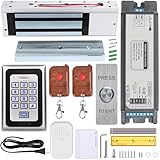
- Smart Access Control System with Tuya App: Easily manage access remotely using the Tuya Smart App. Grant or revoke access anytime, anywhere—perfect for homeowners, offices, or rental property managers.
- 1200LB Holding Force Magnetic Lock: High-strength electromagnetic lock ensures maximum security. Holds up to 1200 pounds, making it ideal for high-traffic areas that demand reliable locking performance.
- Rugged Metal Keypad for Long-Term Use: Engineered for durability, the solid metal construction withstands frequent use, tampering, and tough conditions. Perfect for commercial and residential entry points that demand dependable performance.
- Multiple Access Options: Unlock via password, RFID card, remote control, or smartphone via Tuya app. Comes with 2 remote controls and RFID cards for flexible access control.
- Complete Installation Kit for Any Scenario: Includes a metal exit button, power supply, and all necessary accessories. Suitable for homes, offices, apartments, warehouses, and small businesses.
- Disable remote-access software when it is not in use, rather than leaving it running on standby.
- Place a firewall in front of each system that uses remote-access software, so that exposure is limited to the intended connection path.
- Require remote users to connect through a VPN or another secure channel.
- Implement strong passwords together with MFA.
- Update the software periodically, and track vendor security notices for it.
CISA’s guidance on securing remote-access software also cautions that attackers co-opt legitimate remote-access tools. This means a tool that is authorized and approved can still be abused. Inventory every remote-access tool in use, including ones installed by business units or vendors, and remove the ones with no current owner.
Crashes, No Sound, or Screen Glitches?
Random freezes, missing sound and display glitches usually trace back to one bad driver. Find and replace yours safely.Free scan · under a minutePC Slower Than It Used to Be?
A free scan shows the junk files, broken settings and background clutter dragging Windows down - then fixes them in one click.Free scan · Windows 10 & 11Practice 3: Secure and manage remote endpoints, including BYOD
NIST Special Publication 800-46 Revision 2, Guide to Enterprise Telework, Remote Access, and Bring Your Own Device (BYOD) Security
Quick Recap
Rank #3

- Proven security at scale: Over 9 years and millions of cards issued with no known remote hacks, while military‑grade EAL6+ security keeps your private keys locked inside the chip. Your cryptocurrencies stay strongly protected from online attackers.
- Tap once to manage your entire crypto wallet across 90 blockchains - no USB cables or Bluetooth, no batteries, no setup. Access 14,100+ coins & tokens, DeFi, NFTs, and staking instantly from your phone
- Smart backup: Use your second Tangem Wallet as your Backup keys with end‑to‑end encryption; no more papers, pictures. If one card is lost, the remaining can still restore full access, with an optional seed phrase available for advanced users.
- Engineered to last up to 25 years: Waterproof (IP69K), shockproof and tested for extreme temperatures from −25°C to 50°C. A durable cold wallet with long‑term protection and independently audited security.
- Trusted by 6 million users worldwide (4.9 App Store, 4.8 Google Play) - buy, sell, swap, stake, and spend cryptocurrency directly. The secure offline storage wallet designed for how people actually use crypto wallets
Product prices and availability are accurate as of the date/time indicated and are subject to change. Any price and availability information displayed on Amazon at the time of purchase will apply.




