Free tools Windows power users keep installed
One-click scans. No signup required.
A bartop arcade cabinet can do more than play games: valkyrie0528’s modular control panel swaps the usual arcade controls for a keyboard, touchpad and USB ports, turning the cabinet into a retro-styled terminal and computer-emulation setup. The project was featured in Hackaday’s 2026 Retrocomputing Challenge.
What makes this bartop arcade build different?
The defining idea is a removable control panel. Put the cabinet’s standard arcade-control unit in place for games, or exchange it for a terminal panel when you want to use the cabinet as a computer. The creator describes it as a “modular, swappable control panel which transforms my bartop arcade cabinet into a retro-styled terminal and computer emulator.” See the project on Hackaday.io.

As an Amazon Associate I earn from qualifying purchases.
The inspiration came from configuring the cabinet: with its arcade panel removed, a keyboard placed in the opening made it feel like an early-1980s 8-bit home computer. Rather than leave the keyboard loose, the creator built a dedicated panel around it.
What is on the terminal panel?
The documented panel combines four components:
- An 86-key mechanical keyboard for typing.
- A touchpad module, so basic pointer control does not require a separate mouse.
- A two-port USB breakout for connecting items such as thumb drives or controllers without reaching around to the cabinet’s rear.
- An internal USB hub, to which the keyboard, touchpad and breakout connect.
The project page does not give the keyboard or touchpad model, cabinet dimensions, wiring diagram, host-computer model or a tested compatibility list. It also does not specify a trackball: the creator considered a small one but chose a touchpad after not finding a suitable option within the project’s small budget.
#1 Best Overall

- Dimensions (approx.): Interior Width: 20.75", Exterior Width: 21.75”, Exterior Height: 21”, Exterior Depth: 18”
- Available in HAPP (HAPP joysticks and 28mm buttons) or Sanwa (Sanwa Style joystick and 24mm start/coin and 30mm action buttons) Style
How was the panel constructed?
The creator made the panel from scrap 12 mm plywood, cutting openings for the components and using simple wooden straps screwed to the underside to hold them in place. Woodgrain vinyl laminate and PVC edge trim helped it match the cabinet. These are the materials and methods documented for this particular build, not a tested specification for every cabinet.
If you are adapting the idea, first check the cavity and the existing panel’s fit. Keyboard width and layout, pointer-device footprint, and the placement of the USB breakout and hub all affect whether the panel remains usable and removable. Choose plywood thickness, finish and edge trim to suit your cabinet; the project does not publish cabinet measurements or a component layout to copy directly.
What does the terminal look like, and what does the software do?
In terminal mode, the owner runs CoolRetroTerm with simulated scanlines and green or amber text. CoolRetroTerm is a graphical terminal emulator that supplies the CRT-style appearance and adjustable effects; it is not, by itself, software for communicating with a physical vintage computer. For serial communication, Hackaday’s explainer says to run a separate serial-terminal program such as Minicom inside it. Read Hackaday’s CoolRetroTerm explainer.
The project also offers a downloadable 16:9 PNG called teac_bk_1c.png, depicting two vertical TEAC 5.25-inch floppy drives and a bezel. It is a wallpaper image for CoolRetroTerm, not a pair of drives installed in or supplied with the cabinet. The project page does not identify the host computer or a specific CoolRetroTerm version.
Rank #3
- Dimensions (approx.): Interior Width: 20.75", Exterior Width: 21.75”, Exterior Height: 21”, Exterior Depth: 18”
- Available in HAPP (HAPP joysticks and 28mm buttons), Sanwa (Sanwa Style joystick and 24mm start/coin and 30mm action buttons) Style, or BLANK with no joystick or button holes
What did this project cost?
Valkyrie0528 reports spending less than US$50 for the entire cabinet, including both control panels, on the Hackaday.io project page. That is the creator’s reported cost for this particular build; it is not an independently verified figure or a current parts budget for recreating the project.
Independent reader supportYour contribution helps us test, update, and keep practical guides available for everyone.Why it matters in the 2026 Retrocomputing Challenge
Hackaday’s article, published October 8, 2026, presents the project as an entry in the 2026 Retrocomputing Challenge and said entries were still open at publication. Contest rules and current status should be checked on the challenge page, rather than inferred from that publication-time notice. Read Hackaday’s article about the build.
Quick Recap
Best Value
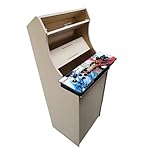
- Dimensions (approx.): Interior Width: 20.75", Exterior Width: 21.75”, Exterior Height: 54”, Exterior Depth: 18”
- If your Pandora's box is shaped like the one in the product image, it will work with this kit. If you have questions about yours, please send us a pic for confirmation
Rank #4

- Bartop Arcade Cabinet for Pandora's Box
Product prices and availability are accurate as of the date/time indicated and are subject to change. Any price and availability information displayed on Amazon at the time of purchase will apply.




