When shopping for a soundbar, the labels 2.0 and 2.1 are shorthand for how many speaker channels you’ll get and whether a dedicated bass channel is included. That difference affects how movies hit, how music sounds, and how much tweaking you’ll do after setup.
This guide breaks down 2.0 vs 2.1 soundbars in practical terms—so you can pick the right setup for your TV, your room size, and your listening habits without getting pulled into marketing noise.
As an Amazon Associate I earn from qualifying purchases.
What 2.0 and 2.1 Mean (Speaker Channels Explained)
The number format describes channels: the first number is left/right sound channels, and the second number is the subwoofer (bass) channel.
Quick wins for a faster PC:
Fix the driver behind crashes, sound loss and screen glitchesFind Drivers →Repair Windows errors before they cause bigger problemsFix Now →- 2.0 soundbar: 2 channels (left + right) with no dedicated subwoofer channel.
- 2.1 soundbar: 2 channels (left + right) plus 1 bass channel, usually powered by a dedicated subwoofer (often wireless).
In real life, both types still produce bass. The difference is whether that bass is driven by a dedicated low-frequency speaker designed specifically for deep notes and impact, or by smaller full-range drivers inside the soundbar.
#1 Best Overall

- 2.1 CHANNEL SPEAKERS: Upgrade your TV sound instantly with the 2 powerful speakers and a wireless subwoofer that deliver 240W max audio power.
- DTS VIRTUAL:X: Whether you’re gaming, watching your favorite movie or show, or listening to that new track on repeat, DTS Virtual X enhances the entertainment you love across all of your devices. It goes beyond ordinary listening by transporting you with the breakthrough spatial sound experience that draws you in deeper, so you hear and feel more.
- WIRELESS SUBWOOFER: A wireless subwoofer delivers the robust low-end frequencies that punctuate your favorite movies, music, and games, without any messy wires. You’ll feel the “boom” while the two front- facing speakers project bright, clear high- and mid-range frequencies.
- EASY CONNECTIVITY: With HDMI ARC, the Hisense HS2100 can connect to your TV through a single HDMI cable (included), connect wirelessly via Bluetooth, and control both with one remote. You’ll be enjoying better TV sound in minutes.
- WIRELESS MUSIC STREAMING: Wireless Bluetooth technology easily connects to smart devices so the listener can enjoy their favorite playlists from their phone or other wireless devices.
2.0 vs 2.1: The Practical Differences You’ll Hear
Bass Extension and Impact
This is the most obvious audible gap. A 2.1 system is built to reproduce lower frequencies with more headroom—so you get fuller explosions, kick drums, and bass lines without cranking the volume as hard.
With many 2.0 soundbars, bass is limited by the soundbar’s internal driver size and cabinet volume. You may hear bass, but it often sounds tighter or thinner, especially in larger rooms.
Dialogue Clarity and Center Sound
Surprisingly, 2.0 can sometimes sound “cleaner” for dialogue because there’s no dedicated sub channel taking up bandwidth. That said, modern soundbars usually apply crossover filtering and EQ, so dialogue clarity depends more on tuning and processing than on whether you have a sub.
Outdated Drivers Are Slowing You Down
One free scan finds every outdated or missing driver and matches the right update for your exact hardware.Free scan · exact hardware matchPC Slower Than It Used to Be?
A free scan shows the junk files, broken settings and background clutter dragging Windows down - then fixes them in one click.Free scan · Windows 10 & 11If your 2.1 sub is too loud or the soundbar’s bass management is mis-set, dialogue can feel less crisp—especially during action scenes where bass masks midrange frequencies.
Soundstage and Imaging
Both 2.0 and 2.1 soundbars can create a wide stereo image, but imaging quality hinges on driver arrangement and processing (not just channel count). A 2.1 system can still image well, but you’ll often notice deeper “depth” during movie effects because low-frequency energy feels more physical.
If you’re sensitive to overly heavy effects, a 2.0 may feel more controlled right away.
What Changes in the Hardware
2.0 Soundbars
A 2.0 soundbar typically uses multiple drivers (for example, a pair of woofers and tweeters) inside the main bar. The bass duties are split among these drivers, then shaped with DSP (digital signal processing) and crossover filters.
Rank #2

- Wireless Subwoofer, Place It Anywhere: The wireless subwoofer connects to the soundbar without audio cables, giving you the freedom to place it anywhere in your room for flexible setup.
- Mica-Reinforced Drivers for Greater Accuracy: Mica-reinforced diaphragms increase driver rigidity by up to 30%, helping suppress cone breakup and unwanted resonance. The enhanced stability helps reduce distortion by up to 20%, delivering cleaner, more accurate sound with improved clarity and detail.
- VoiceMX Technology for Clear Dialogue: VoiceMX technology uses advanced DSP algorithms to isolate and enhance vocal frequencies in real time. By dynamically boosting the 120 Hz–6 kHz vocal range with adaptive EQ and gain control, dialogue stays clear and easy to follow in any scene.
- BassMX Deep Bass Technology: With an 18 mm high-excursion driver, 6.5 L tuned cabinet, and high-density magnetic circuit, the wireless subwoofer produces strong low-frequency output. BassMX optimizes 45–150 Hz bass for deeper, tighter, and more realistic sound at any volume.
- 240W Peak Output with 2.1 Channel System: Featuring a precision-tuned soundbar and a dedicated wireless subwoofer, the system delivers up to 240W of peak power for room-filling sound. With a frequency response of 45 Hz–18 kHz and a maximum SPL of 95 dB, it reproduces clear dialogue, detailed mids, and impactful bass for movies, music, and gaming.
You’ll usually see features like a dedicated “bass” or “low” EQ setting, but it’s still constrained by the soundbar’s physical design.
2.1 Soundbars
A 2.1 soundbar adds a subwoofer built for low frequencies. In many modern models, that sub is wireless and pairs automatically with the soundbar.
The soundbar handles mid/high content while offloading deep bass to the sub. That separation often improves overall balance—less strain on the soundbar’s drivers and better impact when content dips low.
How to Choose for Your Room and Use Case
The best choice isn’t about who “wins” on paper. It’s about what you’ll actually notice in your space.
The Tool Desk
Outbyte Driver Updater FREEScan for outdated or missing drivers - takes under a minuteDriver Scan →Outbyte PC Repair FREEClear out junk files and repair common Windows errorsFree Scan →TV Watching and Dialogue
- Pick 2.0 if your top priority is clean speech and you sit relatively close to the screen.
- Pick 2.1 if you watch a lot of movies, sports, or night-time content where you still want punch without turning dialogue up excessively.
If the room is small (bedroom, studio apartment), a well-configured 2.1 can still work—but you’ll want careful sub level settings to avoid overpowering speech.
Movies and Explosions
If you watch action-heavy content, 2.1 is usually the more satisfying baseline. The sub makes low-frequency effects feel “real,” and it reduces the soundbar’s job during deep bass moments.
If you share walls or you’re noise-conscious, look for app controls like sub level adjustment and maybe a “night mode” EQ.
Rank #3

- FULL, BALANCED SOUND WITH A SUBWOOFER INCLUDED: Hear every beat, rumble and roar with deep and rich bass that fills any space. With the included wireless subwoofer, experience powerful sound that draws you in from the very first scene.
- MULTI-DIRECTIONAL SPATIAL AUDIO THAT COMES FROM ALL AROUND YOU: Let immersive virtual surround sound draw you in, with spatial audio that moves all around you. Feel at the center of all your movies, shows and games without the need for rear speakers.
- AN EXTRA PUNCH OF BASS FOR SOUND YOU CAN FEEL: Add more excitement with deeper, fuller sound in your favorite heart-pumping, beat-thumping content. Enjoy a rush of extra powerful bass in your favorite movie scenes, trending songs and more.
- OPTIMIZED SOUND FOR EVERY SCENE: Get the optimal listening experience for each scene. The soundbar recognizes the type of content you’re watching and automatically adapts audio settings to produce clear voices and detailed sounds.
- PICK UP EVERY PIECE OF DIALOGUE: Hear voices more clearly with automatically amplified dialogue allowing it to stand out so you don't miss a word, no matter what you're watching.
Gaming
For games, bass adds impact to explosions and rhythmic effects. A 2.1 setup can improve immersion, but fast transients can also sound muddy if bass is too high.
If your game audio already has strong bass, start with the sub set low and raise gradually while playing a scene you know well.
Music Listening
- Pick 2.0 if your music library is more vocals, acoustic, or you prefer a tighter sound without heavy low-end.
- Pick 2.1 if you listen to hip-hop, EDM, rock, or any genre where kick and bass sustain matter.
Also consider that some 2.1 systems have a “boomier” tuning out of the box. A few minutes of EQ/sub-level tuning usually gets you closer to what you want.
Common Formats and Features (Don’t Get Tricked by Marketing)
Channel count (2.0 vs 2.1) is only one piece of the performance story. A “2.1 with Atmos” label can mean different processing quality depending on the model.
Dolby Atmos and Virtual Surround
Many soundbars claim Dolby Atmos support using upfiring drivers or virtual processing. Atmos can enhance height cues and spatial separation, but it doesn’t replace bass hardware.
What’s actually slowing this PC down?
Pick the symptom - the matching free tool is one click away.
So a 2.0 Atmos soundbar can still feel wide, while a 2.1 without height tech can still deliver deeper low-end impact. Choose based on what matters most: bass realism, dialogue control, or immersive soundstage.
eARC/ARC, HDMI, and Optical
Your connection affects what audio formats the soundbar can receive. For modern TVs, HDMI ARC or eARC is often preferred.
Rank #4

- Why Choose TCL: TCL is a global leader in TVs and audio, combining innovative technology with reliable performance. Enjoy award-winning sound, durable design, and customer support that keeps your entertainment experience worry-free
- Immersive Sound with Deep Bass Subwoofer: Experience cinematic audio with Dolby Atmos and DTS Virtual:X. Includes a wireless subwoofer delivering deep, room-filling bass that brings movies, music, and games to life while freeing the soundbar for crisp dialogue and detailed mids
- Powerful Room‑Filling Performance (Up to 220 W):The wireless subwoofer adds deep, punchy bass, letting you hear everything from the low rumble of a car engine to the high whir of a helicopter. Perfect for apartments, bedrooms, or small-to-medium rooms where every detail matters
- AI Sonic Auto Room Calibration: Built-in AI Sonic technology adjusts audio to your unique layout and listening position, giving you balanced sound every time. Simple one-time setup via the TCL app
- Works with Any Smart TV: The TCL S55H 2.1 Sound Bar + Subwoofer delivers rich, room-filling audio for TV, movies, music, gaming, and even projectors. Connect easily via HDMI eARC/ARC, optical, Bluetooth, or AUX for an immersive experience anywhere
- HDMI ARC/eARC: Best for passing higher-quality audio formats from the TV.
- Optical: Works, but bandwidth is limited; you may lose support for certain surround formats.
- HDMI (soundbar as switch): Useful if you connect multiple devices (console, streaming box) to the bar.
If your 2.1 system is producing weak or missing surround effects, start by checking your TV’s audio output settings and whether the soundbar input is set correctly.
Wireless Subwoofers vs Built-In Bass
Most 2.1 soundbars include a dedicated subwoofer—often wireless. Wireless subs reduce clutter, but they require pairing and a decent placement signal.
Free tools Windows power users keep installed
One-click scans. No signup required.
If you prefer predictable performance, some higher-end 2.1 systems use wired sub options, or at least strong wireless latency handling. If you frequently notice lag in games, confirm the system has a “game mode” and proper wireless pairing.
Room Placement: Where Bass Goes to Live
Bass is directional only in a loose sense—it’s more about how your room surfaces reinforce certain frequencies. Placement matters more for 2.1 because the sub creates stronger low-frequency energy.
2.0 Placement Basics
- Center the soundbar under the TV (or on the wall) to keep the stereo image aligned with your seating position).
- Avoid placing it inside a tight cabinet with solid doors—reflections and restricted airflow can dull sound.
- If it sounds dull, try moving it 2–6 inches forward from the TV stand edge.
2.1 Placement Basics (Soundbar + Sub)
- Start with the subwoofer near the front of the room, usually anywhere along the same wall as the TV.
- Common trick: try the subwoofer in a corner, then try it 6–24 inches away from the corner. One of those placements usually reduces “boomy” peaks.
- Use the sub level control (or app) to balance impact—don’t assume louder is better.
If your sub is wireless and you have dropouts, reduce interference: keep it away from Wi‑Fi routers and avoid placing it behind metal shelves.
Checklist: Compare These Specs Before You Buy
Two products labeled both 2.1 can sound very different. Here’s what to compare so you’re not relying only on the channel number.
Minimum specs that matter
| Spec to check | What it tells you | Typical target |
|---|---|---|
| Subwoofer presence and size | Deep bass potential and output headroom | Dedicated sub (often 6–10 in drivers depending on model) |
| Frequency response range | Lower numbers can mean deeper bass extension | Pay attention to the lowest rated Hz, if given |
| RMS power vs marketing peak numbers | More realistic continuous output | Prefer RMS figures; treat peak/Watt claims as less meaningful |
| DSP sound modes | How well it handles dialogue, sports, night scenes | Look for Clear Voice / Dialogue mode names |
| Connectivity | Compatibility with your TV and sources | HDMI ARC/eARC or optical support |
Controls and app features
Before you buy, confirm you can adjust:
- Subwoofer level (in 1–10 steps or a dB scale)
- Center/dialogue emphasis (or “Clear Voice” style mode)
- EQ presets like Movie/Music/Night
- Audio sync or lip-sync settings (especially for streaming devices)
Troubleshooting Guide
Even a perfect 2.1 can sound wrong if the settings or placement are off. Use these fixes before returning the unit.
Best Value
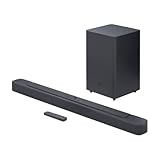
- Bring the power: Fill your whole room with sound. An impressive 300W of total system power puts you in control. Your movies and music have never sounded so good.
- Surround yourself with sound: JBL Surround Sound instantly brings movies, sports and music to life. Upgrade to an immersive sound experience for your TV without any extra wires or speakers.
- All about the bass: Why just listen to the bass when you can experience it. The 6.5’’ wireless subwoofer delivers deep, thrilling sound.
- Visit the movies, from your sofa: Get the popcorn ready. Built-in Dolby Digital gives you an authentic cinematic experience in your home.
- Stream it all: Not in the mood for a film. No problem. With the JBL Bar 2.1 Deep Bass, you can also enjoy wireless music streaming via Bluetooth from your mobile or tablet.
If the Bass Is Weak (2.1)
- Check the soundbar input mode: make sure you’re not accidentally using a “voice” preset that reduces bass.
- Increase subwoofer level by small increments (for example, +1 to +2 steps), then re-test with a bass-heavy track or movie scene.
- Verify the subwoofer is paired and shows a stable connection (some units show a solid/sub LED vs blinking).
- Move the sub 6–24 inches and test again—room nodes can kill perceived bass.
If Dialogue Sounds Hollow or Distant
- Enable a dialogue/voice mode (often labeled Clear Voice, Speech, or Dialogue).
- Reduce subwoofer level slightly so midrange clarity comes forward.
- If your TV has a “Surround” or “Audio Enhancement” feature, turn it off or set it to Standard to prevent double-processing.
- Set the TV audio output correctly to match the soundbar’s input (ARC/eARC vs Optical).
If You Hear Distortion at Higher Volume
- Lower both the TV volume and the soundbar volume—avoid clipping caused by double amplification.
- Turn off extreme EQ boosts (like aggressive “Bass” and “Treble” stacking at once).
- If the soundbar has a “Night mode,” try turning it off for distortion testing (night mode can change dynamics).
- For 2.1, reduce sub level first; subs often overdrive when the setting is too high for the room size.
If the Subwoofer Won’t Pair (2.1)
- Move the subwoofer closer to the soundbar (within a few feet) and retry pairing.
- Power-cycle both units: unplug the soundbar, unplug the sub, wait 30 seconds, then plug the soundbar back in and pair.
- Check that the soundbar is in the correct mode (Bluetooth vs TV input matters on some models).
- Use the pairing/reset procedure listed in the manual (many subs need a long-press on a Pair or Reset button).
If pairing fails repeatedly, test the soundbar without the sub to confirm the main bar is working normally—then decide whether it’s a sub hardware issue or a placement/signal issue.
2.0 vs 2.1: Quick Comparison Table
| Category | 2.0 Soundbar | 2.1 Soundbar |
|---|---|---|
| Bass character | Tighter but limited low-end extension | Deeper impact with dedicated bass channel |
| Room fit | Often easier in small rooms; less “boom” potential | Needs sub level tuning; can overwhelm small rooms if mis-set |
| Movie effects | Good for highs/mids; explosions may feel less physical | More satisfying low-frequency effects |
| Dialogue | Can sound clean right away, fewer variables | Usually excellent if sub level isn’t too high |
| Setup complexity | Simpler: no sub placement | More knobs: sub pairing and placement to dial in |
| Value | Often cheaper for a given brand | Often better for bass realism, especially for movies/music |
FAQs
Is a 2.1 soundbar always better than 2.0?
Not always. 2.1 is usually better for bass impact, but 2.0 can sound cleaner for dialogue and may be easier to live with in small rooms or noise-sensitive homes.
Will a 2.0 soundbar sound weak because it lacks a subwoofer?
It depends on the model. Many 2.0 bars include multiple drivers and bass processing that sounds strong—just not as deep or as physical as a dedicated subwoofer system.
Do these 3 things before closing this tab:
1Scan for outdated or missing drivers - takes under a minute2Clear out junk files and repair common Windows errors3Fix the driver behind crashes, sound loss and screen glitchesCan I add a sub to a 2.0 later?
Sometimes. Some brands support optional wired or wireless sub modules, but many 2.0 soundbars don’t. Check the exact model’s accessory/sub support before buying.
Why does my 2.1 sub make dialogue harder to hear?
Most often it’s sub level or an audio preset mismatch. Lower the sub level, switch to a dialogue/voice mode, and avoid stacking enhancements between the TV and soundbar.
Does ARC or eARC affect bass on a 2.1 soundbar?
It can indirectly affect overall decoding and processing. If the soundbar isn’t receiving the formats you expect, you might get a less dynamic mix. Check TV audio output settings (ARC/eARC) and soundbar input selection.
Bottom Line
If you want the most satisfying bass for movies, music, and action games, a 2.1 soundbar is usually the better default—especially if it includes a dedicated sub with adjustable level and stable wireless pairing.
Recommended Free Tools
If you prioritize speech clarity, simplicity, and a controlled sound in a smaller room, a 2.0 soundbar is often the safer, cleaner choice.
Quick Recap
Product prices and availability are accurate as of the date/time indicated and are subject to change. Any price and availability information displayed on Amazon at the time of purchase will apply.




