A motherboard’s Clear CMOS button or jumper resets stored firmware settings; it may also clear a forgotten BIOS/UEFI setup password, but that depends on the board and how the password was configured. Find your exact motherboard model, follow its manual’s power-disconnection and reset instructions, and contact the manufacturer or an authorized service center if the password remains. Do not treat a battery pull or jumper short as a universal password bypass.
What the Clear CMOS control actually resets
Clear CMOS is a way to restore stored motherboard firmware settings. Depending on the board, the control may be a dedicated button, a header or jumper, or—if the board has neither—a procedure involving removal of the CMOS battery. The available method and exact steps are model-specific.
As an Amazon Associate I earn from qualifying purchases.
A firmware settings reset is not a promise that every password will be erased. ASUS recommends clearing CMOS for a forgotten password, while MSI says that whether CMOS clearing removes a password depends on an option selected when the password was set. If that setting makes the password persist, clearing CMOS will not remove it. The control’s presence alone does not establish how that board handles passwords.
Which firmware password are you trying to clear?
A BIOS/UEFI firmware setup password can protect access to firmware settings. ASUS distinguishes this administrator password from a user password, which it describes as an additional password required to enter the operating system. These are different protections, so identify which prompt you are seeing before choosing a recovery path.
#1 Best Overall
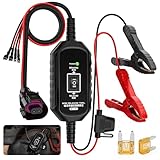
- 【All-in-One Emergency EPB】The BT10 epb emergency release tool is the quick and smart way to take control, whether your car has a dead battery, a system glitch, or just needs maintenance. It safely releases the brake so you can move the car, get it to the shop, or start your repairs—no risky forced towing required.
- 【Smart Dual-Channel Precision Control】Engineered with independent forward/release and backward/brake channels, our tool guarantees stable and precise operation. This intelligent design allows for seamless integration with complex vehicle systems, providing you with reliable control for both emergency interventions and routine maintenance tasks.
- 【Comprehensive Safety Protections】The BT10 epb service tool is fortified with multiple circuit safeguards, including over-current, over-voltage, and short-circuit protection, complemented by reverse polarity protection. A 5A fast-blow fuse and clear power indicator work in tandem to shield your vehicle's electronics and the tool itself from accidental misuse.( 2 spare fuses are included in the package for replacement.)
- 【Two Connection Methods & 6.5FT Cable】Our emergency electronic parking brake (EPB) release and reset tool comes with a dedicated EPB port and two pairs of terminal connectors. Offering two connection options, it ensures broad compatibility with most gasoline, hybrid, and electric vehicles.Powered by a standard 12V battery, it operates within a safe voltage range of DC 10V–14V and a current under 15A, making it reliable and easy to use in emergency situations.
- 【Effortless Operation for All Users】 Simply connect to a 12V backup battery and the vehicle's EPB port, then use the intuitive rocker switch. Audible motor cues prevent overdriving, making the tool safe and straightforward to use, even in high-pressure situations.Designed for both professional mechanics and DIY enthusiasts.
ASUS says its administrator password is “Not installed” by default. That describes a product default, not how many owners set passwords. There is no prevalence statistic here to substantiate the claim that almost nobody sets one.
Find your exact motherboard and its instructions
- Identify the motherboard’s full model name. Check the name printed on the board, your computer’s original documentation, or system information if available.
- Open the official support page for that exact model and consult its current manual. Find the Clear CMOS, CLR_CMOS, or Clear CMOS RTC RAM instructions and check whether the manufacturer says the procedure clears a forgotten password on that board.
- Follow that manual’s shutdown and power-disconnection sequence before touching a button, header, jumper, or battery. GIGABYTE’s general guidance specifically says to turn off the power and remove the power cord before clearing CMOS; the exact procedure should come from your model’s manual.
- Use only the control and pins identified by the manual. Do not short unidentified pins or substitute a generic procedure for the board’s documented instructions.
Choose only the reset method your board supports
| Method | When it applies | What to check |
|---|---|---|
| Dedicated CMOS_SW button | The motherboard has a documented CMOS reset button. | Use the location and sequence specified in the exact model’s manual. A button does not by itself confirm that a password will be cleared. |
| CLR_CMOS jumper or header | The manual identifies a CLR_CMOS header or jumper for the board. | Confirm the correct pins and procedure in the manual; do not guess. GIGABYTE notes that a jumper cap may be used on some boards, but buy one only if the manual calls for it. |
| CMOS battery removal | The board lacks the documented button or jumper method, and its instructions specify battery removal. | Follow the manual’s procedure and power precautions. Removing the battery is not a guaranteed way to clear every firmware password. |
These are alternatives, not interchangeable universal steps. GIGABYTE’s 2012 FAQ describes all three routes in general terms, but its guidance should not replace a newer, model-specific manual.
Rank #2

- 1.This Yuirote universal car motor diagnostic tool is designed to deliver accurate system detection for most vehicle models, working perfectly as an EPB emergency release tool to quickly read engine fault codes and locate car system problems, ideal for daily vehicle inspection and routine maintenance.
- 2.Built with professional-grade performance, our EPB emergency release tool supports electronic parking brake reset and emergency release functions. The universal car motor diagnostic tool features stable signal transmission, helping you solve EPB brake failure issues without going to a repair shop.
- 3.Ergonomic and portable design makes this universal car motor diagnostic tool easy to hold and operate. Compact size allows for convenient storage in your car glove box or toolbox, the EPB emergency release tool is a must-have companion for personal car owners and DIY repair enthusiasts.
- 4.Wide compatibility enables this Yuirote universal car motor diagnostic tool to fit mainstream vehicle brands. As a multi-functional EPB emergency release tool, it covers engine system diagnosis and electronic parking brake emergency release, meeting various vehicle repair and emergency needs.
- 5.Made of high-quality durable material, this universal car motor diagnostic tool ensures long-lasting service life and reliable daily use. The EPB emergency release tool comes with simple operation steps, no complicated settings required, saving your time and maintenance cost effectively.
After clearing CMOS
Expect stored firmware settings to return to defaults. Review the settings that matter to your system, including boot configuration, and restore them as the manual directs. Do not assume that a reset leaves every setting unchanged or affects only the password.
Crashes, No Sound, or Screen Glitches?
Random freezes, missing sound and display glitches usually trace back to one bad driver. Find and replace yours safely.Free scan · under a minutePC Slower Than It Used to Be?
A free scan shows the junk files, broken settings and background clutter dragging Windows down - then fixes them in one click.Free scan · Windows 10 & 11If the password is still there
Stop trying generic reset variations and contact the motherboard manufacturer or its authorized service channel. MSI says that a password can remain after CMOS clearing depending on the option selected when it was created, and directs users to a service center when clearing CMOS does not resolve the issue. MSI also says it does not collect the user-set BIOS password, so support may need to handle the case through service rather than retrieve a stored password.
Rank #3

- Emergency EPB Release Control System: Instantly release electronic parking brake during failure or power loss with stable epb release tool and electronic parking brake reset tool design for safe vehicle movement in emergency and workshop use, supporting parking brake system tool operation
- Advanced ABS & Brake Diagnostics: Integrated abs scan tool and abs brake scan tool with scan tool with service mode for accurate fault detection, supporting brake motor scan tool functions and brake tools use in modern vehicle braking system maintenance
- Universal EPB Service & Reset Tool: All-in-one epb service tool and electronic parking brake service tool supporting epb reset tool and electric parking brake tool functions for efficient brake pad service tool replacement and system reset across multiple vehicles
- Professional Brake Maintenance Kit: Supports brake tools for mechanics including brake adjusting tool, parking brake release tool, electric handbrake tool, drum brake service tool and automatic slack adjuster tool for complete brake system maintenance workflow
- Multi-Function Automotive Repair Tool: Combines car electrician tools, control tool and car power system tool with suspension removal tool and parking brake spring tool while supporting safe car dismantling tools and automotive brake system repair operations
Manufacturer guidance differs: ASUS recommends Clear CMOS for forgotten passwords, while MSI documents a condition under which clearing CMOS will not work. GIGABYTE’s FAQ says CMOS clearing may revoke a previous BIOS password, but it is dated August 1, 2012 and gives general methods. Consult the exact board’s current manual rather than assuming one manufacturer’s behavior applies to another.
Quick Recap
Best Value

- ✅【Emergency EPB Release & Reset】Instantly release electronic parking brakes during power loss or failure. Universal car motor diagnostic tool ensures safe vehicle movement and efficient system reset/unlock for all brake types
- ✅【Advanced ABS & Brake Diagnostics】Epb emergency release tool Integrated ABS scan tool with service mode enables precise fault detection. Supports brake motor testing, caliper adjustment, car window's power regulator checking and full brake system diagnostics for modern vehicles
- ✅【Universal Brake Maintenance Tool】Universal EPB service tool, combines EPB reset, brake pad replacement, and drum brake adjustment. Ideal for mechanics and DIYers handling electronic handbrakes and conventional brake systems
- ✅【Multi-Function Automotive Repair Tool】Automotive EPB emergency release scanner, works as a car motor diagnostic tool and electrical tester. Safely tests windows, wipers, seats, sunroof motors, and other 12V components with reliable heavy-duty connections
- ✅【Safe & Durable Design】Automotive electronic motor retraction tool, features thick insulated wiring, heat-resistant materials, and secure copper clips. Ensures stable testing, safe operations, and long-lasting performance for professional and home automotive repairs
Rank #4

- Diagnostic-Free EPB Tool: By offering direct connection to the vehicle's OBD port, this electronic parking brake tool achieves quick handbrake release without a diagnostic computer. Its click motor control makes brake pad replacement effortless, perfect for routine service
- Wide Range of Uses: This electronic parking brake reset tool works with 12V and 24V systems via smart voltage recognition and wide voltage adaptation, requiring no extra converter. It's suitable for home cars and commercial vehicles
- Piston Retraction and Motor Check: The EPB service tool provides piston retraction and extension, verifies the electronic parking brake motor working status, and offers forward and reverse control for outdoor brake servicing and roadside maintenance
- Rapid Rescue and Unlocking: The EPB reset tool provides effective rescue and unlocking by quickly releasing a locked electronic parking brake, letting you move the vehicle safely without waiting for roadside assistance or expert help
- Clear Polarity, Full Protection: This EPB brake release tool prevents short circuits and overloads with built-in circuit protection and plug-and-play ease. Clear positive/negative marks and multiple safety protections prevent wrong wiring, safeguarding electronics during brake jobs
Official guidance
- MSI: “[Motherboard] I forgot my BIOS password, what should I do?” (August 30, 2023) explains the conditional CMOS-clear behavior and service-center escalation.
- ASUS: “[Motherboard] How to set BIOS password (Administrator Password and User Password)” (last updated August 20, 2024) defines the two password roles and recommends Clear CMOS for a forgotten password.
- GIGABYTE: “What should I do if I forgot the BIOS password?” (August 1, 2012) describes its general CMOS_SW, CLR_CMOS, and battery-removal paths.
- ASUS PRIME / PRO / TUF GAMING Intel 500 Series BIOS Manual gives model-family-specific Clear CMOS RTC RAM guidance.
Product prices and availability are accurate as of the date/time indicated and are subject to change. Any price and availability information displayed on Amazon at the time of purchase will apply.




