Recommended Free Tools
The same scene can look different on an iPhone and a Samsung Galaxy because a phone photo is a finished rendering, not simply a direct copy of sensor data. Each model combines its camera hardware with software decisions about exposure, white balance, color, contrast, detail, noise reduction, HDR, and scene detection. The result depends on the specific phones, lenses, settings, light, and subject—not a single, permanent “iPhone look” or “Samsung look.”
What changes between capture and the finished photo?
A phone camera automatically turns incoming light into an image. Its software must decide how bright the photo should be, how to interpret the light’s color, which details to emphasize, how to manage noise, and how to combine or render bright and dark parts of a scene. Samsung describes its standard camera app as making choices about color, tone, detail, and noise in its discussion of the Galaxy S22 generation’s Expert RAW app (Samsung Global Newsroom).
As an Amazon Associate I earn from qualifying purchases.
Even when two phones point at the same subject, they may use different sensors, lenses, and processing choices. A face under warm indoor light, a bright sky behind a person, or a dim moving subject can prompt different decisions from each camera. One phone may preserve more highlight detail while another makes shadows brighter; one may render skin warmer or boost contrast. These are possible differences to check in a particular comparison, not fixed traits of every device from either brand.
Free tools Windows power users keep installed
One-click scans. No signup required.
Which camera features can affect the look?
Scene detection on Galaxy
Samsung’s Scene Optimiser can identify what is in the frame and adjust camera settings. Samsung’s support documentation says those adjustments can include exposure, contrast, and white balance; the available controls and behavior depend on the phone and software version (Samsung UK Support; Samsung US Support). If a Galaxy photo looks unexpectedly bright, saturated, or warm, scene optimization is one setting worth checking rather than assuming the camera always renders scenes that way.
#1 Best Overall

- ✔ COMPATIBLE WITH ALL SMARTPHONES, TABLETS, and LAPTOPS including ALL iPhone models, Samsung Galaxy and Note, Google Pixel, Huawei and more. CONTENTS INCLUDE: TruView 0.45x Wide Angle Lens, Clarus 15x Macro Lens, TruGrip Lens Clip, GlowClip Mini Rechargeable LED Light + Charging Cable, Quick-Release Lanyard, DuraCase, EasyClip, and Cleaning Cloth.
- ✔ TRUVIEW 0.45x WIDE ANGLE LENS - CAPTURE 45% MORE PICTURE WITH EVERY SNAP: Shoot stunning photos of people, pets, travel scenery, landscapes, architecture, selfies and more. NO DARK CORNERS (vignetting) like cheaper lenses. Crafted from aircraft-grade aluminum and premium optical glass for durability and clarity. Multi-element, coated glass lenses minimize ghosting, reflections, lens flare, and other artifacts. Xenvo cell phone lens attachment is ideal for hobbyists and photography pros alike.
- ✔ CLARUS 15x MACRO LENS - MARVEL YOUR SENSES. MAGNIFY NEARBY SUBJECTS FOR BREATHTAKING, SUPER CLOSE-UP PHOTOS: Capture all the intricacies and details with precision-focus for razor crisp macro photos every time. (For best results, position macro lens approximately 1/2 inch from subject. Not designed for zooming in on distant subjects.) THE TRUGRIP LENS CLIP offers SUPERIOR GRIPPING POWER to fasten your lenses to your cell phone when you're in action mode, framing your next perfect shot.
- ✔ GLOWCLIP RECHARGEABLE LED FILL LIGHT - The GlowClip LED light clips ANYWHERE on your phone to instantly illuminate your subject and surroundings with warm continuous light. The warm and natural LED light is superior to your smartphone's built in flash—which can be blinding and unnatural—especially in darker settings and venues. FEATURES 3 BRIGHTNESS SETTINGS: Low, Medium and High. Say goodbye to frustrating photo "retakes" and hello to brilliant photos the first time.
- ✔ QUICK-RELEASE LANYARD AND TRAVEL CASE - TRANSPORT AND PROTECT YOUR LENS KIT: Perfect for taking your Xenvo lenses with you on the fly. The travel case stores and protects all lens kit components snugly and safely while the quick-release lanyard is the perfect way to carry your lenses on your next outing. Just drape the lanyard and lens around your neck. The quick-release lanyard head makes it a cinch to access your Xenvo lenses in a flash so you never miss another photo moment.
Photographic Styles on iPhone
On supported iPhones, Photographic Styles let you choose a look before taking the photo and adjust its tone and color. Apple’s instructions explain how to select and tune a style, with availability and controls varying by iPhone model and software (Apple Support). A style choice can therefore help explain why two iPhone photos of the same scene look different, or why an iPhone and Galaxy comparison changes when their settings are changed.
More controlled capture
Apple ProRAW combines RAW flexibility with Apple’s image processing; it is not simply an untouched sensor file. Apple also documents RAW, exposure-bracketed, and processed capture options for developers (Apple Developer, WWDC26). Samsung’s Expert RAW offers controls such as ISO, shutter speed, white balance, exposure compensation, focus, and lens selection, while retaining its own processing pipeline (Samsung Global Newsroom). These are different workflows; using either does not make the two manufacturers’ files directly equivalent.
Rank #2

- Upgraded 28x Telephoto Lens – Wider View & Easier Framing: Designed for everyday users, this 28x telephoto lens delivers a wider field of view than most 28x lenses, making it easier to find and frame distant subjects. Whether you're at a concert, a sports game, or just exploring nature, you'll get crisp, high-resolution close-ups without the hassle of perfect alignment.
- Advanced Optical Performance with Reduced Edge Darkening: Features a breakthrough light path design for an ultra-wide view and excellent light intake. The field-of-view ring helps reduce edge darkening, so you get a cleaner image with fewer dark corners (results may vary by phone model). High resolution and true color reproduction significantly enhance your mobile photography.
- Stable Long-Distance Capture & Monocular Function: With 28x magnification, capture clear and steady shots of distant subjects. The lens can also be used as a monocular telescope for extended observation—perfect for birdwatching, wildlife, or scenic views.
- Wide Compatibility & Versatile Use: Perfect for sports events, concerts, bird watching, wildlife observation, and travel. Compatible with iPhone, Samsung, Huawei, Xiaomi, OPPO, Vivo, and most other smartphones.
- Portable & User-Friendly: Crafted with high-quality glass and a durable yet lightweight body. The universal clip attaches securely to your phone, and the compact design fits easily in a pocket or bag—ideal for travel and outdoor adventures.
What should you compare in a real side-by-side?
Compare the actual models and images rather than relying on brand-wide assumptions. A recent hands-on comparison of an iPhone 18 Pro and Samsung Galaxy S26 Ultra describes differences in warmth, brightness, color, and detail that vary across the shots. Those observations apply to the tested phones and scenes, not to every iPhone or Samsung camera (TechRadar).
- Exposure and highlights: Check whether bright areas retain detail and whether shadows are lifted or left dark.
- White balance and skin tone: Look for differences in warmth, color cast, and how people’s skin is rendered.
- Saturation and contrast: Compare how vivid colors appear and how strongly light and dark tones are separated.
- Fine detail and sharpening: Inspect textures and edges closely; apparent crispness may reflect processing as well as lens or sensor differences.
- Noise and motion: In low light or with moving subjects, compare grain, blur, and the way detail is retained.
- HDR appearance: Notice how each image handles a scene with both bright and dark areas.
How can you make iPhone and Samsung photos look more alike?
For a useful comparison, control the conditions before judging the results. Use the same scene, similar framing and subject distance, equivalent lens choices, consistent lighting, and comparable exposure. Check Photographic Styles on iPhone and Scene Optimiser on Galaxy, since these features can influence rendering. Then inspect the original files in the same viewing app or on the same display if you are comparing color; different screens and apps can change what you see. This is a practical comparison method, not a standardized test procedure established by the cited sources.
Rank #3

- Get Closer To Everyday Distant Moments: Bring distant sports events, birds, boats and travel landmarks closer when your phone camera cannot reach. The 28X optical telephoto lens is designed for stable outdoor subjects approximately 49–262 ft / 15–80 m away, making everyday long-distance observation and smartphone photography more accessible.
- Wider, More Natural Telephoto View: Compared with many higher-power phone telescopes, the 28X design provides a wider field of view and makes distant subjects easier to find and frame. It is a practical choice for beginners who prefer a more natural telephoto view instead of an extremely narrow image.
- Smaller Edge Darkening—Phone Models May Vary: Designed to reduce edge darkening on many smartphones. Because camera position and sensor size vary, some newer multi-camera phones may still show slight dark edges at 1X. Center the lens over the main camera and apply a small amount of phone zoom when needed.
- Manual Focus For Clearer Distant Detail: Rotate the focus ring slowly until your subject appears sharp. At 28X magnification, even small hand movements become visible, so brace your arms or use a tripod for clearer photos and video. For moving subjects, set your position and focus before the moment begins.Tripod is recommended and sold separately.
- Universal Clip For Popular Smartphones: Works with many iPhone, Samsung Galaxy, Google Pixel and Android main cameras. Remove thick phone cases, identify the main 1X camera, center the lens carefully and disable automatic macro or lens switching when possible. The aluminum body also works as a compact handheld monocular for travel and outdoor observation.
If you want more control over capture, use each phone’s available manual or RAW-related options, but treat the results as outputs of distinct systems. Matching a few settings may reduce visible differences; it cannot guarantee identical photos because hardware, software, and their processing pipelines remain different.
Quick Recap
Best Value

- 14 IN 1 Phone Camera Lenses Kit: This phone lens kits includes selfie ring light, 0.63X wide angle lens & 15X macro, 2X telephoto lens,198°fisheye lens,3/6 kaleidoscope lens,CPL filter lens,radial filter lens, starburst lens and blue/green/yellow/purple, each phone lens has its unique results. The selfie light has 7 adjustable brightness to choose from.
- The Better the Lens Quality, the Better the Result: All our phone camera lens attachment are crafted with finely processed glass that results in images that are sharp and have minimal distortion and vignetting.
- Unique Results: Wide-angle lens for capturing a broader scene, telephoto lenses for high-quality-zoom capabilities, macro lenses for providing intense up-close detail of subjects, and fisheye lenses for a fun, circular view of the world, CPL lens filter out scattered light, reduce reflection.
- Various Effect: Kaleidoscope lens view a centered object multiples 3/6, Starburst Lens adds a dramatic star flare to very bright areas, Radial filter lens allows you to shoot an object with a radial visual effect.
- Wide Range of Compatible Devices: Portable, removable and solid clip-on design that attaches to almost all smartphones including iPhone 12 11 Xs max, XR, X, iPhone 8 iPhone 7, iPhone 6S, 6S Plus, iPhone 6, 6 Plus, iPhone 5S, SE, Samsung Galaxy S6, S6 Edge, S7, S7 Edge, HTC, Sony, LG G6, G5 and other device which the distance of phone edge to camera less than 1.2 inch.
Rank #4
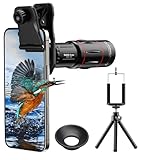
- 【Upgraded 18X Telephoto Lens】: This 18X telephoto lens features an adjustable focal length, allowing you to effortlessly capture crisp and clear images of distant subjects by simply twisting the focus ring. Whether you're an outdoor enthusiast or a passionate photographer, this lens is a game-changer, enabling you to see and capture the world in stunning detail.
- 【BAK4 Prisms & FMC Lens】: Equipped with high-quality BAK4 prisms and FMC (Full Multi-Coated) glass, this lens delivers exceptional image quality, vibrant colors, and minimal distortion. Whether you're shooting in challenging lighting conditions or capturing intricate details, the telephoto lens for iphone ensures stunning results. Say goodbye to glare, and hello to sharp, vivid photos that truly bring your scenes to life.
- 【Polymer Material & Portable】: This 18X telephoto phone lens for Android is crafted from durable polymer material and high-quality optical glass, ensuring both strength and clarity. With an ergonomic design and lens weighing only 120g, it's compact and easy to carry. The included storage bag makes it convenient to slip into your pocket or backpack without taking up space, so you can enjoy telephoto shooting anytime, anywhere.
- 【2 Models & With Tripod】: The telephoto Lens features 2 modes, cell phone shooting and naked-eye observation. With the eyecup attached, it becomes a monocular telescope for clear distant viewing. The included aluminum alloy tripod supports hands-free use, ensuring stable photos and videos without blur.
- 【Widely Compatible & Multipurpose】: Universal detachable clamps make installation and removal easy. The lens is designed with a maximum clip opening width of 0.98in (2.48cm) and a distance of 1.38in (3.5cm) from the clip top to the lens center, fitting most smartphones, including iPhone, Samsung Galaxy and Note, Google Pixel, Huawei, OnePlus, and more. Perfect for camping, sports events, moon watching, bird watching, fishing, hiking, golf, concerts, and travel. IMPORTANT NOTE: This lens fixture supports cell phones ≤ 0.98in thick (including phone case).
Product prices and availability are accurate as of the date/time indicated and are subject to change. Any price and availability information displayed on Amazon at the time of purchase will apply.




